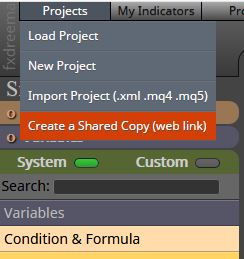
@justintkt , You can share link with the option below:
I also replied about your too many order issue.
@justintkt , You can share link with the option below:
I also replied about your too many order issue.
@justintkt , You can use block named 'Once per bar' to open only 1 trade at once before 'Buy now'.
@cpxiom yes you are right. But to see which buffer provides what information I was using that method 
BTW, thanks for the increased buffer version of the indicator 
Hi @aaehd ,
Af far as I know demo is for to represent what fxDreema can do. You can save your work in mq4 % ex4 formants. But work you create will not be saved.
You can create a free account and save your work. Free accounts are allowed to create blocks connected with a limit of 10 connections (the lines connects the blocks each other). You can save 10 different projects which is another limit. It's free with the mentioned limits.
Paid version do not have any connection (the lines connects the blocks each other) and saved project limit.
Demo, free and paid version (of course) works on real accounts.
You can stop EA in a few ways. One is to click 'Auto Trading' button to enable / disable auto trading using EA. One other way is to right click on the chart and select "Expert Advisors > Remove". Or you can close the chart the EA is loaded.
I hope this helps.
Regards.
I use 'Comment' field in order block. You can input any related information for yourself such as EA name, strategy name etc.
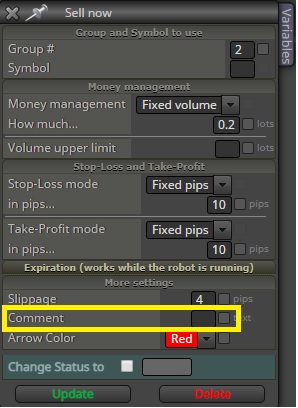
You may display 'Comment' column in MT4 and easily spot which EA or strategy created the order.
@rafaelgrecco I understand.
Maybe this tool can be useful for you to test broker execution time and see if there is really a problem with execution of market orders in time?
Hello @CPxiom ,
I've checked the indicator, it is very useful. Formarly I was creating EAs to read buffer values but this is a better solution.
Indicator also draws lines using past values which provides a good picture. That's the most I like.
Thanks for sharing.
Regards.
@l-andorrà Thank you! I've spent hours! Lack of knowledge is very bad :))))
Thanks again for your kind help on the subject.
Regards.
Dear Friends,
After hours of search, I figured out how to solve this issue. Since I have NO programming knowledge, this simple problem became headache for me.
While I was searching similar issues in forum, I saw that most of the raised questions was not replied with a solution. I hope this info be useful to whom needs help on such topic.
I used 'Custom MQL code' block with the following code to have 5 digits after decimal point.
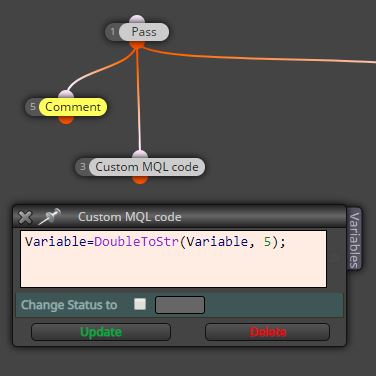
Problem solved!
Regards.
Dear @cpxiom,
I really thank you so much for sharing such valuable information with us. It will be very helpful.
Regards.
LOL @trader-philipps you may have to bro, believe me LOL
Did you check your LAN/WAN connection? You may have connection issues. For example, I had similar issues with WLAN.
Hello @l-andorrà ,
Thank you very much for your reply.
I had seen that post. But what I need to do is to drop last digit. This code seems to get the last digit. Since I do not have programming knowledge I'm not sure if the mentioned post can be used to drop last digit.
I wonder if the value of variable can be modified at 'Adjust' field of the the block?
Any ideas @fxDreema ?
Regards.
Dear Friends,
I set value of a variable from an indicator, which provides 6 digits after point. This causes bid value comparison issue in EA.
For example:
I get value from indicator which sets variable:
myVar=0.123456
bid= 0.12345
How can I adjust digits of myVar to 0.12345?
I tried many things with no success...
Thank you.