If that doesnt work, I guess the "certain hour" filter is bugged and you have to use some other time filter.
Posts made by roar
-
RE: Once a day does not executeposted in Questions & Answers
-
RE: Once a day does not executeposted in Questions & Answers
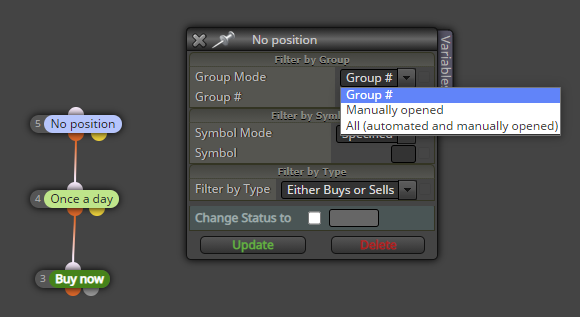
@bertkuiper all right, then I'd suggest trying a different group mode, although I can't think of a reason the default option wouldnt work...
-
RE: Once a day does not executeposted in Questions & Answers
@bertkuiper you have restricted the EA to one allowed minute. If there are no ticks (price updates) during that particular minute, the EA loses its chance to trade and has to wait for tomorrow. I'm not sure this is the root of your problem, though
-
RE: Does anyone know why this picture doesn't even show up, not even the indicator....posted in Questions & Answers
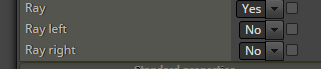
@len-1 use the left/right ray option. Negative candle ID's doesnt seem to work.
-
RE: Does anyone know why this picture doesn't even show up, not even the indicator....posted in Questions & Answers
@len-1 oh, seems they do work after all.
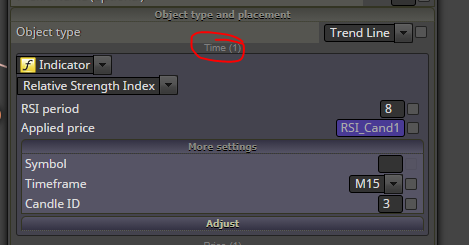
Here's an example drawing a trend-line in RSI, from ID 0 to ID 3
https://fxdreema.com/shared/X2m5ZccX -
RE: Condition Sunflower indicator.posted in Questions & Answers
@ontrade In my personal opinion, all custom indicators (especially repainting ones) do more harm than good, because they are black boxes: you cant see their inner workings, you cant modify them, you never learn anything new. I dont use them, and I think you shouldn't either. This is why I dont like answering custom indi questions very much - its counterproductive.
To check possible crosses before the sunflower, you need to run a candle ID variable through a loop. Search the forum for more loop instructions, (https://fxdreema.com/forum/topic/10894/scan-historical-data-for-conditions-values), I made one detailed example today and dont feel like writing another right now lol
-
RE: Scan Historical Data for Conditions/Valuesposted in Questions & Answers
@cdwilder1 said in Scan Historical Data for Conditions/Values:
Also,
Where you typed "loopid - 4", would "V1 - 4" have also worked?
What if there was a constant 3 that I used as an input in my settings.
Would something like "loopid - constant_3" work?
How about "V1 - C3"? (I'm not sure if constants also get that handy little shortcut like the variables do)
The C's and V's only work in the side box, I think (not sure, though).
"loopid - constant_3" would work anywhere, that's certain.About storing the values, I'm not sure what youre after here. Store all the highest and lowest points and their corresponding candle ID ranges? The most efficient way is using an array, I think. Search the forum for array projects, thats a whole new framework to wrap your head around, lol
MQL4/5 documentation is great help as well https://docs.mql4.com/arrayI modified my example. https://fxdreema.com/shared/J1g1qH0dd
- Now it has constants for the desired minimum streak, and also the loop length.
- The streak can also be longer than minimum
- Minimum/maximum price now accounts also for the candle wicks immediately outside the bull/bear streak. This may or may not be your intention..
- I connected every block back to the loop, so it will now always run through the whole loop until max iterations is reached (while the first version stops at the first match).
- I made this version work by adjusting the streak by +1 in block #5, and +2 when doing the final calculations. To be honest, I'm not sure why this configuration works like this, but it seems to work lol - this is how I build these projects, trying and failing until something works

I probably missed some of your questions here, just remind me in that case
-
RE: Scan Historical Data for Conditions/Valuesposted in Questions & Answers
@cdwilder1 lets go through each block from top to bottom, just to clear any misunderstandings (using the same example link https://fxdreema.com/shared/ov3z3743b

Block #2 (once per bar)
- Firstly, its often good to have this block on top of your project, as it saves your CPU when backtesting. You rarely need to run your code on every new tick, especially when youre only interested in the past candles.
- I also reset all the variables here, so the following loop structure resets for every new candle.
- Take exit from the orange output, that activates on the first price updates on each candle. The yellow output would activate for all the other price updates on each candle.
Block #1 (condition) (sorry for the silly numbering lol)
- The condition restricts the loop to max 500 iterations. Otherwise your tester might run into endless loop and crash
- This block also increases the ID number for each cycle. At the beginning, loopid is 0, and it grows by 1 on each cycle (until we break the loop or reach 500)
"V1+1" is shortcut for "loopid+1", either way works. - We have 2 variables for the bull/bear status of successive candles, current_is_bull and last_is_bull. Here I save the "current" variable value into the "last" variable, before the "current" value gets updated again in the next blocks. This part is probably a bit difficult to grasp, but hopefully it becomes clear later.
- Take exit from the orange output (TRUE)
Block #3 (condition)
- Here we check the bull/bear status of some history candle, identified by the loopid variable.
- If candle is a bull, modify the variable to 1. Otherwise (so its bear), modify variable to 0.
- Take exit from either of the outputs, orange or yellow
Block #4 (condition)
- This block is a text-based condition, but it behaves just like the "normal" condition.
- Here we check if there are successive bull-bull or bear-bear pairs (so the two variables are either both 1 or both 0).
- If the condition is true, increase streak by 1 and continue to next block with orange exit.
- If false, reset the streak and go back to the beginning of the loop through yellow exit (block #6 is just some "cable management", would make more sense in a bigger project)
Block #5 (condition)
- Here we check if the loop has found 4 successive bulls or bears
- If true, proceed to orange exit
- If false, go to next loop iteration through yellow exit
Block #7 (modify variables)
- This block just finds the highest and lowest prices
- As you can see, we can use variable calculations in any edit field, for example "loopid - 4" for the starting candle ID
Blocks #8 and #9 (draw line)
- Draw lines to the highest and lowest point of each bull/bear streak, just for visualization purposes
-
RE: Scan Historical Data for Conditions/Valuesposted in Questions & Answers
@cdwilder1 its a pleasure to help such a fast learner!
The box to the side is just a quick method to modify your variables, without the official "modify variables" block. Open the box by clicking the "Variables" tag in the corner
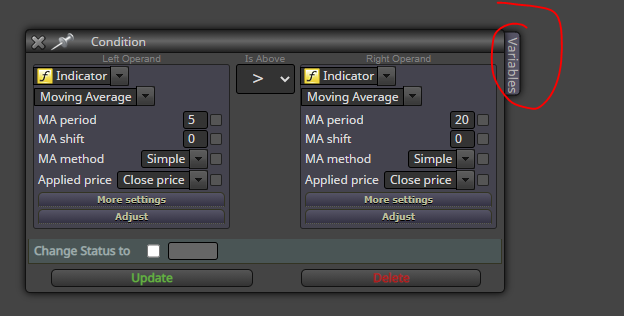
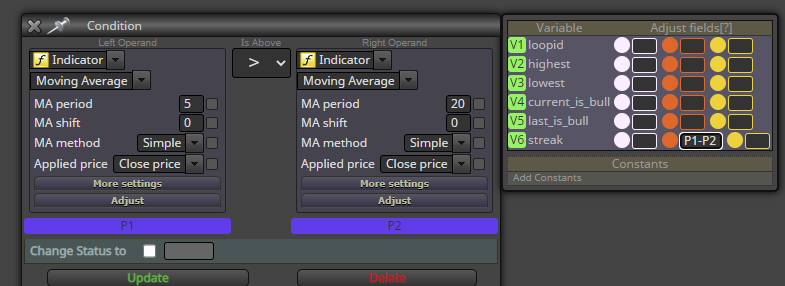
The green V's are shortcuts for corresponding variables, just to save your fingers from writing the longer variable name. The 3 colored columns are as follows:
- White column modifies the variable before the main block does its comparison
- Orange column modifies the variable only if the result from the main comparison is TRUE
- Yellow column modifies the variable only if the result from the main comparison is FALSE
Blue P's are shortcuts for the comparison values. Just for example, this would record the gap between the MA's into variable "streak", only when MA5 is above MA20:
-
RE: error 4806 in an expert advisorposted in Questions & Answers
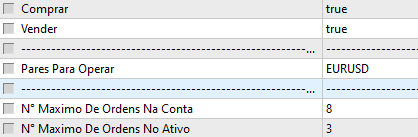
@rafael140 my backtest worked when I select only EURUSD and set "Para Trend" timeframe to 4 hours. No errors.
Cannot backtest multicurrency, my PC freezes..
-
RE: error 4806 in an expert advisorposted in Questions & Answers
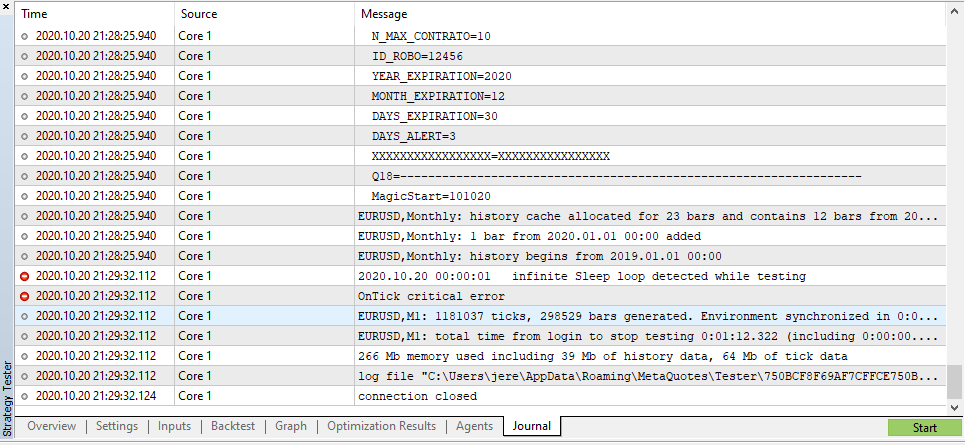
@rafael140 I get a different error (infinite sleep loop) so I can't figure out the problem. Troubleshooting is impossible with such a massive project...
-
RE: error 4806 in an expert advisorposted in Questions & Answers
@rafael140 maybe the custom indicator is "hidden" in some block menu... I guess you have to rebuild your project.
I can also check it, if you create a share link
-
RE: error 4806 in an expert advisorposted in Questions & Answers
@rafael140 check your custom indicator file and the settings in "My indicators" in the builder. Also check if some other custom indicator works properly.
-
RE: Scan Historical Data for Conditions/Valuesposted in Questions & Answers
@cdwilder1 hi!
Here's your example https://fxdreema.com/shared/ov3z3743b
Its... a bit tricky for a new user, I think
-
RE: check button state does not recognize me when the button is pressed.posted in General Discussions
@cesardefez the mouse click must be in "on Chart" tab
-
RE: Problem to export to ex.4posted in Questions & Answers
@ramisignals I just created a new mt4 project and it compiles with no errors.