fxDreema

    • Register
    • Login
    • Search
    • Back to the main page
    • Categories
    • Recent
    • Tags
    • Popular
    • Search
    1. Home
    2. roar
    3. Posts
    • Profile
    • Following 0
    • Followers 184
    • Topics 35
    • Posts 2406
    • Best 422
    • Controversial 6
    • Groups 0

    Posts made by roar

    • RE: Build Cut Switch EA

      @aldric "buy now" and "sell now" blocks have a martingale option, which will help you double the lots. You also need to check type of last trade, and check profit of last trade. There are blocks for those specific tasks.

      Personally I'm not interested in gambling systems

      posted in Questions & Answers
      roar
      roar
    • RE: EX4 custom indicator with licence key conversion

      @geofx hi!
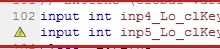
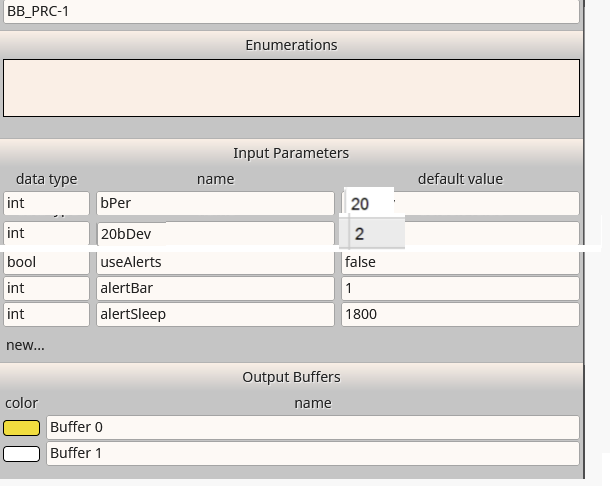
      The keys are declared as integers there. Try changing them to
      input string
      0_1592054440379_6f9a6e42-2e8d-4d29-bfe8-da153d781ad4-image.png

      posted in Questions & Answers
      roar
      roar
    • RE: How to close particular trades on Monday, once first tick starts?

      @7r4d3rsg ok, then you have to select the trade with the violet blocks

      posted in Questions & Answers
      roar
      roar
    • RE: How to close particular trades on Monday, once first tick starts?

      @7r4d3rsg this will close all positions once per week:
      https://fxdreema.com/shared/msSRQAeUc

      posted in Questions & Answers
      roar
      roar
    • RE: How to close particular trades on Monday, once first tick starts?

      Use "once per bar" and set timeframe to weekly.
      You will pay high spread though

      posted in Questions & Answers
      roar
      roar
    • RE: New ea with simple Moving Average. Pleassse!!!

      @georgicaa Just change Candle ID to 1.
      ID 0 is the current, still moving candle. You want the last completed candle.

      posted in Questions & Answers
      roar
      roar
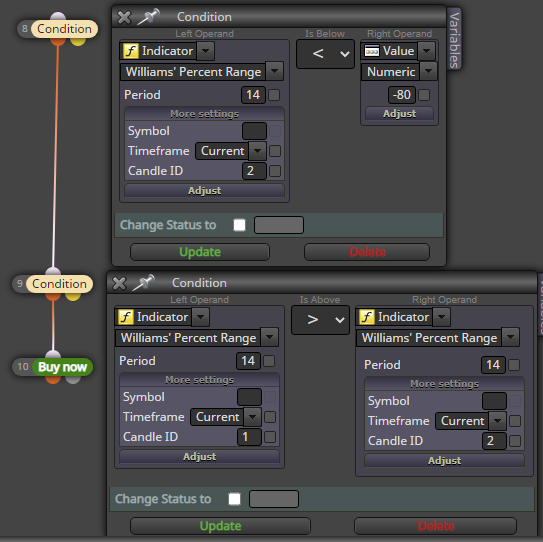
    • RE: how to make William Percent Range buy when it turnup

      @chibu like this
      0_1591722655646_56474245-f978-41d1-a325-c48e57e575b3-image.png

      posted in Questions & Answers
      roar
      roar
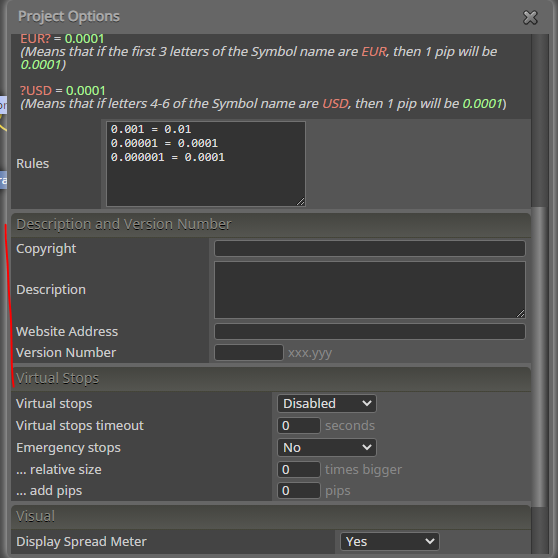
    • RE: fxdreema about page

      @adr383847 Options -> Project options -> Project options
      0_1591705992957_31d5d156-c82f-4bbf-a9e9-8617eedfae1f-image.png

      posted in Questions & Answers
      roar
      roar
    • RE: Trailing Money Loss preventing compiling MT5

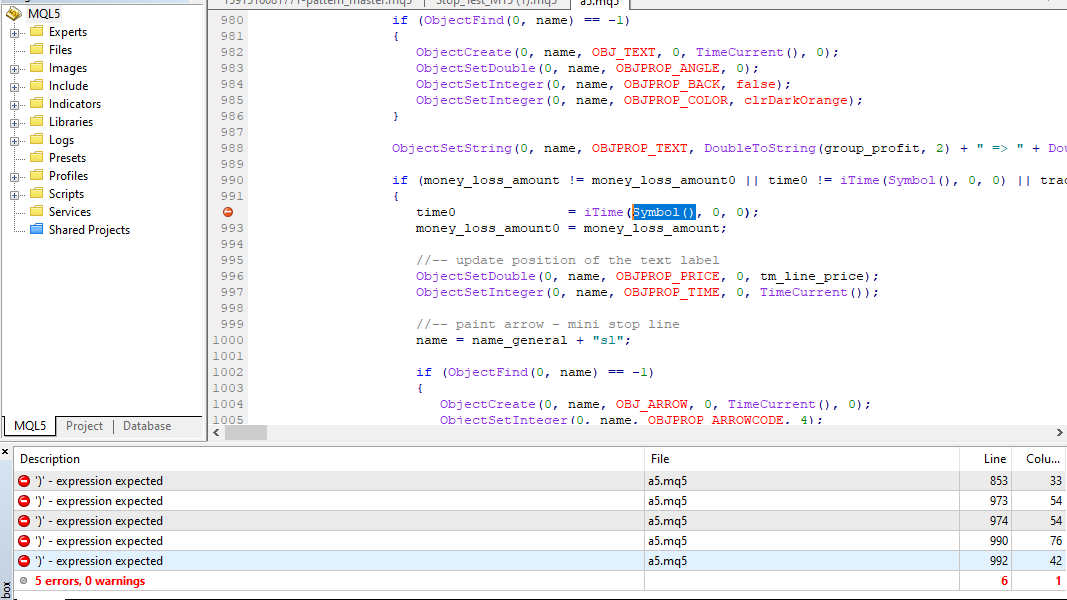
      @clubsport640 the bug seems to be about the trailing money stop.
      If you go to the error lines using metaeditor, you see they all are about the Symbol() function.
      If you manually replace those Symbol() things with "EURUSD" string, it will compile, but this is hardly a solution... Admin doesnt visit the forum very often, consider reporting this to support@fxdreema.com
      0_1591699523263_1890a751-594c-4ebd-bc40-8576b37a94aa-image.png

      posted in Bug Reports
      roar
      roar
    • RE: help please with atr as value for SL/TP

      Do you have "Custom (price fraction)" as the SL type?
      Does your broker have min SL distance?

      You can also share your project link.

      posted in Questions & Answers
      roar
      roar
    • RE: Tester cannot load: error custom indicator?

      @sqlz Your fxdreema settings should look like this:
      0_1591541886715_a1a6a605-07f7-4a55-83b4-92be6ad201a3-image.png

      posted in Questions & Answers
      roar
      roar
    • RE: Why will this setup not work??

      @alphaomega but it does work.
      Maybe you are using too small timeframe, its pretty rare for M1 or M5 to rise 10 pips in just 2 candles.

      posted in Questions & Answers
      roar
      roar
    • RE: Trade Stocks, Forex, Options and Crypto

      0_1591441990376_7f7b1eaf-1e81-4f31-9370-de7d39160de2-image.png

      posted in Questions & Answers
      roar
      roar
    • RE: How do you block an EA reset?

      you could restrict the EA to only modify stops when it has no stop in place.

      i.e. Condition: stop loss == 0

      posted in Questions & Answers
      roar
      roar
    • RE: Indicators inputs are appearing without indicating that

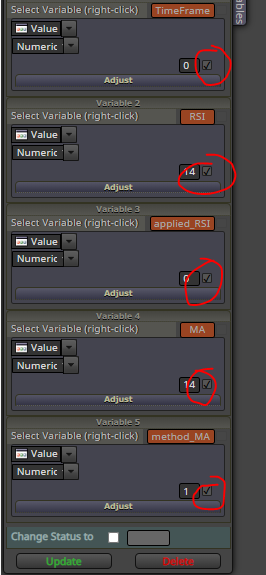
      These tick marks makes the values appear. Untick them. Also, the brown things are constants, not variables. You cant change constants in "modify variables".
      0_1591436624136_793197ab-1194-4695-a60a-f866a589fec8-image.png

      posted in Questions & Answers
      roar
      roar
    • RE: Sharp eyes and logic

      Minimum distance depends on broker.

      posted in Questions & Answers
      roar
      roar
    • RE: Request for help.

      @rafał use candle ID 1.
      ID 0 is the current, moving candle, ID 1 is last completed candle.

      posted in Questions & Answers
      roar
      roar
    • RE: How to write condition OR with "darker condition block"

      @migen I'm not sure, but generally a logical TRUE is equal to numeric 1. So you could try just replacing && with + sign:
      variable = (D1 > D11 || D1 == 7) + (D2 > D22 || D2==7) + (D3 > D33 || D3==7)

      posted in Questions & Answers
      roar
      roar
    • RE: How to write condition OR with "darker condition block"

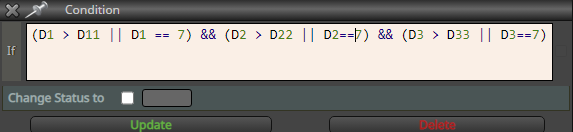
      @migen This should work
      (D1 > D11 || D1 == 7) && (D2 > D22 || D2==7) && (D3 > D33 || D3==7)
      0_1591255162481_b1a3f0d4-d3c1-4b38-adf9-52e80fcc6629-image.png

      posted in Questions & Answers
      roar
      roar
    • 1
    • 2
    • 49
    • 50
    • 51
    • 52
    • 53
    • 120
    • 121
    • 51 / 121