@trader-philipps I must admit I can't remember all the details off top of my head, its been a while when I last worked with objects.
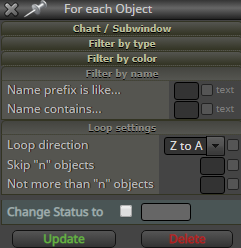
But in any case, it surely is possible to name each object and also find them by specific names, if not with the block settings, then with some actual mql4 functions
https://docs.mql4.com/objects
Posts made by roar
-
RE: Store Trade Targets such as TP1, TP2, etc. *** SOLVED ***posted in Questions & Answers
-
RE: Store Trade Targets such as TP1, TP2, etc. *** SOLVED ***posted in Questions & Answers
@trader-philipps Yeah the object thing would surely end up quite a mess and hard for the CPU as well, probably not what you want lol.
If the pips away block is the only issue, you could make your own pips away -calculations with a loop and formula block... And then perhaps deduce the TP stage (1,2,3) from the currently remaining trade size
-
RE: Store Trade Targets such as TP1, TP2, etc. *** SOLVED ***posted in Questions & Answers
@trader-philipps I try to avoid them as well, but in this case it could be the most straightforward solution...
There's that name contains field, you could put your order ID there.

-
RE: wait after closing tradeposted in Questions & Answers
@turelforex It seems to be a design by mister stroker:
@stroker said in Every "n"bars issue.:
https://fxdreema.com/shared/KQXDpp3ad
Wow! It works!
Thanks again!
-
RE: Store Trade Targets such as TP1, TP2, etc. *** SOLVED ***posted in Questions & Answers
@l-andorrà yeah - just draw 3 lines for each new trade (TP1, TP2, TP3). Name them using OrderTicket().
Loop: for each trade -> find object where name=OrderTicket() -> if price is above object, close partially, delete object
Would also need a cleanup loop for deleting lines that don't find a matching live trade.
-
RE: Store Trade Targets such as TP1, TP2, etc. *** SOLVED ***posted in Questions & Answers
@trader-philipps How about simple horizontal lines on chart? You could also name them using each order number.
-
RE: How/what blocks can i use the blocks to structure this problem?posted in Questions & Answers
@fxgjg said in How/what blocks can i use the blocks to structure this problem?:
Thanks @roar
I'll give it a try now.
I think i have to explain a bit more...
As you can see above, once the sell order (red arrow) was closed (yellow arrow) then all 3 pending buy orders (blue arrows) were instantly closed (pink arrows)What i would wish to happen is for the last/lowest (closest) pending buy (blue arrow) to be closed when the sell is closed leaving the other 2 pending buys open until their sell orders are closed.
So, in a nutshell: buys and sells are done in pairs. This is why I would use some specific group number for each pair.
I wouldn't care to keep such a precise track myself, though.
I would just limit the number of pending orders, using the "check pending orders count" block. -
RE: How/what blocks can i use the blocks to structure this problem?posted in Questions & Answers
@fxgjg Hi!
I would connect the buy and sell orders with the group ID.
I use a variable tradeID for that in my example. Just make sure you use the same group ID for the orders (open the orders at the same time).
Now you can check if there is a running buy/sell, if not, delete pending orders with the corresponding group #. -
RE: Betting System: Fibonacci first lotsize base on balance, is it possible?posted in Questions & Answers
@tom-5 You can use constants and variables simply as a part of code, you don't have to right-click so the field turns brown/blue.
Make a constant lotsize = 0.1
Now the code string is:
AccountBalance()/1000*lotsize -
RE: Betting System: Fibonacci first lotsize base on balance, is it possible?posted in Questions & Answers
@tom-5 To use 0.1 lots for every 1000$ in balance, put this string into the initial volume field:
AccountBalance()/1000*0.1
-
RE: Add more than two variablesposted in Questions & Answers
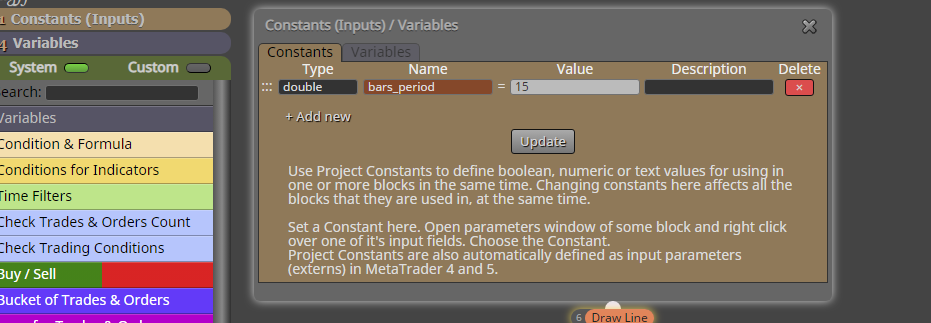
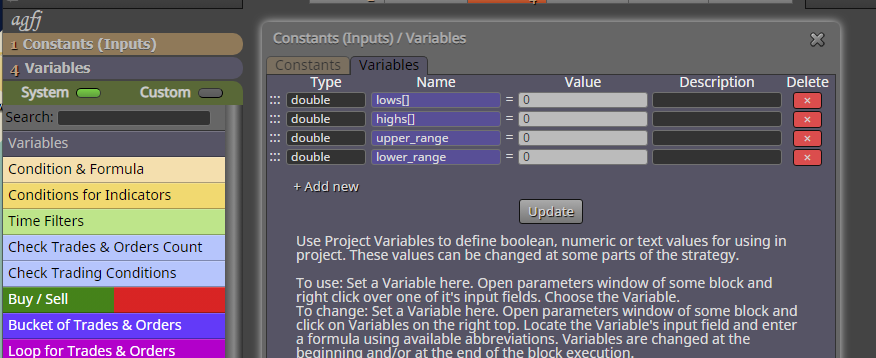
@jaychyke Download the .mq4 and import it again to get the constants and variables done correctly.
Alternatively, just copy the blocks and set up these constants and variables manually:


-
RE: Lot Size = Percentage of Balance in Martingaleposted in Questions & Answers
@bogdaiki ^^ that's right, my bad!
-
RE: Deleted Projectposted in Questions & Answers
@turelforex no, I'm sorry but youre out of luck. You can only use mt4 visual tester and rebuild the whole system...
-
RE: Deleted Projectposted in Questions & Answers
@turelforex If you have downloaded .mq4 or .mq5 files, you can import those.
-
RE: Loading EA .ex5 to MT5 fails in Visualize/Genetic Optimizationposted in Questions & Answers
@rhang Ok, that doesn't tell much.
It could be something wrong with the mql4 - mql5 conversion:
https://www.mql5.com/en/forum/326397Could you share your project?

-
RE: % OF EQUITY = LOT (Automatic-money management)posted in Questions & Answers
@nande-designs Maximum risk depends on your account's maximum leverage.
For 1:1 -> max 100%
For 1:10 -> max 1000%
For 1:100 -> max 10 000%
For 1:500 -> max 50 000% -
RE: % OF EQUITY = LOT (Automatic-money management)posted in Questions & Answers
@nande-designs It's not 0-100 because we use leverage.
1 lot on EURUSD is actually 100 000 €.So with 1000€ account, "100% of equity -> lots" means 0.01 lot.
3000% would mean 0.30 lot, respectively. -
RE: How to close these orders?posted in Questions & Answers
@ambrogio No, actually I think it's just optimal
-
RE: How to close these orders?posted in Questions & Answers
Putting a loop inside a loop is basically a multiplication.
If there are 100 open trades and 3 trades meet the loss condition, then 2 oldest trades are closed 3 times.
As a result, 3 loss trades and 3*2=6 old trades are closed, 91 trades will be left open.