@q8carpenter Ah wait no...seems to be working now. Thanks man!
S
Posts made by SirBoyce
-
RE: Alert showing chart it relates to?posted in Questions & Answers
-
RE: Alert showing chart it relates to?posted in Questions & Answers
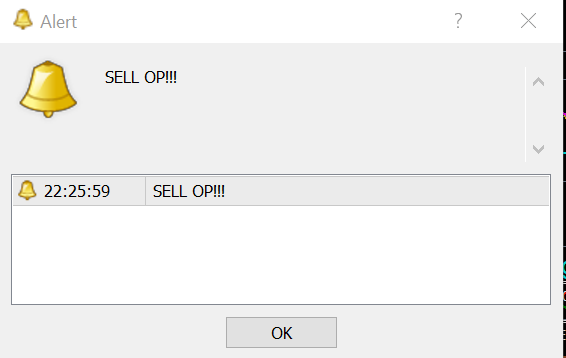
@q8carpenter Hi there. Thanks for taking a look. I tried that but still only get this alert which does not indicate which of the currency chart the opportunity relates to:
-
Alert showing chart it relates to?posted in Questions & Answers
Apologies if this has been covered elsewhere.
I have created a basic alert EA if conditions become true, and have applied it to the charts of a number of currency pairs. However, when the alert shows it does not indicate which specific currency pair chart it relates to. How do I pull this information into the alert that appears on screen?
Many thanks in advance!
-
Any ideas why this EA won't backtest?posted in Questions & Answers
Hi All,
Created this EA: https://fxdreema.com/shared/dF8kulwhd
Went to do a quick backtest on GBP/USD Daily from 1st Jan 2019 to 30 July 2020 and for some reason the visual MT4 strategy tester immediately indicated the test was over with no trading data and a visual chartshowing dates from June 2018 to December 2018 (???).
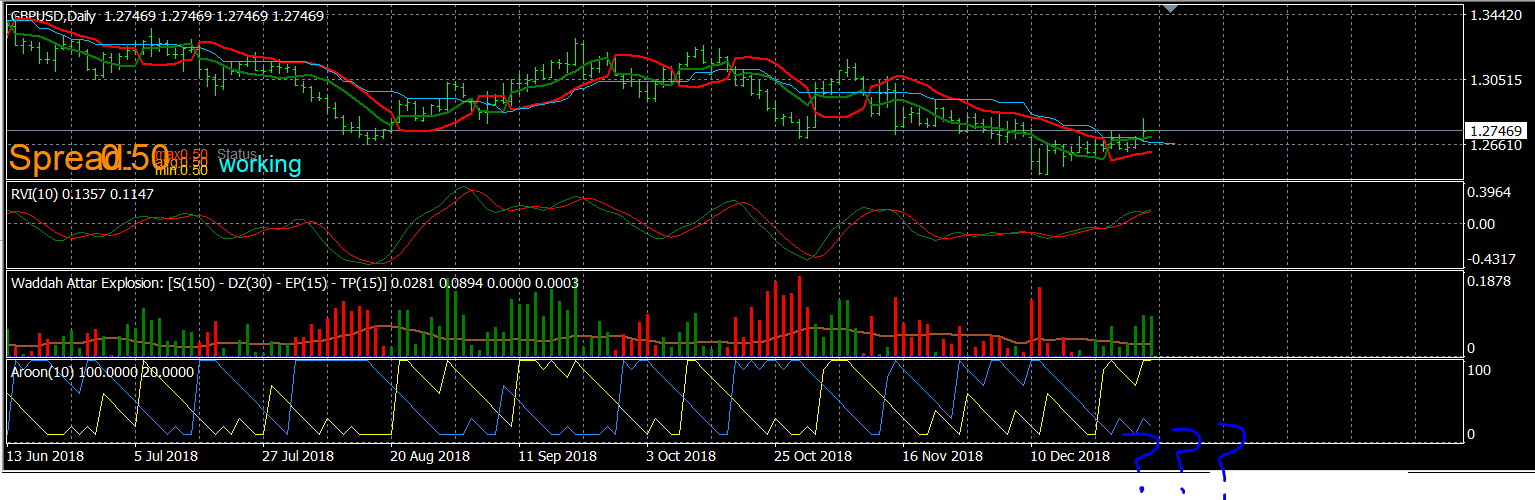
I tried running another EA of mine with the same parameters and worked fine.
Looking at the project I cannot figure out why the EA would not work.
Thanks for taking a look.
-
RE: DPO / Zero-Cross Exit Indicator Problemsposted in Questions & Answers
@jsauter86 Thanks. That's actually where I got the DPO indicator!
-
RE: DPO / Zero-Cross Exit Indicator Problemsposted in Questions & Answers
Thanks for the comments guys. Always much appreciated.
Not sure how I would tell the EA not to close e.g. a buy trade if the indicator crosses above zero. In any event, I identified a further problem with this thinking and it is the 'messy' way the indicator crosses the zero line which would not work (it would still close what would have played out as profitable trades):
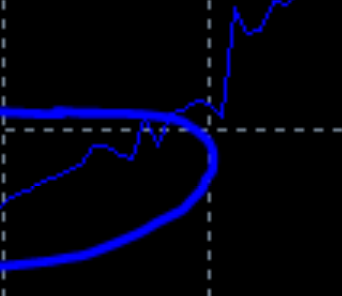
In the above, their was a fractional cross below the zero line after a cross up which would have cut the trade out.
My only solution is to have a cross above (sell) or below (buy) DPO zero line as an exit action after a 1st Take Profit has been met...by which time the DPO line will be cleanly above or below by some distance.
This works quite nicely to exit profitable trades...but the search or a good exit indicator to identify trades that are destined to hit the SL and cut these out to save pips continues! Any suggestions would be greatly appreciated

-
DPO / Zero-Cross Exit Indicator Problemsposted in Questions & Answers
Really hope someone can help me with this one. I have been looking for an effective exit indicator and, visually, the DPO as a zero-cross exit indicator seems pretty good.
Trouble is, other conditions in my EA may open Buy trades, when the DPO is below zero, and setting the DPO block condition to exit these when the DPO X< 0 does not work.
This illustrates such a trade and where I want the DPO indicator EA to exit the trade:
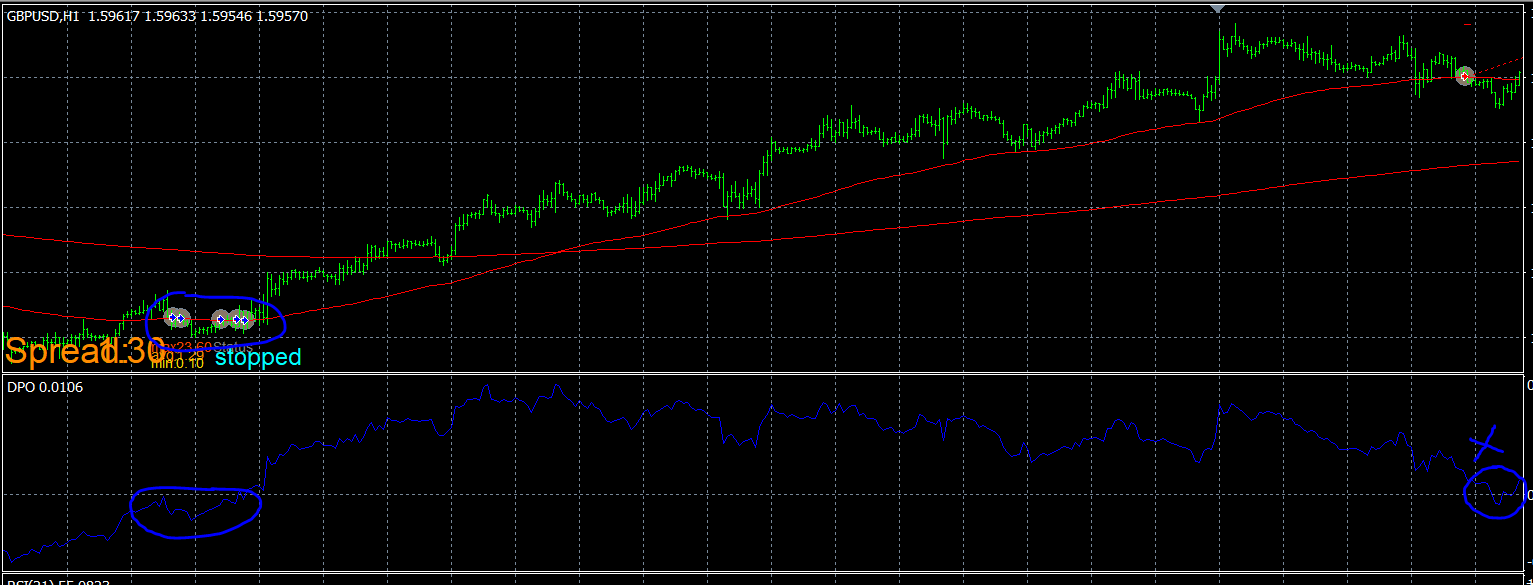
Does anyone have any advice as to how set parameters and conditions to achieve this later cross back below the zero line as an exit, whether or not the Buy trade opened when the DPO was below the zero line?
I have been having this problem generally with potential exit indicators, not just the DPO and it would be a big help!
Thanks.
-
NNFX Money Management / Risk Strategyposted in Questions & Answers
Hi All,
I thought I would try out NNFX's strategy/advice for money management in an EA. Essentially it is this:- Express current ATR value in pips (ATR X 10,000 = ATR_PIPS)
- ATR_PIPS X 1.5 = Stop Loss pips (SL)
- 2% of current balance = RISK
- RISK / SL = Current PIP VALUE
- Calculate Lot Size to reflect current PIP VALUE so risking only 2% of balance on the trade
I created variables and formulae in the following to cover 1-4 of the above: https://fxdreema.com/shared/wTS8dsTI
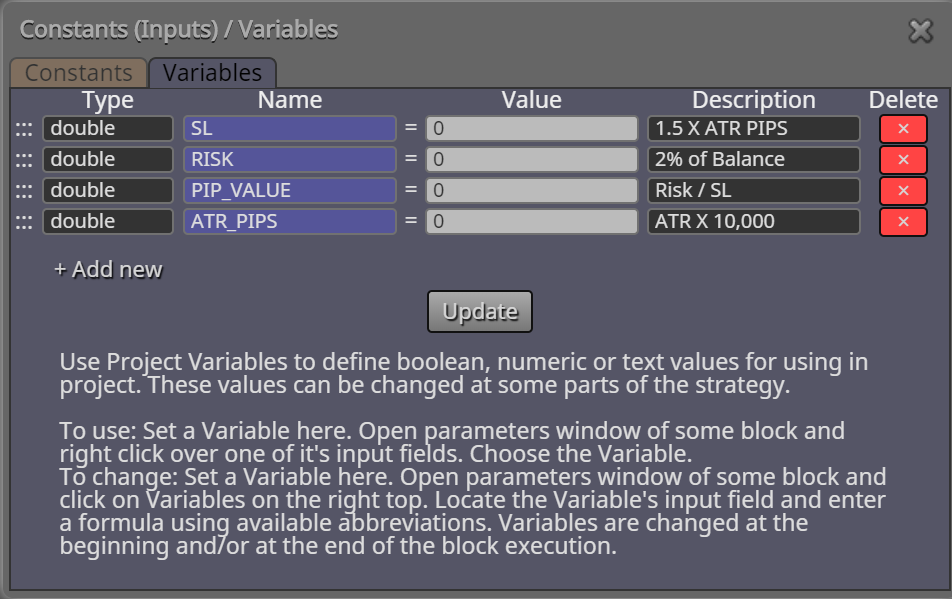
My questions are as follows:
- Is this (creating the variables and formulae) the right way to go about achieving this?
- If so, where and how are these formulae placed/linked in the EA?
- How do I convert PIP VALUE to Lot Size and add this to the EA (e.g. another variable and formula?)
- How should the resultant variables be loaded into the Buy / Sell blocks?
Many thanks in advance!
-
RE: Question for experienced backtestersposted in General Discussions
@line Thanks Line. Hope you're well. I literally just noticed I need to check the optimization boxes in the EA to have them included as changeable parameters in the Strategy Tester and was about to post that I have worked it out.
-
RE: Question for experienced backtestersposted in General Discussions
@roar Default values. I see what you mean: Check the Optimization box and play around with these:
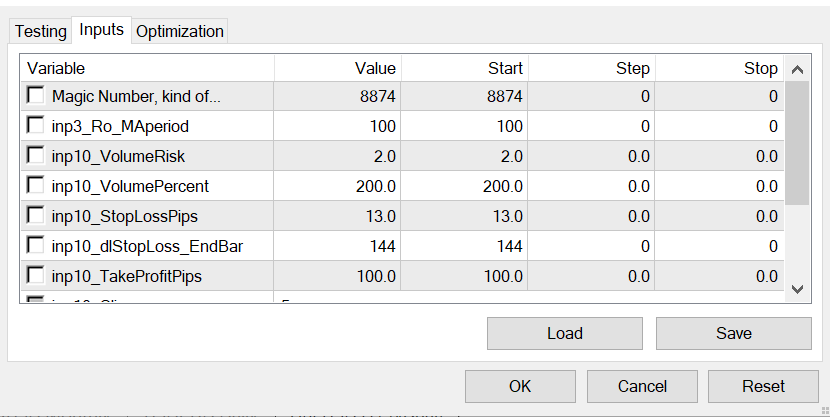
Can't say I know what to do with these inputs though. And it only seems to give some of the inputs. For example, it is an option to alter the 100 EMA input to some other timeframe, but the EA also uses a 500 EMA...can't see that anywhere to tweak.
-
RE: Question for experienced backtestersposted in General Discussions
@roar OK, this is interesting. Pardon my ignorance...but what is 'optimization algorithm'?
-
RE: Question for experienced backtestersposted in General Discussions
Many thanks for your comments guys. Thought I would share the results of a test I did from Jan 2004 - Jul 2020:
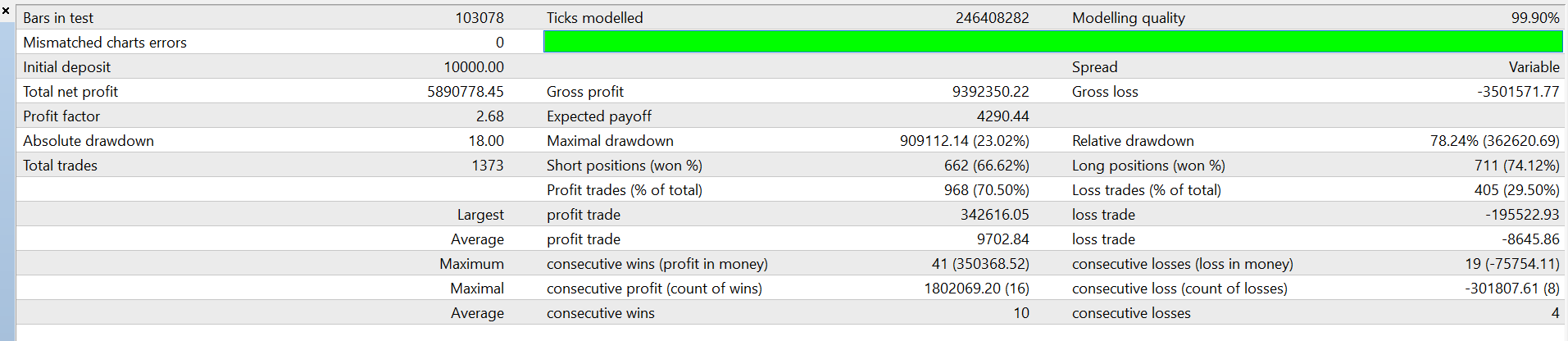
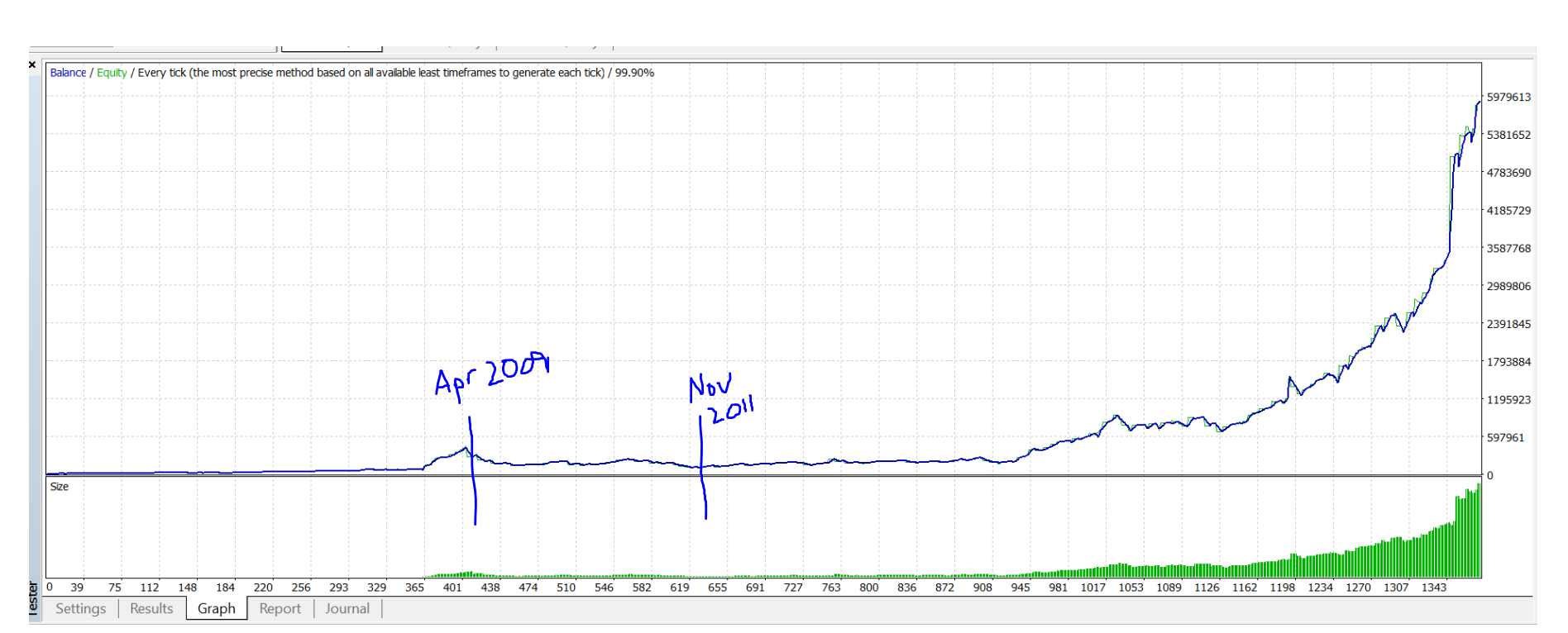
While I would take £10K to £5M any day of the week, and the report stats are mainly pretty stellar and everything worked out fine with the glory of hindsight...fact remains that if I had gone live with this EA beginning of 2009 I would have seen an utterly miserable 2 and a half year run of abject failure which would have been close to wiping a 10K account!
This is really frustrating to see as any other period is a steady (occasionally rapid) uptrend in profit.
Through looking at these results and analysing the visual trades in the tester it is clear that I need the following:
-
Additional indicator(s) to filter out trades that were destined to fail by never taking them in the first place. I am thinking really good volume and baseline confirmation indicator conditions. Suggestions welcome!
-
Money Management: I am happy where the EA places the initial SL, but in this EA test there were no trailing SL's, break evens, partial profit taking etc. Basically, when trades lose they hit the original trade SL and those trades can be really hefty...or crippling (e.g. that 2009-2011 period!). The EA gets way more wins than loses which is what held it up over the test period. Suggestions welcome!
-
Exit indicator(s): The trade exit conditions as is performs...OK. But I noticed that plenty of times I would take a 80 pip win when the trade moved to e.g. 200 pips at the peak. Also need to let winners run more. I need to consider accurate and reliable exit indicators to maximise wins, and just cut losses quickly on trades that slipped though the net and are never going to win.
Suggestions welcome regarding all the above (entry filters, trade management, exits). Any suggestions that resolve these issues and really improve the performance win a free EA!
-
-
RE: ATR stop loss 1.5* ????posted in Questions & Answers
@roar Thanks for the explanation. That makes sense. However, I entered the parameters exaxtly as in the picture and trades immediately hit the SL as soon as opened as they were being placed at the same level. Weird.
-
RE: ATR stop loss 1.5* ????posted in Questions & Answers
@l-andorrà Maybe I'm being stupid, but should it be *15000? Otherwise the SL would be calculated at something like 0.0014 X 1.5 which would obviously not give a valid SL?
Also, if the current ATR is say 0.0050 (50 pips), how would you tell FXDreema to place the SL at 1.5 x 50 above the entry on a sell trade. I had a go at this (and the buy SL's were correct, but in the sells don't place an SL?
-
RE: Losing my mind trying to get trailing stop to work! :)posted in Questions & Answers
@cpbonzo Thank you! Your explanation finally means I understand the way that trailing SL's work in FxDreema and why the stop was not moving. Many thanks again for your time and help!
-
RE: Losing my mind trying to get trailing stop to work! :)posted in Questions & Answers
@cpbonzo I don't follow I'm afraid. In the example I gave he parameters in the custom level Trailing Stop are absolutely correct to place the initial SL on trade open exactly where I want it. Here is a larger screen shot of that exact same trade.
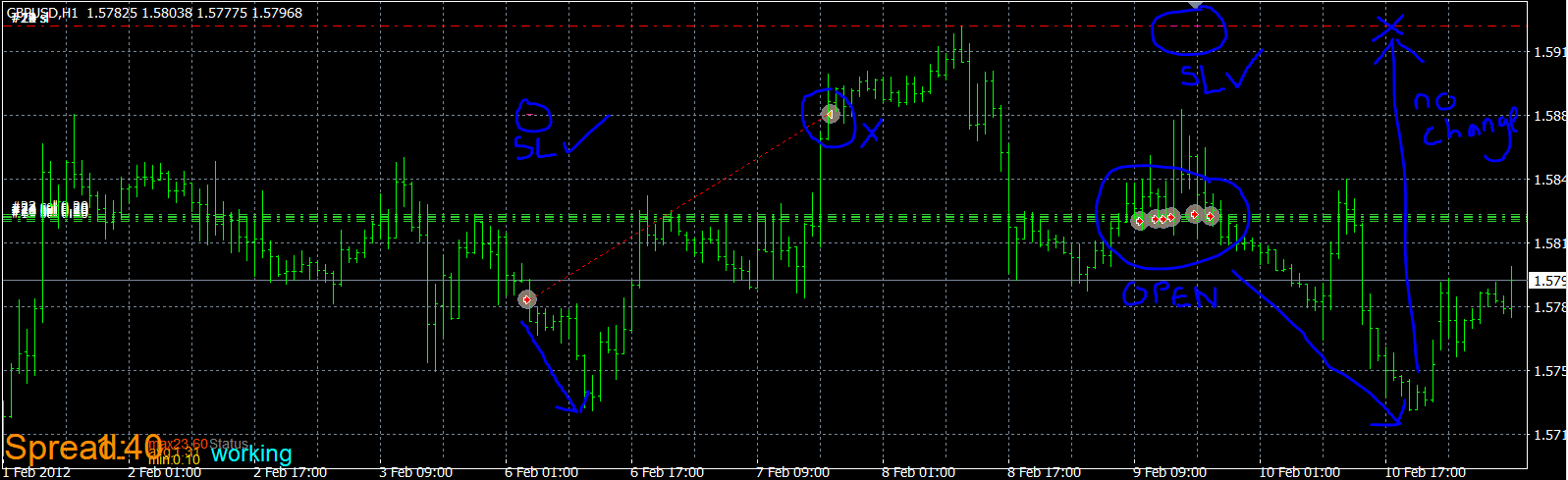
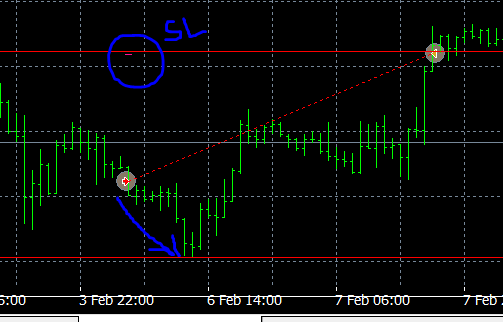
You can also see the next sell trades currently playing out: The SL again is exactly where I want it. But again it has not modified (i.e. stepped down) at all as the trade went into profit. It remains static exactly where it was placed on trade open.
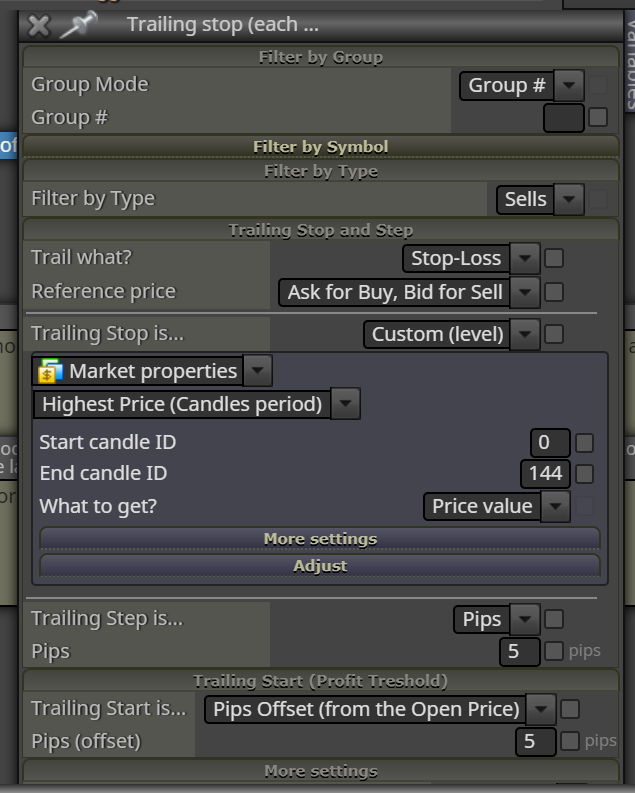
This is the problem. Although I have set Trailing Start to 5 pips offset from Open Price, and Trailing Step to 5 pips...the SL does not move at all!!! It doesn't seem to matter what I put in Trailing Start or Trailing Step...the Custom(level) Trailing Stop does not modify during the trade. Is this a broken aspect of FxDreema?
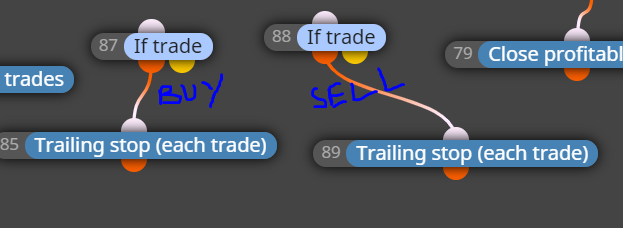
For the avoidance of any doubt, this is how the blocks are set up in my EA with all the parameters:
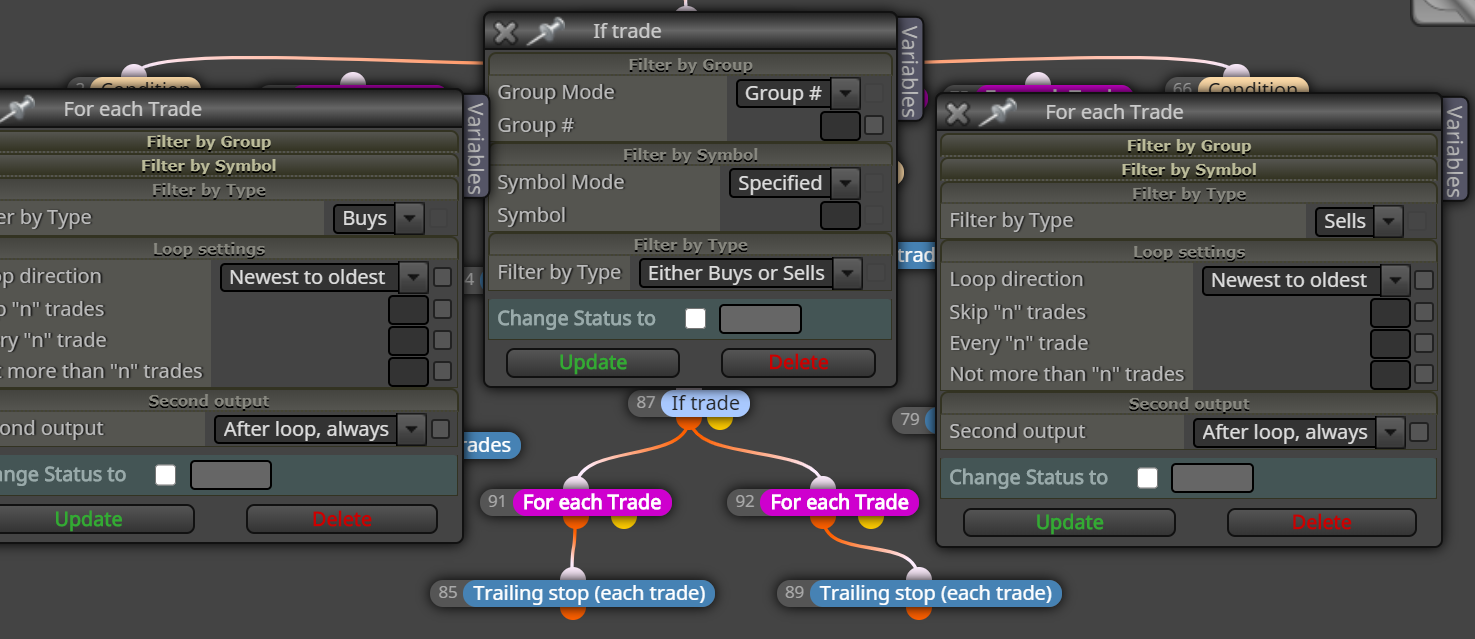
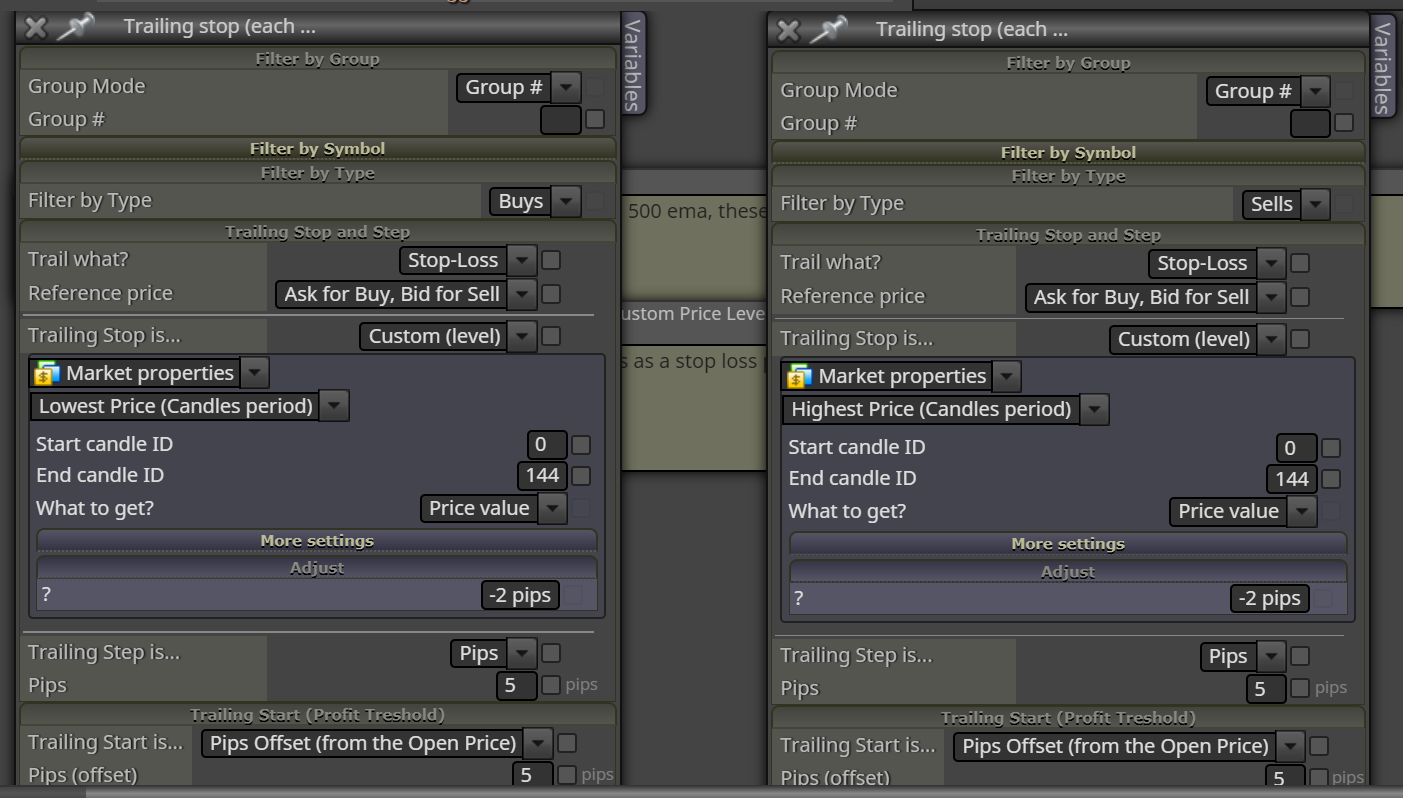
-
RE: Losing my mind trying to get trailing stop to work! :)posted in Questions & Answers
@dragonfly617 Hi. Thanks for trying. But as I said before, the problem is not placing the SL at the custom level. It is getting that SL to trail once the trade starts moving into pips in profit. It just remains static (i.e. at the highest price over the last 144 candles).
In the screenshot I previously shared, the SL is at the correct custom level. But it did not modify at all (and the trade went 50 pips into profit at its peak!)...despite me putting in the trailing stop block to start trailing at 5 pips in profit and to step 5 pips.
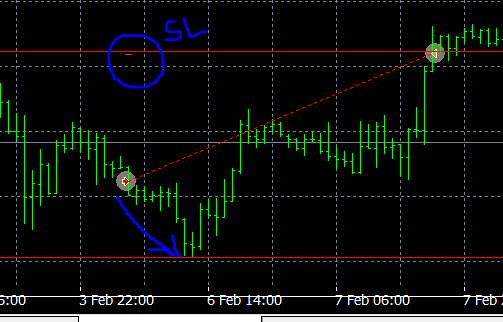
How do I get this custom SL level to step with the trade???
-
RE: Losing my mind trying to get trailing stop to work! :)posted in Questions & Answers
@cpbonzo Thanks for taking a look. However, the Trailing Stop Is...section works absolutely fine and places the SL perfectly. Its just that the SL does not modify (step) during the trade when the trade moves into profit. I am at a loss as to why!
The only way I can get a trailing SL working in FxDreema is if the Trailing Stop is X number of pips rather than the Custom(level) option. But the SL being initially set at (for a sell) the highest price over the last 144 candles is crucial to the success of my EA...and I simply want that SL level to step down in the direction of the trade to lessen the loss on some of the losing trades I have seen in backtesting. The way things are, all my losing trades hit the initial SL (highest price over last 7 days) and quite a few of those are pretty sizeable losses.
-
Losing my mind trying to get trailing stop to work! :)posted in Questions & Answers
Hi Guys,
I have my EA working over the last 8 years at 3.01 profit factor, so I'm pretty happy with it. However, what I did notice is that - when trades do hit the SL (e.g. for a short; highest candle price over the last 7 days) - the losses can be pretty big.
I'm trying to optimise this aspect of my EA still further by adding a trailing stop to cut some of these losses down to size a bit. I added a trailing stop for sell trades and it starts the SL on each trade in the correct place, but no matter what parameters I put in the Trailing Start and Trailing Step, on visual backtesting the SL plots correctly (highest candle in last 7 days) but the SL moves nowhere as the trade plays out.
Here is an example where SL is correct, but the price went 50 pips in the direction of the trade but the SL did not modify and the trade ended hitting the original SL for the full loss:
Here is the trailing SL block in the EA:
And here is how both buy and sell trailing SL's are set up in the EA:
Can anyone help me nail this?
-
RE: Basic Trailing Stop Questionposted in Questions & Answers
@ambrogio Hi. Thanks for taking a look. That is not correct: Settings you have entered means that when the current price hits 100 pips from the price entry, the SL will be placed 80 pips behind current price i.e. at 20 pips from entry price, and will then step 10 pips every time the price moves 10 pips in the direction of the trade.
I believe the Trailing Stop should be changed to 20, to achieve what I want. I have been able to work this out by seeing your suggestion in action in backtesting...so thanks!
I will try my EA with 100 pips offset, 20 pips trailing stop and 10 pip step and see how that does.