Hello, if create & import the mq5 file. You can re-edit or delete the Project Description. I have not tested this for mq4 files, but assume this would work.
S
Posts made by Smallous
-
RE: How to delete a project description in fxfreema?posted in Questions & Answers
-
RE: Unable to connect blocks in 'on Tick' section.posted in Questions & Answers
I have found the problem quite by accident. For some reason one of my blocks stopped working. When I deleted the block everything worked again, so I just recreated the faulty block.
-
RE: Unable to connect blocks in 'on Tick' section.posted in Questions & Answers
I have tried Google Chrome & Edge, deleted cache etc, but the blocks in the 'on Tick' section just refuse to work. I'll see if I can contact Support.
-
Unable to connect blocks in 'on Tick' section.posted in Questions & Answers
I have been working on a project, but I have been unable to connect any blocks in the 'on Tick' section for several hours now. I have tried every trick I can think of without success. Anyone else having problems?
-
What is the function of Arrow Color in the Buy/Sell Block?posted in Questions & Answers
Hello,
Ref.
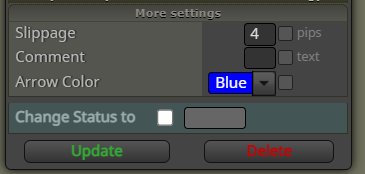 .
.If I change the Arrow Color it does not appear to have any effect. Anyone know what this is for or when the Color is applied? The Arrow colour appears to be hard coded?
-
RE: Write to the Custom column in optimization results MT5posted in Questions & Answers
As a work-around, I may be able to make use of the Write to File block.
My EA controls when it writes to the file, during Optimization ie before Termination of current test.
The problem is I need some Custom Code that is able to fetch the Optimization Pass number, put it into a variable, which I can then Write to a file. Hopefully these would then tie together. If anyone can point me in the right direction, I would be grateful. I have no idea if this would be possible.
-
RE: Write to the Custom column in optimization results MT5posted in Questions & Answers
@l-andorrà Unfortunately, using MT4 is not an option for me. I understand that double OnTester() is tied to Genetic algorithm Optimization, so the above may not work as I am using Slow complete algorithm for Optimization. Not sure how to write to the Custom column and currently thinking about how to tackle this problem. Coding is outside my area of expertise.
-
Project Blocks - Normalise ID'sposted in Questions & Answers
Hello,
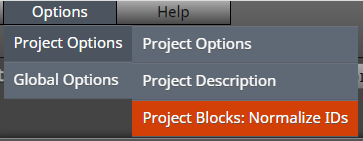
I tend to spend a long time re-numbering my blocks, so I like the idea of using this. However, when discussing this function a long time ago (pre cloud version), I believe caution was advised at it could corrupt the code. Is it safe to use now? Anyone use it regularly?
Paul
-
RE: Write to the Custom column in optimization results MT5posted in Questions & Answers
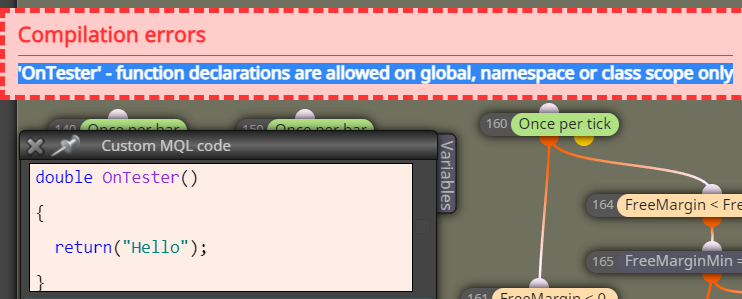
I tried this, but not so simple.
-
Write to the Custom column in optimization results MT5posted in Questions & Answers
Hello,
I understand that this is possible using Custom MQL code, but my programming skills are poor. I don't believe Fxdreema has this functionality built-in.
My EA will Terminate if the Free-Margin falls below a level set via a Constant.
I simply wish to record that a Terminate 'event' occurred in the Custom column in the Optimization results, so I can filter them out.
Any help would be greatly appreciated.
Paul
-
RE: Can't Connect Blocks...posted in Bug Reports
Hello,
I just experienced the almost exact same problem. I was manually re-numbering blocks, but did not notice any same number issue. The last block in the chain was previously switched off (this may be irrelevant). I was then unable to connect any of the old blocks with the dots appearing as above (new blocks connected ok). I tried logging off, clearing cache etc. Fortunately, I was able to resolve the problem by going far enough back through the history to where I started re-numbering. I have been using fxDreema a lot this year, so appears to be a rare issue.
Regards
Paul -
RE: 'input' - unexpected token error when compiling mq5 fileposted in Questions & Answers
@jstap Thanks for your reply. I am now using another indicator and coded my EA differently to get around the error.
-
RE: 'input' - unexpected token error when compiling mq5 fileposted in Questions & Answers
@ambrogio Hello, I changed the settings in the the indicator first, but it stopped the indicator from working.
-
'input' - unexpected token error when compiling mq5 fileposted in Questions & Answers
Hello,
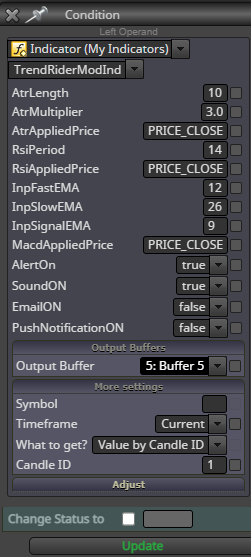
Any ideas on why the above is occurring? The indicator works ok on its own. I am manually entering the indicator values as I have not had any luck uploading an "MT5" indicator.
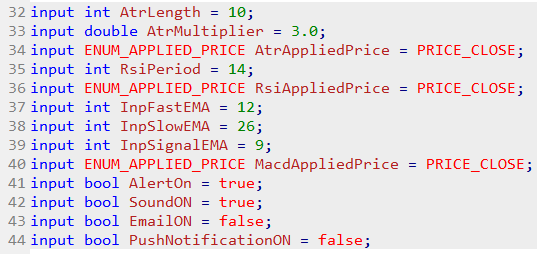
The data type that is obscured below is ENUM_APPLIED_PRICE. Do I need to make entries into the Enumerations field and if so, what should I place there?
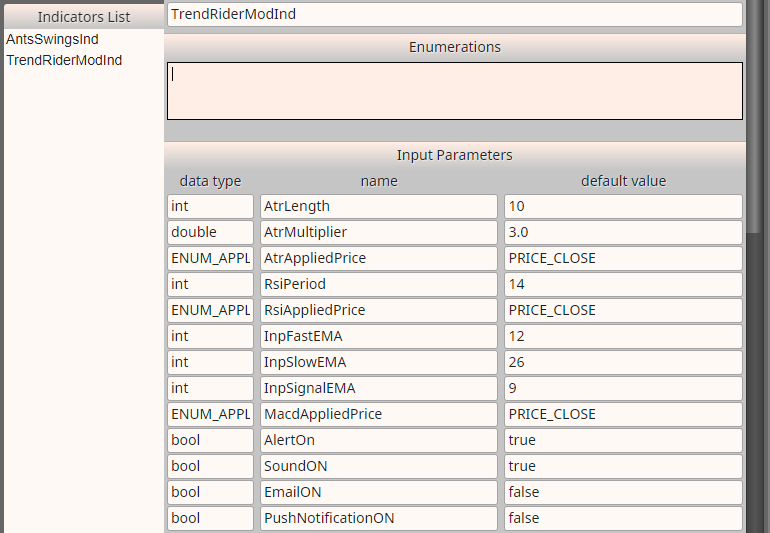
These all look ok.
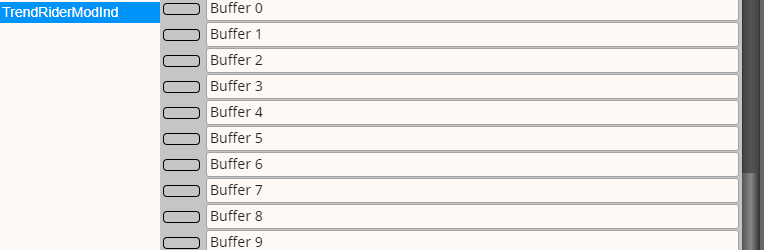
Indicator appears to be ok in Condition block.
Inputs from code:
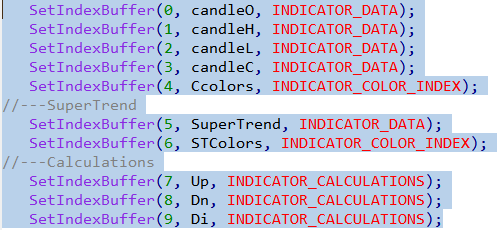
Buffers from code:
Thank you
Paul -
RE: Modification denied because order too close to market (145)posted in Questions & Answers
__My problem with this 145 error is that I can't produce it :)[/quote:1v1n0xcg]
Hello,
I find it strange that you cannot produce the 145 error as I practically encounter it all the time without the 'Pips Away' loop. But not to worry, my work-around in certainly working with my current EA that I'm working on. If I become stuck again I'll can always get back to you (support has been great). Maybe it is better to keep the 145 error and program the EA accordingly, so there are no surprises in a Live environment.
-
RE: Modification denied because order too close to market (145)posted in Questions & Answers
__So, now there are no problems
 [/quote:6iy2b95s]
Yes making use of 'Pips Away' in my EA has stopped the 145 errors and all the strange results I was getting when Optimizing. I now have a much better understanding of this error and the importance of making sure an EA manages the error properly. Because 145 errors can drastically effect back-testing, I would prefer that this error was managed by fxDreema directly, assuming that would be more efficient than my work-around.
-
RE: Modification denied because order too close to market (145)posted in Questions & Answers
Hello,
I added a 'Pips away from stop-loss' loop to the condition that would close a Sell &/or open a Buy and vice-versa. A Trailing Stop is also active. I then experimented with using an Input of 1 to 30 for the 'Pips away' loop.
I am pleased to report the following:
-
No suspected 145 errors were encountered during back-testing in Optimization mode, regardless of whether Virtual Stops were used or not. Optimization completed successfully for all 'Pips away' Inputs tested.
-
No 145 errors were encountered during back-testing outside of Optimization mode whether Virtual Stops were used or not for all 'Pips away' Inputs tested.
-
Back-tests performed with the same Testing Inputs using Virtual Stops now behave the same whether inside or outside of Optimization mode.
-
Back-test results with Virtual Stops and 'Normal' Stops are now identical.
I assume the above confirms the 145 error was genuine and it stresses the importance of making sure an EA includes a proper work-around for this error to produce 'accurate' back tests results.
-
-
RE: Modification denied because order too close to market (145)posted in Questions & Answers
__Well, this error comes frm the broker and I believe that it's description tells the reason. Where are some limits and when you are too close, modification can't happen. The EA will try to do it for few times anyway and it should quit trying after a while. If someone thinks that it's better to just skip this error or don't even try to do the modification, I can program it like this.[/quote:1bjrozop]
Hello,
I would like to resurrect this post as I am experiencing constant problems with back-testing.
-
If a suspected 145 error is encountered during a back-test in Optimization mode, regardless of whether Virtual Stops are used or not, the test goes into an infinite loop if any EA uses Stops. The back-test has to be manually stopped and an 'Optimization stopped due to a fatal error in the EA' Message is created in the Journal.
-
A back-test using the same Inputs outside of Optimization mode will produce a 145 error when Virtual Stops are not used.
-
A back-test using the same Inputs outside of Optimization mode will not necessarily produce a 145 error when Virtual Stops are used. This means that a a test performed with the same Inputs using Virtual Stops can behave differently depending upon whether inside or outside of Optimization mode!
-
With the limited amount of back-testing I have been able to do, results can be significantly different when Virtual Stops are used as opposed to 'Normal' Stops (this would need further testing).
Please note the above error is rare in the sense that it can take thousands of simulated trades before encountering. However, because I back-test over 4 year worth of data I always encounter the error during Optimization mode. Unfortunately, this error is rendering fxDreema unusable for back-testing. The inconsistency of results when using Virtual Stops inside/outside of Optimization mode is also worrying.
I think the above is a strong case to "skip this error or don't even try to do the modification" as I assume this is what would happen in real trading anyway (though I am no expert in this area).
-