@serioza
Add the whole webpage link that you get after you create the shared version

@serioza
Add the whole webpage link that you get after you create the shared version
@fxdreema said in object on chart has no parameter:
Yea, this looks strange to me as well and I will fix it hopefully in minutes.
still seems to be a problem with it though , it dosnt seem to pass in the condition block when you have like closed price </> an object line , So my lines dosnt move anymore.
Upload it by sharing the link to it ( project / create a shared copy ) and you will receive the link to it that you can post.
There is no name input for the objects no more in attributes set 1 ( numeric ) only in set 2 ( text
) image url)
To make the EA become SAD Face.
You need this :
#include <WinUser32.mqh>
extern bool DisableAllEAs = TRUE;
void DisableEA() {
keybd_event(17, 0, 0, 0);
keybd_event(69, 0, 0, 0);
keybd_event(69, 0, 2, 0);
keybd_event(17, 0, 2, 0);
}
int start() {
if (DisableAllEAs == TRUE) {
DisableEA();
return (0);
}
.
.
.
.
}
found this , dont know how to use it or if it actually will work
can it somehow enable/disable autotrading ?
if one ea does it , it will affect all 
See what the flow of the object name is , if it's hard to tell what the next object will be just use the specific color on select object by name .
Attach the ea on chart that looks for the object names /colors and also the indicator that draws them. Then you don't have to spend so much time.
im not giving up , try this value as is instead of as price fraction .
if it dosnt work try absolute distance to yes
i saw you have 0 pips slippage on the buy block buy 4 on the sell , maybe it can be that thing that messes it up ?
its because you are looking for a 5 min candle close to be 55 pips separated from current candle open , And if im not mistaken on exactly the moment 2355 .
You are looking for an insane jump that only happends in an insane crach of the market , to make a leap of 55 pips on 5 min and it has to be exactly at 2355 on your setting for it to see and react to it
Because your 2 conditions is totally different
Buy =
Open price (current)
Closed price (M5) with timestamp
then 55 pips
Sell =
Open price (m5)with timestamp
Open price ( current)
Then - 55 pips
it should be open compaired to close at both sides not open open 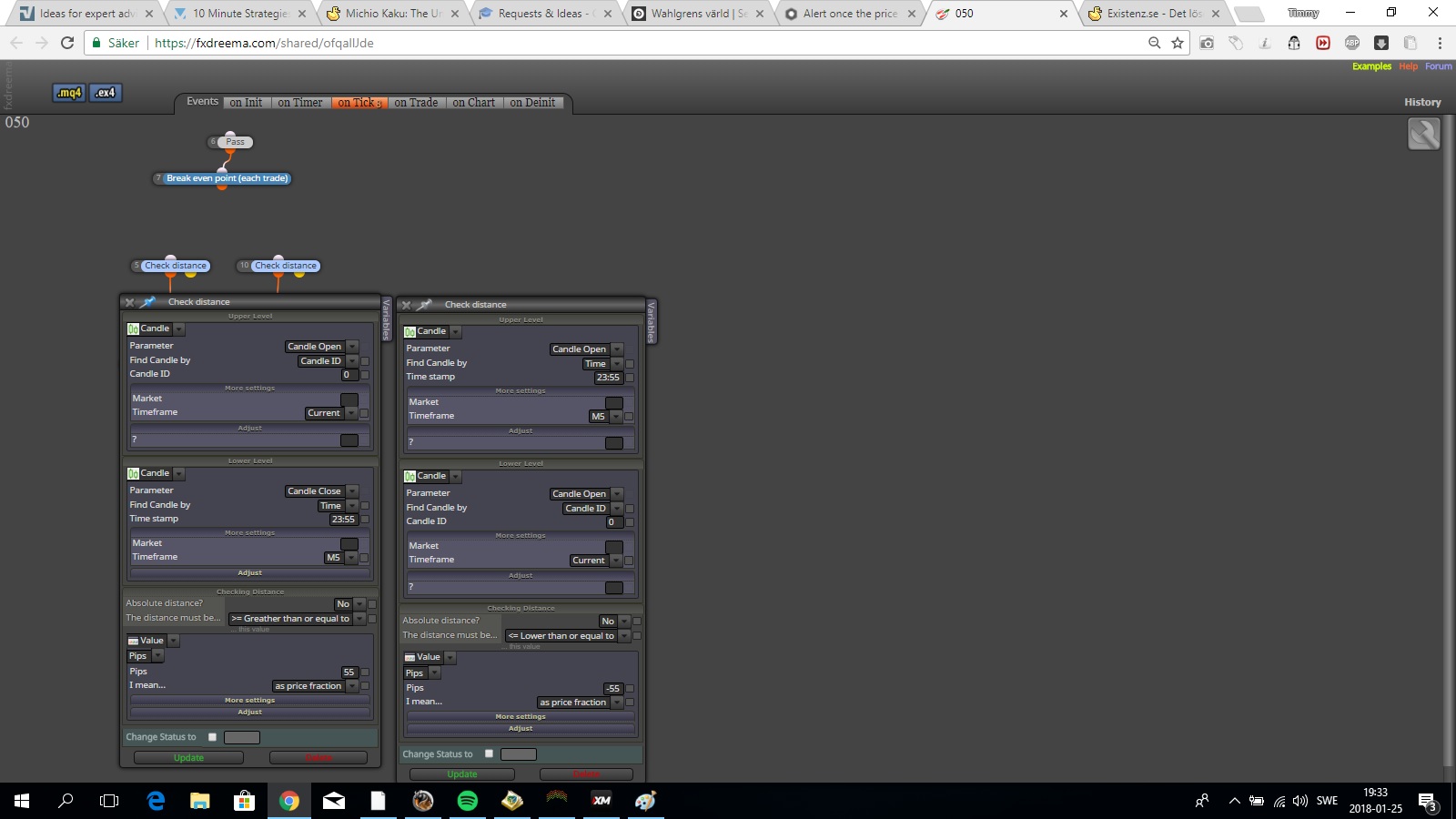
check distance block would also do the trick i think , select the upper and lower bollingerband and select the pips you want
First know if its a buffer that creates the dots or if its objects .
If its a buffer :
Once per bar
No trades ( what you want )
select the correct buffer in indicator visable block
close trade ( the oppsite , if you want to buy close the sell)
Buy now/ sell now
simply set your conditions to candle one then have a once per bar block on top followed by your conditions .
It will pass once the first thing it does when a new bar is created and only once , simple is often the way to go
share it with a link that works , i only got the shared/UIgIsffJ
What i ment is on backtesting most expert advisors on not the tick based especially the once that are made reversed will show you a better result ( opposite trade) but when backtesting they wont do as it was telling , and the same with a normal tick based backtesting.
It shows a better result for many different reasons , and the 2 major is that its faster gain if you trade the opposite of the trade and maybe the spread / payout is different.
The same with time bomb , its some truth behind it as well , but its need to be combined with something to work as it should , because it wont do it by itself, maybe flags to see the trend and range and so on .
The result is up to you to come up with , something that will match the first ever backtest you made on this case timebomb.
Why ? Renko patterns is made as regular forex patterns in candle wise , follows same prices and most of the indicators , just code as you would have been in an original forex expert advisor and there you are , notice that renko will repaint ( show a better result if its newly started or restarted )
see it as its some truth behind it and explore every inch of it
I have always thought that it might hide a very important fact to it anyways , like the way opposite / break of trend often show a better result in backtest than if you trend trade.
Thats because a faster winrate than the loosing once and something small often turns off bigger than you think as in life.
So the aspect is there and use it with a filter of some sort would mean something brilliant.
Remember one thing or a saying that ive come up with :
When something have happened is a result , and most indicators including price action .
Why dont beat the hell out of a raging market with reverse and thats like 90% of the current market and stop when the trend show ?
If you only use x> what happened then ?