fxDreema

    • Register
    • Login
    • Search
    • Back to the main page
    • Categories
    • Recent
    • Tags
    • Popular
    • Search

    Question about strategy tester and objects on chart.

    Questions & Answers
    4
    12
    682
    Loading More Posts
    • Oldest to Newest
    • Newest to Oldest
    • Most Votes
    Reply
    • Reply as topic
    Log in to reply
    This topic has been deleted. Only users with topic management privileges can see it.
    • B
      Bettyblue last edited by Bettyblue

      Hi all,
      If I have a support and resistance indicator that plots objects on the chart and I use those objects as signals/areas/prices in my fxdreema project, what happens when I backtest the project in the MT5 strategy tester (with visualisation turned off)? Will the tester be able to access those objects? If not, what can I do to enable me to backtest it?

      I don't have anything created yet. Just needed to know before I start.

      Many thanks
      B

      1 Reply Last reply Reply Quote 0
      • J
        j4nc0 last edited by

        Yes - object line draw is show zone on high and low before crossing candle/price this zone on backtest in tester strategies MT5

        1 Reply Last reply Reply Quote 0
        • jstap
          jstap last edited by

          If ea is using the objects (not the actual value) then it will only work in visual mode.

          Learn fxDreema Without the Wait!

          My comprehensive book, available on Amazon, is packed with examples and invaluable insights to help you fast-track your learning journey.

          The paperback and hardback editions include MT4 & MT5 QR codes for easy access to all prebuilt projects and robots, including my latest gold trading robot!

          Don’t miss out

          Click here➡️ https://mybook.to/fxDreema to get your copy today!

          Enjoy! 😊

          B 1 Reply Last reply Reply Quote 1
          • B
            Bettyblue @jstap last edited by

            @jstap said in Question about strategy tester and objects on chart.:

            If ea is using the objects (not the actual value) then it will only work in visual mode.

            Thanks jstap. The indicator is in the indicators folder and the objects would normally be on the chart, but if visualisation is turned off, there is no chart. The EA would be pulling the value from the object using "for each object" blocks and check distance blocks. Does that make sense?

            1 Reply Last reply Reply Quote 0
            • jstap
              jstap last edited by

              Yes, You can test to see if a small EA does something on non visual backtest

              Learn fxDreema Without the Wait!

              My comprehensive book, available on Amazon, is packed with examples and invaluable insights to help you fast-track your learning journey.

              The paperback and hardback editions include MT4 & MT5 QR codes for easy access to all prebuilt projects and robots, including my latest gold trading robot!

              Don’t miss out

              Click here➡️ https://mybook.to/fxDreema to get your copy today!

              Enjoy! 😊

              1 Reply Last reply Reply Quote 1
              • B
                Bettyblue last edited by Bettyblue

                @jstap As expected, it did nothing unless visualise was turned on. Question. If you have multiple rectangles on the chart, all the same colour and same name prefix, how does the EA know which one it is reading price coordinates from?
                In this tutorial from Miro, he is taking the price coordinates from a support/resistance rectangle. But his "for every object" only filters by "rectangle" and name prefix. So there are multiple rectangles on the chart that have the same properties. So how does the EA know which one to read the coordinates from? Nearest one? Furthest one?
                https://fxdreema.com/forum/topic/4209/tutorial-07-read-prices-from-indicator-objects

                P.S. I bought your book. Amazing work mate! Well done.

                1 Reply Last reply Reply Quote 0
                • jstap
                  jstap last edited by

                  I can give you a breakdown:
                  Tree 1
                  block 100 - 106
                  looks for a name doesn't care for other parameters
                  block 113
                  checks if a bool constant is false
                  block 102
                  checks if selected object price is above candle 1 close price
                  block 142
                  if all true sets price 1 variable to object price
                  block 103
                  checks if selected object price is below candle 1 close price
                  block 143
                  if all true sets price 2 variable to object price
                  block 140
                  sets the zone width variable (hi-lo=distance)
                  Block 141
                  checks if zone distance is greater than ATR value
                  block 116
                  sets bool variable to 1 (true to start next tree. Using custom code)

                  Tree 2
                  block 117
                  Checks if bool condition is true
                  block 118
                  checks if price 1 variable price is above candle 1 close
                  block 108
                  checks if there is a buy trade
                  block 105
                  if no buy trade buys now
                  blocks 119, 11, 111
                  does the same as 118, 104, 105 for sells
                  Block 120, sets the bool condition to of after completing all above.

                  I hope this has given you some clarity on how Miro's EA works

                  Learn fxDreema Without the Wait!

                  My comprehensive book, available on Amazon, is packed with examples and invaluable insights to help you fast-track your learning journey.

                  The paperback and hardback editions include MT4 & MT5 QR codes for easy access to all prebuilt projects and robots, including my latest gold trading robot!

                  Don’t miss out

                  Click here➡️ https://mybook.to/fxDreema to get your copy today!

                  Enjoy! 😊

                  1 Reply Last reply Reply Quote 0
                  • B
                    Bettyblue last edited by

                    Thanks for that. So basically because of the way that ea works, its looking for price to be between two object price lines (i.e. inside a rectangle) and then waits for the break above. But, what if I wanted to AVOID trading near rectangles (S&R areas)? So I would be buying normally, but if price came within x pips of a resistance rectangle it wouldn't be allowed to buy. And if I was selling normally and price came within x pips of a support rectangle, it wouldn't allow sells.

                    Basically I'm trying to avoid buying into resistance and selling into support.

                    1 Reply Last reply Reply Quote 0
                    • jstap
                      jstap last edited by jstap

                      ->above or -<below those lines would be out of the S/R rectangle

                      Learn fxDreema Without the Wait!

                      My comprehensive book, available on Amazon, is packed with examples and invaluable insights to help you fast-track your learning journey.

                      The paperback and hardback editions include MT4 & MT5 QR codes for easy access to all prebuilt projects and robots, including my latest gold trading robot!

                      Don’t miss out

                      Click here➡️ https://mybook.to/fxDreema to get your copy today!

                      Enjoy! 😊

                      1 Reply Last reply Reply Quote 0
                      • B
                        Bettyblue last edited by

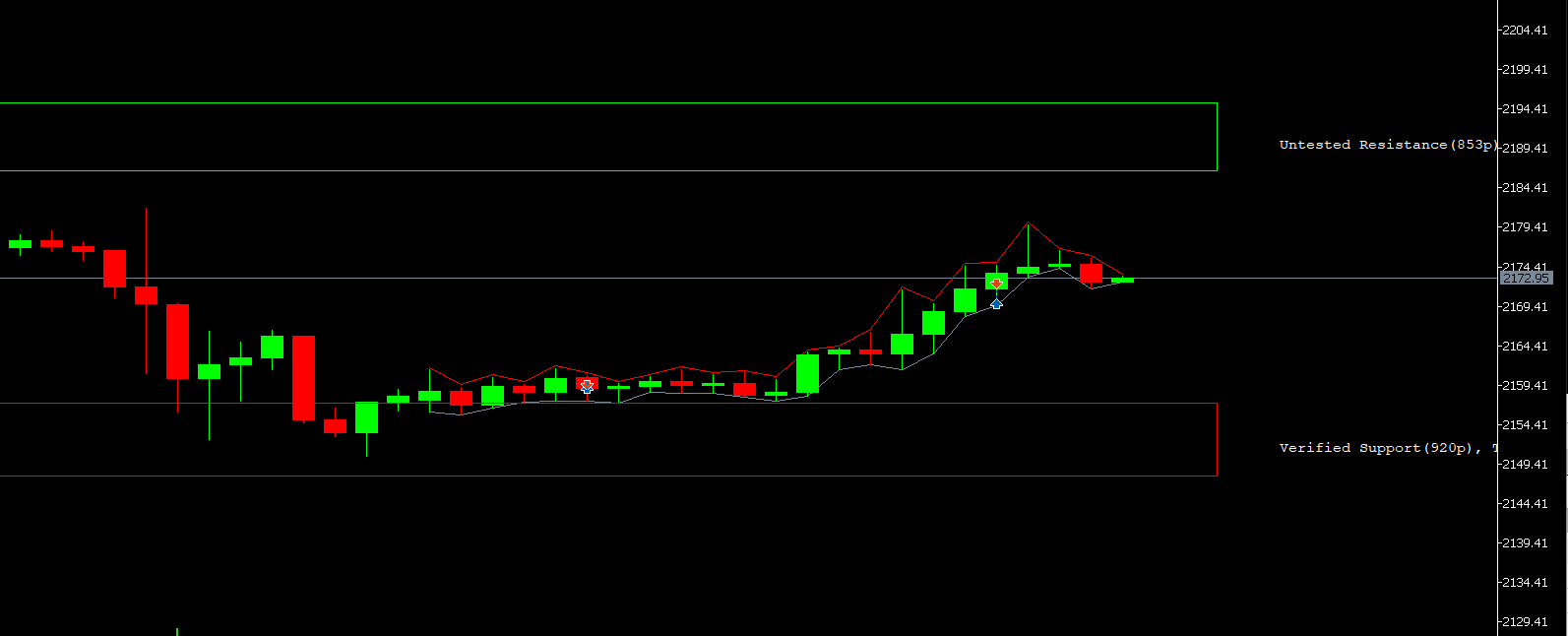
                        Still having issues. Could some kind soul have a look at my project and see what I'm doing wrong? I just used a basic RSI crossing level and 200 MA for trend. The rest is for the support and resistance objects. As you can see in the screenshot, its still taking trades right by the S&R levels, despite me putting the minimum distance from them as 10000 pips (just to ensure no trades are taken).

                        I'd be very grateful if you could steer me in the right direction.
                        Thanks
                        B
                        The indicator I'm using is this one. I've set my colours to lime for resistance and red for support.
                        SR.ex5

                        https://fxdreema.com/shared/wak18GDxe

                        SR trades.PNG

                        1 Reply Last reply Reply Quote 0
                        • l'andorrà
                          l'andorrà last edited by

                          Are you sure the indicator is not repainting. I'm afraid thet is the problem.

                          (English) I will try to help everyone in these fxDreema forums. But if you want to learn how to use the platform in depth or more quickly, I can help you with my introductory fxDreema course in English at https://www.theandorraninvestor.eu.

                          (Català) Miraré d’ajudar tothom en aquests fòrums d’fxDreema. Tanmateix, si vols aprendre a fer servir la plataforma amb més profunditat o més de pressa, t’hi puc ajudar amb el meu curs d’introducció a fxDeema en català a https://www.theandorraninvestor.eu/ca.

                          (Español) Intentaré ayudar a todo el mundo en estos foros de fxDreema. Sin embargo, si quieres aprender a usar la plataforma en profundidad o más deprisa, te puedo ayudar con mi curso de introducción a fxDreema en español en https://www.theandorraninvestor.eu/es.

                          1 Reply Last reply Reply Quote 0
                          • B
                            Bettyblue last edited by

                            I'm not sure, but I do know the first trade was taken right after the red support rectangle appeared. That trade should not have happened because it was way too close to the rectangle.


                            1 Reply Last reply Reply Quote 0
                            • 1 / 1
                            • First post
                              Last post

                            Online Users

                            D
                            S
                            J
                            S
                            C
                            J
                            E

                            15
                            Online

                            146.7k
                            Users

                            22.4k
                            Topics

                            122.6k
                            Posts

                            Powered by NodeBB Forums | Contributors