Not updating the EA
-
When I change the MM settings in the BuyNow block from Martingale / Paroli to anything else, for example Fixed ...it doesnt update when I click the .mq4 button. In my saved EA it remains always at Martingale / Paroli. I noticed this before that sometimes after changing the same EA often and saving ... the changes were no longer updated. What to do ?
-
you need .ex4 file updating
-
clicking on .mq4 saves the file. I use Chrome, it appears under in my screen in the downloads. Clicking on .ex4 opened the default program for that file. One of the many MT4 instances on my PC. So I uninstalled that MT4. Now clicking om .ex4 does nothing any more ...
But this does not explain why I see "wait .. updated" in the gray space right from the .ex4 button when I click the update button on the BuyNow block. But when I download the file, it is still the old file without the change. -
check if you are working with right folders, each metatrader have own folder to store EAs
https://fxdreema.com/help/basics/prepare-your-terminal
.mq4 file is only code, you need also .ex4 file -
I can see you are using those checkboxes to make parameters inputs for the EA. First of all, I really don't recommend to use these. And what is the problem.... when you modify input parameters once in MT, then they are saved somewhere in a cache file. You can modify the default value of the parameter in MetaEditor and there will be no difference. Only if you delete the cache file MetaTrader will start to see the new default values.
-
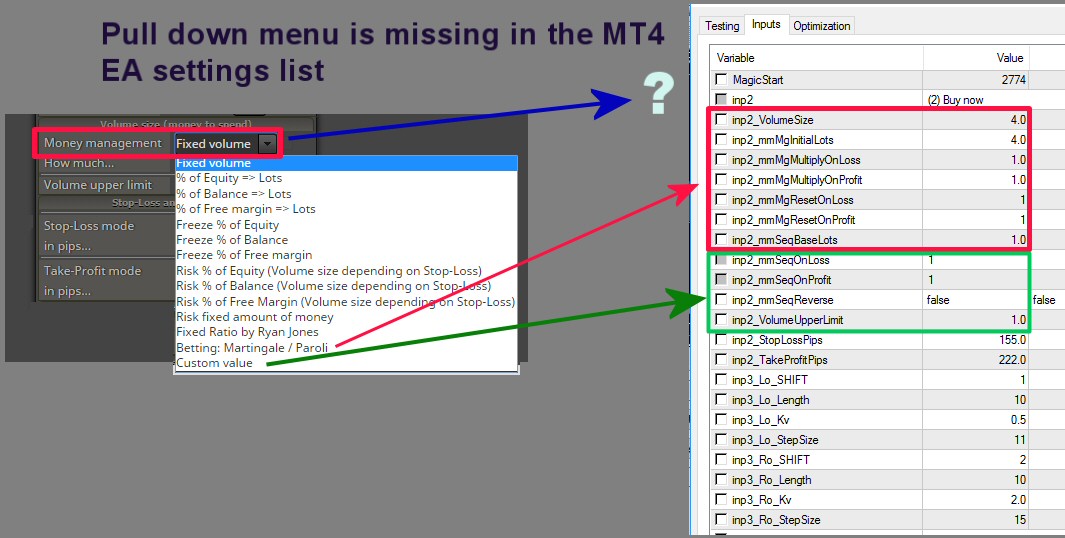
Hi. I am trying to use your tool since a few weeks now. Forgive me for asking stupid questions. I am just changing the default value in the parameter input fileds checkboxes for the EA only once, so that the EA loads automatically with a value that I use most. To be sure ... This is what you speak about ? (see picture)
 image url)
But this is NOT what I am having as a problem. Of course I change the value in MT4 when I open the EA there. The pull down menu of the Money Mangament parameter in the Buy or Sell blocks is missing in the MT4 settings (see picture) so when I want to change the MM I have to go back to Fxdreema and change there from for example "fixed volume" to "Custom volume" and save the EA again, download again, etc ... Am I missing something ?
But these changes are not updated all the time ... or I have both options at the same time ... as you see on the picture.
-
Thanks for helping.
I found a partial solution for the problem. When I use the pull down menu, for Money Management and select for example "Fixed Volume" ... than when I check the box beside the value, it will show up in the compiled EA. When I use the pull down menu and select an other Money Mangement version for example Martingale / Parole... and I check there some parameters ... they also will show up in the compiled EA ... So I better uncheck all, before selecting a new MM version. It is not yet clear if in case I select (check the small square right from the default value (see my first picture) parameters in 2 MM versions and they both show in the compiled EA ... which one works than.
Any way ... still my question: Why do the Pull Down menus not show in the compiled EA ? -
You see how ugly these input variables are anyway. I actually want to remove these checkboxes from the system, or hide them at least, because people are using them too much and I think this is a bad practice.
The whole idea is to develop the EA in fxDreema, not to make universal EA with tons of input settings. This is the reason I started fxDreema, because I found myself trying to make universal EA.
The problem is that you don't know the possible values of these pull down menus. Most of them have string values, some of them have numeric values. Depending on the time I made them and my mood at the time. Most of them have weird options that you will never guess, so that's why they are all disabled. And even if I make some enumerations for them (so they could appear as drop-down menus in the inputs of the EA) there will be a problem - in fxDreema when you change the value, some other parameters appear and disappear, but in MetaTrader this doesn't happen.
Even more - in the output file I have some optimizations to remove unnecessary code. When some parameters are hidden - they are not needed in the EA, so they can be removed. The idea is to put in the output code only the stuff you can clearly see in fxDreema.
And again, these are ugly looking. Their idea is much simpler than that. The idea is to select 2-3 checkboxes, to quickly try the EA with "Optimization" and then to uncheck them. To use good input parameters better use "Constants" - https://fxdreema.com/demo/mt4-constants
-
You are an advanced coder and you can obviously not good imagine anymore ... that we are NOT . I use your fxdreema web tool as a graphical interface to make EAs ... It is up to you to prevent hurdles.
I will investigate your suggestion to use constants. -
This is true. I know that people who learn something very well eventually lose their ability to see from the newbie perspective. That's why most teachers are not very good teachers

In this case I will suggest to use 2 blocks for the 2 money managements. And some Constant that you can put into a Condition block above these blocks. Something like (ConstantName == Value->Boolean->True). I know that I'm recommending using more blocks right now, but this way you will be able to see what is happening in fxDreema (if you open the project in future) and also you can give good names to the input parameters.