First green/red bar above/below MA
-
Hello,
Can you please point me in the direction for the following.
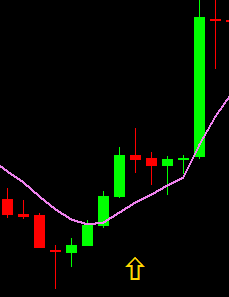
I want that the indicator spots only the first red or green closed bar above MA.
In this picture you see an example where the first red bar has closed above the MA:
Thank you in advance.
-
use condition block where you set Candle Low is above MA ... this will automatically means that candle is above MA ... next condition is to detect if candle is bear or bull (there are more ways for this, one can be condition block where you compare Candle_Open < Candle_Close which means bull candle) ...
next before all this conditions you need something what is called switch ... because you need only first candle above/below ... this switch can be done easily using flag state (or variables) ... just save state when Candle Close id 2 was below MA and Candle_Close id is above MA - set switch to Up, when opposite - to down ....
and now when switch (flage) state is up, you will wait for first candle above MA, when this happens, set switch to neutral and wait when candle closes below MA (to switch down and start looking for first candle below MA) ...
.
are you able do it? -
Thanks for the response. I tried as far as I could understand but nothing seems to happen.
This is what I have come up with: https://fxdreema.com/shared/Y2xQHQg0e
Can you please point me in the right direction?
-
instead of flags you can use variables ... but it is working with same logic ...
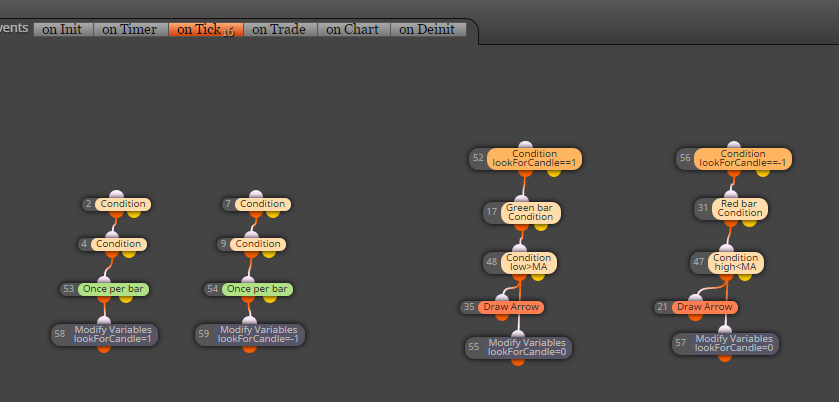
and this is probably working ...
maybe sometimes signal can be skipped, it is metatrader ...
...https://fxdreema.com/shared/Aeoa13t8e
-
and here the same with flags:
https://fxdreema.com/shared/tq1Kawnod -
Thanks a lot for your work. I tested both ways, but for some reason nothing seems to be happening, any idea what it could be?
-
I tried your project and this happens: http://prntscr.com/epnzo5 Obviously there are some arrows, it's not "nothing"
-
I tried again using the project Miro created, still nothing.... so I am not getting arrows. I see status showing: waiting for tick....
Probably a rookie mistake on my side
 , If you have an idea what I am missing please let me know.
Cheers.
-
Ok I found out why it didn't work for me, I had to place the blocks in 'On Charts' not 'On tick'.
So all is fine now;)