Compiling?
-
Are there issues compiling at the moment? I've been trying to compile but haven't been able to. Including existing EAs that I've been able to in the past.
I'm not getting any error message it just seems to 'hang' when trying to compile.
-
I can compile and export your latest project at least. It takes something like 4.22 seconds, but I got the file.
I don't know if you are using the plugin for downloading in Chrome, but if you do, then try to reinstall it. I know that sometimes it breaks for some reason, it happened few times for me before.
-
Thanks for your response. It eventually compiled for me too but took a lot longer than 4.22 seconds. I don't use the plugin for downloading in Chrome. Is this something I should be using?
I usually use Firefox but also tried Chrome to see if it's any better. Is there a best browser to use for fxdreema?
-
@fxdreema I'm having the same issue again. Do you have any suggestions as to why it won't compile?
Is it size of EA? Number of blocks? etc.
I can compile .mq4 but not .ex4? Any reason why?
-
Hi @SydneyFox
Could you share a screenshot showing the error that gives you when you try to compile the Project?
-
I don't get any error. It just says that it's compiling and stays like that for ages (20+ minutes) until I get sick of it and have to either compile the .mq4 or load another project to stop this one.
-
What you can do is to compile the mql4 file using metaeditor. If there is some error, it will be shown.
-
Sorry to be ignorant but how do I do that?
Is it easy to explain or is there a link you could point me to to explain what I need to do?
-
This sounds like some general software problem, maybe antivirus checking the download...
If you download the .mq4 and open it, it should open in metaeditor by default. In metaeditor, hit the button "compile" in the top row, and it gives you information about possible errors. -
Thanks @josecortesllobat @roar
When I compile in metaeditor I get: 0 errors, 35 warnings, compile time 1131 msec.
The warnings I get are:
- possible loss of data due to type conversion
- implicit conversion from 'number' to 'string'
Does this mean it has now been compiled in metaeditor? If so where do I find the .ex4 file?
-
Those 2 warnings come with basically every project, nothing to worry about there - the problem is most likely elsewhere.
Metaeditor puts the compiled .ex4 files to your expert advisor folder, something like "...../MQL4/experts/"
The folder is nowadays in the metatrader install location.
You should see the ea in your metatrader navigation panel, remember to refresh it. -
If you double click over the mql4 file, the metaeditor will open up and you will be able to compile the EA.

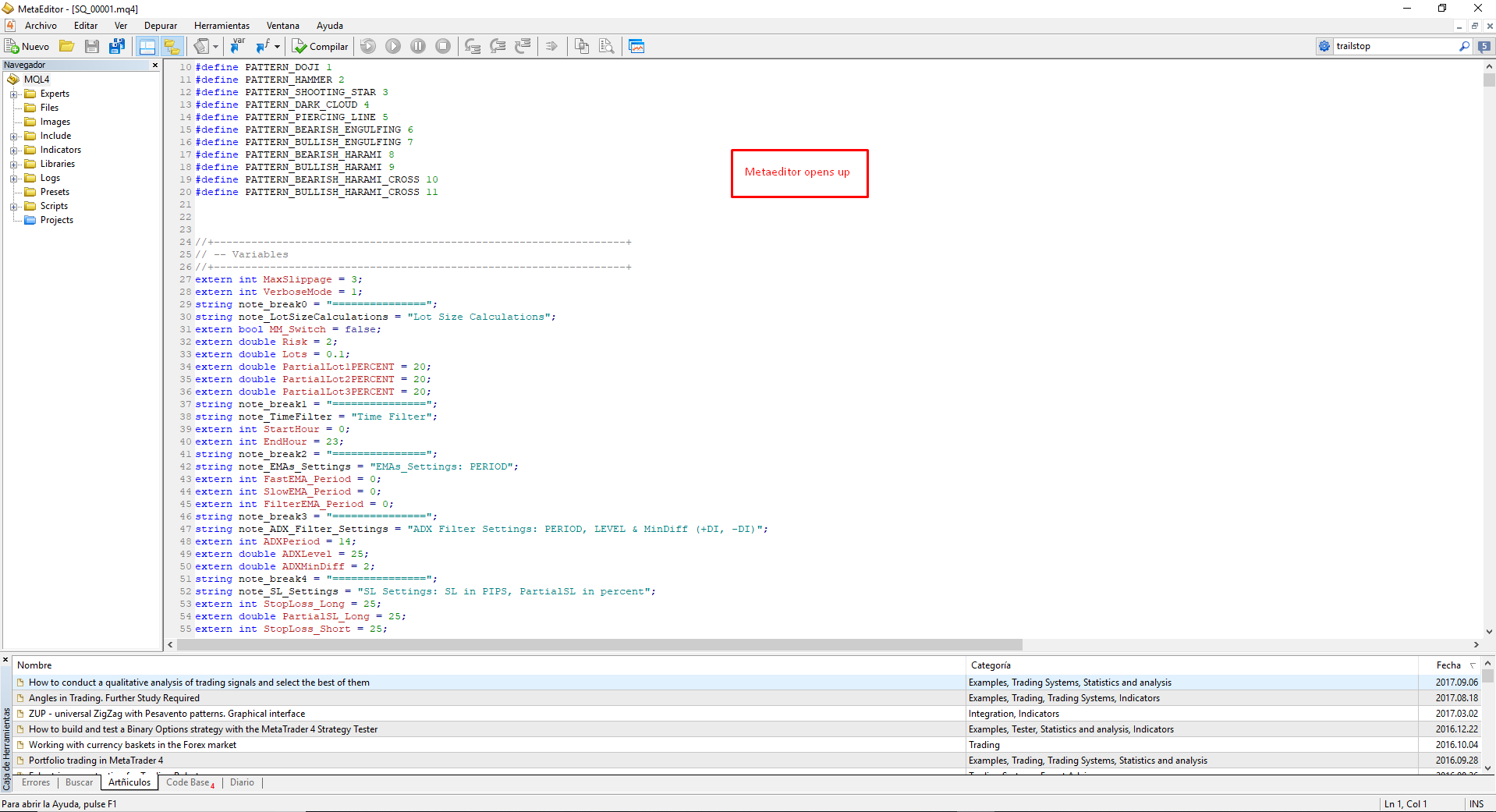

When the job has done, you will get some info about the compiled job.

Warnings (in yellow) are not a problem but Errors (in Red) yes.
-
Thanks again @roar @josecortesllobat I really appreciate your help.
I have been able to compile but still can't find the .ex4 file? I have a demo mt4 open and have refreshed and looked in the MQL4/Experts folder but it's not there.
Can it be because I have other MT4 platforms on my laptop and need to open those to see if it's there?
-
@josecortesllobat @roar another question if I may? As you both seem to be a lot more knowledgeable than me.
I have a variable that I want to modify as either True or False. In the Modify Variables block it says it's Value / Boolean. I thought as this uses boolean I would need to use this when I set up the 'Type' when I add the new variable?
When I compile I get the following errors:
- 'boolean' - declaration without type
- 'MyVariableName1' - struct member undefined
Any suggestions as to how I fix this error?
-
@SydneyFox Most probably is what you are saying.
I suggest a workaround:
- Open the MT4 platform you want the EA compiled be used
- "Open Data Folder" from File menu
- Navigate to \MQL4\Experts and copy the mq4 file inside that folder
- Open the file from there (double click over it)
After you get the EA compiled file, you should find it in that folder.
-
- Check out if the constant/variable you want is set as "boolean" in the Constant/Variables menu
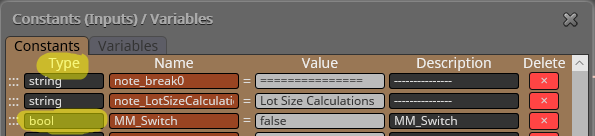
- Might be related to 1 if it is the same constant/variable as you want as boolean
-
@josecortesllobat said in Compiling?:
After you get the EA compiled file, you should find it in that folder.
This bit answered it thanks. It was in the folder where the mq4 folder was. Which was not in the MT4 platform folders.
-
@josecortesllobat said in Compiling?:
- Check out if the constant/variable you want is set as "boolean" in the Constant/Variables menu
- Might be related to 1 if it is the same constant/variable as you want as boolean
You fixed it again! Thanks!!!
Under type I had used 'boolean' instead of 'bool'. Sorted now.
Thanks you very much for all your help. @josecortesllobat @roar
-
You are welcome.
Don't hesitate to ask anything in the forum because we are learning together.


