Trying to set buy/sell at candle close not working right
-
I set the condition for candle close to buy sell above/below 30sma at close of candle. There is another oscillator I'm using with it but is working fine with this. The EA is buying/selling when price/wick of candle crosses 30sma, not at the closing of the candle. I have it set at candle close and the MA as price close. How do I prevent this and get it to buy/sell at the close of candle only? Thanks.
-
If you attach a link to your project someone may have a look at it for you. Hard to help without seeing the blocks.
-
I would be grateful if someone could look at the blocks and determine the issue.
Not sure how to attach my blocks I created. I've uploaded the EA here. If I need to do something else, please advise.
I also only want this to trade one time on a cross. It appears that when the trade hits TP or SL, it will open another trade before crossing the MA again.
-
In your fxdreema builder go "project" -> "create shared copy".
Solution: use the block "once per bar" at the top of your logic tree
-
@roar Thanks for the reply. I'm not sure if using a "once per bar" order would work for what I was looking for. I only want to create a trade once per crossing. Right now it will close a trade with TP or SL hit and then open another trade if conditions are still there. But I don't want it to trade again until opposite crossing occurs. This could be one or many bars after initial trade. I will attach the link. I appreciate any input. (https://fxdreema.com/shared/t15Hptq8c)
-
@makamilman
Try this version, I think it is closer to what you want:
https://fxdreema.com/shared/5EHm72tLd
What I changed:- condition blocks use candle ID 1, that is the latest completed cande, not the updating one.
- because we check the history candle, we can do it only "once per bar" because the situation won't change anyway until a new bar appears
- trailing stop and breakeven don't need separation to buy/sell.
- "trailing start is 100% of trailing stop" = trailing stop starts at the open price
-
@roar Thank you, I will give this a try and see how it performs. I appreciate your help.
-
Doesn't appear to have worked. I've attached an image of a EURUSD chart I was testing.As you can see, it traded twice so far without waiting to cross again. This is what I'm trying to avoid. I only want one trade per crossing. Otherwise the trend stops or turns but another trade is activated.
Any other thought on this would be appreciated.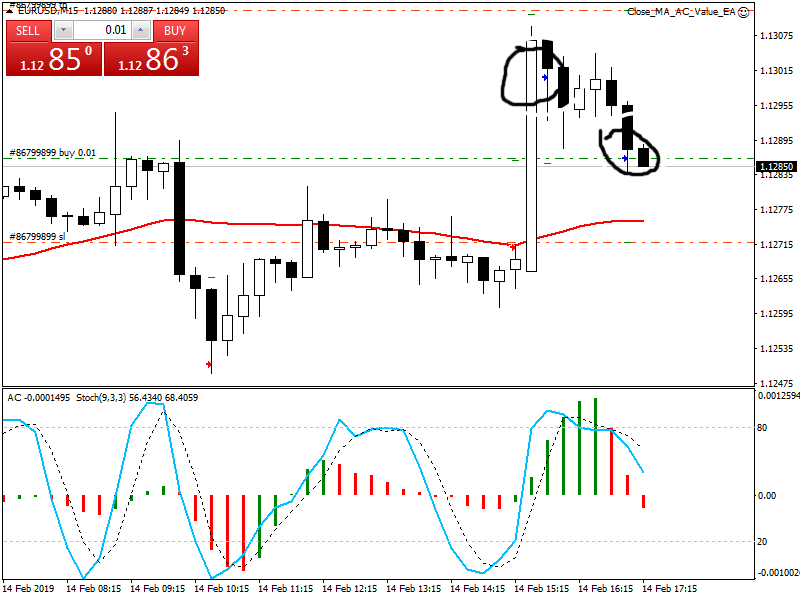
-
I can see your project and I see that you have 2 Condition block in a row, both of which have x> inside. The problem is that x> detects a crossover that happens on the given candle, but before of after that candle you cannot find the same crossover. With your conditions you are saying that you want 2 separate crossovers (one with MA, one with Awesome Oscillator) to be true at the same candle. This could happen sometimes I guess, but I think that you don't want that.
So, try with one crossover. Change the other with > or >=. The thing is that if now line A is > than line B, then for sure line A crossed line B somewhere in the past.
Also I don't like where you placed the blue blocks - break even and trailing stop. Take a look at this example: https://fxdreema.com/demo/mt4-wrong-closing-rule
Also, only one of these blocks can work for both, buys and sells. So in short, disconnect block 6 from block 3 and remove blocks 8 and 9

