Selection according to Symbol
-
@miro1360 Hi, I have a Panel to open operations with different buttons to choose a symbol, my problem is that when I want the Trailing Stop to work, the pips of the EURUSD symbol are not the same with those of the DAX 30 or the S & P500, at the first 5 pips is normal but On the other hand, for DAX 30 the 5 pips should be 50 or even 500 since even the minimum lot per trade is 0.01 for EURUSD and 0.1 for DAX30, how can I make the trailing stop change the pips from 5 to 500 according to the symbol?
-
@xyon126 Using the right pip size rules should be the way to do it.
(English) I will try to help everyone in these fxDreema forums. But if you want to learn how to use the platform in depth or more quickly, I can help you with my introductory fxDreema course in English at https://www.theandorraninvestor.eu.
(Català) Miraré d’ajudar tothom en aquests fòrums d’fxDreema. Tanmateix, si vols aprendre a fer servir la plataforma amb més profunditat o més de pressa, t’hi puc ajudar amb el meu curs d’introducció a fxDeema en català a https://www.theandorraninvestor.eu/ca.
(Español) Intentaré ayudar a todo el mundo en estos foros de fxDreema. Sin embargo, si quieres aprender a usar la plataforma en profundidad o más deprisa, te puedo ayudar con mi curso de introducción a fxDreema en español en https://www.theandorraninvestor.eu/es.
-
@l-andorrà Yes! Ok but how do I do it or select the symbol automatically?
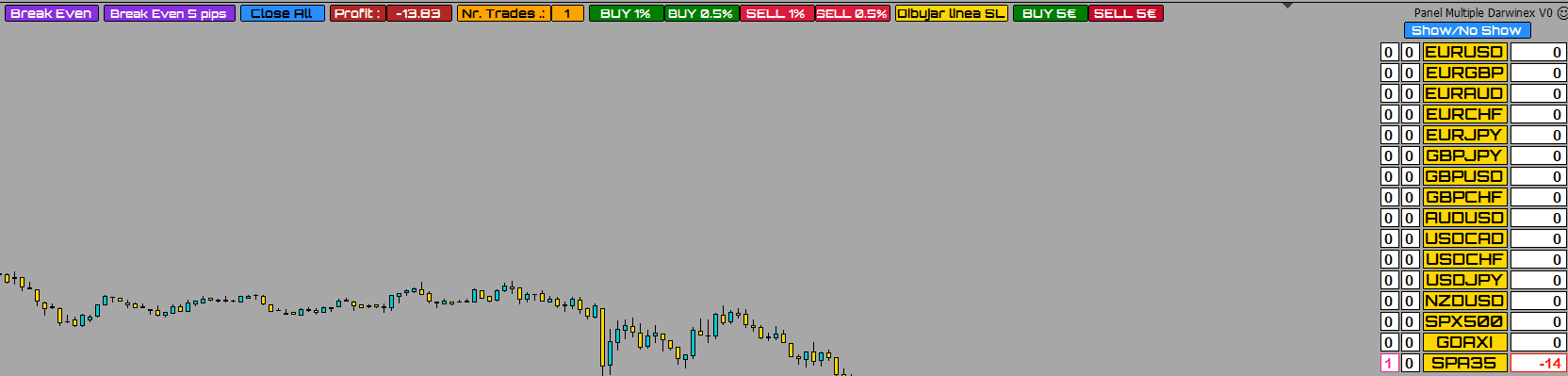
In the photo panel when I press the yellow button of the symbol, I change to that symbol but instead the Trailing Stop is configured for STD symbols and not for DAX30 and my idea is when it is in DAX 30 the Trailing Stop adapts to that PAR or symbol
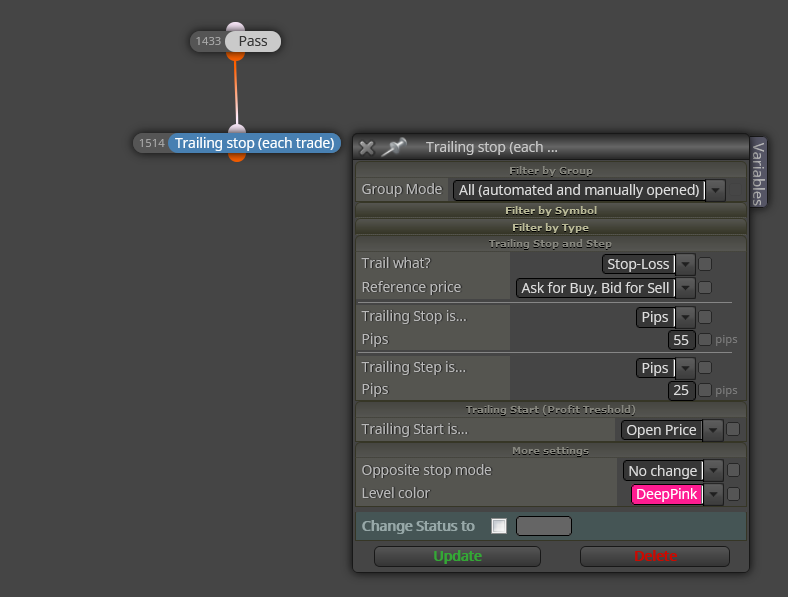
How I modify the Trailing Stop to achieve it.
-
@xyon126 You cannot. You need to do it manually as I explain in this video:
https://www.youtube.com/watch?v=BoRo47a4T3k&list=PLuAINtIcGzoVOBbGJezg_PgmntSql8VRe&index=3
From minute 01:32.
-
@xyon126 you can set the trailing stop to work on all open trades on the account, if thats suitable for you
Need small help? Tag me in your post
Need big help? https://www.fiverr.com/big_algo/automate-your-winning-strategy-in-mql4-or-mql5 -
@roar Hello @roar ! Thank you very much for the answer, but how do I configure it for DAX? I have tested it with only DAX and the result of the TS is that it puts the pips as if it were EURUSD and not as DAX. What value should I place in the Trailing Stop block? Thank you very much in advance.
-
@xyon126 You need to adjust the pips size on the 'project option' window for the DAX only.
(English) I will try to help everyone in these fxDreema forums. But if you want to learn how to use the platform in depth or more quickly, I can help you with my introductory fxDreema course in English at https://www.theandorraninvestor.eu.
(Català) Miraré d’ajudar tothom en aquests fòrums d’fxDreema. Tanmateix, si vols aprendre a fer servir la plataforma amb més profunditat o més de pressa, t’hi puc ajudar amb el meu curs d’introducció a fxDeema en català a https://www.theandorraninvestor.eu/ca.
(Español) Intentaré ayudar a todo el mundo en estos foros de fxDreema. Sin embargo, si quieres aprender a usar la plataforma en profundidad o más deprisa, te puedo ayudar con mi curso de introducción a fxDreema en español en https://www.theandorraninvestor.eu/es.
-
@l-andorrà Hello! @l-andorrà , I have already done it and I have not obtained any difference, I have done it as you indicated in your video.
-
@xyon126 Can you please share a screenshot of your pip size rules?