fxDreema

    • Register
    • Login
    • Search
    • Back to the main page
    • Categories
    • Recent
    • Tags
    • Popular
    • Search
    1. Home
    2. XYON126
    • Profile
    • Following 0
    • Followers 6
    • Topics 57
    • Posts 383
    • Best 24
    • Controversial 2
    • Groups 0

    XYON126

    @XYON126

    24
    Reputation
    2076
    Profile views
    383
    Posts
    6
    Followers
    0
    Following
    Joined Last Online

    XYON126 Unfollow Follow

    Best posts made by XYON126

    • RE: simple panel

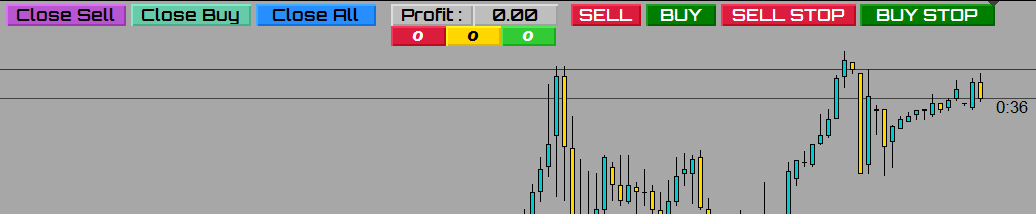
      @bacardi2001 Hello, I am doing and in fact I already have a finished pair (see my post) but if you clarify more exactly what you need we can help you, myself, I started from scratch and now I have several half and others finished. Say what you need and we will help you. I attach photos of some of my projects as a guide:

      0_1607425131625_46bcbbdb-e823-482b-a302-5769f883fbc2-imagen.png

      0_1607425161597_fb4509b7-48df-4451-a6aa-9eed19123a2e-imagen.png

      o un proyecto a medias:

      https://fxdreema.com/shared/nLc2omNS

      The first photo works 100%, it opens operations with a 5: 1 Ratio and a Stop Loss of 20 pips and the "open Trades" button opens two identical operations, one in SELL and the other in BUY. The rest do what you put on the button. I hope I've helped.
      That if and very important, you will need a payment account since there is a minimum of 15 blocks in the simplest and the free one only allows 10.

      posted in Questions & Answers
      XYON126
      XYON126
    • RE: Video Tutorial - Signals Dashboard EA [advanced] - looping Objects, arrays

      @miro1360 Good advice, thank you very much, I usually practice it and advise the same myself, where is the experience and the years. 🙂

      posted in Tutorials by Users
      XYON126
      XYON126
    • RE: button problems (solucionado)

      @cesardefez Hola @cesardefez , veo que ablas español mejor porque asi nos entenderemos mejor. Lo primero que he visto (lo he cargado en un MT5) es que el "Margen max. " te sale desplazado, ¿Es correcto? por el tema de los botones si me detallas que funcion tiene cada uno podre analizarlo a fondo aunque se parece mucho a un Panel mio (ver foto), Lo que mas dudas me provoca son el boton "Close Line, Open line, Invernar y Reset"; comentas que el bucle no se actualiza, ¿A que te refieres, que no se pone a cero?, aqui tienes la foto de mi panel:

      0_1611684664111_659cd9e4-c483-4a62-8e0b-30bc82497550-imagen.png

      La información que da es:
      Botones grises: te dan el valor de las ganancias totales de todos los pares, cambia de color rojo si esta en perdidas, en verde si esta en ganancias y gris si es a "cero" o no hay operaciones.
      Botones naranjas : Pues eso lo que indica, la cantidad de operaciones totales abiertas.
      Boton amarillo "Dibujar linea SL : Con este boton loque realizo antes de hacer nada lo presiono y me dibuja una linea horizontal en el precio actual, esta linea una vez dibujada te permite desplazarla al lugar donde quieres el Stop Loss.
      Botones verdes y rojos: Con la linea horizontal situada donde queremos el SL al presionar cualquier boton te calcula segun el boton los Lotes necesarios para que el riesgo sea del 1% Capital, 0.5Capital, 5€ o 3€ segun el boton que presione.
      Boton azul claro "Show/No Show": este boton es para esconder o visualizar los botones que hay debajo.
      Botones amarillos del PAR: si presionas el boton amarillo te cambia el DRAFT o VENTANA actual al par presionado manteniendo la temporalidad y activando los botones para ese PAR.
      Botones blancos: Las dos columnas de botones blancos al lado de los amarillos del PAR a la izquierda informan en rojo operaciones abiertas tipo SELL en ese PAR, en verde las BUY y la columna de botones blancos alargados a la derecha de los amarillos del PAR te informa del beneficio o perdida de ese par de sus operaciones abiertas en el PAR.
      Los otros hacen lo que indican en el PAR activo el de la ventana actual.

      Naturalmente esta en MT4 pues como te comentaba en MT5 aparte de que mi Brocker de cta real no lo acepta para tener un DARWING tambien me daba problemas de retraso, aunque en MT4 a veces se encalla.

      Punto importante, si la distancia de la linea amarilla que te genera el Panel, su distancia es inferior al minimo del Stop Loss que te permite el Brocker en el PAR activo al abrir la operacion o no la abre, o la abre sin SL y TP con un lotaje igual al minimo estipulado por defecto 0.02 lotes. Esto ultimo es un problema global pues todos los paneles de todos los programadores que conozco tienen el mismo problema.

      Espero esto te ayude, ya me diras.

      posted in General Discussions
      XYON126
      XYON126
    • RE: Panel with EA in the same EA

      @banditdos Yes, if possible, I have a trading panel similar to what you want to do and at the same time it has 4 trading strategies or EAs, these run independently and if I want to open a manual operation with my panel it opens it without problems, even in my panel that opens trades with a fixed size of SL but without Take Profit (I don't like to fix it) it gives me the current total and partial Profit. In other words, it runs several things at the same time without problems. I hope I've helped.

      posted in Questions & Answers
      XYON126
      XYON126
    • RE: Video Tutorial - Signals Dashboard EA [advanced] - looping Objects, arrays

      @miro1360 OKAY! Thank you very much, with this I have analysis and learning for a long time and I will be able to finish (I hope so) my operations panel, I will not tire of thanking you, you are a crack, I think that without you fxDreema would not be successful. Thank you very much and I am at your service as much as I can.

      I will inform you about how my super panel is going, rather your super panel since 70% is thanks to your code, the other 30% my adaptation I have an idea of ​​the panel. If you want when I finish it and add all the adapted code that you have taught me, I will share it with you.

      posted in Tutorials by Users
      XYON126
      XYON126
    • RE: Scaricare Consulente esperto con 3 medie mobili

      @l-andorrà Hello @l-andorrà! It is the same problem that I reported in a post of mine, it depends on the day fxDreema does not allow you to upload images, EA link, Files, etc. As we say in Spain "Se le va la olla" and the window appears in the lower right corner in red with "Error, you do not have enough privileges" I have a payment account for up to 6 months at the moment, I have more than 3 hearts ( someone said that was it) and today I have not been able to upload images or files to respond to a post of mine, that is, the @fxDreema should look at these errors and ignore less, people start to get pissed off and not update. Another problem that you just answered me yourself is that between MT5 and MT4 there are big differences with the fxDreema blocks and many blocks do not have equivalents, another very serious error of @fxDreema in my opinion.

      posted in General Discussions
      XYON126
      XYON126
    • RE: Mql4 to Mql5 convertor problem

      The problem is that you have not made the EA in fxDreema MQL4, but the code is original or native MQL4, fxDreema does not recognize it, you should first pass it to fxDreema by hand, that is, generate the EA in fxDreema and then you could convert it into fxDreema to MQL5 but think that there are many blocks that do not exist in MQL4 and / or MQL5 and if one of these is, the translation will be impossible.

      I hope I've helped.

      posted in Bug Reports
      XYON126
      XYON126
    • RE: Panel with EA in the same EA

      @banditdos Hello Banditdos, this is my panel, I don't know if it will help you or not:

      0_1606561227901_86d8a5c3-b39a-414b-bb4c-ef63fe516c57-imagen.png

      I do not know if it will help you, for me there is no problem, anyway if you look in the forum and look for a post about panels you will find mine because I did it in pieces and then add them all in one (this is not in the forum) , you will tell me.

      posted in Questions & Answers
      XYON126
      XYON126
    • RE: Hi guys ! :)What is the correct way to link the time filter block with the constants or variables, and can I allocate more than one time period?

      @zaher-ahmad Hola @zaher-ahmad !
      In this post you have the solution.

      https://fxdreema.com/forum/topic/10564/como-seleccionar-pares-fijos-how-to-select-fixed-pairs-solved

      posted in General Discussions
      XYON126
      XYON126
    • RE: Hi . Is there a simple way to create a recovery cap ?

      @mustapha I see that you are trying to do a Brazilian EA called Coverage EA, it is a fallacy and it bursts accounts, statistically it is impossible no matter how much they sell it to you since with a percentage of the account of 2% you can only fail 68 operations and that technique to The one that you have 6 operations is already above 20% of the account, a European Brocker only allows you 20% of consecutive losses and once that limit closes all the operations automatically, only if you are a Company they allow you 30% so don't waste time on something impossible, it's advice unless it's for fun. 😉

      posted in Questions & Answers
      XYON126
      XYON126

    Latest posts made by XYON126

    • RE: strategy tester slows down over time

      @piptheripper It has an overwhelming logic, the strategy tester is not instantaneous, depending on the time you want it to perform the test it may not slow down but take the necessary time that is not the same, example: How long does it take to mentally add 2 + 2 and 256985478 +254123595741? True, it does not take the same time because it is identical to the tester, you need to carry out the testing every day, if for one day you need 1 second for 300 days you will need 300 seconds.

      posted in Questions & Answers
      XYON126
      XYON126
    • RE: How to add a common TP price for a group of trades

      As @l-andorrà comments, you must create and calculate it with a variable, for better performance use the mql4 / 5 code block and create the variable and modify it in that block, there are no specific blocks already generated in fxDreema, you must create it yourself.

      posted in Questions & Answers
      XYON126
      XYON126
    • RE: Why do you use SL when it is not switched on?

      @biokaja The link cannot be opened, post it again, anyway the SL may have it activated in the SELL or BUY block, verify that it is not SL in both.

      posted in Questions & Answers
      XYON126
      XYON126
    • RE: Mql4 to Mql5 convertor problem

      The problem is that you have not made the EA in fxDreema MQL4, but the code is original or native MQL4, fxDreema does not recognize it, you should first pass it to fxDreema by hand, that is, generate the EA in fxDreema and then you could convert it into fxDreema to MQL5 but think that there are many blocks that do not exist in MQL4 and / or MQL5 and if one of these is, the translation will be impossible.

      I hope I've helped.

      posted in Bug Reports
      XYON126
      XYON126
    • RE: CHALLENGE MAKE FXDREEMA VERSION OF THIS EA OR SIMILAR TO THIS

      @mr-lenny Hello!
      To do what you ask the first and essential in text indicate what you do in the EA, I have looked at your code in MQL4 and the truth, do not be offended, structurally it is a disaster, it is impossible to know your logic, you will be a good programmer but for you and not for someone else to understand, on the other hand, your code in MQL4 has 486 lines that in fxdreema would become a minimum of 6000 lines and graphically they can be of the order of 100 blocks or more, as you can see I have it looked at and it is impossible to understand your purpose without more information. As for free or expensive, I do not agree with @l-andorrà , since you upload the code and it is usable by everyone, another thing is to convert it to fxDreema that you would not win anything but quite the opposite, it will cost you 50% or more slower and more imprecise, I tell you from experience, you just have to look at when my last post was and you will see that now I 100% do it in MQL4 / 5 and pass this one.

      posted in Questions & Answers
      XYON126
      XYON126
    • RE: How to open a BUY LIMIT or SELL LIMIT order with 3 horizontal lines.

      @tipsywisdom No, no, it is not Mql5 it is Mql4, they are not 100% compatible, there are blocks in Mql4 that do not exist in Mql5 and the same thing happens from Mql5 to Mql4.

      posted in Questions & Answers
      XYON126
      XYON126
    • RE: How to open a BUY LIMIT or SELL LIMIT order with 3 horizontal lines.

      Hi @johntyr! Thank you very much for the help, I have tested your code and it does the same for me, the only variation that I find is that it has 3 more blocks and the location but still does not open any operation.

      posted in Questions & Answers
      XYON126
      XYON126
    • RE: Line cross entry EA to close trade if the lines uncross

      Hi @johntyr! I have looked at your code and from my experience I see that you close with the closing block and option BUY or SELL, if in addition to this you differentiate the groups, you may function since the orders will be exclusive, since you do not have your indicator I have not been able to do tests but In the main blocks (57.58.59.60) in the group filter you give it a number identifying them that will also serve as a recurring filter. I hope I have helped you something. 😉

      Ah! Important point, although fxDreema has the option of crossing lines from top to bottom and quite the opposite, it is very important to know that since it is based on MQL4 / 5 in MQL4 / 5 there are no crosses, to make or identify a cross what is done is:

      1. Identify a line and ask if it is greater or less than the other line (refers to price).
      2. idem to the above.
        With this, MQL knows that one line or curve is above the other, now you have to do the same but asking if the upper line or curve is now lower and the opposite with the other. This is what in MQL identifies a cross, as you can see it is a bit chaotic and the problem is when both are in a vertical point, Mql does not recognize them and it is when it gives you a false Yes or No, this must be taken into account. since for your case you should also give width to the crossing area indicating how many candles there must be in one crossing or another.
      posted in Questions & Answers
      XYON126
      XYON126
    • RE: How to open a BUY LIMIT or SELL LIMIT order with 3 horizontal lines.

      Hi @johntyr! I look at your proposal and I get lost, because I see that instead of having 2 blocks of pending operations there are 5 without counting the canceled ones, I also see that the added ones have a TP and a fixed SL when my idea is that they are obtained with the Lines drawn, would you be so kind to pass me the clean code. Thanks a lot.

      posted in Questions & Answers
      XYON126
      XYON126
    • RE: How to open a BUY LIMIT or SELL LIMIT order with 3 horizontal lines.

      Hi @tipsywisdom! As you will see when pressing the yellow button the two lines are created, the red is the SL and the yellow the price, (up to here OK) I move them where I want the order to be opened and when pressing the green or red button it remains pressed and neither will open the operation, nor will it erase the lines with which I deduce that it is blocked but I don't know where. I have read the errors and in one button it does not say anything and in the other it gives error (3) of parameters and in an undefined loop.

      You can help me, here is the Link

      https://fxdreema.com/shared/naxOKlQ3e

      posted in Questions & Answers
      XYON126
      XYON126