Cannot get buttons to work on live
-
Back test project link
No back test project linkIn the "back test project" link, is my latest project but although all works properly in back test it doesn't in live/demo, when the button to place trade is pressed nothing happens.
In the "no back test project" link, is my latest project that will only work on live/demo but it doesn't, like the other when the button to place trade is pressed nothing happens.
Can anyone see that I have done somthing wrong with these? Maybe someone has an idea of what I can do to get them working? Thank you
Learn fxDreema Without the Wait!
My comprehensive book, available on Amazon, is packed with examples and invaluable insights to help you fast-track your learning journey.
The paperback and hardback editions include MT4 & MT5 QR codes for easy access to all prebuilt projects and robots, including my latest gold trading robot!
Don’t miss out
Click here➡️ https://mybook.to/fxDreema to get your copy today!
Enjoy! 😊
-
@jstap It is certainly a very complex project. I cannot see a serious error at first glance, butI don't know what the custom code blocks do (I'm not a programmer). Unless someone else can offer a detailed explanation I suggest to rebuild theproject from scratch and test each new segment one by one until you find which one is causing the issue.
(English) I will try to help everyone in these fxDreema forums. But if you want to learn how to use the platform in depth or more quickly, I can help you with my introductory fxDreema course in English at https://www.theandorraninvestor.eu.
(Català) Miraré d’ajudar tothom en aquests fòrums d’fxDreema. Tanmateix, si vols aprendre a fer servir la plataforma amb més profunditat o més de pressa, t’hi puc ajudar amb el meu curs d’introducció a fxDeema en català a https://www.theandorraninvestor.eu/ca.
(Español) Intentaré ayudar a todo el mundo en estos foros de fxDreema. Sin embargo, si quieres aprender a usar la plataforma en profundidad o más deprisa, te puedo ayudar con mi curso de introducción a fxDreema en español en https://www.theandorraninvestor.eu/es.
-
@l-andorrà Thank you
Learn fxDreema Without the Wait!
My comprehensive book, available on Amazon, is packed with examples and invaluable insights to help you fast-track your learning journey.
The paperback and hardback editions include MT4 & MT5 QR codes for easy access to all prebuilt projects and robots, including my latest gold trading robot!
Don’t miss out
Click here➡️ https://mybook.to/fxDreema to get your copy today!
Enjoy! 😊
-
@jstap You're welcome.
-
After a couple of days of testing different sections of this project I have found the problem, although this still doesn't work on live/demo when everything is in the on tick area, it does when in the on chart area.
The answer was quite simple, remove/delete the condition block under the mouse clicked on object block, it seems that having mouse click and a condition basically trying to do the same thing caused problems.
Learn fxDreema Without the Wait!
My comprehensive book, available on Amazon, is packed with examples and invaluable insights to help you fast-track your learning journey.
The paperback and hardback editions include MT4 & MT5 QR codes for easy access to all prebuilt projects and robots, including my latest gold trading robot!
Don’t miss out
Click here➡️ https://mybook.to/fxDreema to get your copy today!
Enjoy! 😊
-
Hello @jstap! I have been looking at your keypad and I have found 2 points that make me doubt, the first (Look at some of my keypads, it is a tip) where do you activate the buttons? I don't see it, and where they are, they are under everything they should do, instead of the opposite.
And the second, in one of your branches you identify the button and after it has executed everything you tell it to take one color or another, is that so? that way (I'm still wrong) you have a conflict or so I think. -
@xyon126: Hi xyon thank you for your info, I am sure you are correct that there is a conflict in the following link everything seems to work but I cannot add a pending condition to on tick, if I do then all buttons stop working.
Latest versionI have looked at your posts but you have a lot and I didn't see anything that may correct this, (is quite possible that I missed what I needed).
What did you mean by everything is under what to do? My understanding is that in general:
- Button is created in on INIT
- If button is pressed the state changes
- In a condition block you can use the changed state to do something, (in either CHART or TICK)
- once something is done you can set the button back to it's original state
This is what I think the EA is doing, I may be wrong, if you have any ideas of how to get this working better I would be glad of the advice.
Learn fxDreema Without the Wait!
My comprehensive book, available on Amazon, is packed with examples and invaluable insights to help you fast-track your learning journey.
The paperback and hardback editions include MT4 & MT5 QR codes for easy access to all prebuilt projects and robots, including my latest gold trading robot!
Don’t miss out
Click here➡️ https://mybook.to/fxDreema to get your copy today!
Enjoy! 😊
-
@jstap Let's go in parts:
1st The button you can create the first one that is created when the Chart is opened in On Init, On Timer or On Tick, the difference is:
a) on Init = It is normal, or when you create an array.
b) on Timer and on Tick = the difference between these two is the response time, since in on Timer it will perform the visualization after the calculations according to the stipulated time configured and instead in on Tick it performs the calculations and when they are They are finished, they wait for the next Tick to visualize them, if a tick is 5 min. It will take a minimum of two ticks to display, one for calculations and one for viewing.
2nd True when you press the button, the state changes and you can control it with a state block and a variable.
3º Naturally the condition buttons are for that, verify that the condition occurs and execute the next block after it.
4th Yes, but to leave it in the initial state and repaint, you must place the same block as the "Draw button" button, etc. at the end of the tree or it remains activated, if by mistake the latter has a different coordinate when the whole group has been created you will see that the button has been moved, this trick I use to see if the whole group has been executed or it remains blocked for some error and when I see that it works I put the same coordinates of the button that is drawn first.Do not put a "pass" block at the beginning of the button. This photo is a standard sequence of a Button.
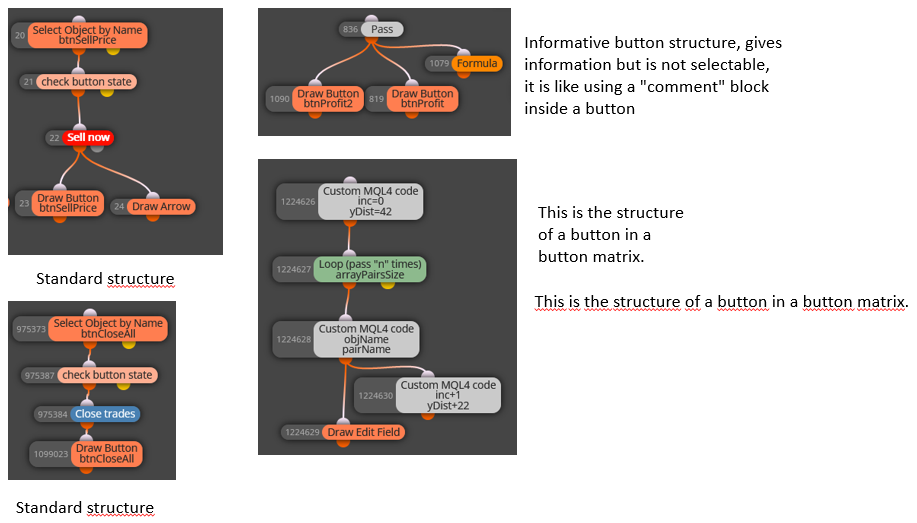
As you can see, of the four cases only the information button group has the "pass" block and they do not have a start button in "on Init", instead the other three types have a start button in "on Init" in Timer or Tick they have either with the MQL4 block or Select Button they have the starting one in Init, the selection and at the end the same starting for the closing, I have learned all this by testing and with the help of the forum, I hope it serves as a summary and guide. Maybe there is some wrong concept and some expert of the forum corrects it but as an explanatory guide I think it will help you.
-
@xyon126 Thank you very much, am sure this will help a lot.
I will put it into practice now and see where it gets me.
Learn fxDreema Without the Wait!
My comprehensive book, available on Amazon, is packed with examples and invaluable insights to help you fast-track your learning journey.
The paperback and hardback editions include MT4 & MT5 QR codes for easy access to all prebuilt projects and robots, including my latest gold trading robot!
Don’t miss out
Click here➡️ https://mybook.to/fxDreema to get your copy today!
Enjoy! 😊
-
@jstap Look at this link, it can help you too.
-
@xyon126
 thankyou