Store Trade Targets such as TP1, TP2, etc. *** SOLVED ***
-
At current I'm always recalculating my profit target again and again, what is a bit inefficient. Also I recognized that pips away from block sometimes doesn't work correctly and hence some trades run through my TP1 for instance withaut any partial closure. So I am thinking ao a different way to achieve this.
At current I have some solutions in my mind.
- Store my profit targets in the order comment and read it from there. Not nice as I expose my levels to the broker, but could work.
- On new trade I'd store the order ticket number in a global variable where the order ticket is the interger value and my profit targets are the string value. I could then read this and split the string into the right numbers.
Is there a better approach to persist the targets without the need to re-calculate them? Simple variable or array will be lost when EA gets re-initialized or terminal restarted.
Any ideas are welcome!
I like to share my knowledge, but expect the others to contribute as well.
-
@trader-philipps How about simple horizontal lines on chart? You could also name them using each order number.
-
Do you mean just drawing them on the chart?
(English) I will try to help everyone in these fxDreema forums. But if you want to learn how to use the platform in depth or more quickly, I can help you with my introductory fxDreema course in English at https://www.theandorraninvestor.eu.
(Català) Miraré d’ajudar tothom en aquests fòrums d’fxDreema. Tanmateix, si vols aprendre a fer servir la plataforma amb més profunditat o més de pressa, t’hi puc ajudar amb el meu curs d’introducció a fxDeema en català a https://www.theandorraninvestor.eu/ca.
(Español) Intentaré ayudar a todo el mundo en estos foros de fxDreema. Sin embargo, si quieres aprender a usar la plataforma en profundidad o más deprisa, te puedo ayudar con mi curso de introducción a fxDreema en español en https://www.theandorraninvestor.eu/es.
-
@l-andorrà yeah - just draw 3 lines for each new trade (TP1, TP2, TP3). Name them using OrderTicket().
Loop: for each trade -> find object where name=OrderTicket() -> if price is above object, close partially, delete object
Would also need a cleanup loop for deleting lines that don't find a matching live trade.
-
@roar Interesting approach. Usually I try to avoid visual stuff. How would you identify those lines? By prefix?
I like to share my knowledge, but expect the others to contribute as well.
-
@trader-philipps I try to avoid them as well, but in this case it could be the most straightforward solution...
There's that name contains field, you could put your order ID there.
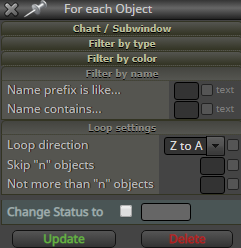
-
@roar Unfortunately I cannot set the prefix of the horizontal line with a variable. Even if I put code there, it is interpreted as a string.
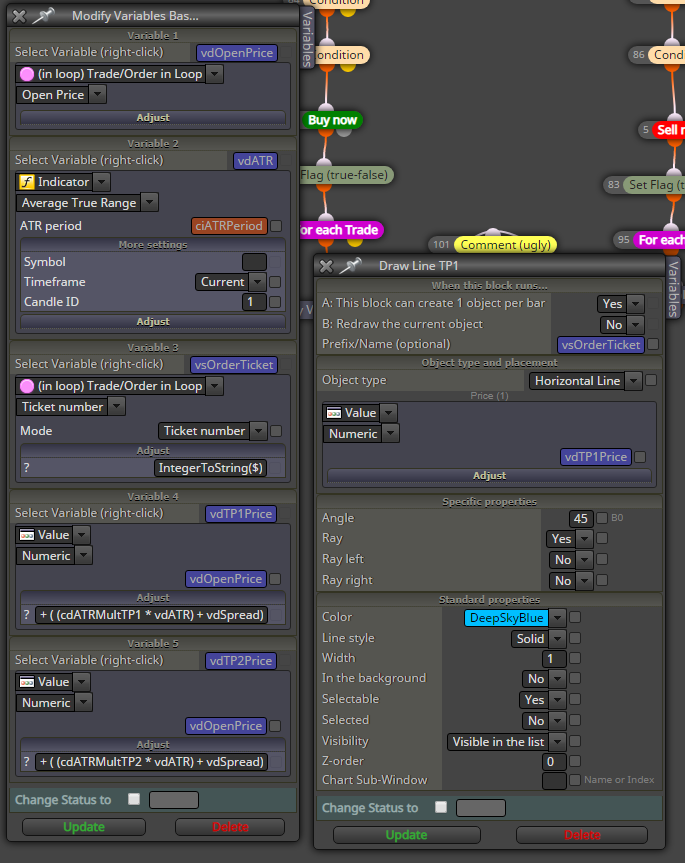
This doesn't work.
So I have to set a static lable such as TP1 or TP2 and have just 1 order per time / chart.
Do you have any other idea?
Another issue I might face with your approach is that the ticket number changes when partially closing a trade. But there might be a way to work around that.
I like to share my knowledge, but expect the others to contribute as well.
-
@trader-philipps Yeah the object thing would surely end up quite a mess and hard for the CPU as well, probably not what you want lol.
If the pips away block is the only issue, you could make your own pips away -calculations with a loop and formula block... And then perhaps deduce the TP stage (1,2,3) from the currently remaining trade size
-
@roar How do I pick up the Horizontal lines correctly?
Example for deletion ....
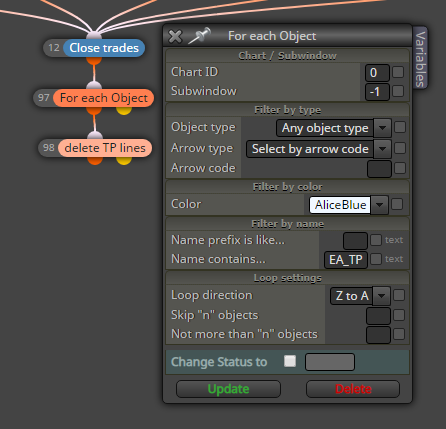
Doesn't work. The lines are all with the color AliceBlue!
-
@trader-philipps Okay, found the error. I need to filter for prefeix not name contains.
I like to share my knowledge, but expect the others to contribute as well.
-
@trader-philipps I must admit I can't remember all the details off top of my head, its been a while when I last worked with objects.
But in any case, it surely is possible to name each object and also find them by specific names, if not with the block settings, then with some actual mql4 functions
https://docs.mql4.com/objects -
@roar Used the horizontal line approach for now. I will post my work in the tutorial section after some testing (including forward on demo).
Here are the main features ..
This project demonstrates how to solve several issues that may occur during building an Expert Advisor. Here are the Key Features:
- Risk Control based on Balance (SL)
- SL ATR multiplied based
- ATR based trailing
- TPs ATR multiplied based (TP1 / TP2)
- TP1/TP2 visualized by horizontal lines - values will be picked up on terminal restart
- Close on Opposite signal
- Close on max. age
- Limiting trading time
- Protect from tripple swap
ToDos:
- Volume filter
- News filter
That's how it looks like right now.
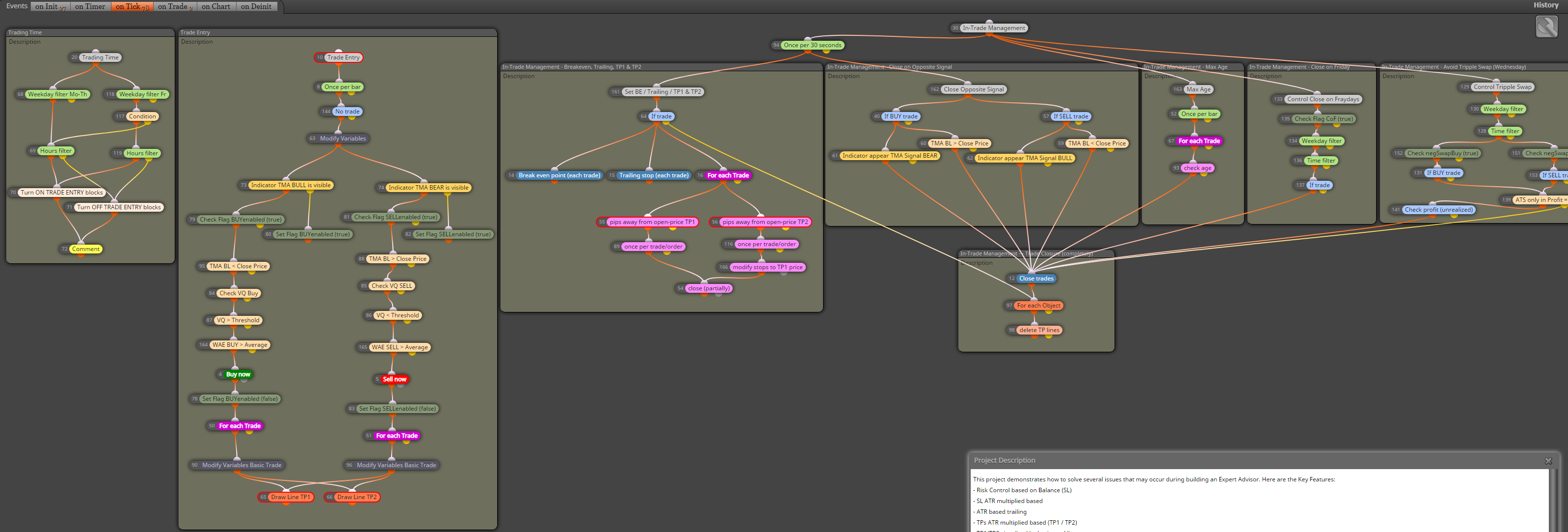
-
@trader-philipps @roar I am facing the issue on TP2 that is executed several times the blocks look like thats
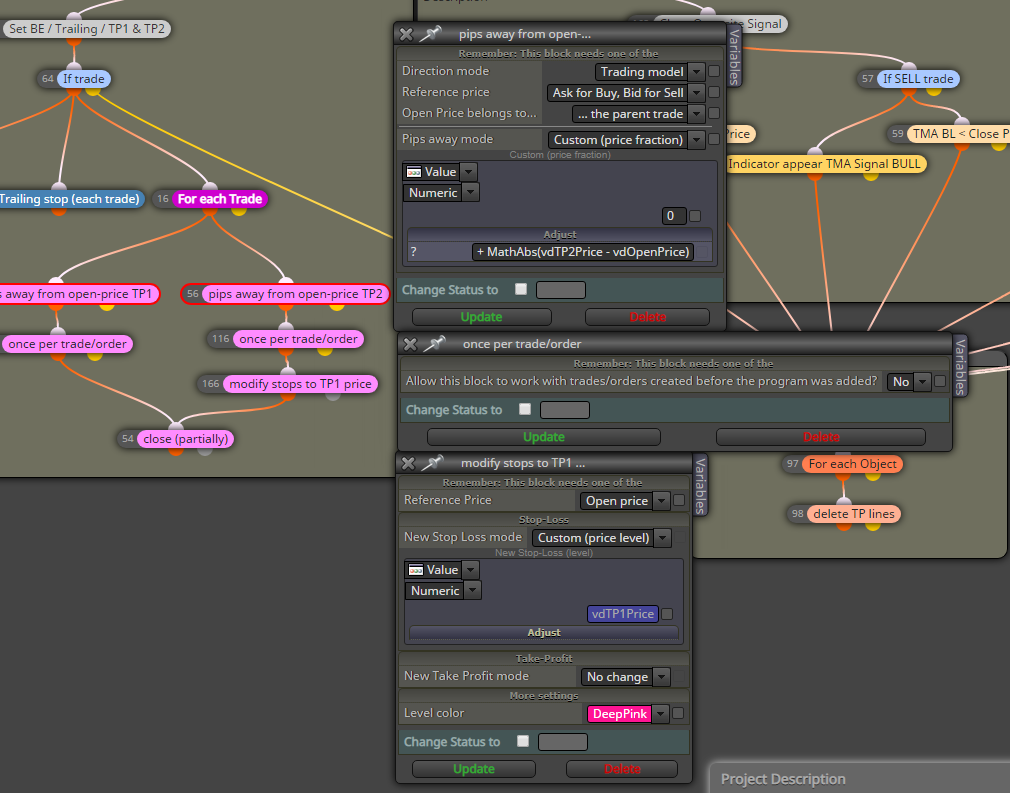
The flow is:
- Initial Trade
- On TP1 partial close (new trade generated = child)
- On TP2 partial close of child trade (from TP1) results in a child-child trade
from here it seems to be executed at least once more. Need to find a test scenario.
Do you have an idea to solve that issue? Of course I could set any variables if passed the partial close block or the once per trade / order block, but that information would get lost.
Maybe I should change something on the TP lines (change color to grey or something like that)? But than I would need to check this before executing the loop, right?I like to share my knowledge, but expect the others to contribute as well.
-
@trader-philipps How do you check the TP2 level?
Directly from the chart object (price > object --> partial close)?
If so, you could just delete the line or rename it, so the loop can't find it anymore and it can't be executed anymore.. -
@roar I finally decided to change the color to dimgrey once the tp was taken as you can see in the tutorial EA. That works best so far.

