fxDreema

    • Register
    • Login
    • Search
    • Back to the main page
    • Categories
    • Recent
    • Tags
    • Popular
    • Search
    1. Home
    2. Archer
    3. Posts
    • Profile
    • Following 0
    • Followers 0
    • Topics 9
    • Posts 70
    • Best 8
    • Controversial 0
    • Groups 0

    Posts made by Archer

    • RE: Using a Delay Function in the MT5 Tester

      Great! I've solved one problem, and now another has appeared.
      EA works well only in visual mode. Otherwise, it only executes a few trades and terminates the backtesting.

      The only thing I added is a time filter block, which I always apply and it never caused any problems with other EAs of my.
      If I remove it, everything works fine. After adding it, it becomes chaotic and only works in visual mode.
      Do you guys know what could be the cause of this situation?

      https://fxdreema.com/shared/foWqnFkqb

      Why does everything have to be so hard to attain...

      posted in Questions & Answers
      Archer
      Archer
    • RE: Using a Delay Function in the MT5 Tester

      Thank you @jstap.
      Your solution should work.
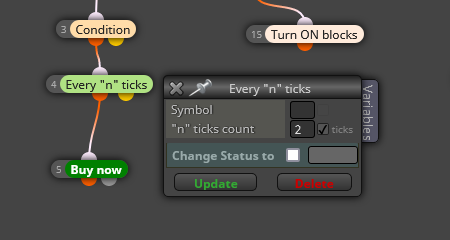
      In the meantime, I managed to find another one. I added the "every n ticks" block here:

      screenshot-fxdreema.com-2023.11.05-16_00_41.png

      It doesn't significantly affect the backtest results because it's enough to set the value to 2 for the EA to have time to realize that the requested block has been disabled. Now, the EA waits to open a position only when the condition is met again, just like in the live market where this block is not needed at all.

      However, if someone doesn't want to have the slightest difference in backtest results, a better solution is a timer that should appear after block 18 or 19.

      posted in Questions & Answers
      Archer
      Archer
    • RE: Using a Delay Function in the MT5 Tester

      @jstap Thank you for your suggestion.
      I've tested all available time blocks on the platform to create such a timer, but none of them work on the tester.
      They do work on the live market, though.
      Could you please show me an example of the block structure you have in mind and where it should be placed?
      Or perhaps you're referring to some form of formula or code that goes beyond the standard FX functions, which I personally am not familiar with.
      I would appreciate further clarification.

      posted in Questions & Answers
      Archer
      Archer
    • RE: Using a Delay Function in the MT5 Tester

      I have the same request from my side as well.
      And if it's not possible to achieve that, I kindly ask for a suggestion on how to construct the blocks in a way that they will function similarly to the ones in the project I presented but be customized for the tester's requirements.

      posted in Questions & Answers
      Archer
      Archer
    • RE: Using a Delay Function in the MT5 Tester

      Hey guys, any suggestions regarding the above?
      All ideas are more than welcome. Don't be shy đŸ˜‰

      posted in Questions & Answers
      Archer
      Archer
    • RE: Using a Delay Function in the MT5 Tester

      While still considering another logical function for this EA to work on the tester like on a live market, I was wondering if there is any method to limit the operation of blocks under 'ONCE PER CONDITION'?
      Something similar to the 'ONCE PER OBJECT' block, but in this case, the EA would open positions only once when a specific condition is met and somehow wait for a reset before opening a position again only after the condition is met once more.

      I applied this logic in the project I shared, and it works well on the live market thanks to enabling and disabling blocks. However, I'm unsure how to translate it to the tester.

      posted in Questions & Answers
      Archer
      Archer
    • RE: Using a Delay Function in the MT5 Tester

      Thank you, but as I mentioned in the first post, I've already tried using that block.
      It only pauses the tester for a selected period of time and doesn't affect the delay in trading itself.
      The conditions that were met during the pause are still being executed when the EA resumes its operation.

      In general, I'm looking for a method that will compel the EA on the tester to fully respect the fact that the BUY block has been turned off.
      It doesn't necessarily have to involve a time delay because I can see that the tester doesn't respect time-based blocks as it does on the live market.
      I only hope any proposed solution won't impact the delay in the price itself, similar to my suggestion in the first post, as it has an impact on backtesting results.
      In other words, in this case such a solution cannot be placed directly before the BUY NOW block. Unless I am mistaken... please correct me if I'm wrong.

      posted in Questions & Answers
      Archer
      Archer
    • Using a Delay Function in the MT5 Tester

      Hello Forum!

      I'm trying to build an EA but I'm having an issue with the tester on MT5 right from the first few blocks.
      Funny enough, on the live market everything works fine and according to my expectations, at least at this early stage of building.
      For some reason, the tester is not fully respecting Block #19, which is supposed to disable the buy function:

      https://fxdreema.com/shared/1bPrMQl4b

      Even though the log shows that the block has been disabled, the EA still immediately opens a new position.
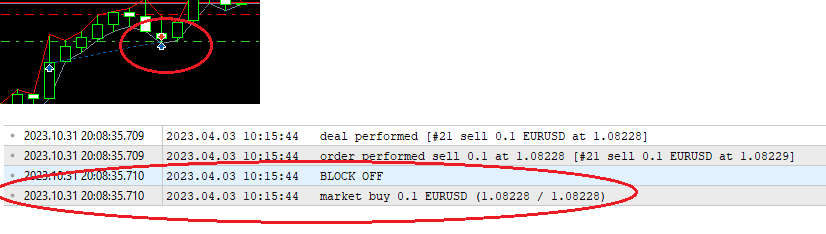
      Based on logs, it seems to me that the problem lies in the lack of time/tick delay in the tester and the EA sees both the disabled block and the condition to open a position at the same time:

      sample.png

      I've tried adding functions like "skip ticks" or "delay" after Block 18/19, but the tester completely ignores them and doesn't delay anything.

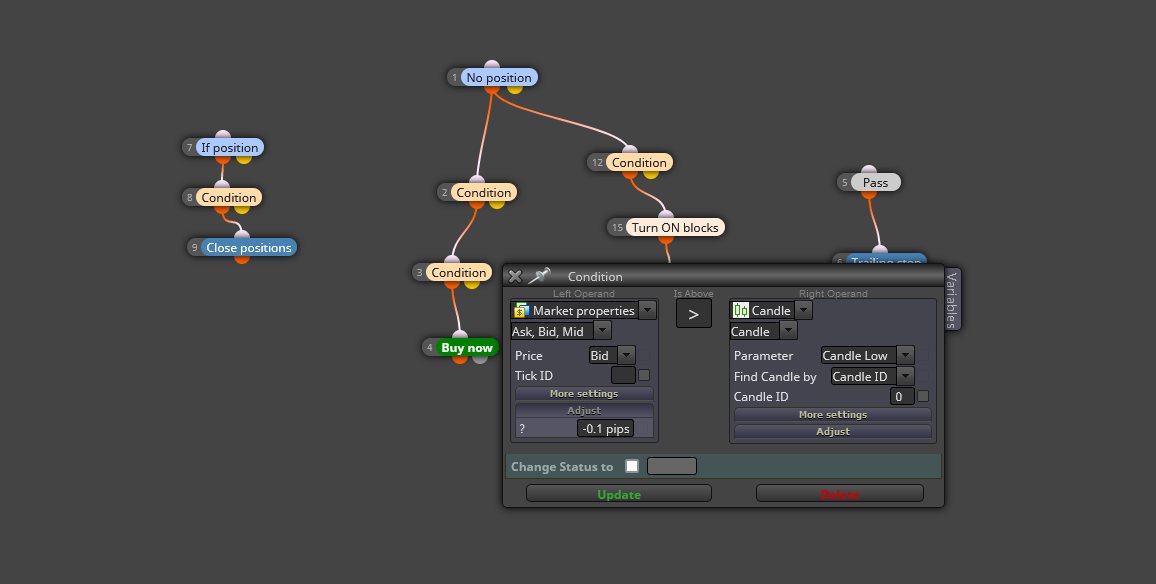
      I did manage to create an "artificial" delay in the tester by adding a condition before the BUY block:

      sample_2.png

      and everything starts working as it should. Unfortunately, even such a small variable affects the tester results compared to when this variable is absent, rendering the entire backtesting meaningless.

      So, my question is: how can I delay the BUY block in the tester so that the EA waits for at least 1 second before taking any action after the execution of Block #19?

      posted in Questions & Answers
      Archer
      Archer
    • RE: Add Volume to the manualy opend trade

      no bother @l-andorrĂ , hopefully next time đŸ˜‰

      posted in Questions & Answers
      Archer
      Archer
    • RE: Add Volume to the manualy opend trade

      Another sleepless night, but this time I managed to figure it out.
      I'm sharing the project so that future fools and untalented individuals like myself, looking for a similar solution don't have to suffer in the agony of own ignorance.

      https://fxdreema.com/shared/wSYttMtAb

      posted in Questions & Answers
      Archer
      Archer
    • RE: Add Volume to the manualy opend trade

      Thank you for the tips @l-andorrĂ 
      I followed your solution from this topic:

      https://fxdreema.com/forum/topic/16208/am-i-missing-something

      and did something like this:

      https://fxdreema.com/shared/CkZWYHI0c

      but it still doesn't calculate the distance from the first open position; it calculates it based on the most recently opened one.

      In the meantime, I also did something like this:

      https://fxdreema.com/shared/EdbAVEime

      to try a different approach and test how EA will react, but it doesn't work either as expected.

      As you can see, I'm not the type of person who just asks and expects everything to be done for them. I always try to do something on my own before asking for help.
      Even though I learn something new with each of your responses, I'm still very far from your level of knowledge.

      In this case, I've run out of ideas for further attempts.
      So, please @roar, @l-andorrĂ  , help me put an end to this agony and kindly present me with a finalized solution on how such an EA should be structured.

      posted in Questions & Answers
      Archer
      Archer
    • RE: Add Volume to the manualy opend trade

      @roar or someone who is able to help me.
      As always, while waiting for a response or even before asking for a help, I try to come up with something myself, but this time I hit a wall.
      After a whole day of trying with various block configurations, I ended up with something like this:

      https://fxdreema.com/shared/TPlCVh63

      but of course, it doesn't work.
      I kindly ask for help in solving this problem because I've run out of ideas

      posted in Questions & Answers
      Archer
      Archer
    • RE: Add Volume to the manualy opend trade

      Hi @roar

      I need to return to the topic of this EA for a moment. Namely, I would like to test one more solution and see how the EA will respect a 2-pip distance when it is calculated not from the last opened position but always from the first position manually opened by the user.

      So, for example, each subsequent position should open at a distance of 2, 4, 6, 8 pips, etc., counting from the first position.

      Based on the average of all entries, theoretically, the EA should perform much better, even if it opens one of the positions at the wrong distance due to some sudden movement or server delay along the way.

      I would greatly appreciate it if you could guide me in the right direction once again, showing in one example how and in which block to make the necessary change for the EA to calculate distances from the first entry.

      https://fxdreema.com/shared/6kFgi3j1c

      I thought this solution would resolve the issue, but after several tests and trying all the options in the block, I'm convinced that the distance is still calculated from the last opened position, not from the first one:

      https://fxdreema.com/shared/z78I7Qekc

      posted in Questions & Answers
      Archer
      Archer
    • RE: Is there a way to make EA run a script?

      @fxDreema said in Is there a way to make EA run a script?:

      I don't know if this is possible. I think one EA can open a new chart, but to run a script... At least I think there is no such function in MQL4/5, but I could be wrong, they are adding new functions sometimes.

      Hello everyone!
      I've been wondering if anything has changed in this matter since 2017.
      I would like, after executing a specific block, for the Expert Advisor to additionally run my script, which I have installed on MT4.
      Does anyone have any information on this matter?

      posted in Questions & Answers
      Archer
      Archer
    • RE: Add Volume to the manualy opend trade

      @roar I see what you mean. I will consider it.
      Thx for all your help.

      posted in Questions & Answers
      Archer
      Archer
    • RE: Add Volume to the manualy opend trade

      Hello @roar,
      I don't want to put pressure on you or something, but this is important to me. If you believe that such a technical limitation is not possible, or it's simply not a one-block or one-line code job, please let me know. Bad news is better than no news.

      posted in Questions & Answers
      Archer
      Archer
    • RE: Resetting custom lot levels after trade is closed.

      Okay, I managed to solve it on my own.
      It seems that it's easier to add a Condition block with a loop than to look for a solution in Modify Variables.
      At least with my limited EA building skills.
      If someone is looking for a similar solution, here is a working project:
      https://fxdreema.com/shared/EbqK2Et2c

      posted in Questions & Answers
      Archer
      Archer
    • Resetting custom lot levels after trade is closed.

      Thanks to @roar's super guidance and assistance, I have learned something and managed to build a simple EA, which is only a very temporary solution to this issue:

      https://fxdreema.com/forum/topic/18284/add-volume-to-the-manualy-opend-trade

      I really dislike using orders like sell limit, etc., but currently, I have no choice. While waiting for Roar's response in the previous thread, I kindly ask you, forum members, for help - how to make the EA reset the lot size to the initial value after closing all orders? I have applied such a solution, but it's not functioning as expected:

      https://fxdreema.com/shared/VDBM92PZc

      posted in Questions & Answers
      Archer
      Archer
    • RE: Add Volume to the manualy opend trade

      Hey @roar.
      Another day of testing is behind me. The EA is being tested on low-spread pairs that almost always have zero spread. However, to eliminate sudden spread spikes that can negatively affect the accuracy of distance checking when opening BUY positions, I modified the block functions to open opposing SELL positions.

      https://fxdreema.com/shared/b3zog4Tab

      Now, the spread has no influence on the accuracy of distance because it always opens a position at a fixed BID price. Unfortunately, there are still cases of premature position openings by the EA. I recorded some tests today so that you could see how it looks, but YouTube is taking so long to process the video that it would be faster if I upload screenshots instead.

      The first example shows a situation of premature opening on USDJPY (bottom left corner).
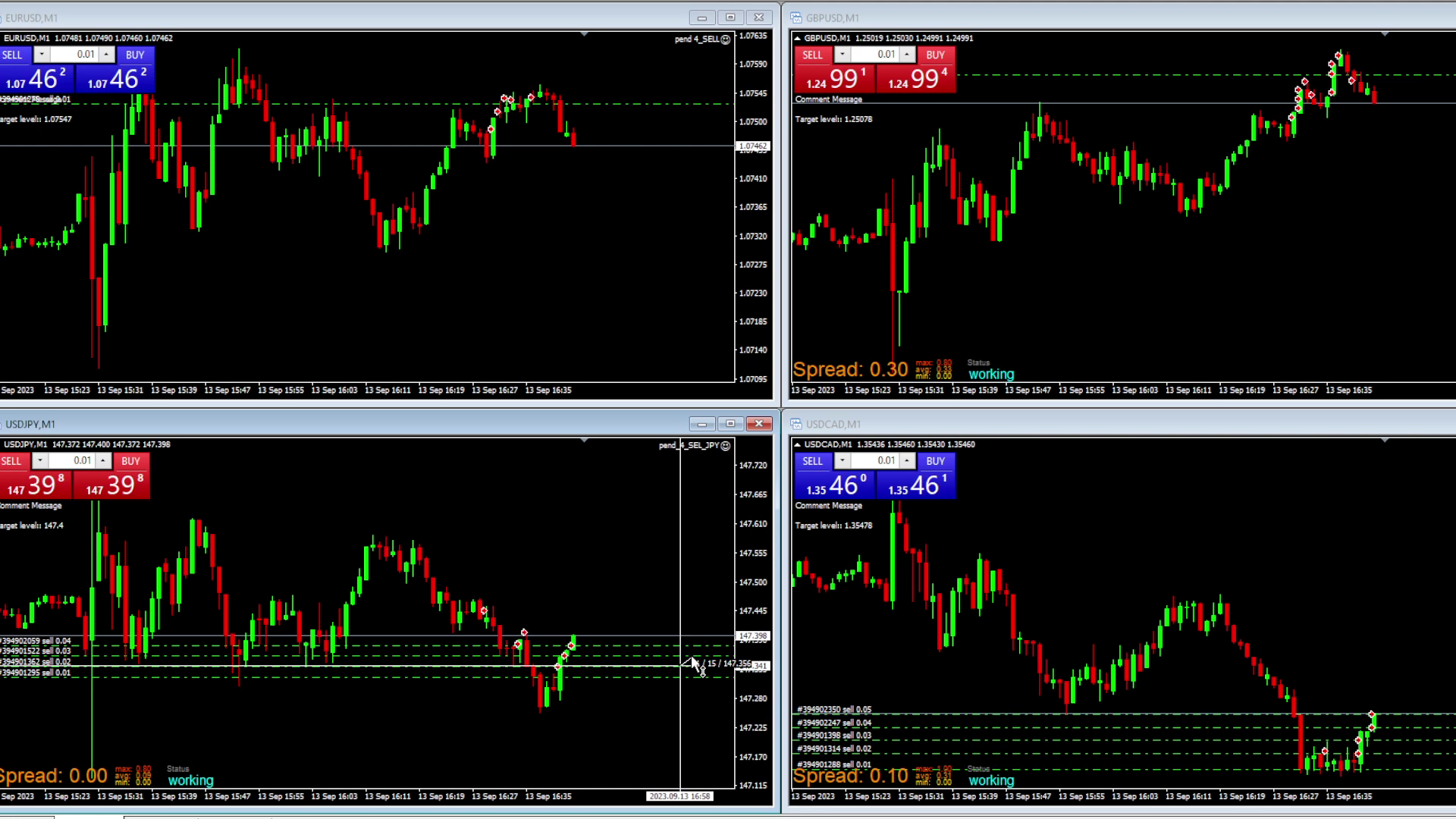
      vlcsnap-2023-09-13-17h58m53s049.png

      Another one is GBPUSD (top right corner). You'll have to trust me that the distances are below 2 pips here :). I measured them, but after two I went off the recorded screen...
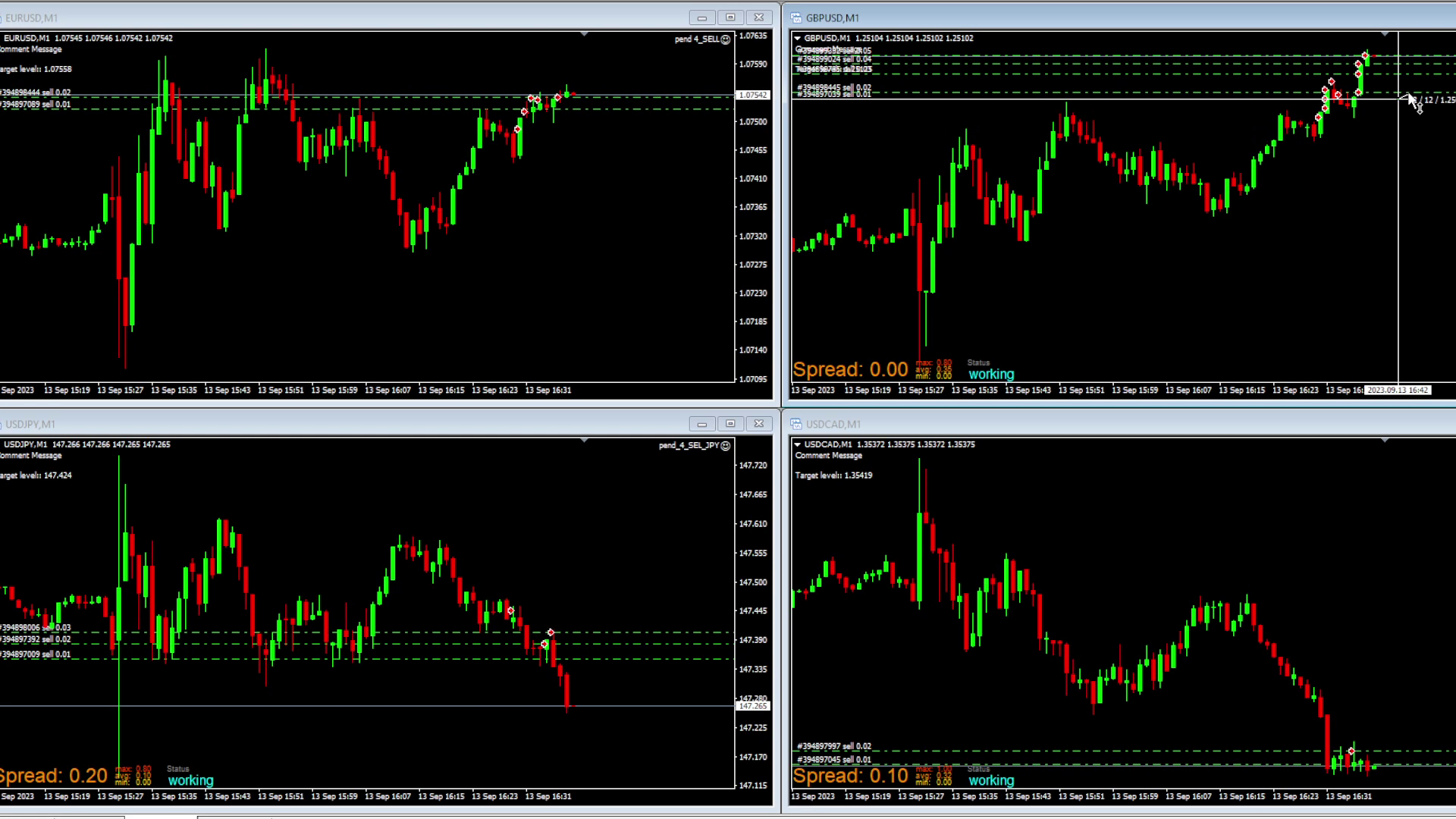
      vlcsnap-2023-09-13-18h00m37s895.png

      The target distance is always correctly determined by the EA. I still believe that the issue occurs when the price movement or TICK is sudden and sharp, indicating that the EA is simply too slow.
      Describing it in the EA's perspective, it probably thinks like this: "Okay, the distance from the last position is 2 pips, so I can open a new one." A sudden TICK makes it just 1 pip away, and the EA still opens a new position. So, at this point, it might be beneficial to add another command for the EA to double-check before opening, ensuring that the distance is still indeed 2 pips.
      This is just my logical thinking; what matters more is what you think?
      What should be the next step that we should take?

      posted in Questions & Answers
      Archer
      Archer
    • RE: Add Volume to the manualy opend trade

      @roar Okay, thanks. I'll add these changes to the EA, leave it for a few hours tomorrow, check what the log shows, and I'll let you know.

      posted in Questions & Answers
      Archer
      Archer
    • 1
    • 2
    • 3
    • 4
    • 2 / 4