fxDreema

    • Register
    • Login
    • Search
    • Back to the main page
    • Categories
    • Recent
    • Tags
    • Popular
    • Search
    1. Home
    2. Archer
    3. Posts
    • Profile
    • Following 0
    • Followers 0
    • Topics 9
    • Posts 70
    • Best 8
    • Controversial 0
    • Groups 0

    Posts made by Archer

    • RE: Add Volume to the manualy opend trade

      @roar thank you. Of course, I will try.
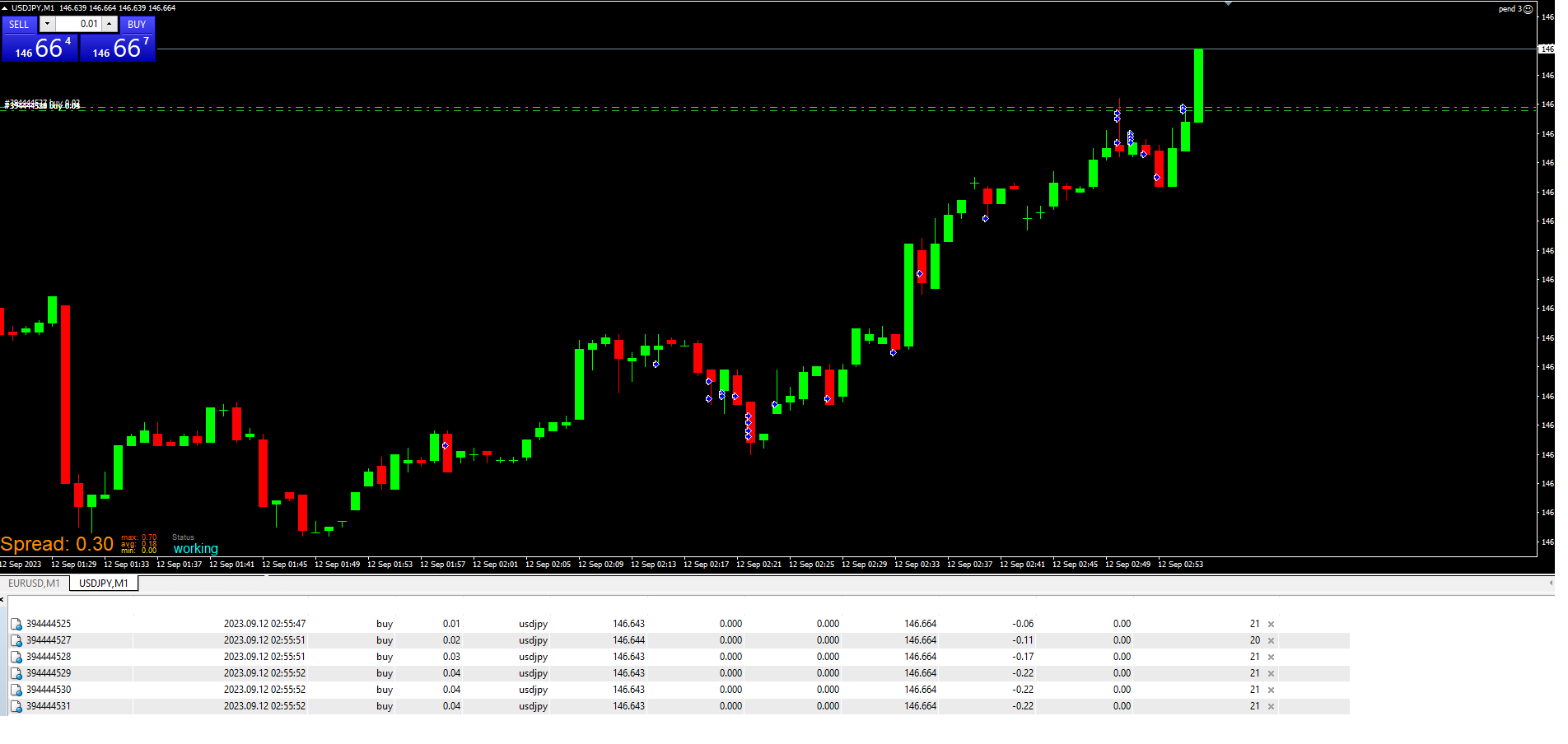
      But I spent the whole day today testing your solution on a separate MT4 to see how the EA behaves on different currency pairs. I ran it on 5 pairs, and for example, USDJPY has been performing almost perfectly for the past hour. The distances between consecutive openings are nearly perfect. I've attached a screenshot. However, on other pairs like EURUSD or GBPUSD, the issue persists even though the same EA with the same parameters is running on each of them. I also checked the latency in milliseconds, and it's negligible everywhere, so it's not a connection issue either. That's why I believe it's related to sudden price movements rather than a specific pair.
      Do you think it's possible to somehow prevent the EA from opening positions earlier than the specified distance?
      Maybe with a additional block or a function, etc.?
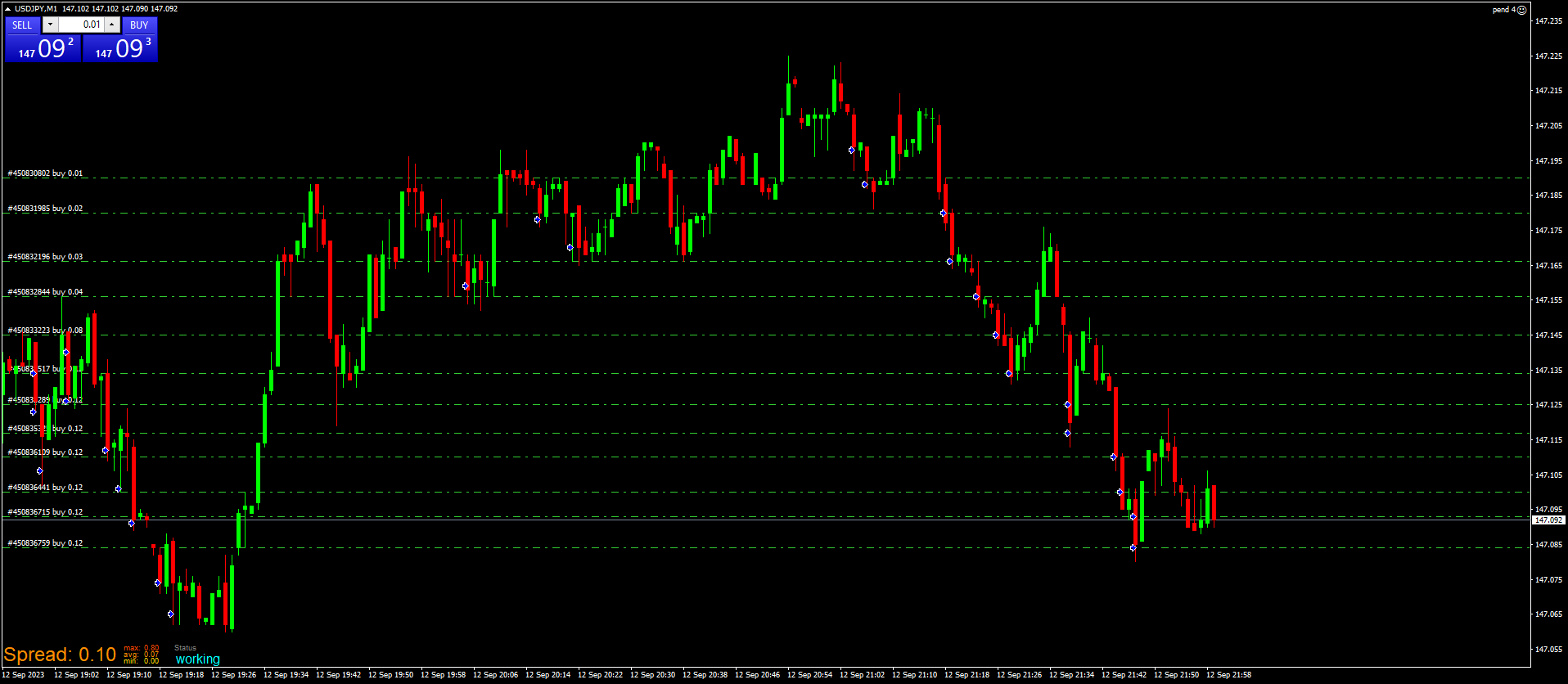
      sample3.png

      posted in Questions & Answers
      Archer
      Archer
    • RE: Add Volume to the manualy opend trade

      I tried to reduce premature position opening by adding, among other things, a block called "check distance" in every possible place and configuration, but it only disrupts the solution proposed by @roar :

      https://fxdreema.com/shared/xBSiyQRDd

      Could someone please point me in the right direction for a proper solution?

      posted in Questions & Answers
      Archer
      Archer
    • RE: Add Volume to the manualy opend trade

      @roar So I did some testing.
      It seems that quite often, for some reason, EA does not respect the required distance before opening the next position and opens them whenever it wants.

      This is especially noticeable when the price movement is a bit more volatile.
      I tried to use the 'slippage' option, but it doesn't work on ECN accounts that most brokers use, including mine.
      I'm attaching an example after an hour of testing.
      This is during the nighttime session when the market is barely moving. During the day, the price movements will be obviously much more abrupt.

      There's no problem if the EA opens the next position further than 2 pips away. That's actually beneficial for me. But if it does so earlier or accidentally, it's not good.

      Would you be so kind and show me how to limit the opening of consecutive positions so that a minimum of 2 pips from the last opening is maintained?

      sample_2.png

      posted in Questions & Answers
      Archer
      Archer
    • RE: Add Volume to the manualy opend trade

      @roar said in Add Volume to the manualy opend trade:

      @Archer here's some example
      https://fxdreema.com/shared/h6BiNKJoc

      Roar, this looks very promising. Thank you very much. I will now test your solution, and after analyzing it, I will try to add the opposite block by myself that will do the same but for SELL positions.

      posted in Questions & Answers
      Archer
      Archer
    • RE: Add Volume to the manualy opend trade

      @roar said in Add Volume to the manualy opend trade:

      • You are calculating the lot size after the next trade is already opened, not sure if that makes sense
      • To make an EA work together with manual trades, you need to filter by group "All"
      • If you have a pre-defined list for each subsequent order size, you must always check the current count of trades and selecting the proper lot size according to the count, before making the next addition

      I appreciate your guidance, but I really don't know how to build this EA. The more I read, the more I get confused about which direction to take. With each passing hour of trials and errors, I lose hope that I can do it on my own. I would genuinely appreciate it if someone could simply show me how such an EA should look like.

      posted in Questions & Answers
      Archer
      Archer
    • RE: Add Volume to the manualy opend trade

      This is the maximum I was able to achieve on my own after spending several hours reading other posts with similar problems:

      https://fxdreema.com/shared/gYXD4aW9d

      And it still doesn't work the way I want it to.

      I thought it would be the easiest EA in the world to build.
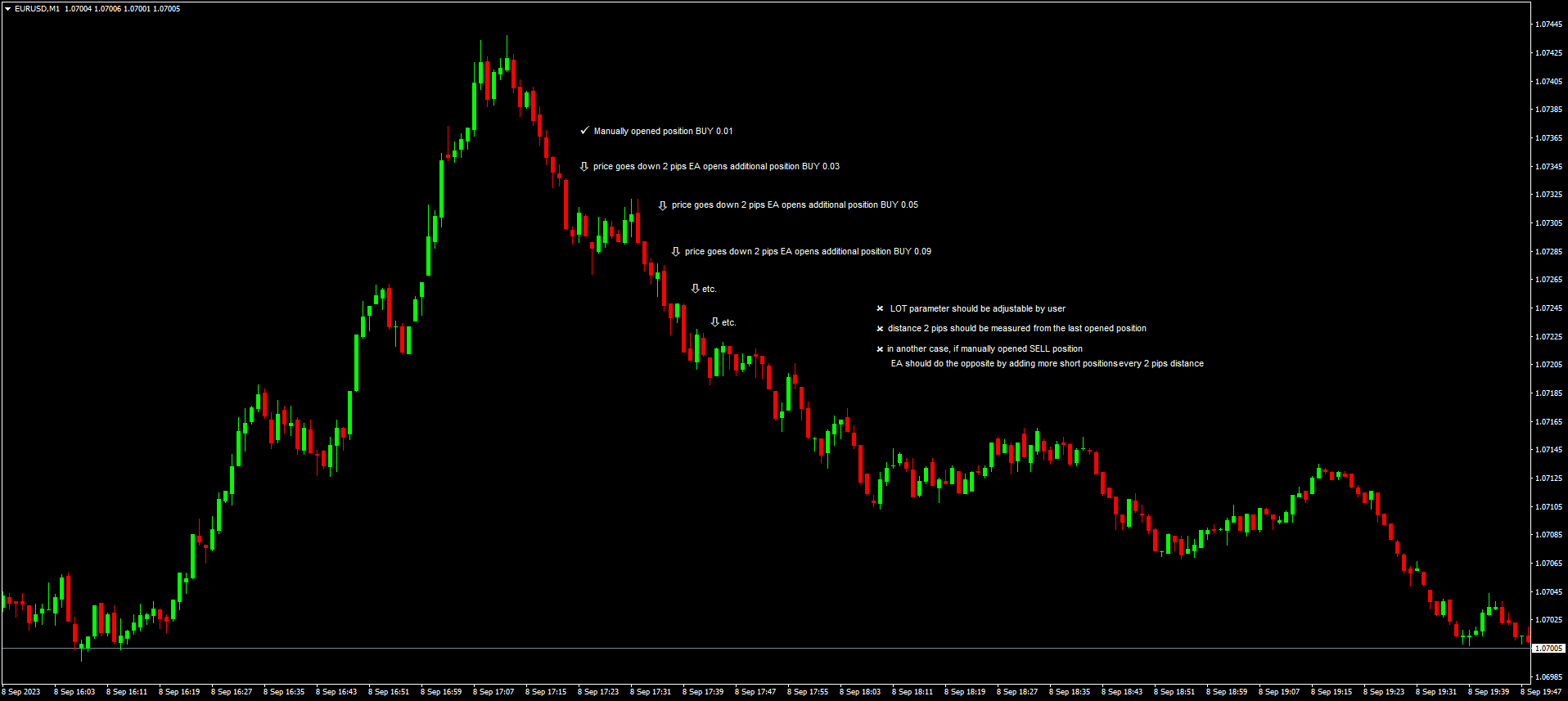
      It should simply open new positions when the previous ones are in loss, as presented on the attached picture above.
      Each new position should open every 2 pips from the last one. The lot size for each subsequent position must be user-defined.
      At times, it will be 0.01, 0.05, 0.12, and at other times, it will be 0.02, 0.05, 0.09

      I've found plenty of options for multiplying the last lot size, for increasing the subsequent lot sizes based on a percentage of the last one, but I can't find any option for simply manually defining the sizes of the next positions.

      I really need your help guys, because I'm starting to give up on this.

      posted in Questions & Answers
      Archer
      Archer
    • RE: Add Volume to the manualy opend trade

      @l-andorrĂ  said in Add Volume to the manualy opend trade:

      Just to get it right. You will be opening trades MANUALLY and then bot the bot should open additional hedging trades AUTOMATICALLY. Is that correct?

      well, not exactly that.
      I've explained everything on the attached picture as an example.
      Hope that helps.

      sampl.png

      posted in Questions & Answers
      Archer
      Archer
    • RE: Add Volume to the manualy opend trade

      So when I started digging deeper, I created such a simple EA that worked great on the tester and did exactly what I wanted it to do.

      https://fxdreema.com/shared/jg50oIJdd

      Later, I modified it a bit to work on manually opened position

      https://fxdreema.com/shared/YBfJ21JUb

      and switched to live trading. When I tried using it on a demo account, it went crazy and either didn't open positions at set intervals (X pips) or opened positions with incorrect lot sizes or many positions every tick ingoring distance. No matter what I tried, it didn't perform the same as it did on the tester. Can anyone help me with this?

      posted in Questions & Answers
      Archer
      Archer
    • Add Volume to the manualy opend trade

      Hello Forum!

      I would like to support my manual trading with a simple EA that, when the market goes against me, EA opens additional positions every X pips from the first position I opened, while also increasing the LOT size to X with each subsequent entry.

      So for example, I opened a BUY position, the price dropped by 2 pips, and the EA is supposed to add an additional 0.02 LOT. If the price drops another 4 pips from the initial entry, the EA should add another 0.05 LOT, and so on.

      The LOT parameter should be adjustable. The distance from the opening price can remain the same.

      I've read the HOW TO section, and there's an example there on how to do similar thing called Add to Volume (every 10 pips), but I can't figure out how to modify it to fit my own needs, so I'd really appreciate your help with this.

      posted in Questions & Answers
      Archer
      Archer
    • RE: How to combine two EAs into one ?

      @biztet said in How to combine two EAs into one ?:

      @Archer trust me. It's all about how you play with the settings and timeframes to make a profitable EA.
      I only use RSI & Stoch. Everybody can laugh, but i made profits. đŸ˜‰

      yeap, I totally agree. I also follow the KISS rule.

      posted in Questions & Answers
      Archer
      Archer
    • RE: How to combine two EAs into one ?

      @biztet trust me. So far it's an extremely unprofitable EA đŸ˜‰

      posted in Questions & Answers
      Archer
      Archer
    • RE: How to combine two EAs into one ?

      Thank you @biztet
      I was looking for that option in this block, but for some reason I have missed it ...
      Now everything is working as should be đŸ™‚

      posted in Questions & Answers
      Archer
      Archer
    • RE: How to combine two EAs into one ?

      @biztet
      thx, but I did this at the beginning.
      I used two exact same blocks for a test.
      Unfortunately this solution multiples number of trades.
      For example when the blocks are saved in the separate EAs, each of them opens 100 trades.
      Connected should open 200 exact same trades at exact time. For some reason they open 400 trades...
      Not sure why. This is how I set groups:

      https://fxdreema.com/shared/yXWws6y4e

      Tried a few configurations with the numbers and still no hope.
      Am I doing something wrong ?

      posted in Questions & Answers
      Archer
      Archer
    • How to combine two EAs into one ?

      Hello Forum!

      I've build two separate EAs that are based on the "NO TRADE" block.
      Now I would like to combine them into one EA but NO TRADE block is affecting both EAs and new trades are opening differently than when EAs were separated.

      What I want is to have one EA and two separate blocks that are working independently.

      So my question is how to separate NO TRADE blocks to make sure that they effect only one EA without "touching" the second one ?

      This is a simple example of my problem:

      https://fxdreema.com/shared/gzoFQVVI

      Bascily GROUP C should open a new trade even if GROUP D already is running other trade. And the same thing but the other way around - GROUP D should open a new trade even if GROUP C already opened another trade.

      Obviously I can't remove NO TRADE blocks from the equation because I still don't want new trades inside groups.

      Can someone please assist me with the above?

      posted in Questions & Answers
      Archer
      Archer
    • RE: HOLO Trade

      @l-andorrĂ 
      OK, thank you. Will do the tests and let you know if it worked.

      posted in Questions & Answers
      Archer
      Archer
    • RE: HOLO Trade

      @l-andorrĂ 

      no, I don't mean the daily open. It's also nothing to do with the previous day.
      It looks like it's a very hard thing to explain by words, so once again, please use the indicator that I have attached in the previous post with the presets provided.
      Use it on the MT4 platform. Look at any pair on the M30 time frame.
      Trust me, its gonna take you less than 5 minutes to figure it out.
      New lower/higher open of the day may occurs many times during the day.
      And that is what I'm looking for on the charts.
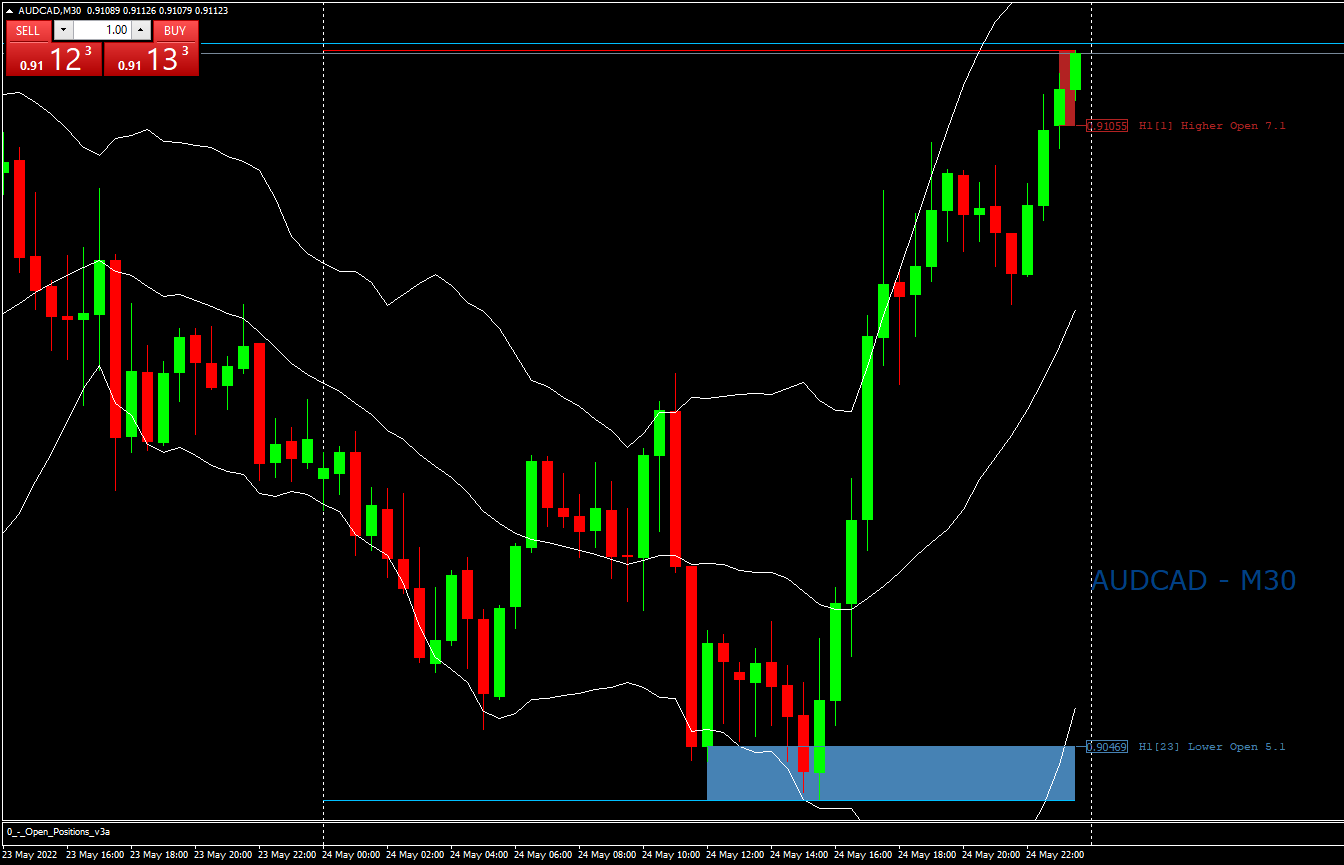
      It looks like on the attached picture.
      Why is it 30 min chart ?
      Because it's easier to look it that way and it's because the time frame does not matter as long we compare lower/higher opens on the H1 time frame.
      Price will be always the same on any other time frame.

      0_1653425891865_AUDCADM30_HOLO.png

      posted in Questions & Answers
      Archer
      Archer
    • RE: HOLO Trade

      @l-andorrĂ 
      there is still some small misunderstanding here.
      I want to compare today's highest/lowest opens with each other. This is a part of my trading strategy.
      In a nutshell, I would like to build an EA that opens a long position everytime when the new lower open of the day occures on the H1 time frame and a short position when the new higher open of the day occures also on the H1 time frame.
      With some exceptions of course, but first of all I need the solution and help which blocks to use to define today's highest and lowest opens.

      posted in Questions & Answers
      Archer
      Archer
    • RE: HOLO Trade

      @l-andorrĂ  thank your replay.

      I'm aware that buffers are not correct đŸ™‚
      Therefore I was hoping that somebody knows the solution via blocks and functions that are offered on fxDreema.
      At the end of the day, new lower & higher opens are based on the time period, price and candles.
      Indicator is not a crucial thing in this case.
      Please correct me if I'm wrong that this condition is possible to create via builder.

      posted in Questions & Answers
      Archer
      Archer
    • RE: HOLO Trade

      @l-andorrĂ  said in HOLO Trade:

      @archer When you say 'lower open' do you mean open price for a bullish candle maybe? An open price is not the low proce except at the moment of a new candle is formed. And that is apparently what you show in your screenshot. Is that correct?

      Please try attached indicator and use provided presets than you will see exactly what I mean.
      I'll really appreciate a solution that will recognize daily lowest opens and highs on the H1 time frame.

      TURN_OFF=false
      Draw_Monthly_Lines=false
      Draw_Weekly_Lines=false
      Draw_Daily_Lines=true
      Draw_Hourly_Lines=true
      Draw_H4_Lines=false
      Draw_M30_Lines=false
      Draw_M15_Lines=false
      Draw_M5_Lines=false
      Draw_M1_Lines=false
      Draw_PD_HOLO_Lines=false
      Draw_Pip_Lines=false
      PipIncrement=5.0
      NumPipLines=5
      Show_Time_Infos=false
      Shift_Factors=
      Shift_M1_Labels=0
      Shift_M5_Labels=0
      Shift_M15_Labels=0
      Shift_M30_Labels=0
      Shift_H1_Labels=0
      Shift_H4_Labels=0
      Shift_D1_Labels=0
      Shift_W1_Labels=0
      Shift_MN_Labels=0
      ts0=
      Line_Style_M1=0
      Line_Style_M5=4
      Line_Style_M15=2
      Line_Style_M30=2
      Line_Style_H1=0
      Line_Style_H4=1
      Line_Style_D1=0
      Line_Style_W1=0
      Line_Style_MN=0
      Pip_Line_Style=1
      ts1=
      Line_Width_M1=1
      Line_Width_M5=1
      Line_Width_M15=1
      Line_Width_M30=1
      Line_Width_H1=1
      Line_Width_H4=1
      Line_Width_D1=1
      Line_Width_W1=2
      Line_Width_MN=2
      Pip_Line_Width=1
      s0=
      Draw_OpenLine_Previous_Day=false
      Draw_HiLoLines_Previous_Day=false
      Draw_PriceBoxes_Previous_Day=false
      Draw_Texts_Previous_Day=false
      s1=
      Draw_OpenLine_Current_Day=false
      Draw_HiLoLines_Current_Day=true
      Draw_PriceBoxes_Current_Day=false
      Draw_Texts_Current_Day=false
      s2=
      Draw_OpenLine_Current_H1=false
      Draw_PriceBox_Current_H1=false
      Draw_Text_Current_H1=false
      s3=
      Draw_ExtremeOpenLines_Current_Day=true
      Draw_ExtremeOpen_PriceBoxes=true
      Draw_ExtremeOpen_Texts=true
      Draw_PriceBoxes_Weekly=true
      Draw_Text_Weekly=true
      Draw_PriceBoxes_Monthly=true
      Draw_Text_Monthly=true
      ts2=
      Draw_Ask_Bid=false
      AskWingDing=165
      BidWingDing=165
      TextPostion=4
      Line_Colors=
      colorOpenHi=2237106
      colorOpenLo=11829830
      colorOpen=0
      colorHigh=255
      colorLow=16760576
      pip_line_color=0
      Ask_Bid_Colors=
      colorAsk=0
      colorBid=0
      Trend=
      Draw_Trend=false
      Trend_Bars=0
      colorTrendUp=32768
      colorTrendDn=128
      Trend_Style=0
      Trend_Width=3
      Draw_TradeAid=false
      SHADE_HOLO=true

      0_1652708911173_smHiLoOpen Lines_v1.2.mq4

      posted in Questions & Answers
      Archer
      Archer
    • RE: How to delay EA from action (first candel)

      thank you @jstap
      It looks that this solution is working fine so far

      posted in Questions & Answers
      Archer
      Archer
    • 1
    • 2
    • 3
    • 4
    • 3 / 4