F
Posts made by fabiobioware
-
RE: Urgent - Checking profit on the operation does not work in real account, only works in demo account.posted in Bug Reports
@rahim-1 I will question the broker and test at 2 different brokerages.
-
RE: Urgent - Checking profit on the operation does not work in real account, only works in demo account.posted in Bug Reports
@rahim-1 You will test in a demonstration account that it will work, but you will test it with real ones, that you will not obtain the values.
-
RE: Urgent - Checking profit on the operation does not work in real account, only works in demo account.posted in Bug Reports
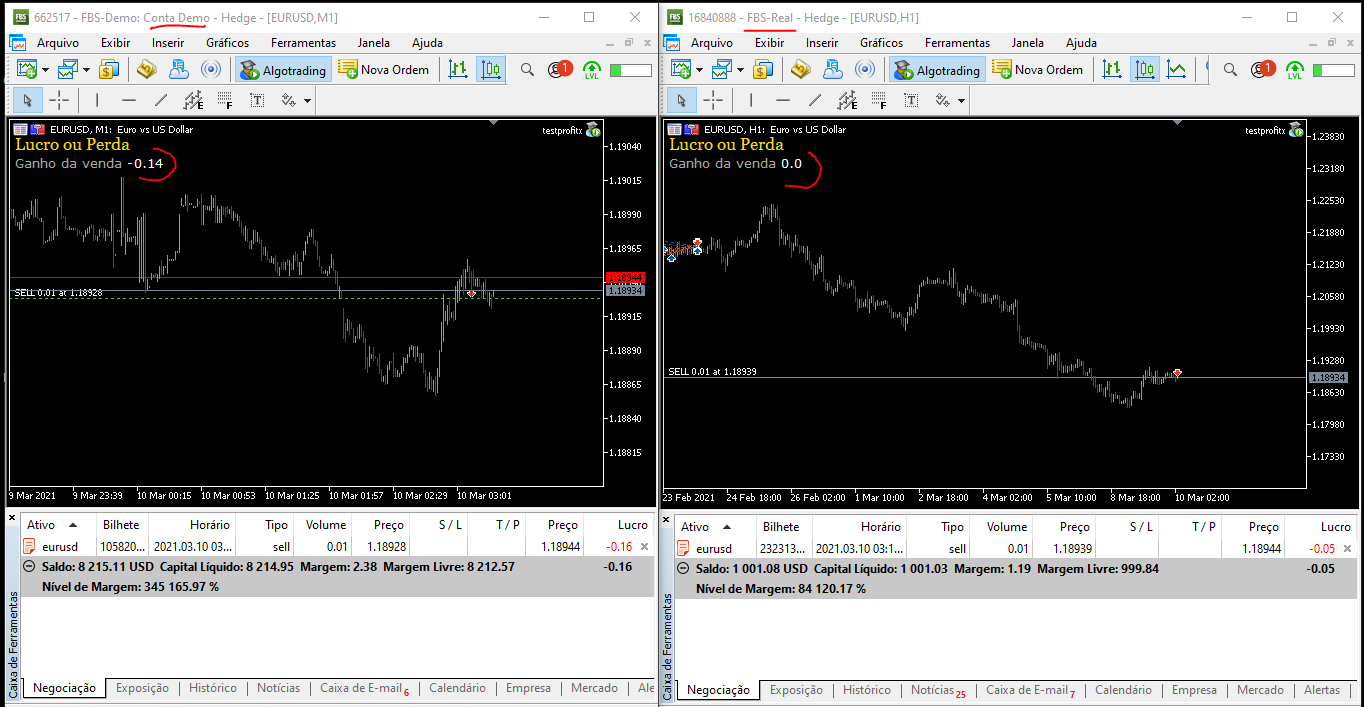
This type of problem can financially prejudice that you are using this "bucket of positions" block to obtain values and be a decision taken to enclose the orders, it worked perfectly a few days ago and suddenly it had prior notice to stop working.
Percebi that the demonstration reports this block continues to function, but the actual reports do not work anymore. -
RE: Urgent - Checking profit on the operation does not work in real account, only works in demo account.posted in Bug Reports
@rahim-1 Olá friend, do you mention what problem is happening to me (real account).
Você testou em conta real?
It has been done or tested in a real account, in various real accounts and it does not work.@fxdreema please help here, is urgent ( real account )
-
Urgent - Checking profit on the operation does not work in real account, only works in demo account.posted in Bug Reports
https://fxdreema.com/shared/kGSjgT2O
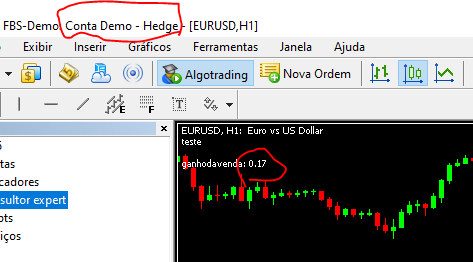
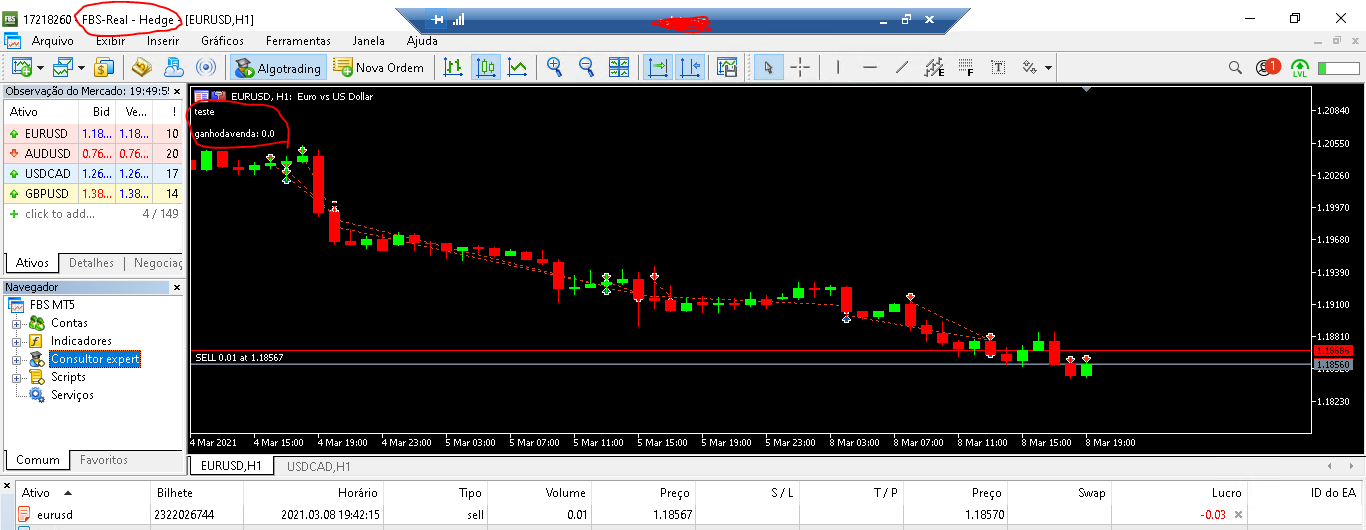
I am using the project below to check the complete profit of the operation because it is the only one that accurately calculates Swap + commission.
Unfortunately, all of a sudden it stopped working on real accounts.
It only performs the calculation in a demonstrative account.@fxdreema Can you please solve this problem?
-
RE: Save .csv file to a different location.posted in Questions & Answers
@miki thank you, sorry i'm very lay programming.
Let's see if I understand ...
- First step is to generate my .mq5 source code file, open it and insert the codes below at the beginning before all the programming it already has.
#import "shell32.dll"
int ShellExecuteW (int hwnd, string operation, string file, string parameters, string directory, int showCmd);
#import- Second step is to generate within my project 3 constants all as data type "string" and insert in the first 2 the paths of origin and destination and in the third insert the data as you wrote.
Place a block of fxdreema's mql code and place this code below it in one piece linked to a "pass" in ONTICK.
string strFrom = "C: \ Path \ you \ want \ copy \ namefile.csv";
string strTo = "C: \ Path \ where \ copy;
string strParameters = "/ c copy" + strFrom + "" + strTo;int result = ShellExecuteW (0, "open", "cmd.exe", strParameters, NULL, 1);
if (result <= 32) Alert ("Shell Execute Failed:", result);can you confirm that I got it right?
-
RE: Save .csv file to a different location.posted in Questions & Answers
@l-andorrà Sorry buddy, I think I expressed myself badly.
I am working with that "Write to file" block that is inside the "Output and Communication" menuThis block works only with files in the .csv extension which is from excel.
I realized that this file can only be saved inside the "Files" folder or else I can create a subfolder inside this "Files" folder to be able to work with it.
I want to save the file that is generated by this block in a location outside the "File" folder.
-
RE: Save .csv file to a different location.posted in Questions & Answers
@l-andorrà Excuse me friend, I was wrong.
You are working with that block "Write to file" that is inside the menu "Output and Communication"This block has submitted files to the .csv extension that are to be excelled.
I realized that this file can only be saved within the "Files" paste or then I can create a sub-pasture within this "Files" paste to be able to work with it.
I want to save the file that was generated by this block in a local file for "File".
-
Save .csv file to a different location.posted in Questions & Answers
Hello friends, I can save the file generated by fxdreema in a subfolder inside the files folder just by placing foldername\filename
But i want to save the file in a file folder of another metatrader how can i do this?
-
RE: Gain including commission and swap does not seem to work well.posted in Questions & Answers
@l-andorrà I put a post on bugs to report, thanks my friend for the help.
-
RE: "As money plus swap and commission" block not working fine.posted in Bug Reports
@miki Or can we conclude that to avoid using this block, we can then use "Bucket of positions" that it is working correctly and even performing calculations including swaps and commissions?
-
RE: "As money plus swap and commission" block not working fine.posted in Bug Reports
@miki Thanks for the help my friend.
But we can then conclude that the correct function of the block should be to perform the complete calculation of all open orders and this is precisely what he is not doing and for this reason, did you insert a formula for this calculation to be included?
In your opinion, is the existing problem confirmed? -
RE: "As money plus swap and commission" block not working fine.posted in Bug Reports
@miki Take another look at this example: now a negative swap value and a negative order are appearing.
Follow the project. https://fxdreema.com/shared/LOdfqtsCc
-
RE: "As money plus swap and commission" block not working fine.posted in Bug Reports
@miki said in "As money plus swap and commission" block not working fine.:
the calculation is correct the swap and the commissions are negative numbers that it adds to get the 2 of profit. For what you want you have to calculate them individually and add them as positive numbers
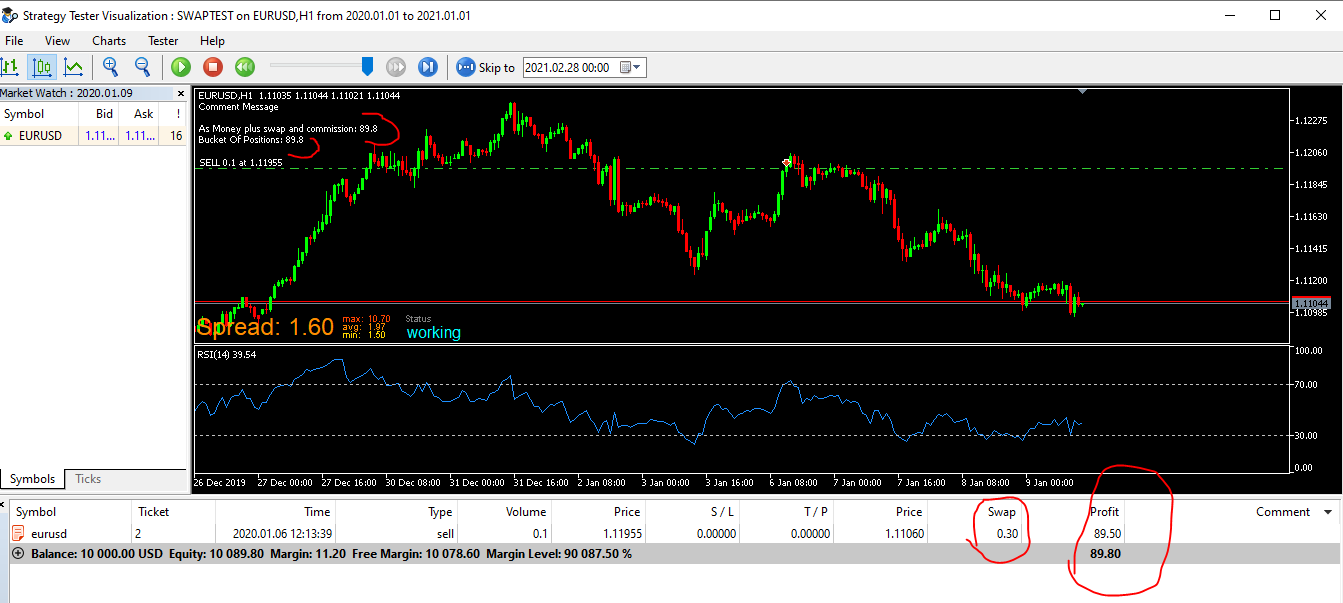
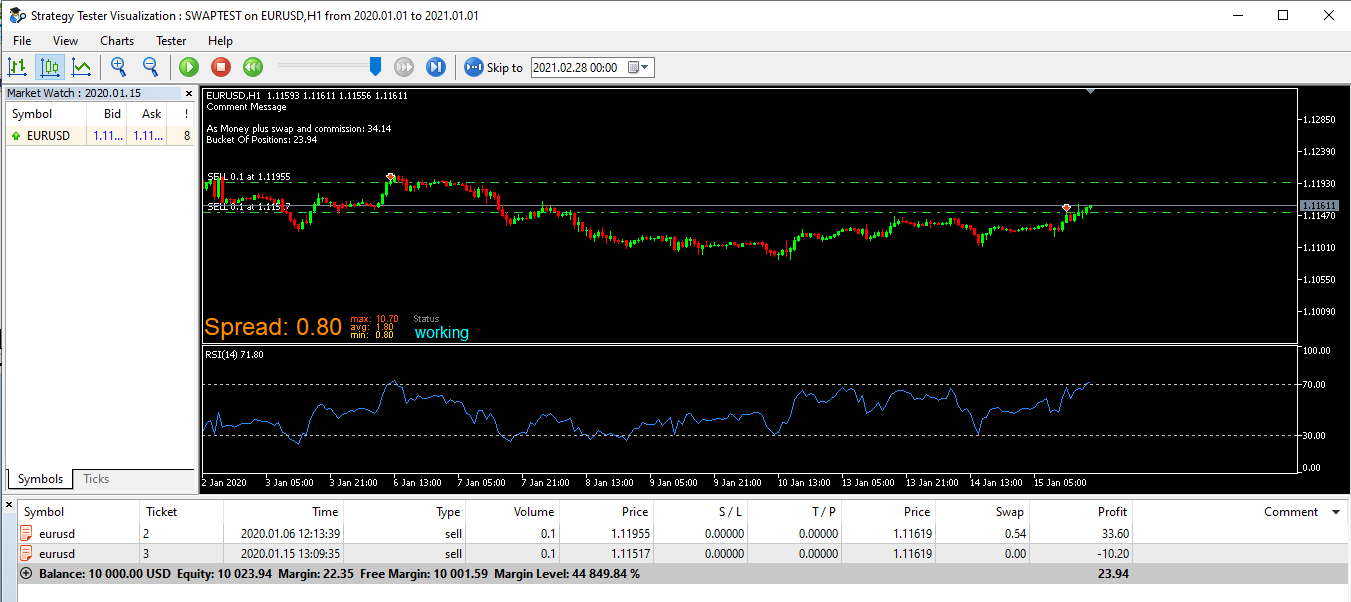
I put a comparison on this project using the "Bucket of positions"
In the first image when there is only 1 single trade, the values are the same for both "For each Position" and "Bucket of Position"
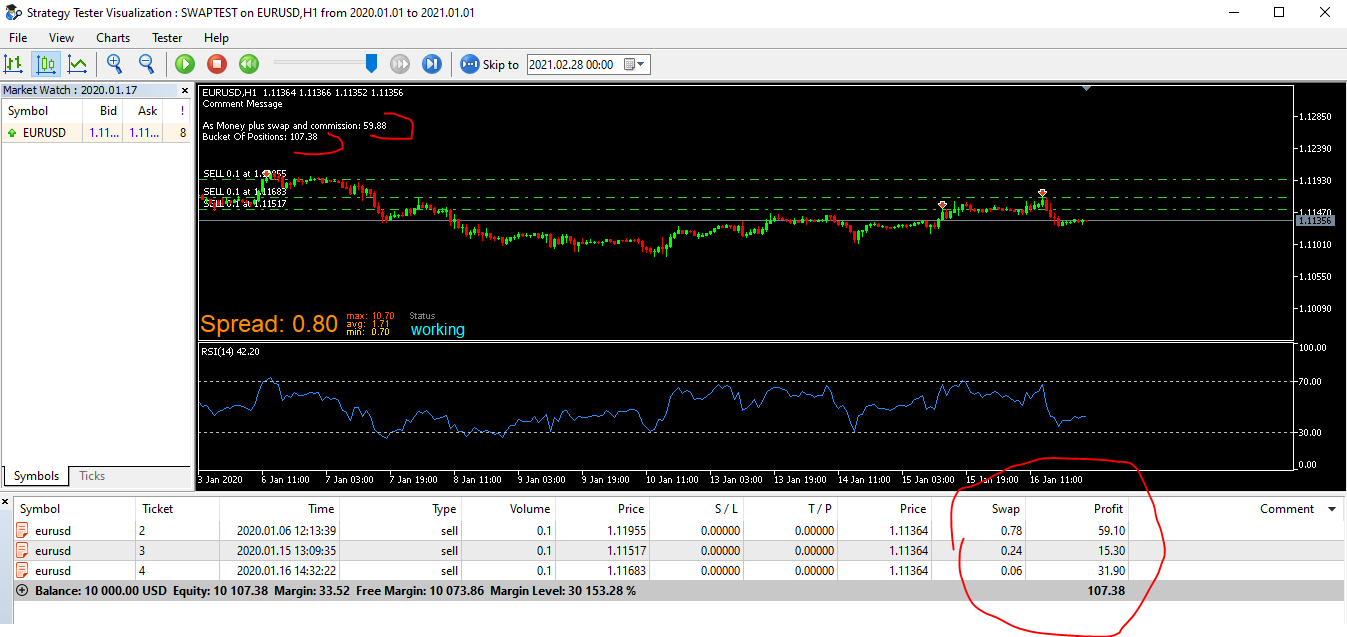
When I have more than one open trade the calculation is totally different.
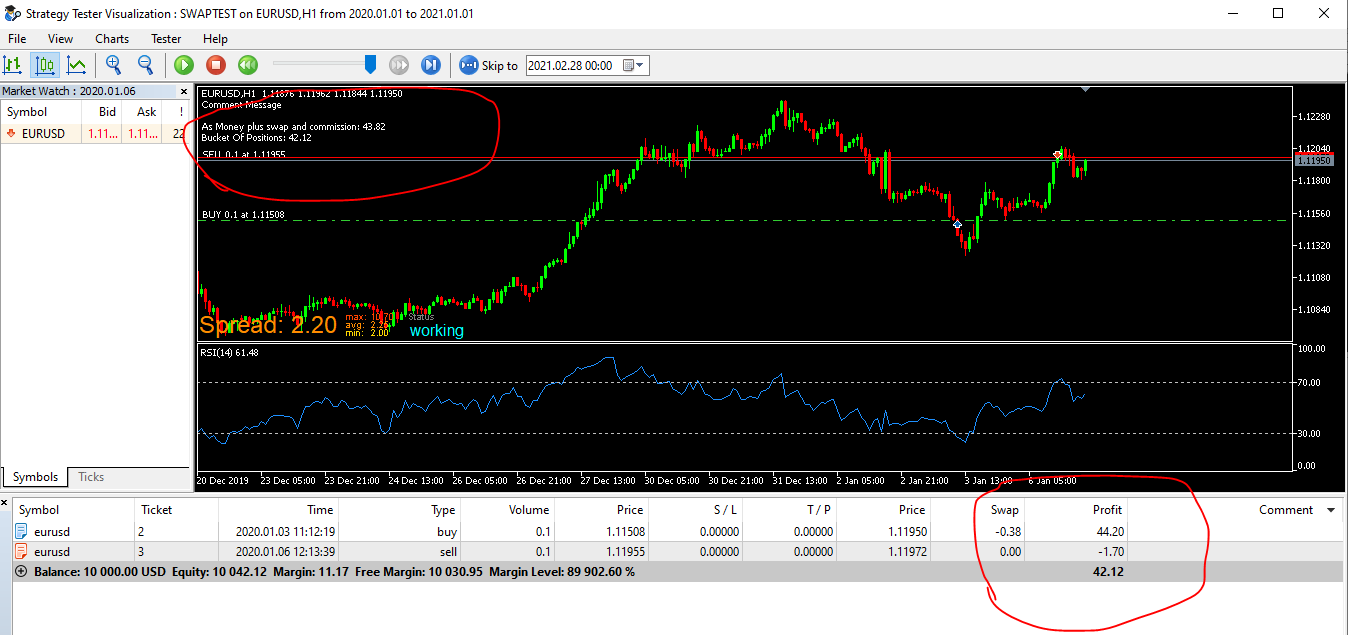
See the last image I sent:The Bucket of Positions block is showing the sum value of only Profit including the sum of the Swap of all transactions in his account by recording the total win amount of ($ 107.38). This calculation is correct.
The "As money plus swap and commission" is showing a wrong amount. ($ 59.38), but it should show the value that Bucket Of Positions is showing. Or am I wrong?
-
RE: "As money plus swap and commission" block not working fine.posted in Bug Reports
@miki Put it to monitor on a variable and you'll know what I'm talking about.
-
RE: "As money plus swap and commission" block not working fine.posted in Bug Reports
@miki I didn't understand what you meant ...
You are showing a metatrader screen and not a calculation being done by the block.
What I am trying to say is that the calculation that this block should do is not correct. -
"As money plus swap and commission" block not working fine.posted in Bug Reports
Project for tests : https://fxdreema.com/shared/OyxArLenb
I found something that I believe is a Bug (problem).
There is a condition called:
(in loop) Trader / Order in Loop that when selected the "profit" field enables a choice of options and the one chosen in my case was "As money plus swap and commission"When I use this condition logically, I place a block above it called "For Each Position".
My target value as a test I used 2 $, and I connected a closed block then ordering to close all open trades when my profit is 2 $.
What I thought is that if I configured it this way in the project, then when the value of "gain + swap + commission" when reaching the value of 2 $ would close the negotiations exactly at this value or higher giving me the profit on the operation . But what is happening is that he is not doing this, he is closing some with a profit of 2 $ or more and others even negative so I assume this is a calculation problem in the block.
Please check this ?