Create a Constant (input), named like Multiplier.
In Adjust field enter: Multiplier*
You can now use Multiplier in your backtest, to find the right setting for your strategy.


Create a Constant (input), named like Multiplier.
In Adjust field enter: Multiplier*
You can now use Multiplier in your backtest, to find the right setting for your strategy.
@miro1360 THANX MIRO! EXACTLY what I've been trying to achieve & wanted to ask for. Good mind reading. Very useful tutorial!
@fxDreema It would be interesting to hear why you so passionately hate MT5.
I also used to do it, while it had all its limitations, like no hedging, one position only, few brokers had it, etc.
But now that the limitations are taken away, I also see a lot of attractive features with MT5, like
I haven't done anything with MT5 yet, but it's looking more and more attractive. And soon, it seems we are all forced to do the shift anyway - for the better.
I believe it would be very important for FXDreema to have a Converter or Export Function from MT4 to MT5, instead of having to remake every EA manually. Very needed. I imagine just added buttons to choose which version I want to download. [MQL4] [MQL5]
https://www.metatrader5.com/en/trading-platform/comparison-mt5-mt4 (Users)
https://www.metatrader5.com/en/brokers/comparison-mt5-mt4 (Brokers)
Have FUN FX Trading!
Noticed that free can't download anymore. A pity.
Anyways, I paid for monthly today, but still can't download.
It says I have 31 days. What seems to be the problem?
Several hours, download buttons appeared. HANDLED!
Now, on reload page, I briefly noticed a link that disappears quickly:
Get fxDreema: Download Files to automatically download files!
What is that?
I just got error: Trade is disabled (133)
No trades are taken at all.
The EA works perfectly on 4 other accounts accross 2 different brokers.
I asked my friend to check with the broker if there is any problem with them.
Sure enough, his KYC docs were first approved and money deposited to the MT4 account.
But, then the broker thought they needed cleaner photos or something so his account was dissabled, while waiting for new docs and new approval.
So I am happy that it wasn't a problem with the EA, as it shouldn't be, having worked fine else where.
I am waiting for his docs to be approved and everything is going to be fine.
THE ERROR SEEMS TO BE A BROKER IMPOSED LIMITATION.
Perhaps for other reasons as well, besides what was mentioned above.
BTW, this EA of mine that my friends asked me to run on their accounts, made me 500% in 9 days.
Deposited $500 and 9 days later had over 2500.
Withdrew 1500 and left 1000 on the account. (300% safe in my pocket)
The 1000 grew again to 1700 in 2 days. (today), Exciting.
Basically, it doubles the account every 4th day, with risky settings.
Or doubles every month or two with very safe settings. (7.5% Drawdown).
This is wild. Thanks to FXDreema for making it easy to program my algorithms!
Add a grid. Choose the distance to each grid to be 30 pips. Every time price passes the next 30 pip grid it buys again.
OnInit
Block: Modify Variable
Account - Name:Broker (Store as Variable: BrokerName, store your broker in Input setting of the EA)
Block: Condition
Account - Name:Broker = BrokerName (Your variable storing your sepcific Broker) = True
Block: Terminate
Same problem here.
You have been waiting FOUR YEARS for the answer. Hmm!?
Is the site owner alive perhaps?
Please help us.
Many MT4 Trade statistics, when EA's converted to MT5, will work.
Another way is to create some custom MQL5 code block.
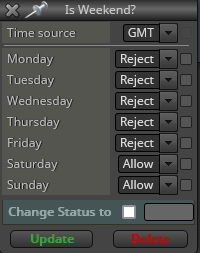
Weekend Close Check
Use block: Weekday filter
Reject working days
Allow Saturday + Sunday
When true = Weekend = Market closed
Noticed that free can't download anymore. A pity.
Anyways, I paid for monthly today, but still can't download.
It says I have 31 days. What seems to be the problem?
Several hours, download buttons appeared. HANDLED!
Now, on reload page, I briefly noticed a link that disappears quickly:
Get fxDreema: Download Files to automatically download files!
What is that?
Create a Constant (input), named like Multiplier.
In Adjust field enter: Multiplier*
You can now use Multiplier in your backtest, to find the right setting for your strategy.
Mr FXDreema!
Please respond asap.
Let me know how it's going with the Bug-fixing.
I am appreciating an urgent reply and handling.
@l-andorrà No need to share (to big project anyways). You can replicate the bug easily.
Just add Apply Template block on onInit, and you will see your EA removed from the chart.
Ok, here is a simple sample project for you to save your time...
I have added the Apply Template block on onInit (for MT4).
It does load the correct template.
The EA name flashes by in the right upper corner for a part of a second and is then removed.
I have a function that sends a report to my phone, it's executed, so it's a proof that the EA runs.
But, then unexpectedly the EA immediately removes itself. It now seem to act like a Script, haha.
I don't have any remove EA block.
What seem to be wrong? A bug?
ALSO A BUG REPORT ON THIS FORUM!
This post was not possible using Brave (a popular Chrome Browser).
The preview to the right was not visible and after posting an icon would continue circulating forever.
I'm now testing Firefox again, let's see if it works... (at least the preview is visible here)