fxDreema

    • Register
    • Login
    • Search
    • Back to the main page
    • Categories
    • Recent
    • Tags
    • Popular
    • Search
    1. Home
    2. FXFun
    3. Posts
    • Profile
    • Following 0
    • Followers 1
    • Topics 4
    • Posts 36
    • Best 4
    • Controversial 1
    • Groups 0

    Posts made by FXFun

    • RE: How to display Labels or Text Input on the Chart

      @Processman

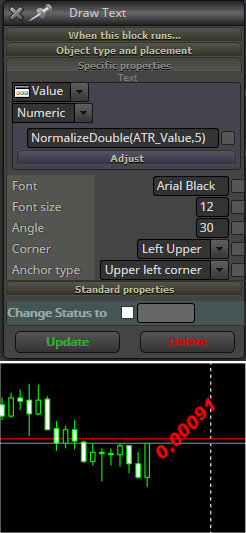
      Some Fun anyway... It works for me, even with "Draw Text"-block and formatting. See image how to do it... and evidence it works. 😉

      0_1507561433183_MQL4_NormalizeDouble.jpg

      Now, I will agree that lately it seems a bit glitchy, meaning it works, but suddenly it will not work, and then the glitch goes away and it works again. Sometimes I switch Timeframe and it's then not working.

      That must be an error in FXDreema, and there is only one man on earth that can fix that: Mr FXDreema himself - Radoslav!

      Radoslav has also promised to fix Normalizing for the built in functions, which also seem to have lost its normalization lately, like when I want to show Balance. Sometimes it looks like: 525.1200000001 - which is ugly.

      But these things are out of your and mine control.

      posted in Questions & Answers
      FXFun
      FXFun
    • RE: How to display Labels or Text Input on the Chart

      @Processman

      Example:

      In Comment field replace your "Price"-variable with:

      NormalizeDouble(Price,2)

      (Where Price is your Price-variable)

      Change "2" to how many decimals you want.

      The above should show Price: 0.78

      Use this principle for all your other variables.

      Have Fun Processman! 🙂

      posted in Questions & Answers
      FXFun
      FXFun
    • RE: modify stoploss

      @Jennifer (I wrote the answer first where you linked to this page. I should have written it here, so I copy it here now) 🙂

      Hi Jennifer! No answers? I would try doing it with one block instead...

      I'd say there could be a problem with using "If trade". I seldom need to use it myself, and I use pretty advanced stuff. Why complicate using two blocks in this situation, when you only need one, I'd say?

      Try using "Trading Actions / Modify stop of trades" directly. That should do the same thing, that you used two blocks for. But you might need to connect it after something at the top, or at least a Pass block.

      I don't know if it will work for you, but that's how I would try to set it up first, if I would do it.

      Hope it works for you trader friend. Good luck Jennifer.

      posted in Questions & Answers
      FXFun
      FXFun
    • RE: DropDown list for inputs [advanced]

      @miro1360 THANX MIRO! EXACTLY what I've been trying to achieve & wanted to ask for. Good mind reading. Very useful tutorial! 🙂

      posted in Tutorials by Users
      FXFun
      FXFun
    • RE: DropDown list for inputs [advanced]

      @Jennifer Hi Jennifer! No answers? I would try doing it with one block instead...

      I'd say there could be a problem with using "If trade". I seldom need to use it myself, and I use pretty advanced stuff. Why complicate using two blocks in this situation, when you only need one, I'd say?

      Try using "Trading Actions / Modify stop of trades" directly. That should do the same thing, that you used two blocks for. But you might need to connect it after something at the top, or at least a Pass block.

      I don't know if it will work for you, but that's how I would try to set it up first, if I would do it.

      Hope it works for you trader friend. Good luck Jennifer.

      posted in Tutorials by Users
      FXFun
      FXFun
    • RE: How to display Labels or Text Input on the Chart

      @kekhumbo Hello, I feel bad that you haven't gotten any help for 3 days, so I'll try to help you. 😇

      Use block Output & Communication / Comment.

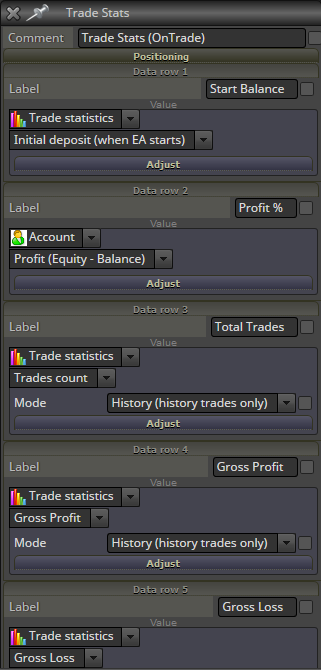
      Most of the things you want to display you can find under "Trade Statistics" & "Account". See image...

      0_1507394798077_Screenshot-2017-10-7 FX Executor v0 3.png

      In the second dropdown you can choose things like Now for current open trades or Historical for close trades or count both.

      If you place the comments onTick it will be updated on every tick, BUT not during weekends.

      If you place the comments onTrade it will be updated only on position modification, which means nothing will be visible, until a trade has been placed, closed etc. I like this method, since it places less workload on MT4 and processors.

      You can also use onCart, which will also lessen load on processing, to only when you do something on the chart. When you are not there, nothing is updated.

      You can also use onTimer. Just decide how often you want this to update, like once per second or minute.

      I believe you can find all of the things you ask for in these menus. Hope this helps. Good luck.

      posted in Questions & Answers
      FXFun
      FXFun
    • Importing a mq5 file creates a mq4 project, NOT mq5

      Since I didn't see a mq5 project after the import, I happened to try to import the mq5 file several times.

      Later I made developments to the EA, but then I understood I was randomly working with several different projects, with the same name, but different Magic numbers.

      So, now everything is just a confusion and a mess.

      I don't know which project to delete or keep, since I made developments a little here, a little there, before I realized it's not the same project anymore.

      I am sure the function should be that importing a mq5 file should create a mq5 project, and not mq4, right?

      I might add that the mq5 file came from a conversion with your tool, to convert from mq4 to mq5.

      My intention was to not recreate my whole mq4 project as a mq5, but simply convert it, and then re-import the mq5 file as a mq5 project and continue developing for MT5. Smart, I thought, but not, so far. 😉

      This happened 2017-09-05.

      posted in Bug Reports
      FXFun
      FXFun
    • RE: UPDATE time, write here if you have problems!

      @fxDreema Wow! History did the trick. My EA is back. Thank you.

      I didn't know of the "History" function. Very helpful. Good protection.

      I could have been waiting the whole month for you to fix compilation.

      However, compilation works now, since I back-rolled 4 steps in the History.

      Very good function. Thank you. Continue with your good work. 😍

      posted in Questions & Answers
      FXFun
      FXFun
    • RE: UPDATE time, write here if you have problems!

      ERROR REPORT 2017-09-04!

      Has worked fine all night for .ex4, until about CET 07.10. Still not working at 18:20. This error occurred...

      New error: undefined - this block model doesn't exist (used by block 2)

      -- which is a simple PASS block.

      -- ALSO, ALL CONSTANTS DISAPPEARED in the EA I was working on!
      However, says: 24 Constants (Inputs) before trying to open the dialog.

      Hope you can make them visible again, and that all functions again very soon. Was a lot work.

      posted in Questions & Answers
      FXFun
      FXFun
    • RE: MT4>>MT5

      @fxfun
      Here's a guide how to convert MQL4 to MQL5:

      https://www.ea-coder.com/convert-mql4-to-mql5/

      Something I believe we'll leave to Mr FXDreema to enjoy doing. 😉

      posted in General Discussions
      FXFun
      FXFun
    • RE: MT4>>MT5

      @fxfun

      Another good comparison site:

      http://mt4vsmt5.com/

      posted in General Discussions
      FXFun
      FXFun
    • RE: MT4>>MT5

      @fxDreema It would be interesting to hear why you so passionately hate MT5.

      I also used to do it, while it had all its limitations, like no hedging, one position only, few brokers had it, etc.

      But now that the limitations are taken away, I also see a lot of attractive features with MT5, like

      • Using all CPU cores for calculation and backtesting in 64-bit, can make it 500% faster.
      • Partial order filling
      • More Pending Order Types
      • Built-in Economic Calendar (Programmable triggers for news events, I suppose. If Yes = Great.)
      • Order Depth.
      • Backtesting multi-currencie EAs at the same time etc. Multi-threaded. Multi-currency. Real ticks.
      • Better reports.
      • More Timeframes (finally).
      • More markets, like stock exchanges.
      • Native SQL Export.
      • Distributed computing (multi server power) etc.

      I haven't done anything with MT5 yet, but it's looking more and more attractive. And soon, it seems we are all forced to do the shift anyway - for the better.

      I believe it would be very important for FXDreema to have a Converter or Export Function from MT4 to MT5, instead of having to remake every EA manually. Very needed. I imagine just added buttons to choose which version I want to download. [MQL4] [MQL5]

      https://www.metatrader5.com/en/trading-platform/comparison-mt5-mt4 (Users)

      https://www.metatrader5.com/en/brokers/comparison-mt5-mt4 (Brokers)

      Have FUN FX Trading! 🙂

      posted in General Discussions
      FXFun
      FXFun
    • RE: Draw horizontal line and calculate round numbers from open price.

      @okranoblues
      Did you find a solution?

      I need a similar solution. I need to know the Upper & Lower Round number from current market price.

      From there it should be easy to get your next target TP & SL, by the round number, which I believe is what you want to have.

      posted in Questions & Answers
      FXFun
      FXFun
    • RE: Video Tutorial - Signals Dashboard EA [advanced] - looping Objects, arrays

      @miro1360
      Yes, I meant Columns. I made a few extra showing different indicator values.

      I got the idea if we add many more columns, if we can make it a more effective code with an array somehow for the columns as well, like you said - the reason for your tutorial was to create 1000+ less blocks. Is it a good idea and how would one add another dimension array in that case?

      About Max & Min sorting... I find the concept very useful, I get new ideas all the time now, where it could be very useful.

      E.g. I have 3-5 MAs on the chart or even more - or some other indicators of course. I would like to know which one is the highest (MAX PRICE) and the lowest (MIN). I could then calculate the distance between them and save that result in a Variable, to know some range.

      I tried the code from [https://docs.mql4.com/math/mathmax](link url) but could not get it to compile correctly. Lost of errors. And how would I store the Max / min value in variables?

      I could of course create a massive amount of formula blocks and calculate all combinations, but with many indicators, this method too would get into the 1000nds of blocks.

      I thought if this could be done as smart, as you have been using arrays, to reduce blocks used, to use MathMax & Min to store the value simply and immediately to a variable, as simple as that, since MQL has the function already built in. Knowing this could be very useful for many applications.

      Does FXDreema not have the Math Functions built in? It should. Even VTS/iExpertAdvisor has that (but in the end, it's a useless software, where even basic functions don't work, like limiting the number of trades etc, that's why I had to dump it & fortunately found FXDreema).

      MQL Math would however be very useful in FXDreema, especially for us who don't code much raw MQL code.

      Do you have any idea how we could sort out the Max & min values, even if it is not in an array, but I suppose it could be?

      I really loved your tutorial. It's useful. I'm going to check out more.

      Interestingly, I made the same conclusion earlier about drawing the average ATR line some time ago.

      I have also been thinking how to solve the problem of self adaptation, so your link was very spot on for that too.

      It seems like we are very synchronized. 🌞

      Big thanks to you my friend!

      posted in Tutorials by Users
      FXFun
      FXFun
    • RE: Video Tutorial - Signals Dashboard EA [advanced] - looping Objects, arrays

      @miro1360
      Thank you for this very well done job & tutorial on using MQL & Arrays! Very valuable. Keep up your good work!
      😀

      Would it be a good idea to use a vertical array for rows as well, e.g. if I would add many more indicator rows?

      Sorting of Min & Max data, I believe is very useful and important to create many useful formulas, indicators & for condition/decision making -- which can be done in MQL4 using MathMax & MathMin .

      E.g. your tutorial EA could mark which pair has moved Most & least today.

      But how can these Math functions be utilized in FXDreema? I believe they are missing in this software, and if so they should definitely all be added, what do you think?

      Meanwhile we could perhaps use a "Custom MQL code" block, or what do you think?

      I tried to calculate Min & Max and store the resulting value into a variable, but nothing compiled correctly. Any ideas?

      Ref: [https://docs.mql4.com/math/mathmax](link url)

      posted in Tutorials by Users
      FXFun
      FXFun
    • RE: Block "play sound" not working correctly

      @Andermaiden2nd
      Yes, this is true. I meant to write about it several days ago, but had no time. I confirm this bug, as appearing recently.

      posted in Bug Reports
      FXFun
      FXFun
    • 1
    • 2
    • 2 / 2