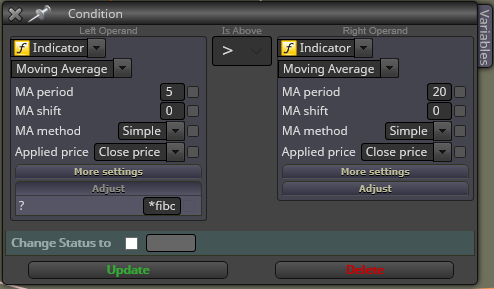
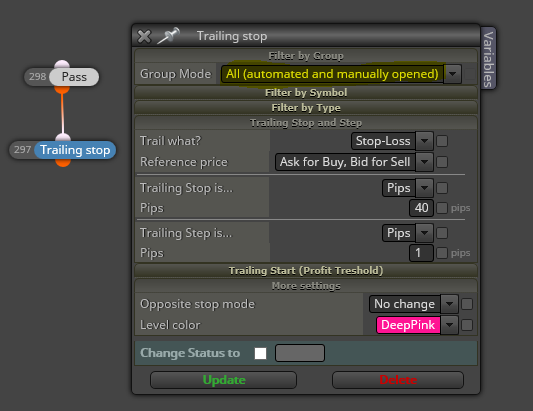
Podría ser que estuviera relacionado con que no tienes el bloque "NoTrade/Position".
J
Posts made by josecortesllobat
-
RE: alguien sabe dos operacionesposted in Questions & Answers
-
RE: Updating loop criteria as the loop happensposted in Questions & Answers
This might be a starting point (not tested)
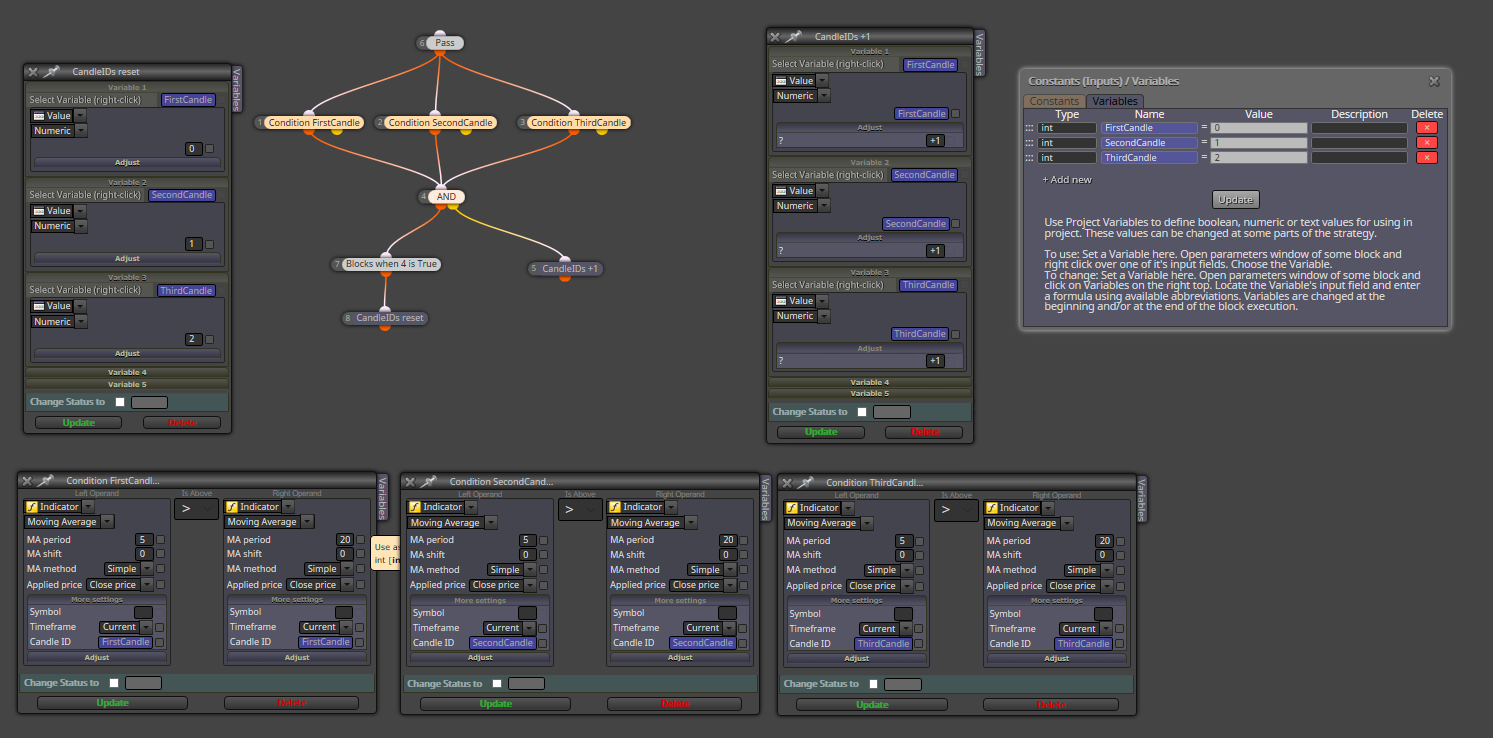
If the 3 conditions are not met at the same time, false output of block 4 passes and the Candle IDs are incresed by one. The conditions Will be evaluated again for the next tick or bar but with the increased candle IDs.
-
RE: colocar trailig stopposted in Questions & Answers
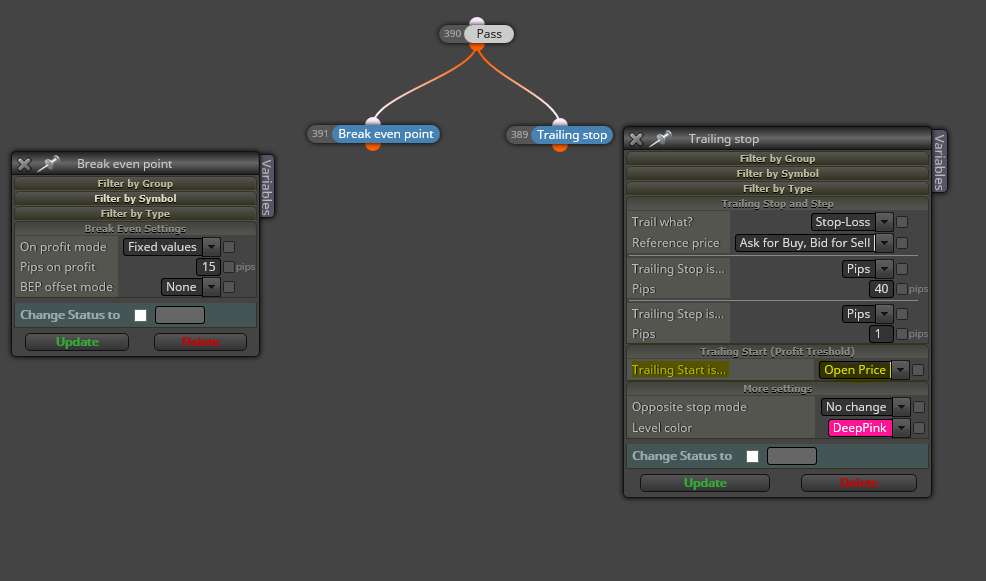
Tienes que rellenar "Pips on profit" para el bloque "Break even point".
Tienes que rellenar en el bloque "Trailing stop" los settings que harán que el SL se mueva. "Trailing start is… Open Price" indica que el SL no se moverá hasta que el trade alcance ese nivel. Si quieres que empiece desde el OP una vez que el SL se ha movido a OP por el BE, habría que añadir una condición del tipo
If SL Level >= OpenPrice -> pass
Y conectar el bloque TS en la salida true. Es cuestión de probar.
Más info en
-
RE: colocar trailig stopposted in Questions & Answers
Lo que entiendo es que quieres un break event + trailing stop desde el open Price.
-
RE: How can I print the stop loss live?posted in Questions & Answers
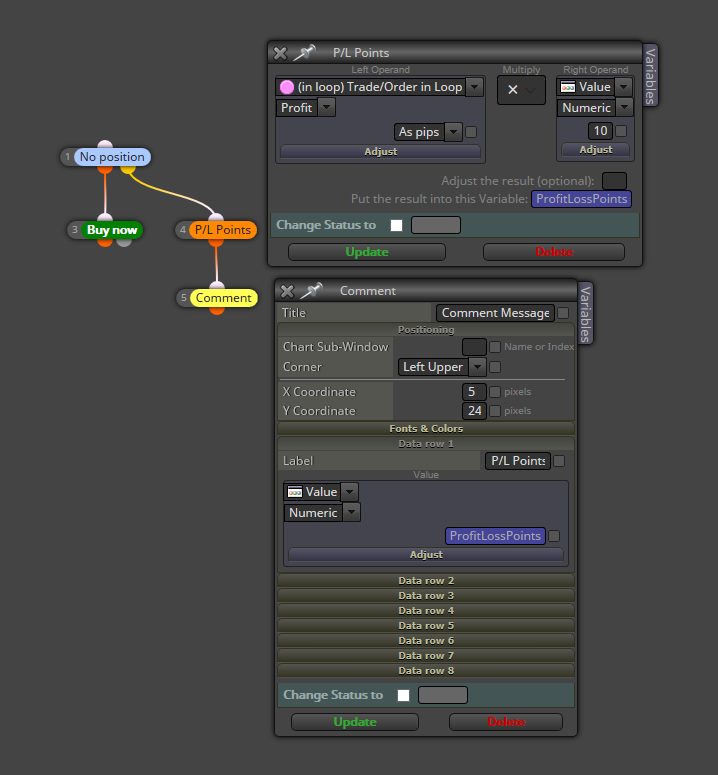
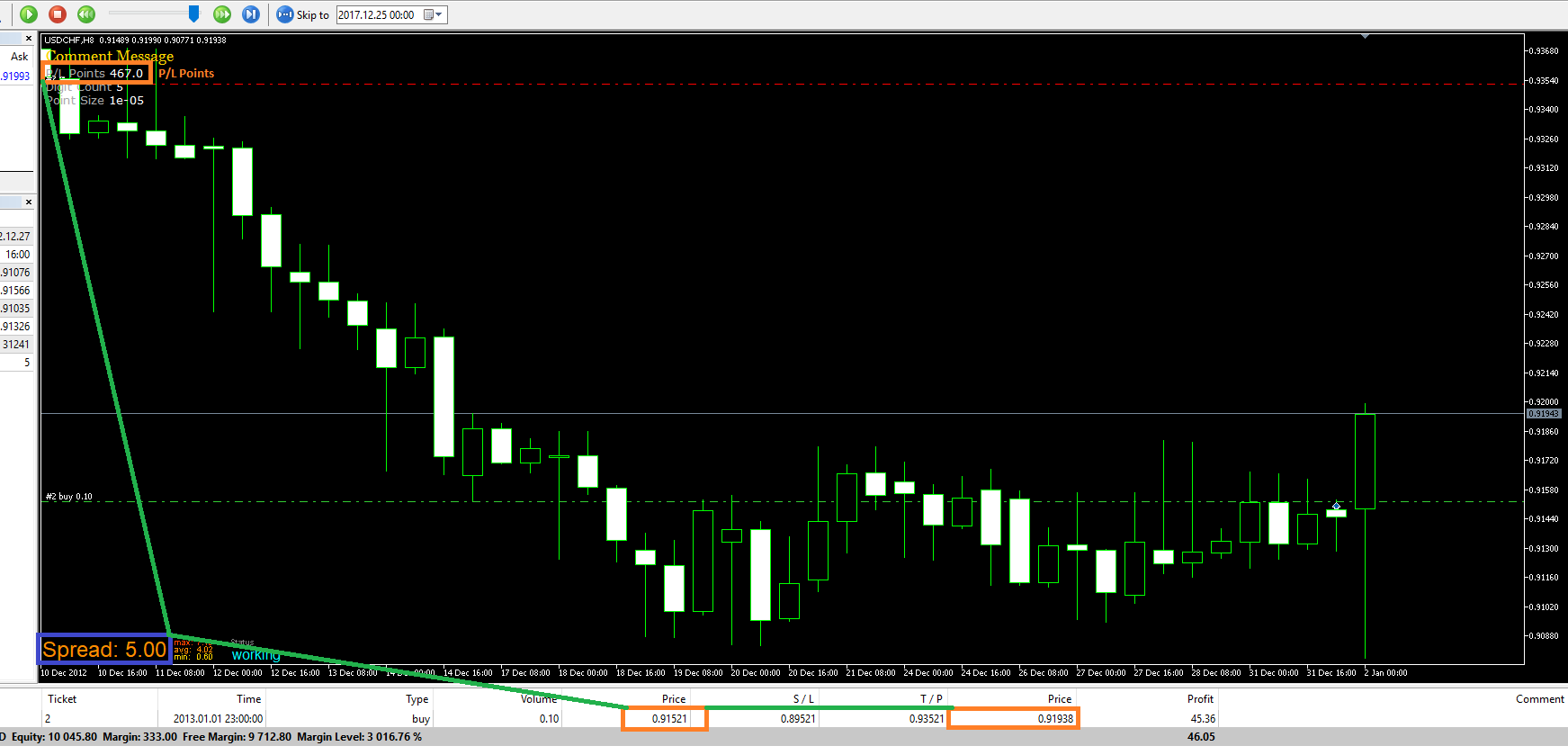
Not sure if it Will work for all the brokers because it Will depend on the digits count but usually 1PIP = 10POINTS.
-
RE: How can I print the stop loss live?posted in Questions & Answers
This could be an approach (not tested)
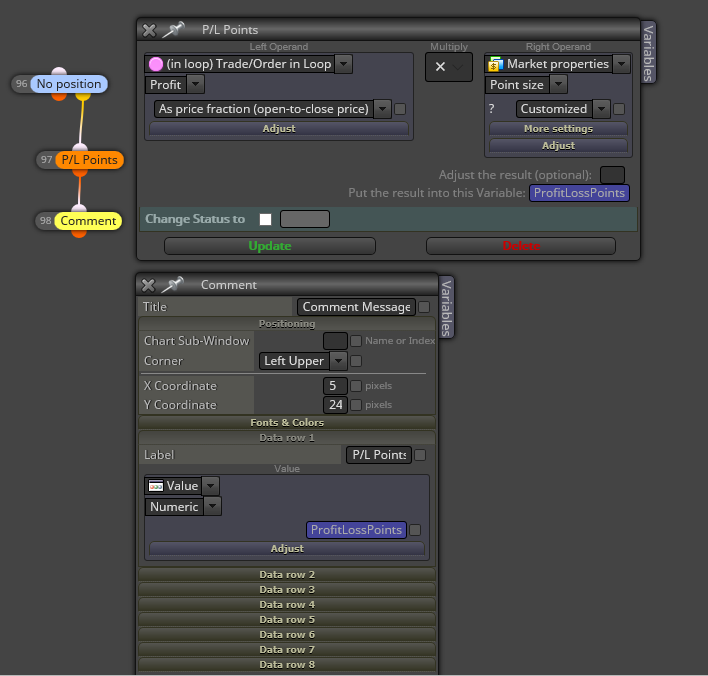
You can have one "Comment" block for a BUY trade and other one for a SELL trade using the block "If position".
-
RE: Distance between operation and priceposted in Questions & Answers
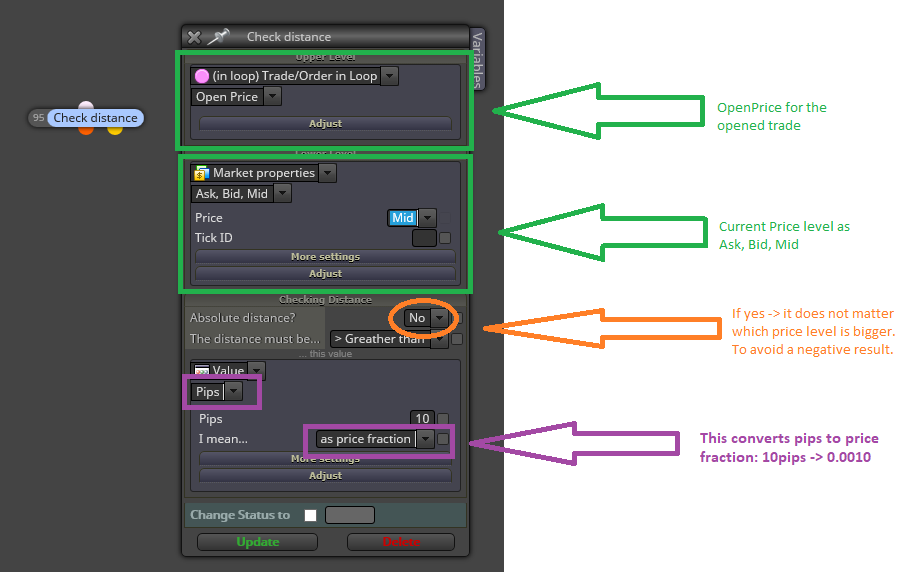
You can use any of the Ask, Bid or Mid price as for one of the levels to check the distance
-
RE: Position´s Expirationposted in Questions & Answers
Understood!!!
Don't waste your time trying to figure this out because I have different options working pretty accurate for expiration.
Thanks
-
RE: Move confirmed with breakout above moving average of volumeposted in Questions & Answers
I have converted your mq4 file to mq5 using the fxDreema converter but after compiling with the MT5 editor there are 2 errors

Please, could you be so kind to develop your custom indicator for MQL5 or fix what is wrong?
0_1540361017305_1540323305933-miro1360_test_1.0.mq5
Many thanks.
-
RE: COMO NO PERDER EL ARCHIVO DE PROYECTO EN FXDREMAposted in Questions & Answers
Yo lo que hago es guardar una copia localmente en mi ordenador y/o nube. Luego sigo trabajando en el EA pero cambiando el nombre. Así cada vez que modifico algo, descargo el mq5 y ex5, guardo ambos y sigo el proyecto.
EA_0001 -> ex5/mq5 -> EA_0002 -> ex5/mq5 -> EA_0003....
Si en algún paso veo que el cambio no ha ido bien, deshago desde el menú "History" si el historial está disponible o importo la versión anterior o una más vieja.
Cuando llego a un punto que me convence, conservo el inmediatamente anterior y borro todos los anteriores.
-
RE: Position´s Expirationposted in Questions & Answers
Hi @fxDreema
For the "check age", would it be posible to add like a "how many bars since trade open" mode? This way, the weekend days Will be avoided.
My current condition to check "real" trade age is:
If "BarCounter >= ExpirationBars -> Close"
Thanks
-
RE: How to add Custom MQL blocks to "Custom" blocks section?posted in Questions & Answers
Thanks @miro1360
I think that this block builder seems to be addressed to coding experienced people.
I was asking for a someway to add the "Custom MQL code" blocks that I have been using almost in every Project. As an example, I like to use one block from one of your tutorials:

I would like to add that block to my "custom" block area to have it available on my account.
-
RE: How to add Custom MQL blocks to "Custom" blocks section?posted in Questions & Answers
Please, could you be so kind to explain some tips about how to use the "block builder"? A short tutorial would be very welcome.
Thank you so much.
-
RE: How to add Custom MQL blocks to "Custom" blocks section?posted in Questions & Answers
Thanks @miro1360
I did not see that button.
-
RE: open buy/sell on the next openning candleposted in Questions & Answers
You can use a Boolean variable for that.
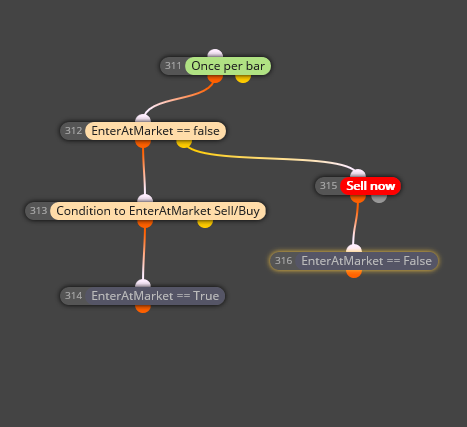
Sell/Buy will not be triggered until the condition to EnterAtMarket == True. Sell/Buy will be triggered at next bar.
-
How to add Custom MQL blocks to "Custom" blocks section?posted in Questions & Answers
Hi @fxDreema
I would like to save my "Custom MQL code" blocks in some way and have them available for other projects. I am doing that by copying my custom code blocks from one Project to other one.
I think that you have that option because there is a button beneath the "Variables" menu called "Custom" but I don´t know how to add them into it.

Please, could you explain how to do that? I mean to add our custom code blocks into the custom block menu.
Thanks