fxDreema

    • Register
    • Login
    • Search
    • Back to the main page
    • Categories
    • Recent
    • Tags
    • Popular
    • Search
    1. Home
    2. josecortesllobat
    3. Posts
    J
    • Profile
    • Following 2
    • Followers 20
    • Topics 34
    • Posts 507
    • Best 41
    • Controversial 1
    • Groups 0

    Posts made by josecortesllobat

    • RE: Are groups necessary when running multiple EAs?

      Correct.

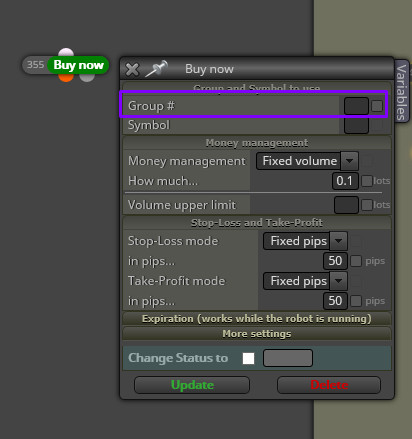
      Group# are used to be very specific in which trades you want to do anything. For that, there is avalaible different kind of filters going from a general group (sells or buys) to a specific one (#1, #2,... and so on).
      In addition to this, Group# is a part of the MagicNumber used by the EA to control a specific trade.

      https://fxdreema.com/tutorial/builder/groups-and-magic-numbers
      posted in Questions & Answers
      J
      josecortesllobat
    • RE: How to calculate buy volume based on balance and stock price ?

      I think you Will have to use a "Custom MQL Code" block with the next math function

      https://www.mql5.com/es/docs/math/mathround

      posted in Questions & Answers
      J
      josecortesllobat
    • RE: setting

      Sorry, I don´t know what you mean with "setting". Could you clarify it to know better what are you looking for?

      posted in Questions & Answers
      J
      josecortesllobat
    • RE: Closing of the oldest.

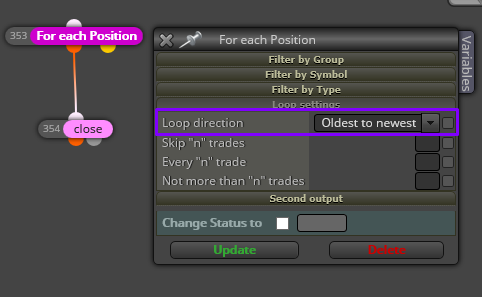
      I think you just write 1 in the field Not more than "n" trades that means the first one starting from the Oldest.

      You be very specific if for each trade you write a "Group #" in the Sell or Buy block.

      0_1530121842568_c7941bc5-90db-4f8f-8a41-cc1fc83a33af-image.png

      Then, if you open 10 trades and the last trade has Group # = 10, you can set this number in the Close block to close specifically that trade.

      posted in Questions & Answers
      J
      josecortesllobat
    • RE: setting

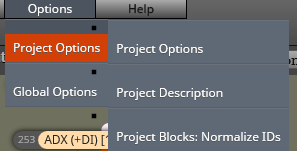
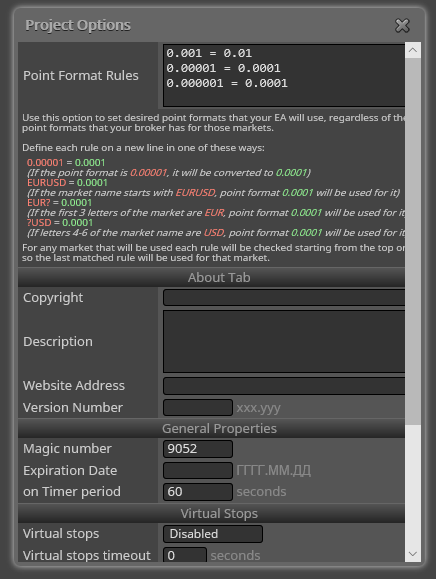
      For "setting" do you mean "Project options"?

      0_1530042426991_8751ee49-dbf5-4d90-b3f8-33d453244aa3-image.png

      0_1530042450958_430fcb25-80e9-4814-bfea-db3a426a92b0-image.png

      posted in Questions & Answers
      J
      josecortesllobat
    • RE: Onde trade after another-

      Is there a trade opened? Because the condition is no longer "true" while there is a trade (sell or buy) because the project starts with a "No Trade" block.

      posted in Questions & Answers
      J
      josecortesllobat
    • RE: Closing of the oldest.

      0_1530035477607_a20c9b35-e70d-43d4-b466-e3d55e8221bf-image.png

      posted in Questions & Answers
      J
      josecortesllobat
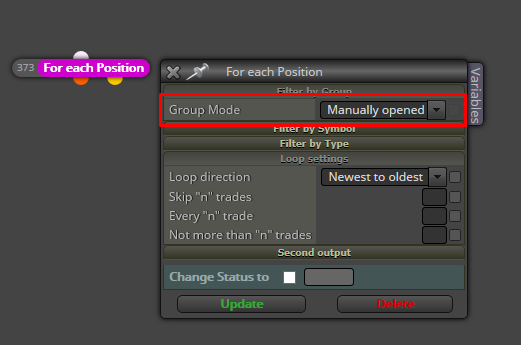
    • RE: Assign Magic number to manually taken trades

      0_1529864971221_4ade8231-fbd7-4ef0-98b0-de95f1a70d51-image.png

      posted in Questions & Answers
      J
      josecortesllobat
    • RE: Money Managment Trigger/Switch

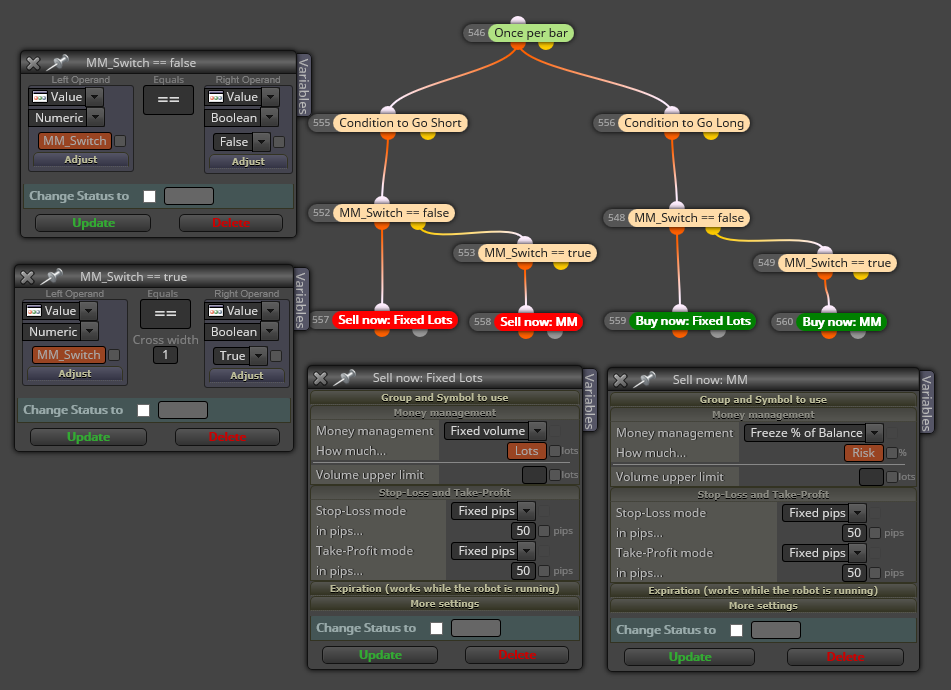
      I am using something that it is close to what you need. In my case, I am working in "OnTick" section but you can try it in the "OnInit" section.

      0_1529593378123_8a000ca0-660d-4b70-8f3a-28df3a213e14-image.png

      0_1529593866929_684f4301-f845-447f-b54b-fd1a9d7f605f-image.png

      posted in Questions & Answers
      J
      josecortesllobat
    • RE: unable to draw arrow on crossover

      Hi

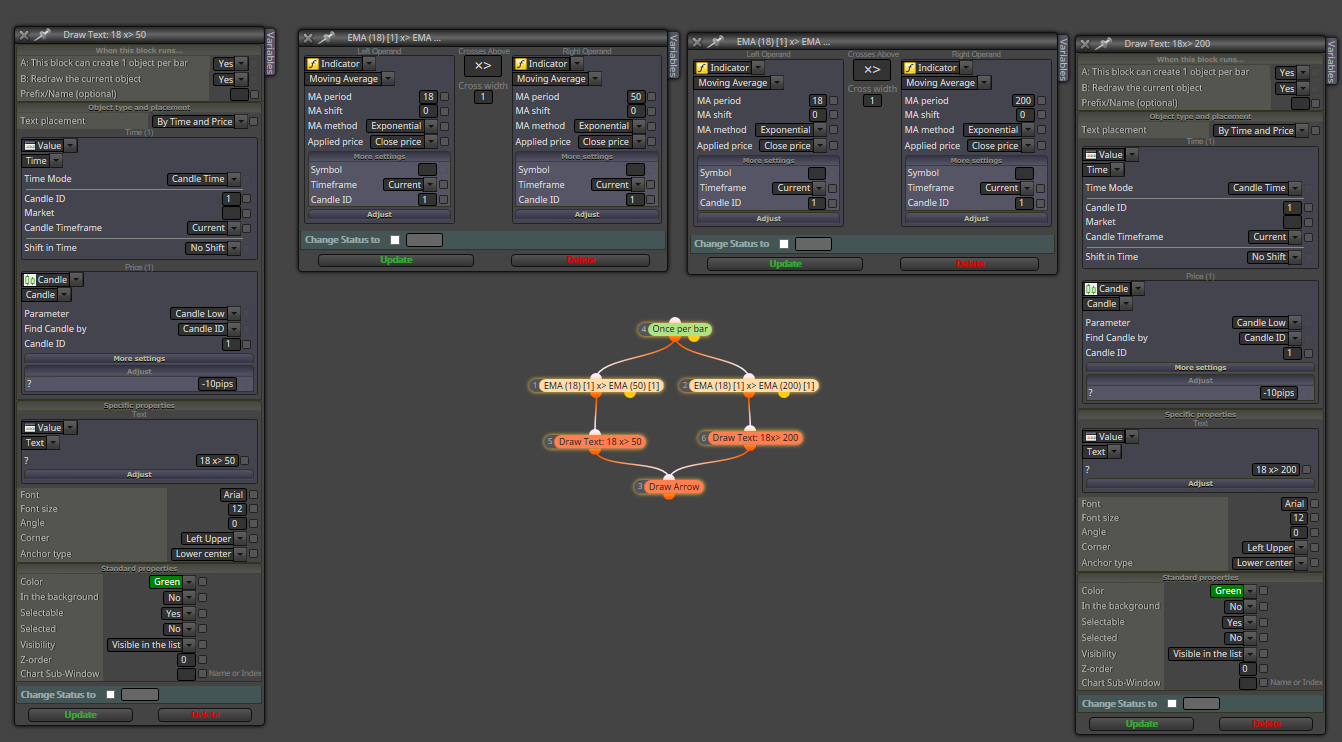
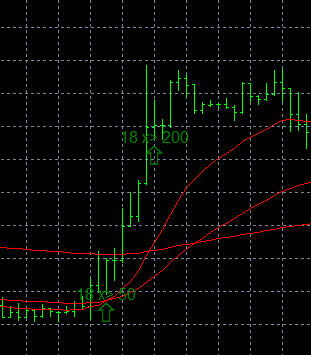
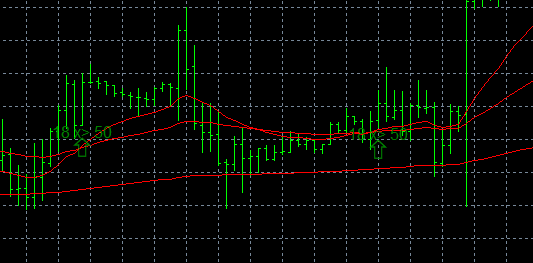
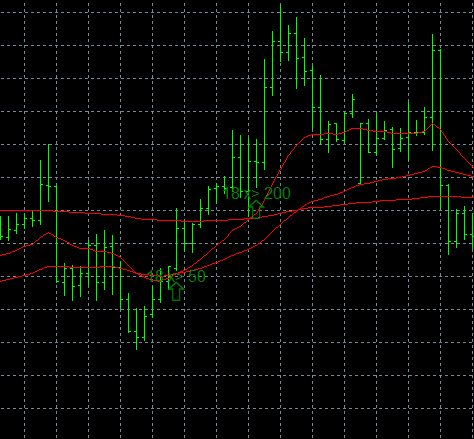
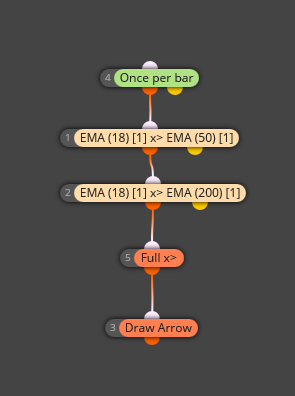
      If you want to draw an arrow for each crossover condition, this should be work

      0_1529333814230_0b74aa82-9e04-4746-8a99-6297c394712d-image.png

      0_1529333852408_0bec7c05-f512-49a2-b767-2397c9f3b999-image.png

      0_1529333873249_11738724-5486-413d-aa12-bddec93d76be-image.png

      0_1529333896247_2b1a9d12-bc17-47db-8b4b-ea7ebc5d073a-image.png

      But if what you want to draw is an arrow when both conditions meet at same time, it is probably that you Will get few times or noone.

      0_1529334148406_a9c9c70c-b20d-4b1a-ac87-d8af4c44a2c7-image.png

      posted in Questions & Answers
      J
      josecortesllobat
    • RE: Square root

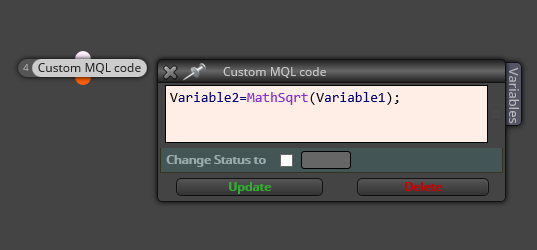
      You need to use a "Custom MQL Code" block with this function:

      https://docs.mql4.com/math/mathsqrt

      0_1529262456305_3fcf093e-4ca9-4eac-9e4d-b7766d43d8c0-image.png

      posted in Questions & Answers
      J
      josecortesllobat
    • RE: Day levels

      I think so.

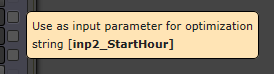
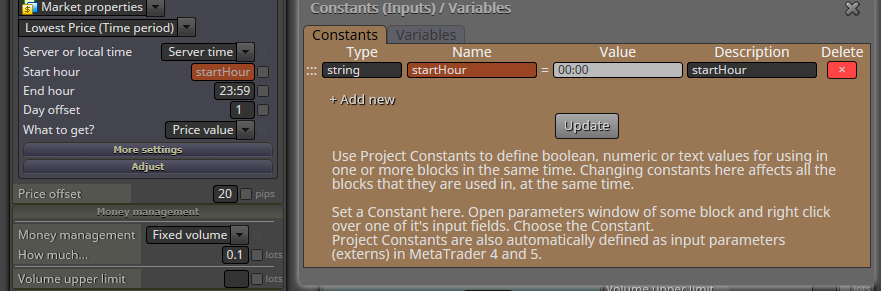
      The "Start hour" and "End hour" are "string" inputs. then, you can set a constant for each one at the Constants/Variables menú.

      0_1529252706678_d6124299-1638-4982-acc5-89f393ca0076-image.png

      0_1529252758922_a17906b9-ab90-45cb-a940-dfed9e66b5d2-image.png

      posted in General Discussions
      J
      josecortesllobat
    • RE: Day levels

      You can check this out

      0_1529169579109_c8ec470e-325d-48ea-bdb5-79b9c177f171-image.png

      posted in General Discussions
      J
      josecortesllobat
    • RE: sellstop or buystop

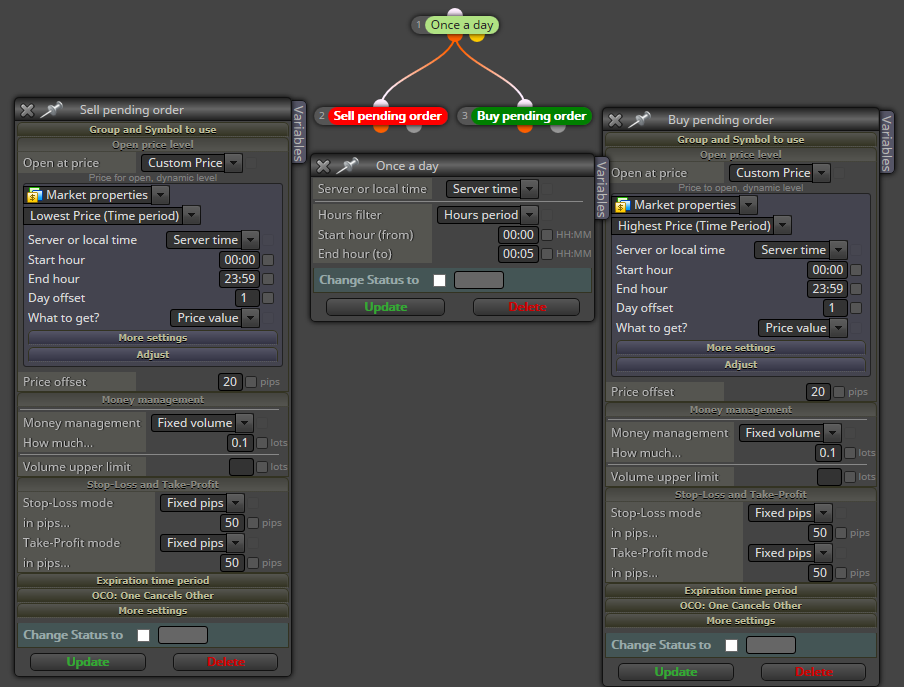
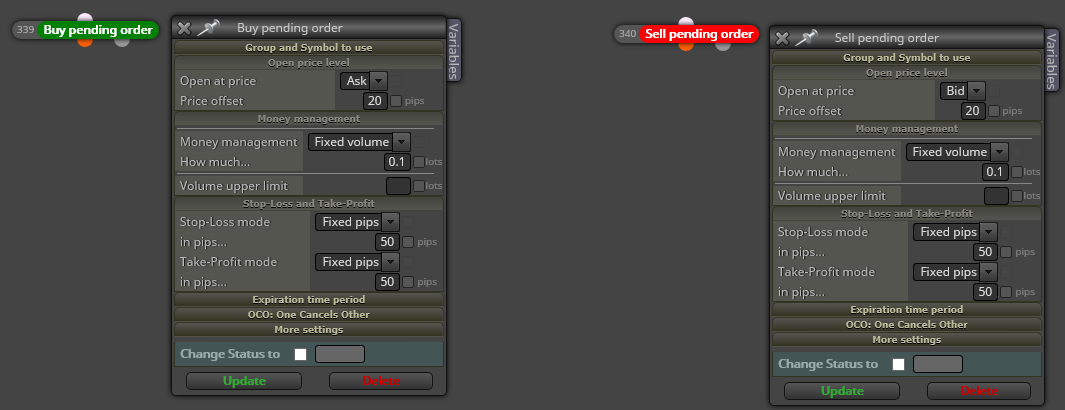
      You can use "Buy Pending Order" &/or "Sell pending order" blocks

      0_1529168943366_4e0bca2a-6efb-4681-b30a-368f552e1caf-image.png

      posted in Questions & Answers
      J
      josecortesllobat
    • RE: problema optimizacion

      https://fxdreema.com/forum/topic/5975/lentitud-en-optimizacion

      posted in Questions & Answers
      J
      josecortesllobat
    • RE: LENTITUD EN OPTIMIZACION

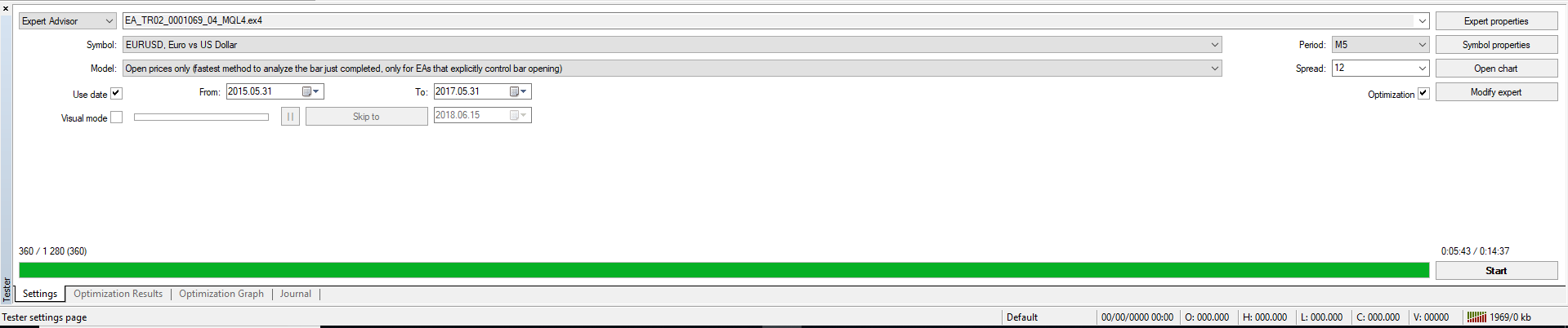
      Para un proyecto que contiene
      For a project that has

      0_1529073656339_dfe4ce9f-5bca-490e-b544-2743aacd2d26-image.png

      Optimizando dos parámetros (2 periodos de MA, 18 y 20 pasos = 360) en M5 con Open Price y con Genético
      Optimizing 2 parameters (MA period, 360 passes) in TF M5 with Open Prices and genetic optimization

      0_1529073822870_4a3c2594-ac90-4d6f-9a40-7e3352ccf131-image.png

      0_1529073839285_98ce5fa7-74aa-42c5-8c6c-851cab0f0664-image.png

      ETA = 1:46:35

      0_1529073924791_01fe5167-9e6d-400c-a107-e674b5f6333b-image.png

      Optimization Time

      0_1529074442066_0b9c26d3-09be-4e89-b6c4-8044cb0ba196-image.png

      H/W

      0_1529074098365_f92f4dbe-19ed-4ea9-aeca-1d0c0055f30d-image.png

      0_1529074120614_a01355af-bc4d-40c4-9950-a43af822ccd6-image.png

      Recuerda que MT4 no puede utilizar los multiprocesadores o los procesadores multihilos. Para ello, hay que ir a MT5.
      Remind that MT4 is not able to optimize using multiprocessors or multithread processors. That has been implemented in MT5.

      posted in Questions & Answers
      J
      josecortesllobat
    • RE: problema optimizacion

      Prueba con la versión web porque seguramente la de escritorio no esté actualizada.
      Check it out with the web builder because the most probably is that desktop's versión is out of date.

      posted in Questions & Answers
      J
      josecortesllobat
    • RE: problema optimizacion

      ¿Esta hecho con el builder web o el de escritorio?
      Is that EA built with fxDreema web builder or the desktop one?

      posted in Questions & Answers
      J
      josecortesllobat
    • RE: problema optimizacion

      ¿Podrías poner una captura de pantalla del proyecto?
      Could you share a project's screenshot?

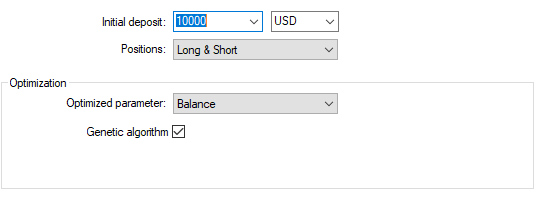
      ¿Estás utilizando el "algoritmo genético"?
      Are you using the "Genetic algorithm"?

      ¿Qué tipo de modelo de velas estás usando: Precios de apertura, cada tick, etc.?
      Which model are you using for the optimization?

      Puedo decir que los EA creados con fxDreema optimizan más rápidos que con otros builders.
      I can say that the EAs built in fxDreema optmizes faster than the EAs built with other builders.

      posted in Questions & Answers
      J
      josecortesllobat
    • RE: Trader

      Hi @Juan-Manuel-Quiñonero

      You can use a combination of two blocks
      Puedes usar una combinación de dos bloques

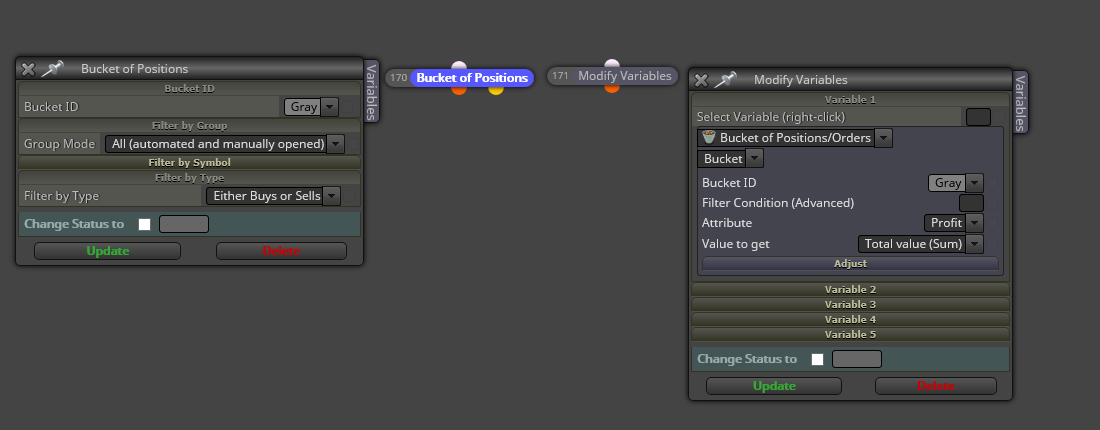
      0_1528904039813_00502c8e-a5d3-4b5f-811b-ba1b5db03952-image.png

      "Bucket of Positions" is for selecting which trades you want to choose and use "Modify Variables" block to store the Profit value. Then, you will set that variable in the "Comment" block to show the number in the chart as @isp00rt suggested.

      Con el bloque "Bucket of Positions" puedes seleccionar los trades y con el bloque "Modify Variables" guardas el beneficio en una variable. Luego utiliza el bloque "Comment" con la variable establecida para mostrarla en pantalla.

      posted in Questions & Answers
      J
      josecortesllobat
    • 1
    • 2
    • 17
    • 18
    • 19
    • 20
    • 21
    • 25
    • 26
    • 19 / 26