In here: https://fxdreema.com/shared/csrakExfe
Is how to work out if ZigZag, is on the way up or down, without having to use custom code.

In here: https://fxdreema.com/shared/csrakExfe
Is how to work out if ZigZag, is on the way up or down, without having to use custom code.
Re: ATR value to Pips - Tutorial
Have just been looking at using ATR values for stop loss after using the above topic for information, I have worked out how to accomplish saving ATR pips into a variable for all broker symbols, the following link contains all but it is set up for a broker that has 5 zeros after the decimal for most forex pairs.
Hope people find this useful.
Recently I have seen many people asking how to have the EA to remember the values that were used before.
This link will show how to achieve this, this is for constants, but a variable can be stored in the same way, and MT5 is the same:
might not work as needed, see below
https://fxdreema.com/shared/tnu6XI6od
I had a thought that in a crash this might not work, so I added variables and set them to amend oninit
@l-andorrà Thank you, this loop is very important to me, it will allow the EA to confirm whether pair is in a place of continuation of structure or needs break of structure, confirm whether the fibo lines up with entrance candle and so the TP is in the correct place.
I take it there is no chance of fxdreema inserting another block for loop with ID?
If I knew how to code I could probably create, I cant, I have someone that can create custom indicators so could probably handle this but he has no idea of how to start.
Have been trying to print arrows using Heiken Ashi, couldn't get to work correctly, one off the values is different to the data window value, in this project I have used iCustom to get it to work: https://fxdreema.com/shared/Mnapg7Mje
@6ixpappi Use this in MT4 or MT5, it works on all assets. https://fxdreema.com/shared/bUCD0mdBb
@l-andorrà Although this is a good question when time frames are selected using the enum method the EA can optimise all, I have never used the number method except for start/finish time but if you use this as custom code I think it would work:
if((Ma_Method = 1) {Value = "MODE_SMA";}
if((Ma_Method = 2) {Value = "MODE_SMMA";}
if((Ma_Method = 3) {Value = "MODE_EMA";}
if((Ma_Method = 4) {Value = "MODE_LWMA";}
Linked below is button projects that don't use custom code, unfortunately edit fields don't work on MT5 back test, the buttons do and all works on demo/live.
There are other buttons that do nothing in this project but, they are there so a true/false bool condition can be put in a standard buy/sell tree, to start/stop trading from pressing a button.
MT4: MT4 PROJECT
MT5 (edit fields don't work on back test): MT5 PROJECT
I do agree with this, times are constantly changing so FX should move with them. I will also add this:
Custom Indicator Integration: (This can be done already)
Strategy Optimizer: (I would say MetaTrader already does this)
Backtesting Improvements: (I would say MetaTrader already does this/should worry about this)
User-Friendly Interface: (This is a personal preference, the more you use FX the more you know it)
Advanced Money Management: (A lot is already here, but improvements would help)
Multiple Timeframe Analysis: (I would say MetaTrader already does this/should worry about this)
Improved Documentation: (Yes this would help, but has always been like this)
Custom Alerts: (This can already be done)
Debugging Tools: (More information could be good when things are wrong, but the more you use the less this is necessary)
Community Sharing: Easier ways to share and collaborate on projects within the user community. (The community does share (more could be better) but people don't always want to read and just want solutions provided)
Better Mobile Compatibility: (This has more to do with MetaTrader, anything done on PC can be watched on mobile)
Integration with Other Platforms: Support for platforms beyond MT4 and MT5. (This would mean a completely different platform/options to choose type, which might be good but distracts from MetaTrader)
Template System: A more flexible template system for quickly applying common strategies. (this would be good)
Visual Enhancements: Requests for improved graphical elements and node organization. (Not sure what improvements you think would be good)
Conditional Blocks: More versatile conditional logic blocks. (Current is solely logic, but other options inside would be handy)
Licensing Options: More flexible licensing and subscription options. (Don't know but if people need this but it would be good)
Performance Metrics: Detailed performance metrics for strategies. (This site is not here to give people strategies, it is here so people can use their own)
Grid and Martingale Systems: More advanced options for grid and Martingale trading systems. (Martingale is a bad idea, other options would help but they can be created using current blocks)
API Access: API access for more advanced users. (this can be done, especially with things like emails, it would be good for other platforms)
Improved Export Options: Enhanced options for exporting projects to different formats. (again though this is for MetaTrader)
User Support: Better and more responsive customer support. (This would be good)
Platform Stability: General improvements to platform stability and reliability. (I think this is stable, but as above quick response times would be good)
Community Plugins: Ability for users to create and share plugins. (what plugins?)
Advanced Charting: More advanced charting tools and features. (not sure what you mean)
Trade Copying: Tools for copying trades from one account to another. (this could be good but is a lot of work and this software is available elsewhere)
Scalping Tools: Specialized tools for scalping strategies. (don't know what you mean, scalping strategies can be created)
News and Events Integration: Integrating economic news and events into trading strategies. (this would be good, single blocks that can be added to avoid news)
Data Import/Export: Easier import/export of historical data. (this can be done already, is how you collect the data)
Enhanced Strategy Testing: More options and parameters for strategy testing. (this is a MetaTrader enhancement)
Multilingual Support: Full support for multiple languages within the platform. (I don't need this, but if others do it would be good)
The following links are how to create a candle countdown timer, MT4 & MT5, will display next to the current candle, and then switch to seconds in the last minute. All done on tick.
I have now changed the links to a, slightly slimed down better working version... MT4 & MT5
@MT4Nutzer Just add the seconds to the hour and minutes, 00:00:00
In this link is how to take hour and minute constants, add leading 0's and compile into a string so testing optimisation can loop through different times.
MT4 link: https://fxdreema.com/shared/UI9CUeHEc
Lines on MT5 backtest can't be dragged like MT4, so TP & SL cannot be moved. By creating buttons you can step the line up or down, then click a button to modify the stop. This project will show you how to achieve this: https://fxdreema.com/shared/27A7ZxmA
I was thinking how to get the current ZigZag direction, and I thought if the value is checked every tick then the reaction time would be the quickest it can be. So I worked out how to achieve this without any custom code.
The following project is how I've managed it:
This tutorial is how to close all trades at once (this only works on MT5).
1st click on custom, then click on create custom blocks to create a custom block.
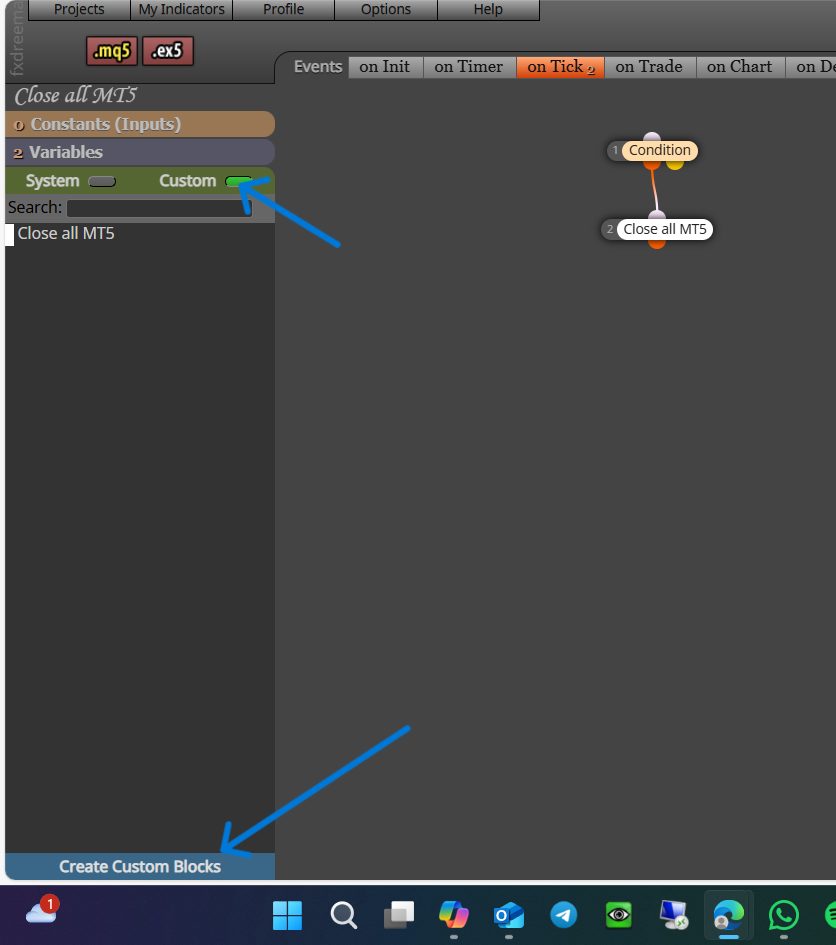
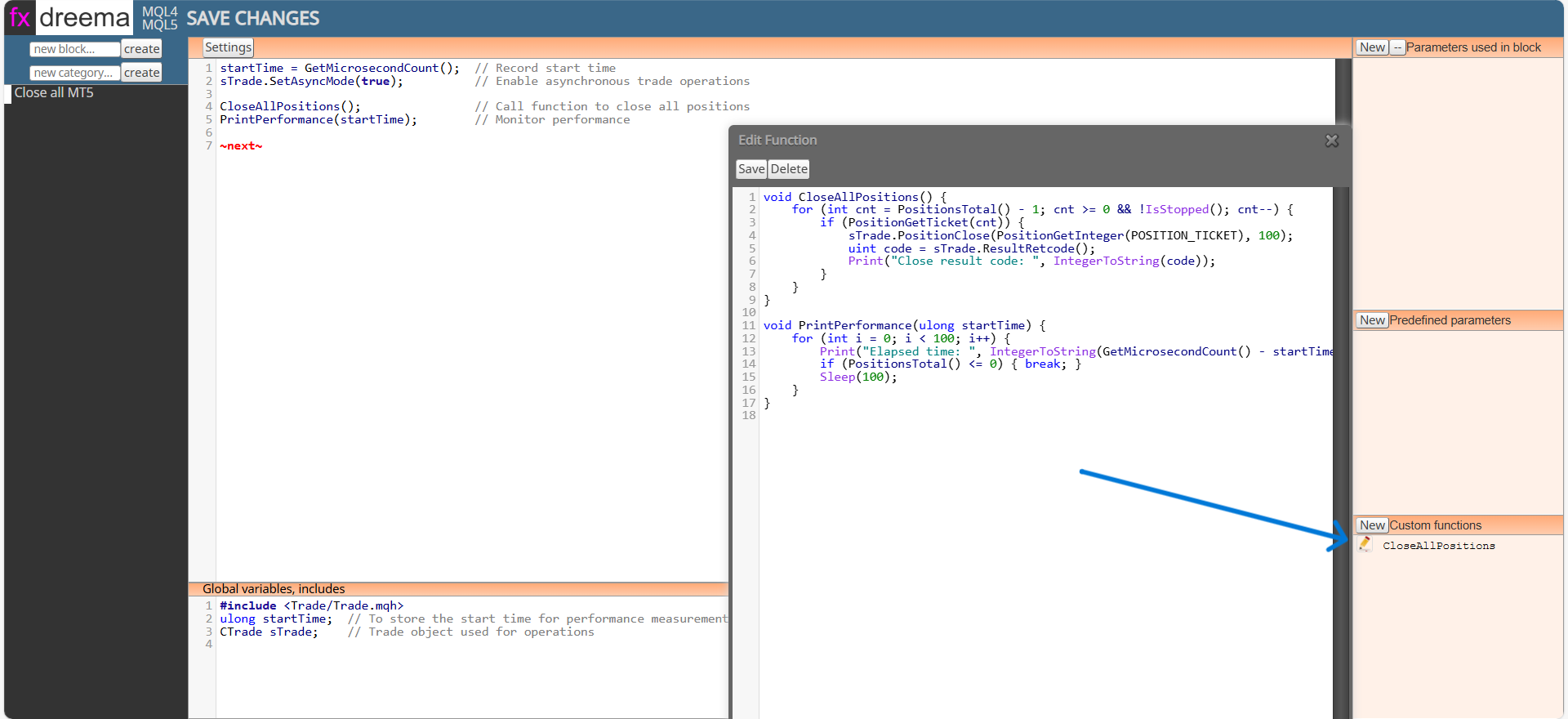
This code is for the first section. This section is classed as on tick because the block is to be used in the on tick tab, it ends with a ~next~ to activate the next connected block:
startTime = GetMicrosecondCount(); // Record start time
sTrade.SetAsyncMode(true); // Enable asynchronous trade operations
CloseAllPositions(); // Call function to close all positions
PrintPerformance(startTime); // Monitor performance
~next~
This code is for the Global variables, includes section:
#include <Trade/Trade.mqh>
ulong startTime; // To store the start time for performance measurement
CTrade sTrade; // Trade object used for operations
This code is for the custom functions section, when added the function will be named from the first line:
void CloseAllPositions() {
for (int cnt = PositionsTotal() - 1; cnt >= 0 && !IsStopped(); cnt--) {
if (PositionGetTicket(cnt)) {
sTrade.PositionClose(PositionGetInteger(POSITION_TICKET), 100);
uint code = sTrade.ResultRetcode();
Print("Close result code: ", IntegerToString(code));
}
}
}
void PrintPerformance(ulong startTime) {
for (int i = 0; i < 100; i++) {
Print("Elapsed time: ", IntegerToString(GetMicrosecondCount() - startTime), " microseconds. Open positions: ", IntegerToString(PositionsTotal()));
if (PositionsTotal() <= 0) { break; }
Sleep(100);
}
}
@ontradingx He is talking about the highest or lowest open or close price:
@zhahz The other examples work but, I prefer to use the loop in this link: link text
This will reset to 0 whenever the condition is false.
Hope this helps
I keep seeing people asking about how to use Fibonacci, although this is quite specific to someone's requirements, I will add an MQL4 shared link on how I use it (MT5 is the same). This moves high/low to a new top and bottom in trend, then moves as price moves while constantly moving Fibonacci to match.
I hope this helps people.
There are useless brokers, there are people who want to make money from teaching, rather than trading, and there are profitable traders, nearly every penny you lose goes into someone else's pocket, and the broker makes nearly nothing.
@alphaomega Ill reply for tipsy, although the names used shouldn't make a difference, they quite often will and you will get undesirable results, this can also happen if you name a comment the same as a variable/constant, normally takes quite a few before this happens, so getting an unexpected result is not what you would expect.