fxDreema

    • Register
    • Login
    • Search
    • Back to the main page
    • Categories
    • Recent
    • Tags
    • Popular
    • Search
    1. Home
    2. jstap
    3. Posts
    • Profile
    • Following 2
    • Followers 222
    • Topics 37
    • Posts 9382
    • Best 1086
    • Controversial 23
    • Groups 0

    Posts made by jstap

    • RE: Pyramiding/Stacking Trades anyone done this on FXDreema?

      Add a shared link of what you have done, you can use the last trade SL in a loop to set the new trade SL.

      posted in Questions & Answers
      jstap
      jstap
    • RE: how to have EXACT opening price with pending order???s

      You can't, this is just slippage but a different broker might be less

      posted in Questions & Answers
      jstap
      jstap
    • RE: How to set dropdowns for inputs

      The enum value has to be at the top of the constants list.

      posted in Questions & Answers
      jstap
      jstap
    • RE: Candle

      There are yellow blocks called bull candle and bear candle, use these to achieve this.

      posted in Questions & Answers
      jstap
      jstap
    • RE: How to set dropdowns for inputs

      You will see how to achieve in here: https://fxdreema.com/shared/NTqgifSme

      posted in Questions & Answers
      jstap
      jstap
    • RE: Pyramiding/Stacking Trades anyone done this on FXDreema?

      Yes but you need to give more information as to what you are trying to achieve

      posted in Questions & Answers
      jstap
      jstap
    • RE: Can an executed order's magic number be used for recovery after an EA crashes?

      Yes, you will need to create a separate variable for each chart, then use something like a condition to decide which variable to check and change.

      posted in Questions & Answers
      jstap
      jstap
    • RE: close and change variable

      All I can say is this is what I do and it works for me, try recreating the project from scratch, add a shared link instead of pictures, this way everything can be look at

      posted in Questions & Answers
      jstap
      jstap
    • RE: close and change variable

      Undeclared identifier means you haven't created the variable first, go onto the blue variables tab in the top left, and add all names

      posted in Questions & Answers
      jstap
      jstap
    • RE: Stop all Trading for the day

      Test and see what's working, add a shared link to look at and explain any problems.

      posted in Questions & Answers
      jstap
      jstap
    • RE: EA NOT WORKING ON REAL OR DEMO AS IT WORKS ON TESTER

      Never had this, add a shared link to see how it's set up.

      posted in Bug Reports
      jstap
      jstap
    • RE: HELLO BEEN HAVING A PROBLEM WITH THE BUY PENDING ON MT5

      Project screen-projects-create a shared link-open in web page-copy address bar and past here

      posted in Bug Reports
      jstap
      jstap
    • RE: EA NOT WORKING ON REAL OR DEMO AS IT WORKS ON TESTER

      I mean back test settings, which may not work in a live environment, depending on broker settings.

      posted in Bug Reports
      jstap
      jstap
    • RE: HELLO BEEN HAVING A PROBLEM WITH THE BUY PENDING ON MT5

      Ok, but what are you struggling to get working? If you add a shared link then problems can be seen.

      posted in Bug Reports
      jstap
      jstap
    • RE: Stop all Trading for the day

      You can use flags, you can turn blocks on/off, or you can put check blocks above buy/sell. But you need to make sure block IDs match with what you are doing:
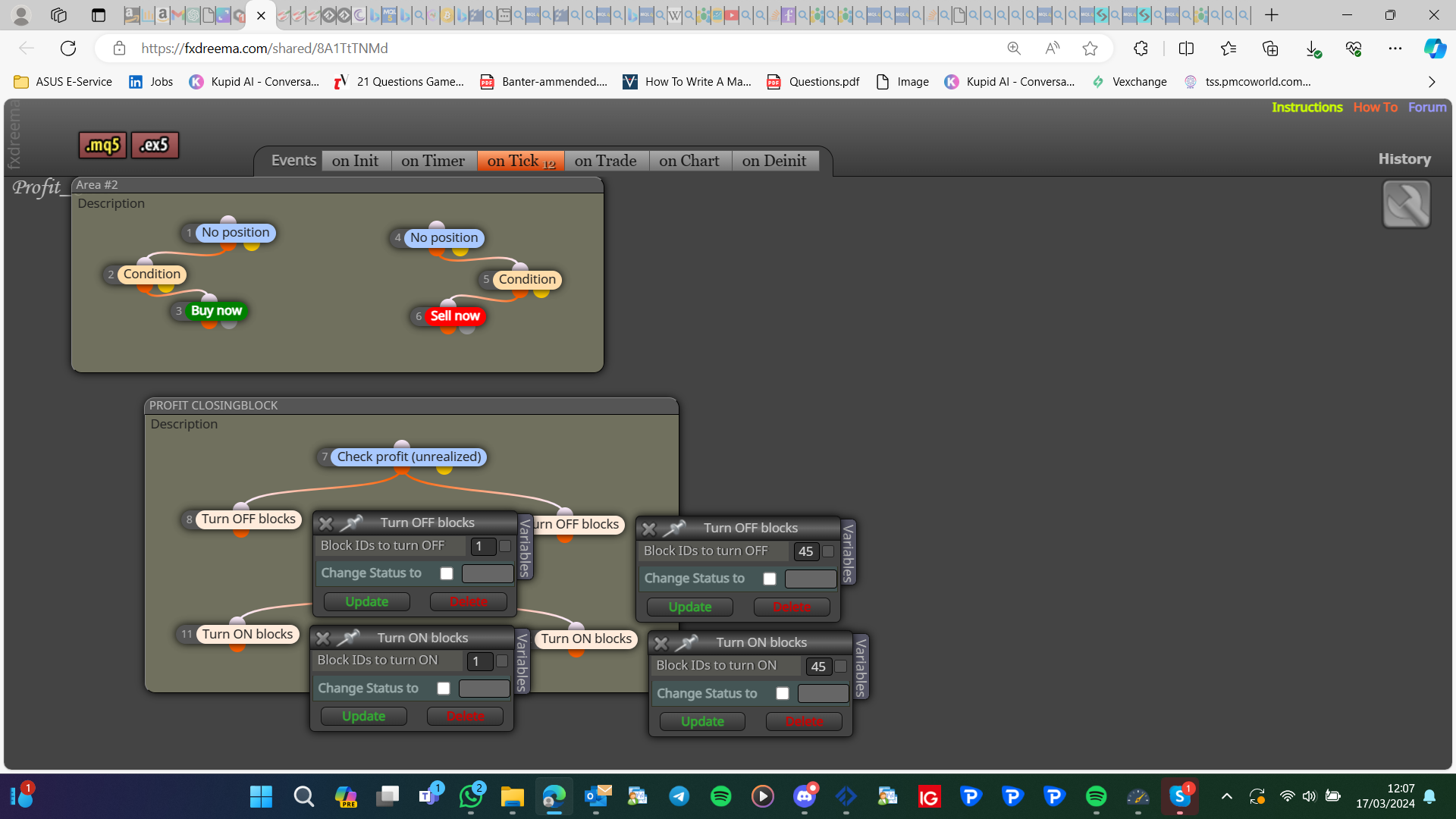
      image.png

      posted in Questions & Answers
      jstap
      jstap
    • RE: indicator window

      Yes if you can get the indicator values to work with, all values would need to use the same chart values, in other words, you cannot compare the main chart value vs the indicator chart value, you can though use something happening on one chart, and something happening on another.

      posted in Questions & Answers
      jstap
      jstap
    • RE: Can an executed order's magic number be used for recovery after an EA crashes?

      Global variables (terminal variables) are values saved in a file in the terminal folder, push fn f3 to see a window of variables used in your platform. In output you have a yellow block that will save this from the name you chose, you can then get this value using most blocks, use in the same way as normal variables, but the backtest will change like in live, so you may need to use an if testing block to limit when it can be changed

      posted in Questions & Answers
      jstap
      jstap
    • RE: Can an executed order's magic number be used for recovery after an EA crashes?

      Save things in a terminal variable (global variable), this way any saved values stay is terminal is closed

      posted in Questions & Answers
      jstap
      jstap
    • RE: EA NOT WORKING ON REAL OR DEMO AS IT WORKS ON TESTER

      Not without a share link, but this is common due to settings

      posted in Bug Reports
      jstap
      jstap
    • RE: HAVING PROBLEM WITH CHECK DISTANCE MT5

      Without a shared link it is impossible to say, this block is designed to work with trade prices, you may be better off using a condition, price 1 is < or > price 2 adjusted to the distance you need

      posted in Bug Reports
      jstap
      jstap
    • 1
    • 2
    • 190
    • 191
    • 192
    • 193
    • 194
    • 469
    • 470
    • 192 / 470