@burakthesecond Condition block, indicater (using correct buffer) X> number buy, X< number sell.

@burakthesecond Condition block, indicater (using correct buffer) X> number buy, X< number sell.
@nightrain743 You get the source code by pressing the MQ button, as for uploading I don't know, not sure if anyone else on here will either.
@burakthesecond You can get that indicator for MT4/5 from google, to covert means a coder.
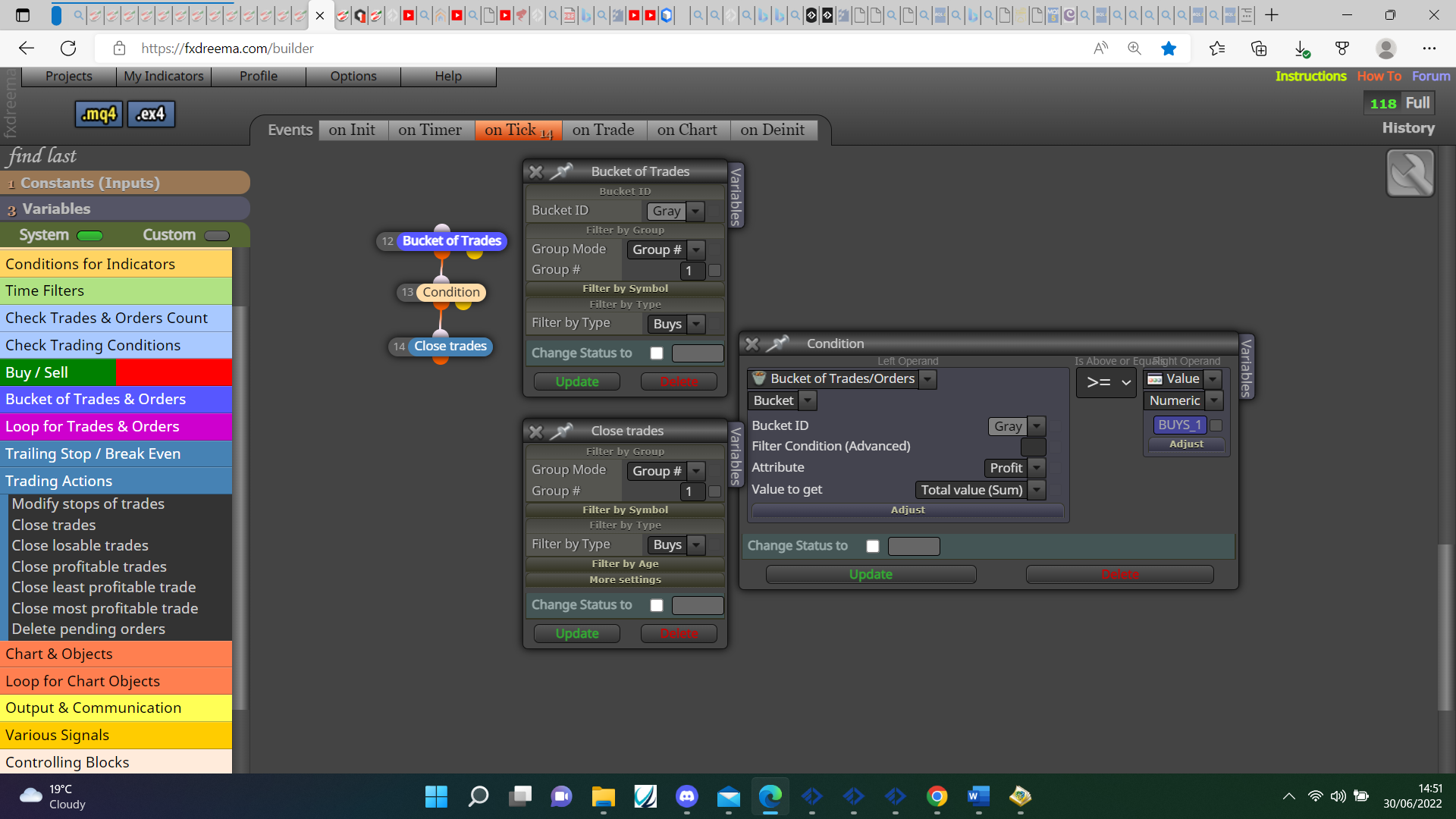
@anon Use blue bucket of trades, save result into a variable, then check with a condition and close using group number.
@cashflows Am pretty sure you can't, can use EX4 here though.
@nashwan Looking for last buffer can be done, have tried to get all but failed previously, try this but change the indicator and buffers, is set to ID1 encase indicator repaints on ID0.:https://fxdreema.com/shared/VpxC7alkc
@bmarchand Try this then but to me was always easier to drag already created lines, start this project and add a shared link with any problems, help can then be given.
@ric60 I do not know, no position is MT5, no trade is MT4, I only get the correct type depending on whether creating for MT4 or 5.
@jim67 For a start if you want this to work on manual trades you need to set group to all, you don't need the pass above pink blocks, how are your SL's set? If set by pips you could use this in the pips away block, when a trade is closed you can use the purple trade closed by blocks connected to a buy or sell block on the on trade tab.
@bongan89 Ok is a lot of work to add fibs, but when that's done doing little things is quite simple.
@saurav007s Go to projects>click projects>create shared link>click link>copy web link that opens and past here.
@bongan89 This you tube video will show how to use the fib lines, once you have this working post the latest project and will see how to achieve the pull back: https://www.youtube.com/watch?v=Vl70r7j1x_0
@trader-1978 Have tested this and when no connection to server returns blank, if connected returns the name of server, you should be able to add blocks under to send notifications you want: https://fxdreema.com/shared/N5o3GLRxe
@bongan89 on your project screen click projects, create shared project link, click link, copy web link that opens and past here.
@baxishparmar I don't think it can.
@bongan89 This can be used but put the shared project here, saves having to download and import.
@bmarchand Personally I would have the EA create lines that are named, you then drag this to the point you like, this saves having to name each line manually.
@nicholas86 I don't know if it is possible.
@bongan89 Put the indicator and a shared project here, what's happening can then be assessed.