@zedeai2 This will show how to do the basic.
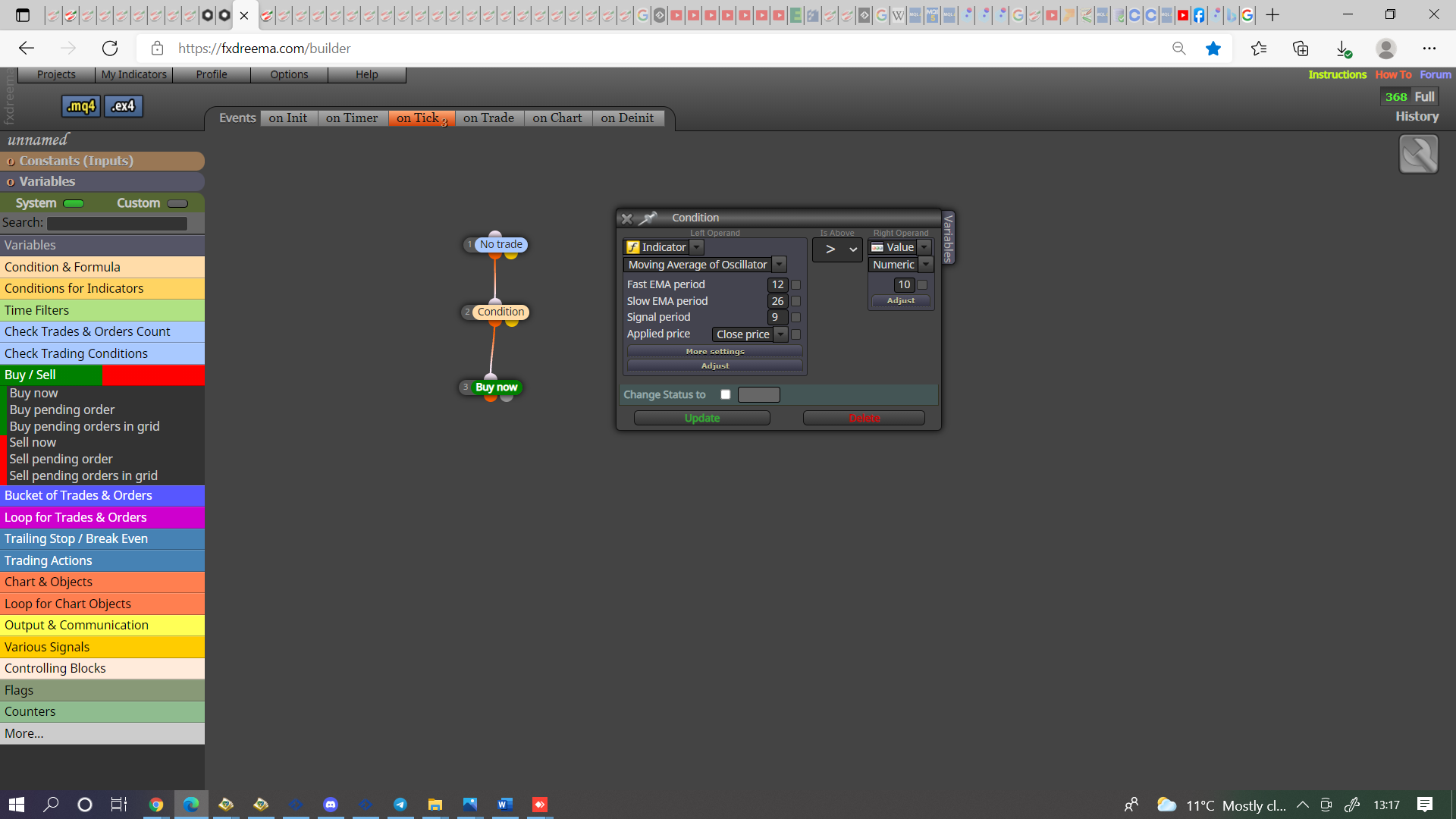

@zedeai2 This will show how to do the basic.
@slimmz he fast MA (low number) is high when crossed above, so for a buy use what I put in the post above to only open a trade once your desired distance is met. Put this into a project, if you're still having trouble, put a shared link here (get this from your project tab) and problems can be assessed.
@haikel You get the shared link from your projects tab, the crass width is number of candle of candle for the cross to happen, I've never used other than 1, in more settings you get candle ID, 0=current, 1=1 previous and so on, this will ensure the cross happens on preferred candle.
@haikel Unsure what you are asking but if yoy put a shared link here then problems can be assessed, if you want to confirm a cross use candle ID 1.
@zedeai2 In this case it's simple, condition block, left operand OsMa, = right operand value 10, connect this to your buy/sell block with a no trade block above.
@zedeai2 What @l-andorrà is saying is OsMa is a custom indicator? if so how to read these values will determine how EA is created
@talalkhan I have showed you how to do this, set an variable for when tour cinditions are correct, use a condition to enter the trade in tree.
@joe_fx Have made a few adjustments in HERE check what I have done with group numbers, you should see all you need.
@slimmz If your indicator is s MA's then I assume the solid line is the slow a and the bars represent the fast, when these cross the bars change colour? If so MA cross will give you the colour change, when the gap is big enough your conditions to enter the trade have been met?
@xlestergg For each pair you need to set up a variable condition to add on each trade, then check the number before buying/selling and reset this number when your conditions are met.
@xlestergg What I mean by shared link is your fx project link so what has been done and what isn't right can be assessed. If the condition is met by the EA that is on 1 chart then will work regardless of asset (providing trades are placed from the 1), if more than 1 EA and on different chart you would need to use terminal variables (global variables), this will mark the platform so different EA's can read.
@musa-5 Yes, using pips sorts the difference in assets
@xlestergg This depends on the conditions set, if you put a shared link here then this can be answered.
@musa-5 This depends on what you are adjusting, if you add 5 when you want to add 5 pips your adding a lot, most forex pairs 5 pips is 0.0005.
@piptheripper I think you can get slippage on MT5 strategy tester but this depends on how the settings are.
@talalkhan It's ok, you are welcome.
@talalkhan This works for me is probably the condition, if it's set to =< it will place another trade so go over the number, if is set to < then to place a trade the number of trades has to be 1 under the set number, so you get the correct maximum set.
@talalkhan In HERE is a simple RSI above/below EA that puts the answer into a comment, replace the RSI condition with your indicator, so you see what it takes to get the trade conditions you need, then add your other conditions.
@talalkhan What you need to do is start with one condition and variable, once this is working add the other conditions one at a time until all is working. This is how me and many other people have learnt to use.
@talalkhan You set the variable true/false when needed to allow/stop trade.