fxDreema

    • Register
    • Login
    • Search
    • Back to the main page
    • Categories
    • Recent
    • Tags
    • Popular
    • Search
    1. Home
    2. QuantEngineer
    3. Best
    Q
    • Profile
    • Following 1
    • Followers 22
    • Topics 17
    • Posts 79
    • Best 17
    • Controversial 1
    • Groups 0

    Best posts made by QuantEngineer

    • Finally, News Filter for MT5 in 1 easy to use Block !!

      Hello Fellow FXDreema users!! Because I Love FX Dreema, I have decided to build a News Filter that can be entirely coded into 1 block that can be compiled directly in the FX Dreema Cloud System !
      Enjoy !

      The goal of this tutorial is to build 1 custom block that I call "isEventNear" and it will look like this, at the end:
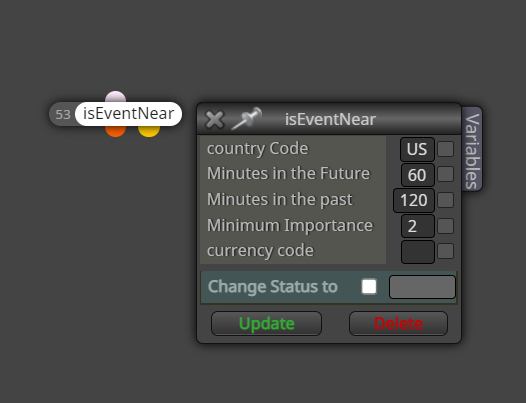
      0_1642472112231_49e21c25-e8f7-4ccb-809b-a9cbc7ded606-image.png

      Notice that this block has the 2 dots underneath, for true or false... meaning that if there is an important event near, then the next block to be processed will come from the orange dot, and if there isn't any event near, then the next block to be processed, will be coming from the yellow dot... it is the same concept as any other conditional block.
      By near, it means near in time... less than x minutes in the future, or less than y minutes in the past.
      Minimum importance stands for the importance of the events to trigger this block... refer to the original MQL5 manual, where it explains the importance of the events, on this link, where the possible importance vary from 0 to 3, being None, Low, Moderate, High. https://www.mql5.com/en/docs/constants/structures/mqlcalendar#enum_calendar_event_importance

      Here is how I have built this block
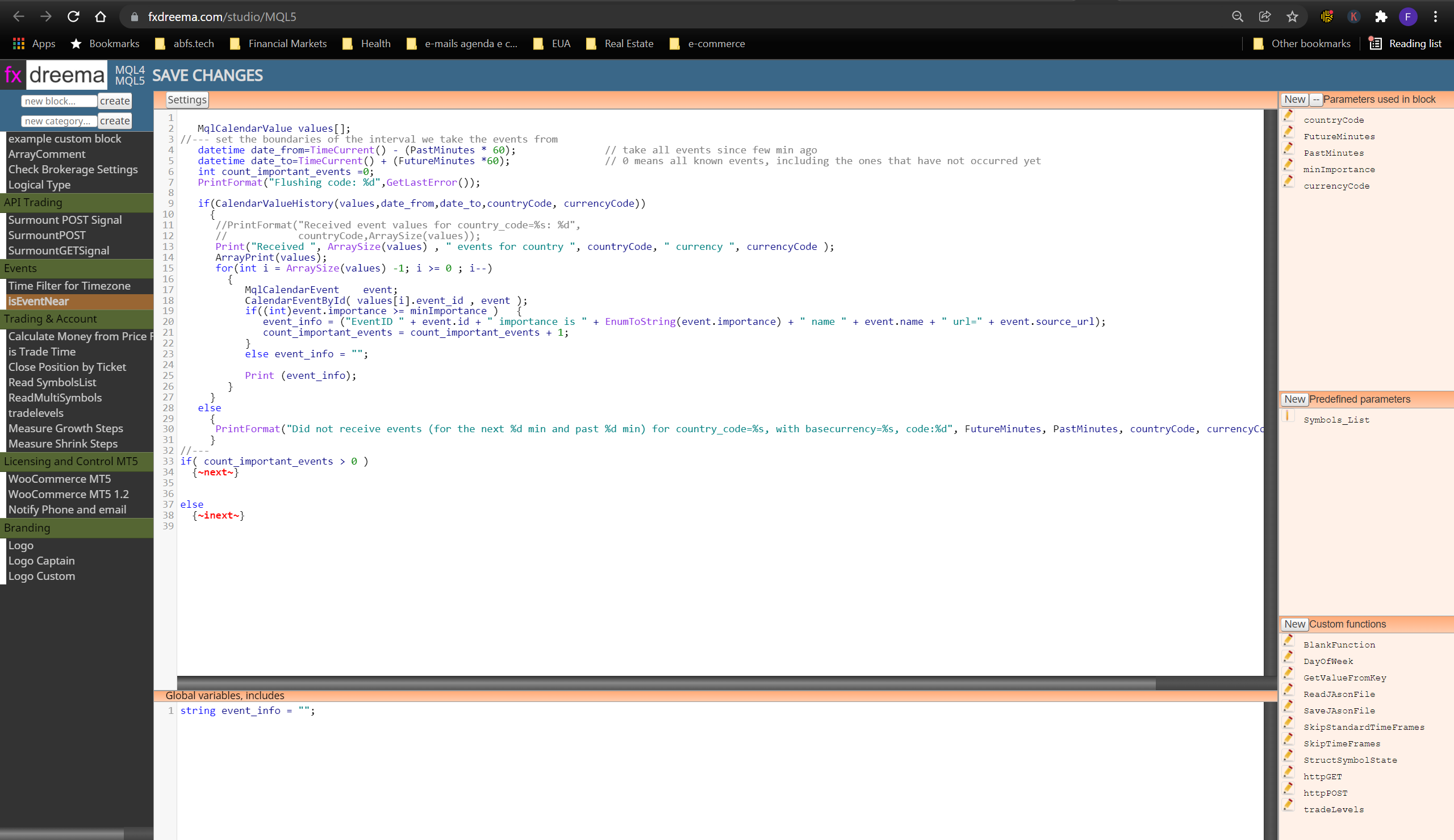
      0_1642472671374_d0ee5dd7-2439-4185-b580-02ea27cb5507-image.png
      Notice that I am using code in 3 key areas:

      1. The "main code area", where I have typed the main codes for the custom block.
      2. The "Global variables, includes" area
      3. The "parameters" area, where this block will receive parameters from the developers.

      That's it. pretty simple. the developer of @fxdreema has done a really GREAT JOB, by making the studio available for us !
      In case you still don't know how to use the studio, check out my previous tutorial on the basics of how to use FX Dreema Studio.
      I wish you all a very successful and happy 2022!
      posted in Tutorials by Users
      Q
      QuantEngineer
    • Tutorial - Create Custom Blocks with "FXDreema Studio"

      Hello Developers,

      This is a simplified tutorial on how to build Custom Blocks using "FX Dreema Studio", which is part of "FX Dreema"
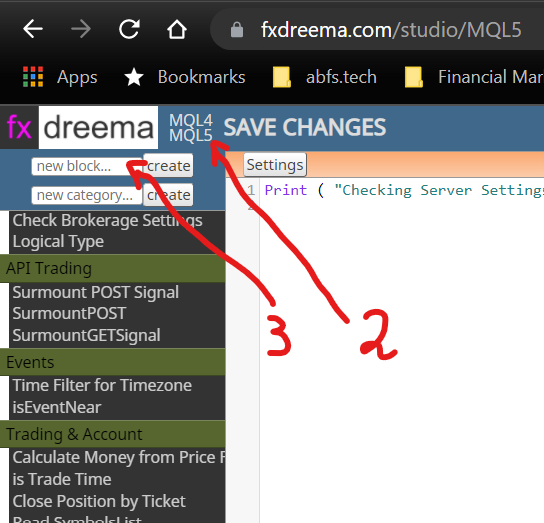
      Step 1 - Since The Studio works in a separate link, use your internet browser to navigate to https://fxdreema.com/studio/MQL5 .
      Step 2 - Choose the platform you are using, by clicking MQL4 or MQL5
      Step 3 - Name and Create your new Block
      0_1636215900357_76365e94-a589-4595-a4af-212be0277d68-image.png

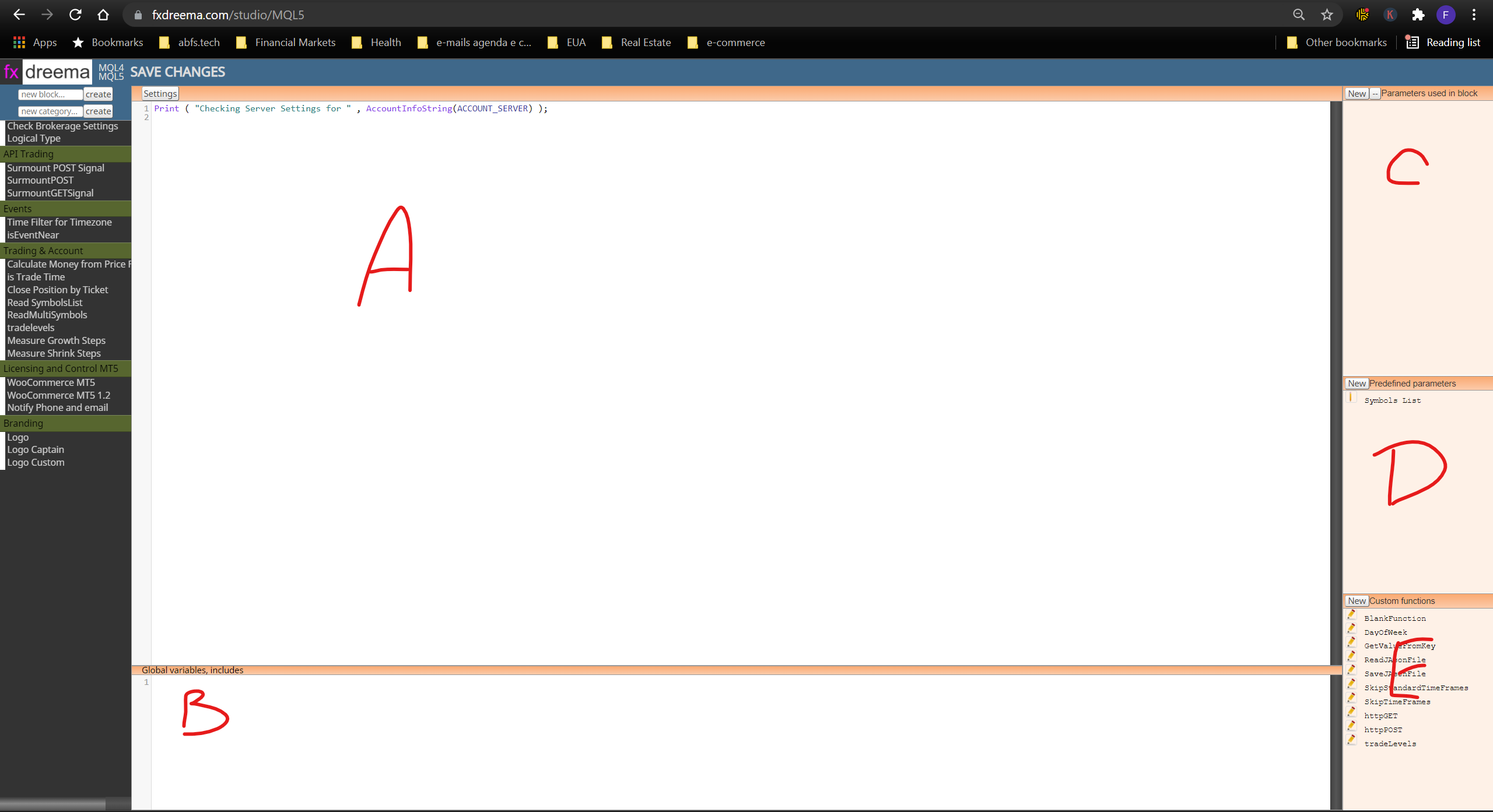
      Step 4 - Create your Block by writing your code on Region A, Put your Global Variables on Region B, Create Input Parameters for the Block on region c, Pre-defined parameters go in region D and Global Functions for all your custom blocks will go on region E.
      0_1636216071689_e11fb536-2e1d-4564-b94a-d53c087eefae-image.png

      Once you go through these basics, it is pretty straightforward.
      I hope you enjoy this intro tutorial, that will save time on getting your fingers moving.

      posted in Tutorials by Users
      Q
      QuantEngineer
    • Simple Custom Block to detect Hedging or Netting Accounts

      It is known to all developers that running the logic of the EA for netting accounts is usually different from hedging accounts, and sometimes, not even desirable to run on certain types of accounts.
      To resolve this, I have created the simplest custom block that will detect if the account being used is hedging or not. With this block, developers can even decide to terminate the EA, in case it is not running on the right type of account, or the developers can also choose other logical paths, depending on the type of account.

      0_1642701419332_d72f6a36-6d8c-48dd-85ca-994cd00bc399-image.png

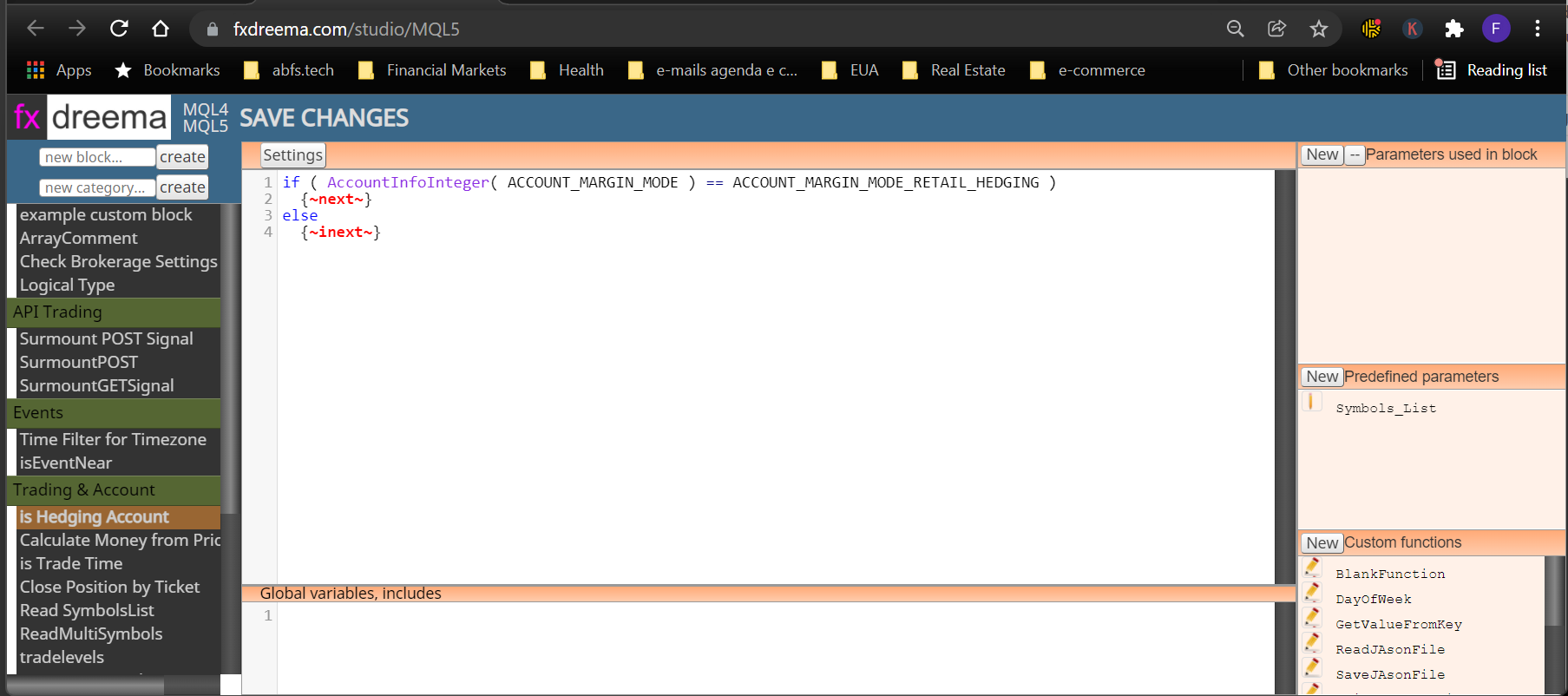
      In this simple 1 step tutorial, we will create a custom block that looks like the above image.

      0_1642701517729_a0650659-e7d2-42d7-a660-b495a419c254-image.png

      This Tutorial is ideal for someone just starting out on creating their own custom blocks, because it only uses 1 area of FX Dreema Studio. Just open up your FX Dreema Studio, create a new block and copy paste this code into the main area:

      if ( AccountInfoInteger( ACCOUNT_MARGIN_MODE ) == ACCOUNT_MARGIN_MODE_RETAIL_HEDGING )
      {~next~}
      else
      {~inext~}

      Once this is done, just click Save changes, and that's it.

      Your custom block will show up on the appropriate region of your FX Dreema Builder.

      Allright, this was the easiest tutorial on the Studio, about building useful blocks! Hope you all enjoy it!
      I wish you all the best!

      posted in Tutorials by Users
      Q
      QuantEngineer
    • RE: Finally, News Filter for MT5 in 1 easy to use Block !!

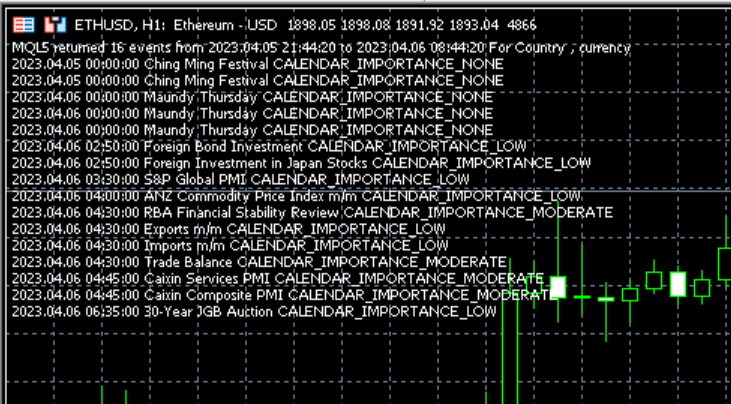
      And here is how the chart will look like, in case the verbose mode is set to true

      image.png

      posted in Tutorials by Users
      Q
      QuantEngineer
    • Issue with loading Custom Indicators from EX5 files resolved

      I was working with some custom indicators, without source codes today, and resolved the issue where the compiler doesn't compile correctly... Since I thought that someone else might have the same issue, I have decided to post it here.

      The issue: Loading data from Custom indicators without Source Codes, on blocks like this.
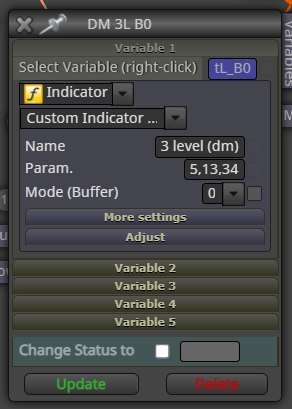
      0_1638565223732_46d7667e-f522-4bf1-99b6-566114030ac0-image.png

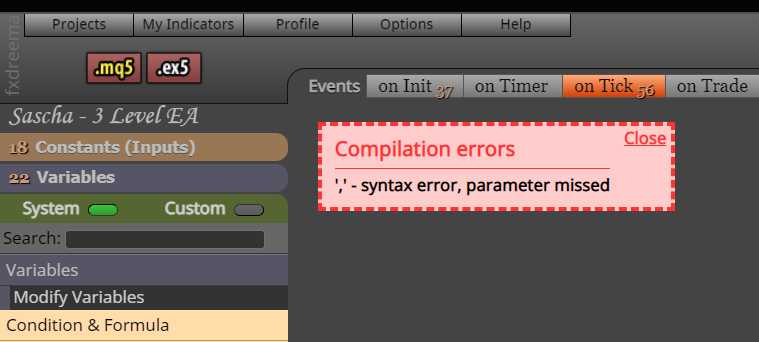
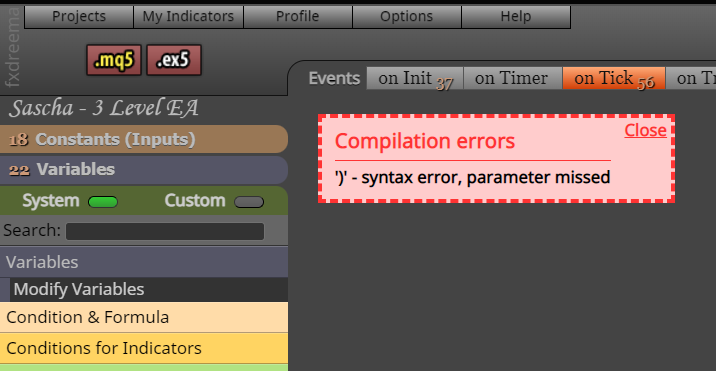
      This error will show up if no parameters are passed to the indicator:0_1638565344014_28eb3a8e-d1f3-456b-bd65-c5e4cfde7526-image.png

      This other error will show up in case you do pass some parameter.0_1638565387266_1a9f8dbf-216c-4514-8463-1d2a630cae9d-image.png

      The solution:
      Generate the mq5 file by clicking on the "mq5" button.
      Open up the file on Metatrader's IDE and remove the extra comma that is hanging there.

      Enjoy Custom indicators working in your algo.

      In case anyone else has an easier solution for this bug, please post.

      posted in Bug Reports
      Q
      QuantEngineer
    • RE: Tutorial - Create Custom Blocks with "FXDreema Studio"

      Yes, I have found the same error with enumerations... I think the text parser that fxdreema uses on custom blocks prior to compiling the code is not compatible with enumerations ... The only way I could get enumerations into FX Dreema without having to copy-paste every time a new compilation was needed, was to place the enumerations into a custom indicator and import the indicator into the fxdreema EA via "My Indicators-> Add Custom Indicator" and use the indicator anywhere in the decision trees... once the indicator is part of the fxdreema project, now you can use any of it's enumerations freely...

      posted in Tutorials by Users
      Q
      QuantEngineer
    • MT5 Optimizer not working with many FX Dreema EA - RESOLVED

      Many times the MT5 optimizer doesn't work with many FXDreema EAs, and that was very limiting to building professional-level trading strategies properly tested.

      I got to the bottom of this bug, and here is what is happening:
      There is a class used to close multiple trades called "MDL_CloseOpened" and this class has a main loop "while (finished == false)" , that keeps doing infinite attempts to close the positions that match the criteria...

      But some brokers have a data feed of prices (candlesticks) during hours when they do NOT allow trade... If the Close block runs during non-trade hours, then the loop will never end... and the backtest never completes... that is why the Optimizer gets stuck...

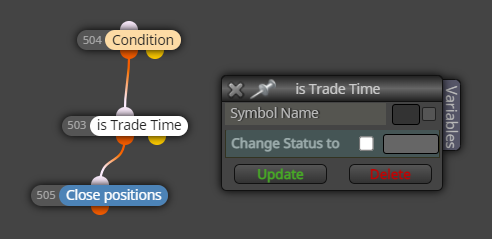
      To resolve this issue, we need to know if the broker allows trading before using the Close Block... (the blue Block...)
      The MQL5 native function to check on that is SymbolInfoSessionTrade() and can be found on the official documentation on this link:
      https://www.mql5.com/en/docs/marketinformation/symbolinfosessiontrade

      f12f60a4-8ed8-4e79-be51-7d01e360d43e-image.png

      I created this small block called "is Trade Time" to be placed before the Close All block, to prevent this infinite loop.

      Find the source code for FX Dreema Studio below... remember that you will need to create the parameter ttSymbolName (type string) on FX Dreema Studio. Enjoy the solution and happy week.

      //Create string Paramter ttSymbolName
      datetime SessionStart;
      datetime SessionEnd;
      
      datetime SessionTimeNow = StringToTime("1970.01.01 " + TimeToString(TimeTradeServer(), TIME_MINUTES));
      if (ttSymbolName=="") { 
      
      	ttSymbolName = (string)CurrentSymbol();  // Known Issue, function has to be called twice in a row, anyways, not working well, unless opening the chart in advance, for some reason.
      	ttSymbolName = (string)CurrentSymbol(); 
      }   
      //Print( "checking ttSymbolName=" , ttSymbolName , " Symbol=" , Symbol() , " CurrentSymbol()=" , (string)CurrentSymbol() , " Symbol()=" , Symbol() , ", _Symbol=", _Symbol );
      //Print( "checking ttSymbolName is " , ttSymbolName  , " CurrentSymbol()=" , (string)CurrentSymbol() , " Symbol()=" , Symbol()  , ", _Symbol=" , _Symbol );
      
      //Print("Current time is ", TimeToString(TimeTradeServer(), TIME_MINUTES), " SessionTimeNow=", TimeToString(SessionTimeNow));
      int SessionIDLoop = 0;
      bool isthissessionactive = false;
      
      while (SymbolInfoSessionTrade( ttSymbolName , DayOfWeek(TimeTradeServer()) , SessionIDLoop , SessionStart , SessionEnd  ) )
      {
      	//Print("while cycle #", SessionIDLoop, ", on symbol " , ttSymbolName , " on dayofWeek " , DayOfWeek(TimeTradeServer()), ", Now is ", TimeToString(SessionTimeNow, TIME_MINUTES), ", Starting at ", TimeToString(SessionStart, TIME_MINUTES), ", ending at ", TimeToString(SessionEnd, TIME_MINUTES) );
      if (SessionTimeNow>SessionStart && SessionTimeNow < SessionEnd )
      {	
      	isthissessionactive = true;
      	break;
      }	
      	
      	
      SessionIDLoop++;
      }


      if (isthissessionactive && TerminalInfoInteger(TERMINAL_TRADE_ALLOWED) && MQLInfoInteger(MQL_TRADE_ALLOWED)) {~next~} else {~inext~}
      
      posted in Bug Reports
      Q
      QuantEngineer
    • RE: Finally, News Filter for MT5 in 1 easy to use Block !!

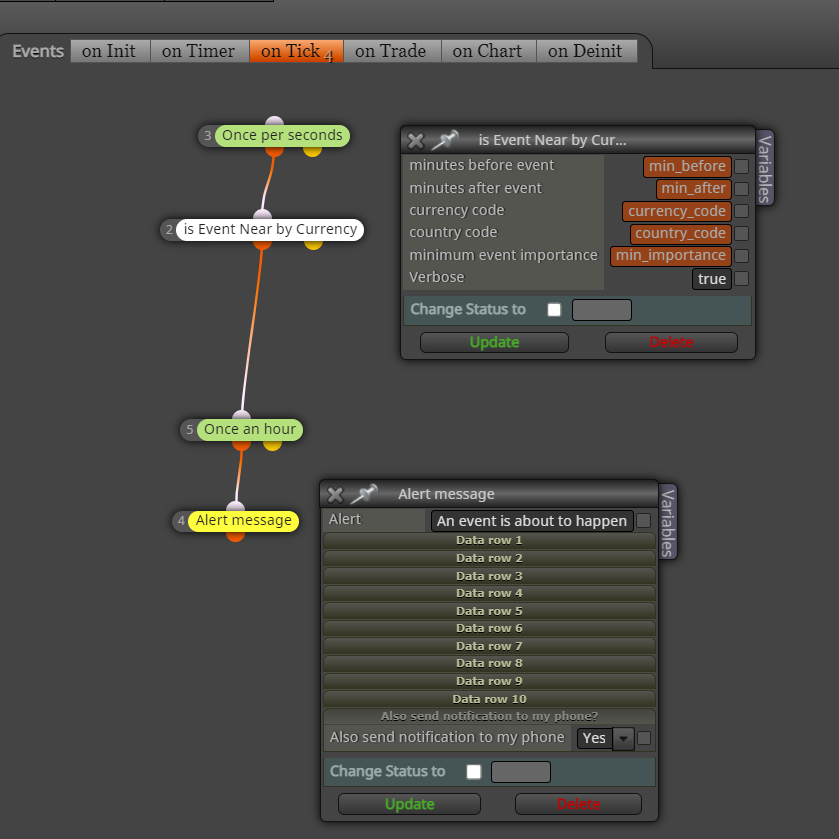
      Hello Developers, I am happy to announce that I have done some improvements to this code and now it also displays the events on the chart, for reference...

      Here is how the block looks like
      fbd1ea6f-6967-488f-a71a-1e412ce39968-image.png

      Enjoy the latest main code

      /*
      int minbeforeEvent = 60*24;
      int minAfterEvent = 60*24;
      string currency_code = "";
      string country_code=NULL;   //--- country code (ISO 3166-1 Alpha-2)
      ENUM_CALENDAR_EVENT_IMPORTANCE min_event_importance = CALENDAR_IMPORTANCE_HIGH;
      */   
      
      int FilteredEventsCount = 0;
      MqlCalendarValue values[];
      //--- set the boundaries of the interval we take the events from
      datetime date_from=TimeCurrent() - (60*minbeforeEvent);  
      datetime date_to=TimeCurrent() + (60*minAfterEvent);                // 0 means all known events, including the ones that have not occurred yet
      //Print(TimeToString(TimeCurrent(), TIME_DATE|TIME_SECONDS), " -> Searching from ", TimeToString(date_from, TIME_DATE|TIME_SECONDS), " to ", TimeToString(date_to,TIME_DATE|TIME_SECONDS));
      //--- request event history since the beginning to future time
      
      //if(verbose) Print("Begin Searching for events from " + TimeToString(date_from,TIME_DATE|TIME_SECONDS) + " to " + TimeToString(date_to,TIME_DATE|TIME_SECONDS) + " For Country " + country_code + ", currency " + currency_code );
      if(!CalendarValueHistory(values, date_from, 0, country_code, currency_code))
        {
         PrintFormat("Error! Failed to get events for country_code=(%s), currency=(%s)", country_code, currency_code);
         PrintFormat("Error code: %d", GetLastError());
      
        } else {
      	  //if(verbose) Print("Found some events");
           //PrintFormat("Received event values for country_code=(%s), currency=(%s) is (%d)", country_code, currency_code, ArraySize(values));
      		int total=ArraySize(values);
      		string commentString = "";
      		for(int i=0; i<total; i++)
      			  {
            //if(values[i].impact_type < )
               MqlCalendarEvent event;
               ulong event_id=values[i].event_id;
               if(CalendarEventById(event_id,event))
                 {
                 if(((ENUM_CALENDAR_EVENT_IMPORTANCE)event.importance >= min_event_importance )
                     && (values[i].time <= date_to)
                     )
                    {
                     FilteredEventsCount++;
      					  
                     commentString = commentString + TimeToString(values[i].time,TIME_DATE|TIME_SECONDS) + " " + event.name + " " + EnumToString((ENUM_CALENDAR_EVENT_IMPORTANCE)event.importance ) + "\n";
                    }
                 }
           }
         commentString = "MQL5 returned " + FilteredEventsCount + " events from " + TimeToString(date_from,TIME_DATE|TIME_SECONDS) + " to " + TimeToString(date_to,TIME_DATE|TIME_SECONDS) + " For Country " + country_code + ", currency " + currency_code  + "\n" + commentString;
      	if(verbose) Comment(commentString);  
      }
      if( FilteredEventsCount > 0 )
        {~next~}
      else 
        {~inext~}
      
      posted in Tutorials by Users
      Q
      QuantEngineer
    • Easy to use MT5 indicator for Equity and Balance over time!

      Hello Everyone, I programmed a small but very effective indicator to track and display the Equity and Balance of MT5 accounts, it can be added to any MT5 EA, just to display Equity and Balance changing dynamically over time as it is trading on the back tester, to make our visualization a lot easier !

      b6f9f6bc-fb10-44d3-b0de-bae7bb0c8aed-image.png

      And here is the source code to be compiled on the native MT5 IDE.

      Have a good weekend and Enjoy !

      //+------------------------------------------------------------------+
      //|                                Indicator: Equity and Balance.mq5 |
      //|                                       Created by Quant Engineer  |
      //|                                            https://www.abfs.tech |
      //+------------------------------------------------------------------+
      #property copyright "ABFS Inc"
      #property link      "https://www.abfs.tech"
      #property version   "1.00"
      #property description ""
      
      //--- indicator settings
      #property indicator_separate_window
      #property indicator_buffers 2
      #property indicator_plots 2
      
      #property indicator_type1 DRAW_LINE
      #property indicator_style1 STYLE_SOLID
      #property indicator_width1 1
      #property indicator_color1 0x00FF00
      #property indicator_label1 "Equity"
      
      #property indicator_type2 DRAW_LINE
      #property indicator_style2 STYLE_SOLID
      #property indicator_width2 1
      #property indicator_color2 0xFFAA00
      #property indicator_label2 "Balance"
      
      //--- indicator buffers
      double Buffer1[];
      double Buffer2[];
      
      
      //--- Custom functions ----------------------------------------------- 
      
      double AccountBalance()
      {return AccountInfoDouble(ACCOUNT_BALANCE);}
      double AccountEquity()
      {return AccountInfoDouble(ACCOUNT_EQUITY);}
      
      //+------------------------------------------------------------------+
      //| Custom indicator initialization function                         |
      //+------------------------------------------------------------------+
      int OnInit()
        {   
         SetIndexBuffer(0, Buffer1);
         PlotIndexSetDouble(0, PLOT_EMPTY_VALUE, EMPTY_VALUE);
         SetIndexBuffer(1, Buffer2);
         PlotIndexSetDouble(1, PLOT_EMPTY_VALUE, EMPTY_VALUE);
         return(INIT_SUCCEEDED);
        }
      
      //+------------------------------------------------------------------+
      //| Custom indicator iteration function                              |
      //+------------------------------------------------------------------+
      int OnCalculate(const int rates_total,
                      const int prev_calculated,
                      const datetime& time[],
                      const double& open[],
                      const double& high[],
                      const double& low[],
                      const double& close[],
                      const long& tick_volume[],
                      const long& volume[],
                      const int& spread[])
        {
         int limit = rates_total - prev_calculated;
         //--- counting from 0 to rates_total
         ArraySetAsSeries(Buffer1, true);
         ArraySetAsSeries(Buffer2, true);
         //--- initial zero
         if(prev_calculated < 1)
           {
            ArrayInitialize(Buffer1, EMPTY_VALUE);
            ArrayInitialize(Buffer2, EMPTY_VALUE);
           }
         else
            limit++;
         
         //--- main loop
         for(int i = limit-1; i >= 0; i--)
           {
            if (i >= MathMin(5000-1, rates_total-1-50)) continue; //omit some old rates to prevent "Array out of range" or slow calculation   
            
            //Indicator Buffer 1
            if(true //no conditions!
            )
              {
               Buffer1[i] = AccountEquity(); //Set indicator value at fixed value
              }
            else
              {
               Buffer1[i] = EMPTY_VALUE;
              }
            //Indicator Buffer 2
            if(true //no conditions!
            )
              {
               Buffer2[i] = AccountBalance(); //Set indicator value at fixed value
              }
            else
              {
               Buffer2[i] = EMPTY_VALUE;
              }
           }
         return(rates_total);
        }
      //+------------------------------------------------------------------+
      
      posted in Tutorials by Users
      Q
      QuantEngineer
    • RE: Everybody interesting in creating Custom Blocks

      If FX Dreema could at least allow users to share custom blocks, that would be a HUGE help already !

      posted in Tutorials by Users
      Q
      QuantEngineer
    • RE: ATR value to Pips - Tutorial

      Hello everyone,

      I was just dealing with this pips calculation and I found a very safe way to do that for any symbol. It turns out that it is also the easiest way.
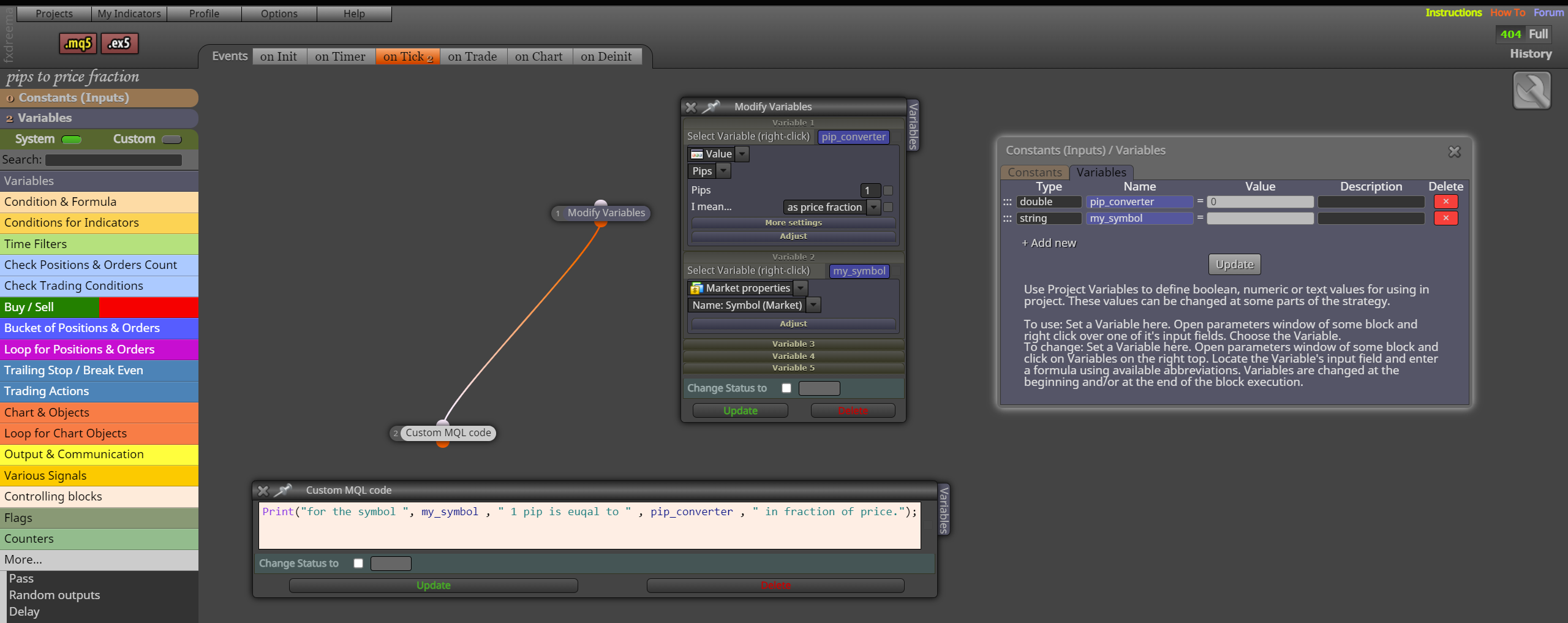
      Because this pip calculation involves many possible scenarios, including broker settings, asset class, etc... FX Dreema has already done all this work in advance for us, by creating a function that converts 1 pip to a price fraction, We can just save that to a variable and use it on any calculation to convert pips to price fraction and vice versa, and by using FX Dreema's methods, the compatibility with other FX Dreema's functions will be safer where it uses pips or price fractions.

      Here is a screenshot:
      image.png

      Safe Bots to everyone!

      posted in Tutorials by Users
      Q
      QuantEngineer
    • RE: MT5 Optimizer not working with many FX Dreema EA - RESOLVED

      That is cool ! thanks for the feedback!

      We have to watch out because the reason why FX DReema creates the infinite loop is that when the EA is attempting to close a large number of positions, many of the commands can get rejected for multiple reasons and that is why it might need to go back and make new attempts to close positions over and over again, until they all close. If people choose to close them with the for loop, it is a good idea to run the loop multiple times on the same group of trades to ensure all the positions close.

      I believe it might be related to the asynchronous close, it works a lot faster than the synchronous close but leaves some positions behind sometimes...

      posted in Bug Reports
      Q
      QuantEngineer
    • RE: Money Management Formula

      In the Current version of MQL5, there is a function called OrderCalcProfit() that does this job of calculating potential profits or losses for hypothetical scenarios.
      Here is the link, in case someone else is interested https://www.mql5.com/en/docs/trading/ordercalcprofit

      posted in Questions & Answers
      Q
      QuantEngineer
    • RE: [Custom Block Release] Send a message or screenshot to Telegram Blocks

      @Spuzy You are AMAZING ! Thank you so much for your post ! Extremely helpful, I was already dealing with the issue with the JSON objects, and found out that you already went through and described all of it.

      In case you want to have 2 exits from the FX Dreema custom Block for when the Telegram Message was sent successfully, or Not Successful, you can use the {~next~} and {~inext~} on your custom block. There is a more detailed description on the usage here: https://fxdreema.com/forum/topic/14131/simple-custom-block-to-detect-hedging-or-netting-accounts

      Thank you so much for sharing ! Peace !

      posted in Tutorials by Users
      Q
      QuantEngineer
    • RE: Finally, News Filter for MT5 in 1 easy to use Block !!

      @stevenpham1996 That sounds right... Line 13 Prints received 0 events, etc etc when there are no events near, for the items in the events filter, on that date time when the block is running. if there would be any events in the array, it would say how many events were received.

      posted in Tutorials by Users
      Q
      QuantEngineer
    • RE: Easy way to make ENUM

      Exactly !
      It is good to match the interior beauty with some exterior beauty when possible!

      posted in Tutorials by Users
      Q
      QuantEngineer
    • RE: Easy way to make ENUM

      About the inputs of the EA, is anyone here familiar with the groups feature ?
      on the MQL5 documentation, it is mentioned an input type called group, to make the user inputs panel more organized... https://www.mql5.com/en/docs/basis/variables/inputvariables

      posted in Tutorials by Users
      Q
      QuantEngineer
    • 1 / 1