fxDreema

    • Register
    • Login
    • Search
    • Back to the main page
    • Categories
    • Recent
    • Tags
    • Popular
    • Search
    1. Home
    2. roar
    3. Posts
    • Profile
    • Following 0
    • Followers 184
    • Topics 35
    • Posts 2406
    • Best 422
    • Controversial 6
    • Groups 0

    Posts made by roar

    • RE: Strategy Results, Good? Bad? Okay?

      28 trades doesnt really tell much to me. You spin a roulette table 28 times, very possible to walk away with profit.

      posted in General Discussions
      roar
      roar
    • RE: How to create a block to stop losses in each buy or sell?

      @ramon2020-1

      when it reaches 3 0 4 losses buying for the market rebounds?

      This sentence makes zero sense to me lol

      posted in Questions & Answers
      roar
      roar
    • RE: Pending order based on price moving a percentage of ATR after a previous condition is met

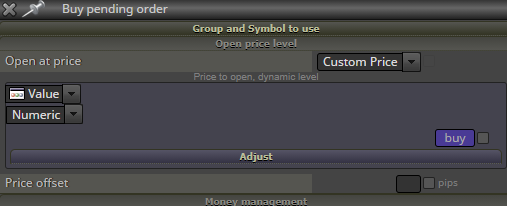
      @mikev_303 you have calculated the correct levels into buy and sell variables. Now you dont have to use ATR + adjust in the order block, just insert the level as custom price:
      0_1610882822120_44a76662-8bf2-471b-99a2-837ce0b046e5-image.png

      posted in Questions & Answers
      roar
      roar
    • RE: MQ4 Indicator to Custom Block

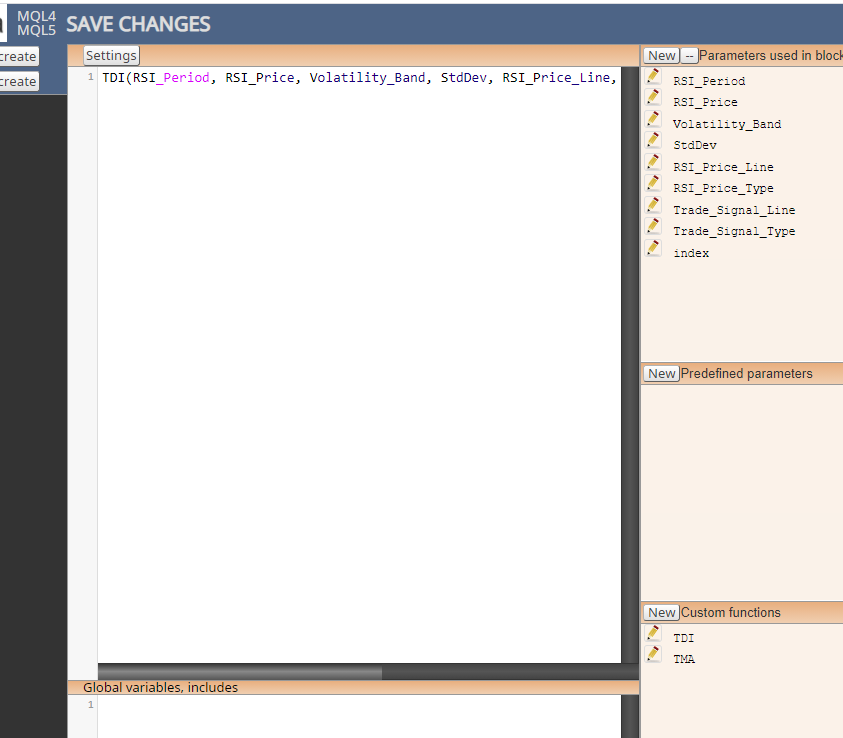
      @mikemanahan basically, paste the mq4 code as "Custom function", set inputs as "Parameter used in block" and then call the function. This way you can convey the buffers to fxdreema variables. I dont know if thats the best way to manage it, I dont really use the studio - I dont think anyone on this forum does lol
      0_1610825156757_d300255e-5150-47b5-9049-8dd063822447-image.png

      posted in Questions & Answers
      roar
      roar
    • RE: Dropdown Constants

      0_1610822205452_7c6e519f-096e-446f-a294-f6c3f79ce62b-image.png

      posted in Questions & Answers
      roar
      roar
    • RE: Dropdown Constants

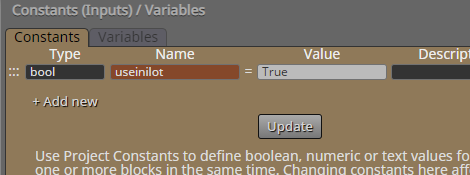
      @sjthetechguy I dont think its possible on fxdreema, you have to add it manually in metaeditor.

      Well, boolean variables are possible. You cant get "yes" and "no", but you can get "true" and "false".

      posted in Questions & Answers
      roar
      roar
    • RE: How to create a block to stop losses in each buy or sell?

      "Check consecutive losses" counts already closed trades, not running ones. You aware of that?

      posted in Questions & Answers
      roar
      roar
    • RE: Copy trade services

      https://www.mql5.com/en/signals/mt4

      posted in Questions & Answers
      roar
      roar
    • RE: Variable uses and examples

      @fideld003 I see youre a fast learner - this isnt the most simple example lol

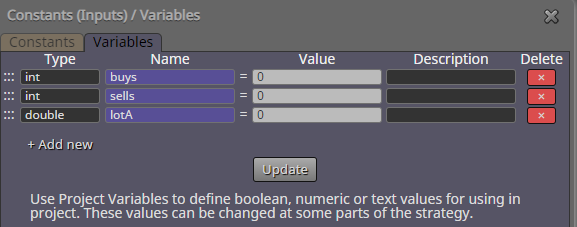
      1. Yes, its usually best to set variables zero at the beginning, you will modify them later anway - thats why they are called variables 😄

      2. The color fields are a quick way to set new values for the variables. White, orange and yellow fields correspond to the half circles around the blocks: white is something that happens before the block, orange and yellow are outputs depending on block type. In case of a loop ("for each..."), orange is something that happens on each loop iteration, and yellow is the "exit door". So, to count buys:

      • reset buys variable to 0 before beginning the loop, to erase any earlier calculations
      • for each buy trade found with the loop block, increase buys by 1
      • when loop is complete, take exit from yellow output and move to next part of the project
      1. The custom code has a logarithm calculation. Logarithms basically scale big numbers to smaller numbers. If youre using chrome, you can try "ln(20)" in the adress bar - it gives 2.99.
        So, if there is 20 buys open, the lot value for next sell order will be
        0.01* 2.99 * 2 = 0.0598 = 0.06 (just as in your picture)

      The 2nd line is just a lower limit for the lot amount. MathMax function picks the bigger value in the parenthesis. So, the line reads as "set lotA as itself or 0.01, whichever is bigger".

      posted in Questions & Answers
      roar
      roar
    • RE: Variable uses and examples

      @fideld003 all right, here's an example project. It keeps track of order counts, and uses that value to calculate lot size. Its a dangerous betting strategy, just for example - dont trade it.
      https://fxdreema.com/shared/IQDWzM8qc
      0_1610639586093_224ee7ee-4153-4b84-b2ec-0f01aad0d225-image.png

      posted in Questions & Answers
      roar
      roar
    • RE: Pending order based on price moving a percentage of ATR after a previous condition is met

      Here https://fxdreema.com/shared/6qOHXk6Q

      posted in Questions & Answers
      roar
      roar
    • RE: Pending order based on price moving a percentage of ATR after a previous condition is met

      @mikev_303 ATR is not a price level

      edit: oh you knew that

      posted in Questions & Answers
      roar
      roar
    • RE: Variable uses and examples

      @fideld003 you will need variables for any math calculations, communication between blocks, storing values over time. You can do basic projects without variables too, but mastering them will open up 100x more possibilities for you.

      Anyway, its probably best for you to just keep making your own designs, and learn variables once you actually need them.

      posted in Questions & Answers
      roar
      roar
    • RE: Limit the n of decimal places in comments

      @cesardefez if you dont need any decimals, just use an int variable instead of double variable

      If you do need some decimals:
      https://docs.mql4.com/convert/doubletostring

      posted in General Discussions
      roar
      roar
    • RE: Minimum Stop Loss allowed vs. coin

      @ambrogio to get pips, multiply by ten, to double the amount, multiply by two.
      x/10*2 = x/5

      posted in Questions & Answers
      roar
      roar
    • RE: Minimum Stop Loss allowed vs. coin

      @xyon126 it says "points" in the mql4 article, I've never actually used this lol. I guess youre right.

      @Banditdos just copy it exactly as in the pictures and see what you get.

      This one should be secure: if no stop-loss, set SL of 2 times minimum
      https://fxdreema.com/shared/3VcgNhIX

      posted in Questions & Answers
      roar
      roar
    • RE: Minimum Stop Loss allowed vs. coin

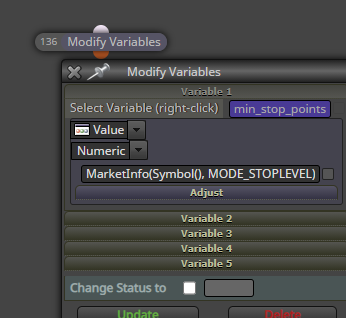
      @xyon126 just put it anywhere you want that value to be, in "modify variables" block for example
      0_1610540334598_512f09a9-6c31-4720-9ff2-6f2fe9c31a88-image.png

      posted in Questions & Answers
      roar
      roar
    • RE: Minimum Stop Loss allowed vs. coin

      This function returns the minimum stop distance:
      MarketInfo(Symbol(), MODE_STOPLEVEL)

      https://docs.mql4.com/constants/environment_state/marketinfoconstants

      posted in Questions & Answers
      roar
      roar
    • RE: place variable in box you adjusted by performing operation

      @cesardefez just do it like in the upper picture, its fine.

      posted in General Discussions
      roar
      roar
    • RE: strategy result .. whats your comments !!?

      Getting 29 lucky trades is very easy, no matter how accurate your data is. You should get at least 200 trades for some statistical validity, 2000 even better.
      posted in General Discussions
      roar
      roar
    • 1
    • 2
    • 30
    • 31
    • 32
    • 33
    • 34
    • 120
    • 121
    • 32 / 121