@siggi12345 I think I got it, try this version
https://fxdreema.com/shared/cV7V8KE9e

@siggi12345 I think I got it, try this version
https://fxdreema.com/shared/cV7V8KE9e
@brend or "Once per bar (5 minutes)" -> buy
@ramimoujaes hi!
You didnt mention about buy/sell separation, does the calculation take that into account. So I have to assume.
https://fxdreema.com/shared/NYjuilPKd
Here is my thoughts, its not exactly as in your project, but I hope you get something out of it.
Download the .mq5 and import it back again to your builder, then you see all the variables and such.
There's lots of "advanced" tricks in the example - I'll leave you to chew on it for a couple days, before answering the follow-ups 
@siggi12345 I think the logic is right and you do understand the structure, but there is just some minor bug. Maybe the MA is not 9, instead its 20, etc... Does the EA make trades at all, even in "weird" situations? Share a link?
@ikarus_ Sorry, I confused even myself with the true/false things here.
Made a fix: the comparator in the second block is ==, not !=.
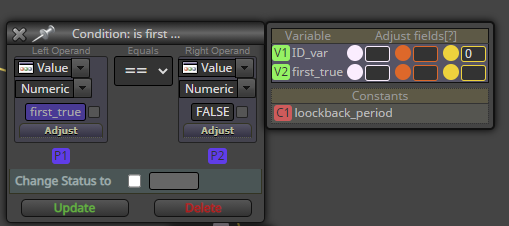
So, the logic is
Edit: Goddamn now I'm confusing my projects with each other, fixed again.
@ikarus_ said
I think there is a big learning curve awaiting for me about loops.
Yes I think its more "advanced" stuff - and the worst part is, this particular loop logic is my own scribble lol
There is also an official loop block in the builder, it works a bit different. If youre familiar with the coding jargon, my loop here is a while loop, whereas the fxdreema loop block is a for loop.
@ikarus_ this block needs to change the variable when the loop finds a suitable candle, otherwise the algo never proceeds to the next stage
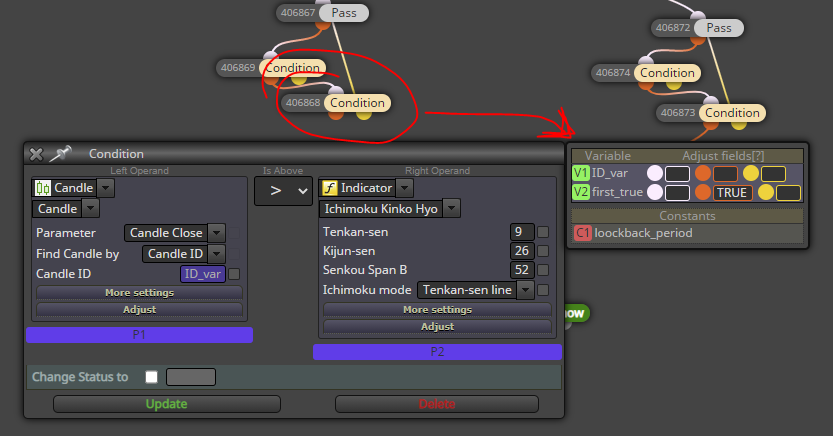
You dont need to reset the IDs, they dont matter in this EA. I just like to keep them small myself, just a preference.
@siggi12345 yes this is pretty technical stuff, youre smart for learning it so fast!
Answer to question: "Pass orange first" is my method of organizing the whole algorithm. It first does the loop thing, and later does other things (whatever is connected to yellow output).
Basically just to make sure the EA doesnt check the loop results before the loop has even done its calculations.
Oh, didnt know about the casing.. I don't use boolean variables myself, just integers 0 and 1 for true/false, but I thought that would confuse others..
@ikarus_ yeah looks ok, but because of the missing variables, cannot see the variable modifications (in right-side of blocks) which are critical for the logic
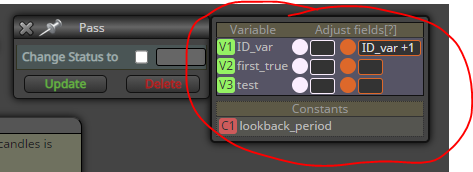
@siggi12345 sure!
To operate our loop, we need to first create 2 variables. The variables menu opens from the top of blocks list.
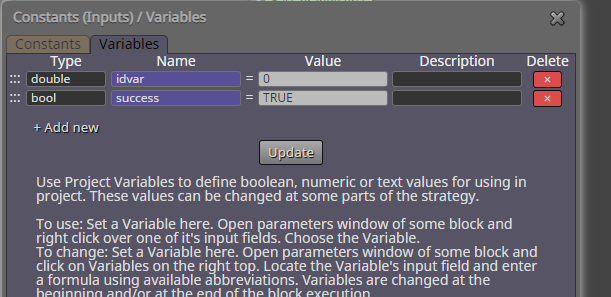
The idea in my loop is to first set some boolean variable ("success" in the example) to TRUE, and then loop through all 5 candles -> if some of them breaks our condition, the variable is set to FALSE.
After the loop, we can simply check if our variable has stayed TRUE, which would mean that all conditions were ok.
https://fxdreema.com/shared/6Zmxnuj6c
Edit: wrong pic
@mmaarits hi!
To keep it simple, here's an algo just to keep track of those 4 fractals. You can add the comparisons and trade operations yourself, right?
https://fxdreema.com/shared/A9UObbiqe
up1 is latest up fractal, you get the rest...
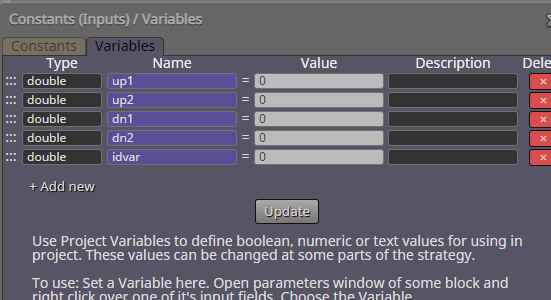
@ikarus_ Your example is missing all variables - you need to declare them yourself, exactly as is shown in my pictures above.
I don't know any great learning source, my style is to try and fail, learn that way...
Well, Miro has created a loop tutorial but that uses the actual, official loop block, I didnt.
http://fxdreema.com/forum/topic/4510/tutorial-loop-advanced-find-and-save-specific-value-from-indicator-history
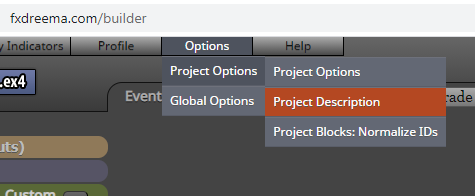
By the way, you can reset your block IDs from "Project Options" 
@ontrade are you familiar with fxdreema constants?
Just declare them and insert into fields with right-click.
And remove those tick marks.
Method and applied price are a bit more technical, you need to refer to mql4 documentation (for example, "Simple" is constant value of 0 or MODE_SMA)
https://docs.mql4.com/constants/indicatorconstants/enum_ma_method
@nilsen ah, I noticed it too. I don't really know about this then, I'm starting to fear its not possible in "Custom MQL code".
Making your own blocks in fxdreema studio would allow to use mql in "global scope", whatever that means. But I can't really help you further..
https://fxdreema.com/studio/
@nilsen maybe that's an outdated function, I can't find it in documentation..
https://www.mql5.com/en/docs/standardlibrary/tradeclasses/ctrade/ctradebuy