(current price - open price) / open price * 100

(current price - open price) / open price * 100
yea that's cool. thank you for showing me this. also like I said meta traders inside functions aren't build for this kinda thing, this is an outside plugin of sorts.
there's no lots in crypto. play around with that
wait, you mean you actually can trade crypto using mt5 with this pandora? how does it work? are you trading futures or actual crypto?
also that's probably because fxdreema code hasn't been designed for crypto and who know how their lot sizes and all that work.
play around with code, try to buy very small lots and see what you get, find out how much does it cost for 0.01 lot of that coin and then try to figure it all out.
the errors are most likely because metatrader client doesn't have all the info or the brokers info is very different than on forex, like point data, lot sizes, currency and so on, leverage
ah because you can't trade crypto on meta trader, you use crypto charts for your indicator and send emails, then you have a bot that reads those emails and places orders?
why not just use tradingview with their alert system that sends email and jubot that has a lot of options and does it very efficiently. for a usermade bot that is at least. hopefully we get some crypto brokers on mt5.
jubot:
https://discord.gg/ZvN4TN
write to file block can help with that.
not sure if you can access the log with EA's.
what data do you want to save into the file?
For this to work, you must have all of the telegrams include files in the include folder
Custom Function:
int SendScreenShot(const long _chat_id,
			const string _symbol,
			const ENUM_TIMEFRAMES _period,
				int x_axis,
				int y_axis,
				bool current_chart,
				string token)
{
CCustomBot bot;
bot.Token(token);

int result=0;
long chart_id;
if(!current_chart)
chart_id=ChartOpen(_symbol,_period);
else
chart_id=ChartID();

if(chart_id==0)
return(ERR_CHART_NOT_FOUND);

if(!current_chart)
ChartSetInteger(ChartID(),CHART_BRING_TO_TOP,true);

//--- updates chart
int wait=60;
while(--wait>0)
{
if(SeriesInfoInteger(_symbol,_period,SERIES_SYNCHRONIZED))
	break;
Sleep(500);
}
string filename;
if(!current_chart)
{
ChartRedraw(chart_id);
Sleep(500);
ChartSetInteger(chart_id,CHART_SHOW_GRID,false);
ChartSetInteger(chart_id,CHART_SHOW_PERIOD_SEP,false);
filename=StringFormat("%s%d.gif",_symbol,_period);
}
else
{
	filename=StringFormat("%s%d.gif",Symbol(),Period());
}

if(FileIsExist(filename))
FileDelete(filename);

if(!current_chart)
ChartRedraw(chart_id);

Sleep(100);

if(ChartScreenShot(chart_id,filename,x_axis,y_axis,ALIGN_RIGHT))
{
Sleep(100);

bot.SendChatAction(_chat_id,ACTION_UPLOAD_PHOTO);

//--- waitng 30 sec for save screenshot
wait=60;
while(!FileIsExist(filename) && --wait>0)
	Sleep(500);

//---
if(FileIsExist(filename))
	{
	string screen_id;
	result=bot.SendPhoto(screen_id,_chat_id,filename,_symbol+"_"+StringSubstr(EnumToString(_period),7));
	}

}

if(!current_chart)
ChartClose(chart_id);

return(result);
}
Block Code:
if(current_chart)
{
	_symbol = Symbol();
	_period = Period();
}
SendScreenShot(_chat_id,_symbol, _period,x_axis,y_axis,current_chart,token);
Block Include:
#include <Telegram.mqh>
use the following images to make your parameters
this is color code for telegram blue if you wanna get extra fancy 
#0088CC
if current chart is chosen then it will take a screenshot of the current chart together with all objects/indicators on the chart and your coloring of bars/background and such
if you choose a symbol and timeframe it will open a new default looking chart for that symbol,timeframe and take a screenshot and close it afterwards.
changing width changes how much of it is screenshotted
to anyone knowledgable in coding don't laugh at how sloppy it is. it works ok.
how did you get binance charts on meta trader?
no problem man, glad I could help
if bar 0 doesn't work I'll look at it and maybe get you a fix so you don't need to delete the thing every time
you can still do it like this and do everything else normaly, then when you download the EA download the .mq5 file
open it in the meta editor, search for iCustom and delete the last parameter
',PRICE_CLOSE'
together with the , and do that on every iCustom call and then compile
problem is you'll need to do that on every update you make
you can also make a integer variable that equals to
iCustom(Symbol(), Period(), "time-fractal-energy-adaptive-laguerre-rsi" , (int)14, (ENUM_APPLIED_PRICE)PRICE_CLOSE, (double)5, (double)0.85, (double)0.15);
where you change the numbers to your constants.
and than instead of using the condition block and choosing the indicator there you can use a custom if block and use
fxdCustomIndicator(int_variable,0,0)
that function will return the value of your indicator on the current bar, to use previous bars change the last number like so
fxdCustomIndicator(int_variable,0,1)
altho this is a decently advanced method that will require even more custom code
very lucky for your that unknown enumeration is the last parameter and can be ignored.
do it like this:
int ATR period 14
ENUM_APPLIED_PRICE Price PRICE_CLOSE
double Smoothing factor 5
double Level up 0.85
double Level down 0.15
delete the last one as it's an unknown enumeration that we can't know without the source or the guy who made it tell you.
also there is only 1 buffer from that indicator and the name isn't the color name but the name you want shown on the fxdreema when making blocks.
now, unfortunately this should only work on mt4, in mt5 iCustom works differently and fxdreema autogenerated code adds PRICE_CLOSE as the last parameters because mt5 works like that.
that might be a problem because it will take that as a value for the last parameter which isn't of that type and will return an error.
hopefully you're making this for mt4 and it works hope it helps
make a time filter block and put your wanted times there, then for the condition have it x> and x< which means crossing.
above on the last bar, bellow on the current.
that block will only run withing your time range, meaning if the block runs at 8:00 and the price is already bellow 30 it will not trigger
the Candle ID you can see in the candle close section is what candle to take the value from.
0 being the current candle
candle close is the current price on the current candle, because close is the last value that bar ever had
since the bar is still running it means close is always the current value
glad it helped somehow
this is what I meant tho
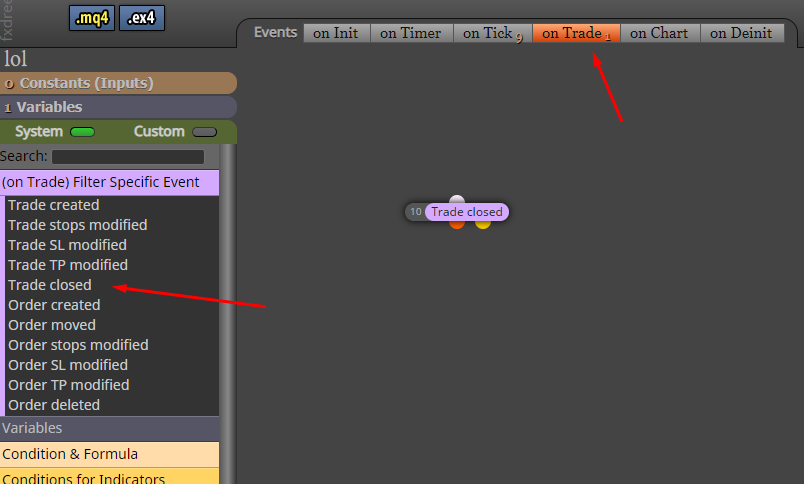
this way might be more efficient as that block won't be firing on every tick but only on a trade event.
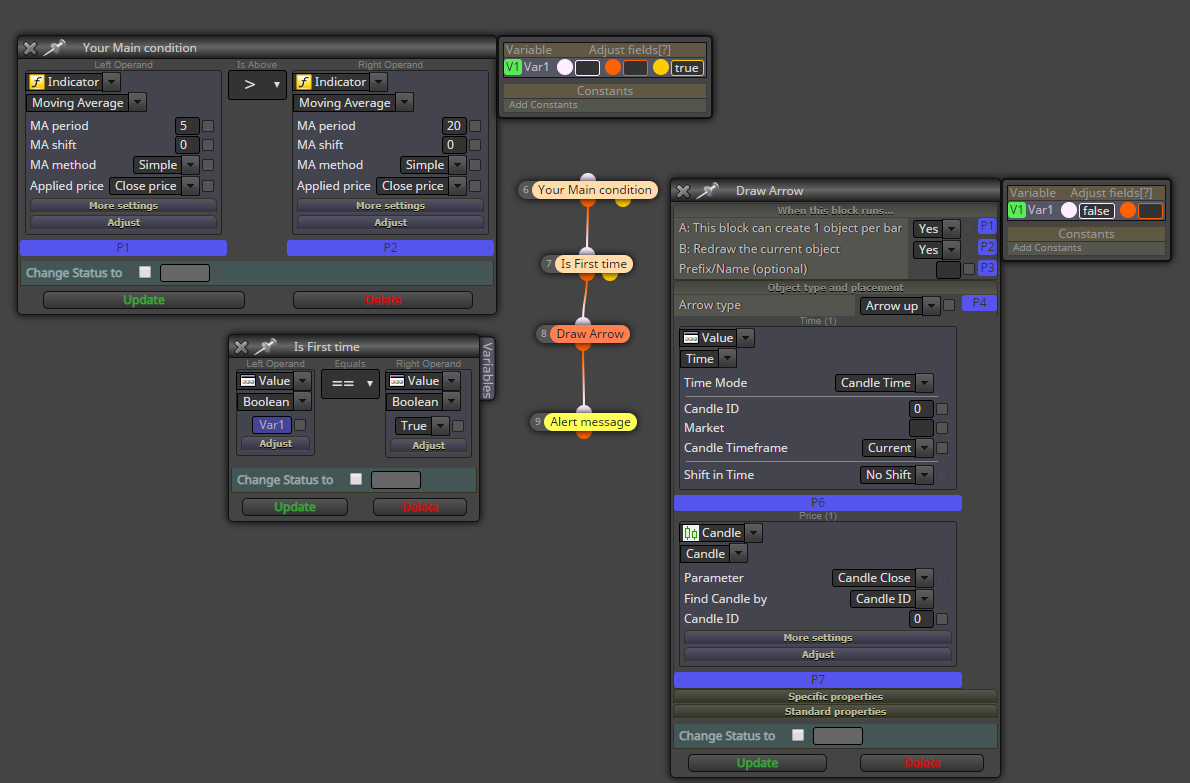
make a bool variable, once the arrow block fires put that variable to false. before the draw arrow and alert block put a condition block that will fire only if the variable is true. then on your main condition block make the variable go true once the yellow dot fires aka the condition is false.
doing this will register that your main condition was true the first time it fires. then it will stop your draw arrow or alert block form firing till the condition isn't true anymore and then it will allow it on the next run.
have you tried making a condition block with 5MA < 20MA and connect the trailing stop to it. when the block condition is false it will stop activating the trailing stop block.
go to the OnTrade tab and make a block on trade close and connect the email block to it.
I don't know, I've never played around with child/parent trades so I don't know if you can just do it with that one block.
try it out, test it in the backtester.
try with different blocks, test it.
try with something different again. test it.
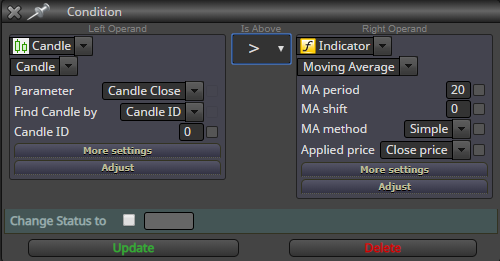
"> higher than
< less than
x> crossed above
x< crossed under
ah, like lowering your take profit?
it can be done yes. use the modifiy stops pink block after you add to volume.
make a math formula to get the values you need
sorry I don't understand the question
try using freeze % of balance and see if that works
that will take your leverage into account as well
hopefully that will work cuz otherwise I don't know.