fxDreema

    • Register
    • Login
    • Search
    • Back to the main page
    • Categories
    • Recent
    • Tags
    • Popular
    • Search
    1. Home
    2. SydneyFox
    3. Posts
    S
    • Profile
    • Following 0
    • Followers 1
    • Topics 29
    • Posts 121
    • Best 3
    • Controversial 1
    • Groups 0

    Posts made by SydneyFox

    • RE: Draw Line

      A further question @miro1360 is it possible to get the trend line to start on the bar that is on the screen and not on the next not yet commenced bar?

      Should I be able to see the trend line on any timeframe?

      Is it possible to have the trendline stay on the chart until manually removed?

      posted in Questions & Answers
      S
      SydneyFox
    • RE: Draw Line

      Thank you @miro1360 . I have made some changes to your suggestion to get the level that I want. Of course I know have some further queries/questions.

      1. The trend line shows on the screen when the EA is first added to a chart.
      2. If amendments are made to the EA inputs the trend line doesn't move to where the new inputs say it should.
      3. I wonder if that's because of how the EA is initialized? I have (hopefully) added a screenshot to show what I mean. When the EA is first loaded the inputs are shown on the next line with the next line showing it as being initialized. However when changing inputs the initialized line comes before the inputs line. Does this mean that in the second instance the blocks in the oninit tab don't actually do anything? Because MT4 doesn't know they exist at the time of initialization?

      You can see in the screen shot the LongValue was initially 1.1868 and with the 2 pip adjustment the trend line is at 1.1870. When the inputs are amended to LongValue 1.1862 the trend line should be at 1.1864 but it has stayed at 1.1870.

      Hope that makes sense?

      A further question that I thinks has a similar issue is that when first loading and initializing the EA, if the level that needs to be broken i.e. bid < longvalue is valid then the trade is actioned. If however the condition is valid after changing the longvalue but not deleting and loading again the EA then the trade is not actioned.

      Does this have to do with the set flag to false on initialization working when the EA is first loaded but not working when the inputs are amended?

      The trendline EA can be found here https://fxdreema.com/shared/KuXrTD1Id

      The reason I have used the flag is because if a long trade is closed but price is below the LongValue I don't want a new trade to be automatically opened.
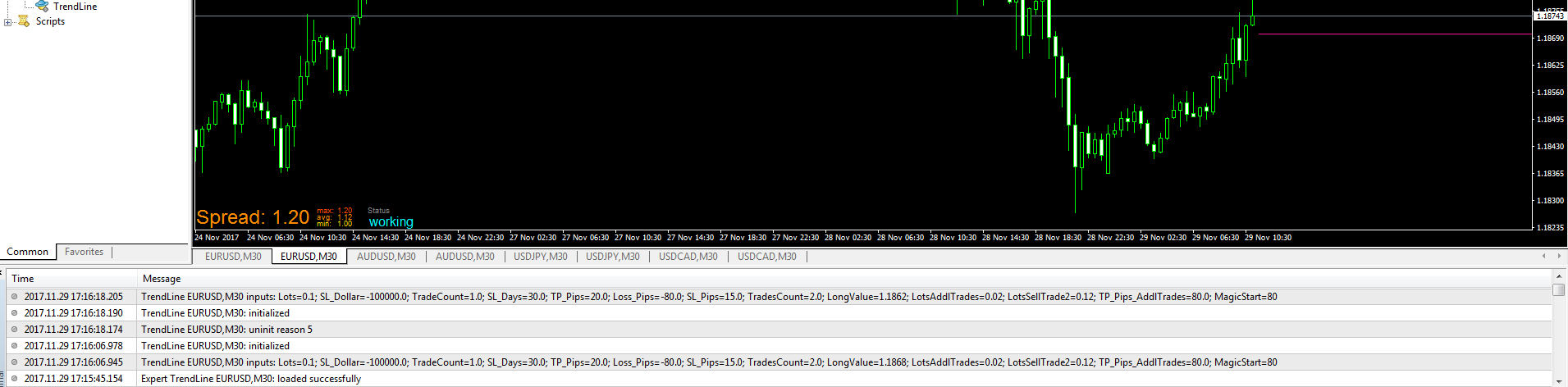
      0_1511948099645_EA_Trendline.PNG

      posted in Questions & Answers
      S
      SydneyFox
    • Can't access forum using iPad

      Until yesterday I have been able to access the forum on my iPad. I just checked the iPad settings and it says I'm using iOS 9.3.5 and 'Your software is up to date'.

      I get the following message when trying to open fxdreema.com:

      Oops, it looks that your browser is too old for fxDreema. Please ues a modern browser 🙂

      posted in Bug Reports
      S
      SydneyFox
    • RE: Draw Line

      Is anyone able to help with this? @fxDreema? @miro1360?

      posted in Questions & Answers
      S
      SydneyFox
    • RE: Draw Line

      Yes same issue as I get. Any ideas how we can fix it? Is there a change you can make to how the block works?

      I have read previously your dislike for hedging. I'm not sure that my idea of hedging is the same as what other people have tried to do (maybe it is). I'm also not after something that is magical. I do know of some very successful stock investors who hedge their position and see no reason for it not to work as I intend in FX.

      I would really appreciate your help with the trend line issue. Thanks.

      posted in Questions & Answers
      S
      SydneyFox
    • RE: Draw Line

      I have changes to trend line. It now goes vertically upwards and not horizontally.

      Please provide example of how I would use the blocks to place the line on a chart.

      posted in Questions & Answers
      S
      SydneyFox
    • Draw Line

      I would like to be able to draw a horizontal line at the level I want to take a trade but have the line start at the time I initialize the EA.

      I have found the Draw Line block and have used this to draw a line at the correct level but it is across the whole screen whereas I would like it to only start from the time of initializing the EA and then to continue only to the right of this point?

      posted in Questions & Answers
      S
      SydneyFox
    • Hedging Strategy

      I know hedging isn't very popular but I can't find an example of what I am trying to achieve.

      I want to achieve the following:

      Enter long with 30 pip TP and no SL
      Enter short (hedge) if long trade 100 pip unrealised loss with no TP and 20 pip SL
      If hedge trade is stopped out but long trade doesn't reach TP then enter a further short (hedge) if long trade once again 100 pip unrealised loss.
      Enter maximum of say 5 short (hedge) trades
      If after the 5th short trade is stopped out then the long trade either reaches TP or if it again reaches 100 pip unrealised loss then close long trade

      Once the long trade is closed then start the sequence again. I can get the first sequence to work as per here shared/BMdZcsVxc but can't get the second one to work.

      https://fxdreema.com/shared/BMdZcsVxc

      Anyone able to help?

      Thanks

      posted in Questions & Answers
      S
      SydneyFox
    • RE: Long entries won't trigger

      Ok thanks.

      It takes short trades because the large stop loss is above the price and us still a valid price. For the long trade the stop loss is below zero and is invalid.

      That makes sense. Thanks again for your help.

      posted in Questions & Answers
      S
      SydneyFox
    • Long entries won't trigger

      The attached EA won't trigger long entries https://fxdreema.com/shared/DlQKLjkpd

      I'm sure it must be something stupid that i'm doing but I can't see what the issue is?

      Can anyone explain what I'm doing wrong? I haven't had this issue in the past.

      It happens when I have long only or long and short ticked in Expert Properties within strategy tester.

      posted in Questions & Answers
      S
      SydneyFox
    • RE: Order of Highest High and Lowest Low

      Thanks @miro1360

      What does the variable 'highestID' do? Where does the variable go? i.e. in which block? Where in the block?

      I can see it in the Modify Variables block but no where else?

      posted in Questions & Answers
      S
      SydneyFox
    • Order of Highest High and Lowest Low

      Is it possible to determine whether the bar that makes the highest high of say the past 50 bars is more recent than the bar that makes the lowest low of the past 50 bars?

      Or vice versa? i.e. the bar that makes the lowest low of the past 50 bars is more recent than the bar that makes the highest high of the past 50 bars?

      posted in Questions & Answers
      S
      SydneyFox
    • RE: Art Collins_Scoring System

      Thank you. That works a lot better.

      posted in Questions & Answers
      S
      SydneyFox
    • RE: Art Collins_Scoring System

      I think the final result is for the last candle in the test?

      Is it possible to get the result for any candle? Say a candle that doesn't generate a buy or sell so that the calculation can be checked?

      posted in Questions & Answers
      S
      SydneyFox
    • RE: Art Collins_Scoring System

      Thanks again. You are the best!!

      I have added Comment block but not sure if it's where it should go. It seems to give me the right answers but I don't know which candle the answers relate to?

      https://fxdreema.com/shared/ItVQg5X6b

      I will try the custom code shortly,. Just not sure I'll be able to do something similar in the future so might leave it with the pre-made blocks.

      posted in Questions & Answers
      S
      SydneyFox
    • RE: Art Collins_Scoring System

      Also Miro1360 is there a way of showing the total score for each candle on the chart during a back test? It would be good to be able to see if the score calculated by the EA is the same as the score I calculate manually.

      posted in Questions & Answers
      S
      SydneyFox
    • RE: Art Collins_Scoring System

      Does it have something to do with the number order of the blocks? If so how do you change the block numbers after putting them together?

      posted in Questions & Answers
      S
      SydneyFox
    • RE: Art Collins_Scoring System

      Hi miro1360, thanks again for your help.

      I have made the change you suggested and got the EA to work. I have now added a further criteria but when I test the EA sometimes I get one trade opened but on many occasions two trades open. I can't figure out why this would be?

      Also do you see an easier/ more logical way of putting together what I am trying to do? I might want to have say 5 or 6 different criteria which requires say a +3 or -3 count to take a trade.

      My updated EA is here https://fxdreema.com/shared/ctWAYcMVd

      Thanks

      posted in Questions & Answers
      S
      SydneyFox
    • Art Collins_Scoring System

      Has anyone read about or made an EA using Art Collins' scoring system. In basic terms what I am trying to do is give certain criteria a score of either 1 or -1. If the total of the criteria is say 2 then place a sell trade if -2 then place a buy trade. If between 2 and -2 then place no trade.

      I have attempted it here https://fxdreema.com/shared/gfRKKmcLd but can't get it to work.

      Any assistance appreciated.

      Thanks

      posted in Questions & Answers
      S
      SydneyFox
    • RE: Time based exit

      Awesome thank you. That works a treat. I really appreciate your help.

      posted in Questions & Answers
      S
      SydneyFox
    • 1
    • 2
    • 3
    • 4
    • 5
    • 6
    • 7
    • 5 / 7