fxDreema

    • Register
    • Login
    • Search
    • Back to the main page
    • Categories
    • Recent
    • Tags
    • Popular
    • Search
    1. Home
    2. trbedell
    3. Posts
    T
    • Profile
    • Following 0
    • Followers 1
    • Topics 5
    • Posts 29
    • Best 1
    • Controversial 1
    • Groups 0

    Posts made by trbedell

    • RE: Here, take this profitable ea

      @roar - Gave your MT5 version a spin. I have a broker that uses hedge method , so I added a close positions block at the "if buy/sell" blocks and it works in test mode. I ran it on a demo account for the past 12 hours across 8 pairs and it failed to open a single trade.

      What timeframe do you recommend. I ran it at M15. Any suggestions?

      Thanks for the EA. I am going to marry it to...

      https://fxdreema.com/forum/topic/7370/new-spin-video-tutorial-signals-dashboard-ea-advanced-looping-objects-arrays/6

      I will modify the dashboard to use ADX and Bollinger and drop MA's to give a visual spin to the EA. I will share it when complete.

      Thanks,
      Thomas
      posted in Tutorials by Users
      T
      trbedell
    • RE: New Spin! Video Tutorial - Signals Dashboard EA [advanced] - looping Objects, arrays

      @miro1360 - Thanks Miro!

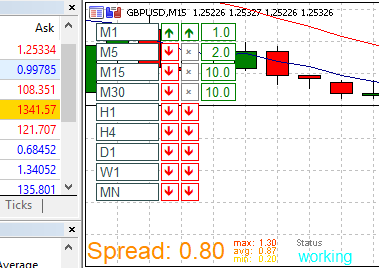
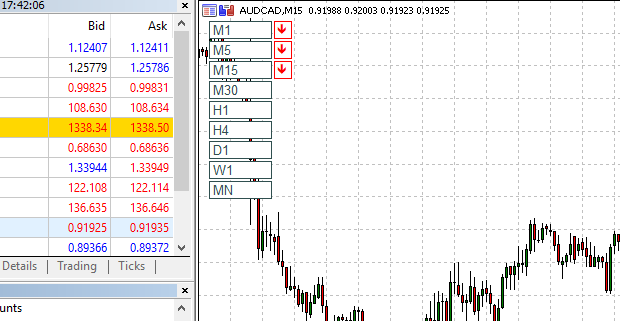
      0_1560856729313_Complete.PNG

      This task has been completed. If anybody wants to use this EA it is here:

      https://fxdreema.com/shared/ZDWXV1bsb

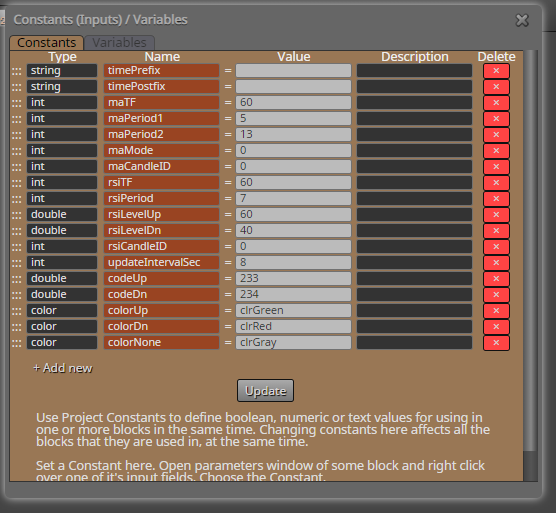
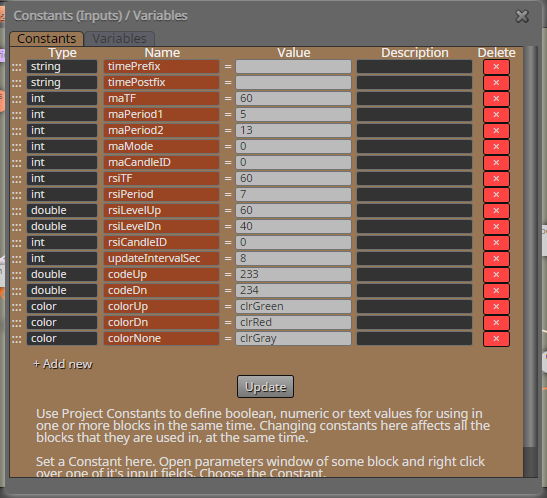
      Constants:

      0_1560856920238_constants.PNG

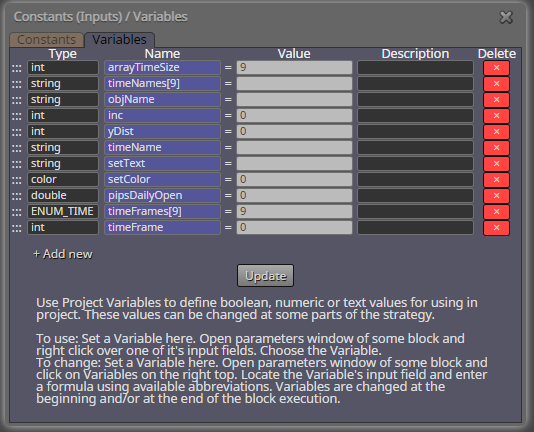
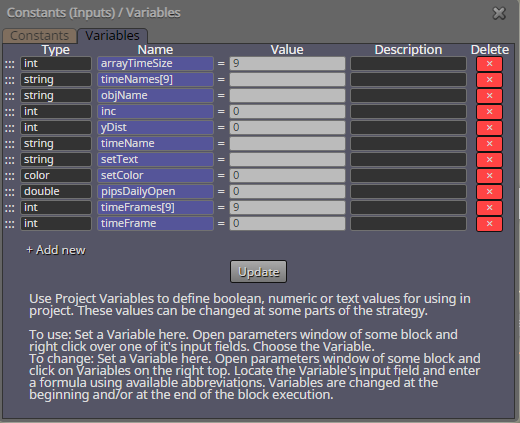
      Variables:

      0_1560856935602_Varables.PNG

      Good Trading All!
      Tom

      posted in Tutorials by Users
      T
      trbedell
    • RE: New Spin! Video Tutorial - Signals Dashboard EA [advanced] - looping Objects, arrays

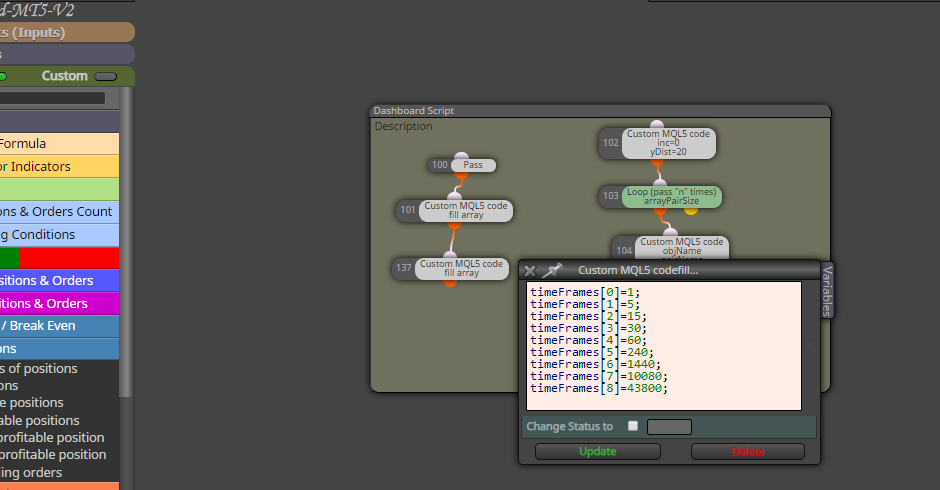
      Found it: Time Frames

      https://www.mql5.com/en/docs/constants/chartconstants/enum_timeframes

      Type: ENUM_TIMEFRAMES

      Sample: PERIOD_M1 - one Minute

      Again. Thanks for your assistance.
      Thomas

      posted in Tutorials by Users
      T
      trbedell
    • RE: New Spin! Video Tutorial - Signals Dashboard EA [advanced] - looping Objects, arrays

      @miro1360 - On second thought... I am wondering how to express timeFrame - in this application I have been using seconds. Is this the correct way or do I need to use another variable?

      0_1560827139112_complete2.PNG

      Thanks again,
      Thomas

      posted in Tutorials by Users
      T
      trbedell
    • RE: New Spin! Video Tutorial - Signals Dashboard EA [advanced] - looping Objects, arrays

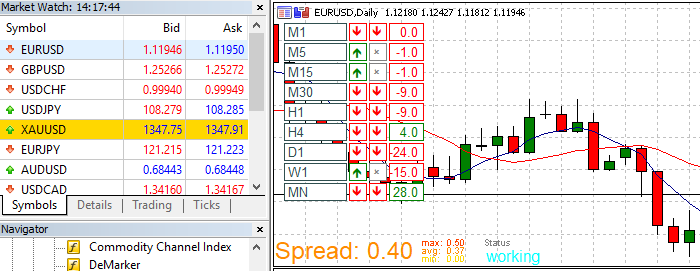
      @miro1360 - Looks good now. I updated the timeFrame in seconds per period. As the system loops, it stops at 30 minutes. I looked and the time calculates Candle 0 - Candle 0 to get the pip size but stops at H1. Any ideas?

      Current EA >>> https://fxdreema.com/shared/czlTvUN9c

      Here are the results:

      0_1560824185080_Complete.PNG

      Again. Thanks for your assistance.
      Tom

      posted in Tutorials by Users
      T
      trbedell
    • New Spin! Video Tutorial - Signals Dashboard EA [advanced] - looping Objects, arrays

      Re: Video Tutorial - Signals Dashboard EA [advanced] - looping Objects

      @miro1360, I find this to be an excellent project and tutorial. I have created a new spin to this older tutorial and am having a bit of difficulty (as I am not a programmer by trade). I have been able to make some strides, using the existing code you have provided.

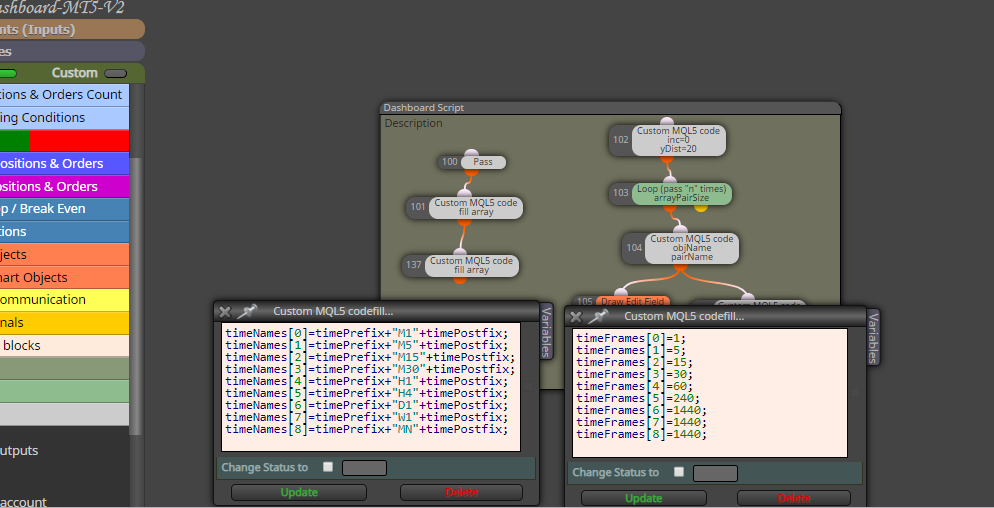
      Instead of a Multi Pair dash board, I am looking to create a Multi Time dash board for a single pair. I have found that I need a 3 arrays to create the task but I am having difficulty making the EA loop properly to give the results.

      I have attached my modification and constant/variable changes. Your insight would be grateful to complete the task. Here is what I have so far.

      Shared EA >>> https://fxdreema.com/shared/duB0geW7b

      Results: (notice it only draws 3 MA - Stops at M15)

      0_1560782747743_results.PNG

      Constants:

      0_1560782818561_constants.PNG

      Variables:

      0_1560782837713_Varables.PNG

      On-Init:

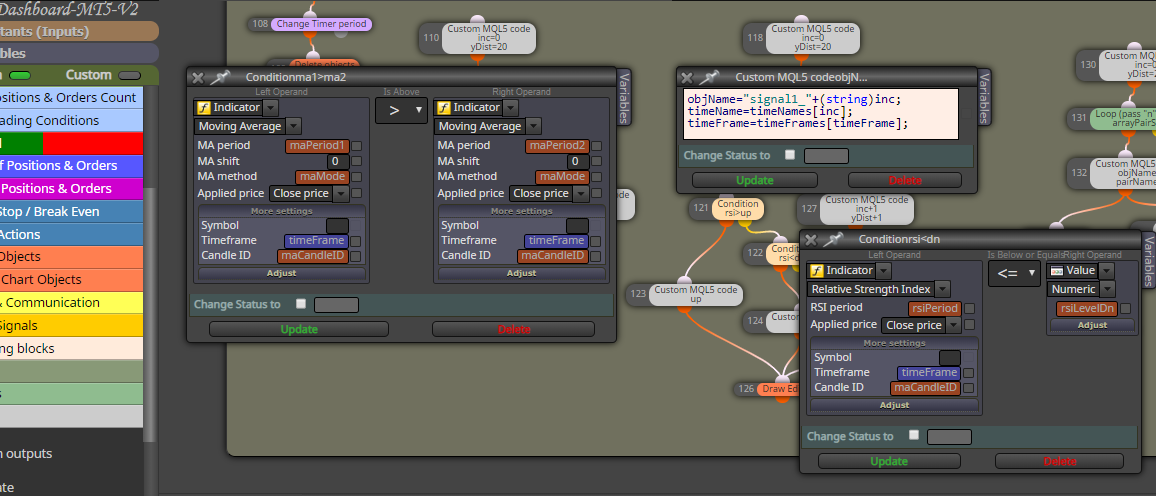
      0_1560782875879_on-init.PNG

      On-Timer:

      0_1560782893178_On-Timer.PNG

      The result of this dash board is to provide a Multi-Time View of a pair.

      Can you assist me with this?

      Best,
      Thomas

      posted in Tutorials by Users
      T
      trbedell
    • RE: How do I evaluate a variable (Not a terminal variable) in a condition?

      @l-andorrĂ  - Thank you for that.

      posted in Questions & Answers
      T
      trbedell
    • How do I evaluate a variable (Not a terminal variable) in a condition?

      Good Day @fxdreema,

      I have declared several variables.
      TP = Take Profit
      SL = Stop Loss

      On trade > Formula > Condition > Close

      Formula: Ask - 2 pips > V1
      Condition: Ask < V1
      Close

      https://fxdreema.com/shared/EWXUh0uhd

      Question: How do I access V1 in the condition block? Terminal Variables is not the answer.

      Can you please assist?

      Thanks in advance,
      Thomas

      posted in Questions & Answers
      T
      trbedell
    • RE: If call exist Bid=0 close trade please help

      Are virtual stops converted to market orders? My broker has a 5 pip SL minimum and 3 pip TP minimum to thwart scalping. Can you give more detail on virtual stops please?

      posted in Questions & Answers
      T
      trbedell
    • Help with MT4 Scalping limitations by brokers.

      Good Day,

      Are there any scalpers in the crowd? It seems most brokers have SL and TP limits to thwart scalping. Does anybody have a code sequence to counter this behavior?

      Mine appears to have a 5 pip SL and a 3 pip TP limit. Setting limits any close to the open price is rejected and defaults to the broker limits.

      Any suggestions would be appreciated.

      posted in Questions & Answers
      T
      trbedell
    • RE: Buy Now @ Candle Close (or close to it)

      Look at the spread... It is 15 pips wide. Your EA is buying on close. Find a broker or pair with a 1 pip spread and test.

      posted in Questions & Answers
      T
      trbedell
    • RE: Multiple trades are created one after another?

      Nevermind... I found it. Thanks!

      @dgrl - How do you enable a Virtual Stop Loss?

      BTW: I consider a virtual stop loss - an order that is not posted to the broker as a stop order. It is a variable that triggers a market order once a stop price variable has been met.

      posted in Questions & Answers
      T
      trbedell
    • RE: What is the best way to build a virtual SL - TP that converts to a market order after X pips?

      PLEASE REMOVE THIS > I have moved it to General Questions.

      Thanks

      posted in General Discussions
      T
      trbedell
    • What is the best way to build a virtual SL - TP that converts to a market order after X pips?

      Good Day,

      I am looking to create 2 separate "In Trade" sequences.

      A virtual trailing stop at X pips that "Close Trade"
      A virtual TP at X pips that "Close partial"
      The purpose is to avoid publishing a SL and TP stop orders.

      The attached EA opens a trade.
      Establishes a variable SL and TP
      Draw a line were the virtual SL and TP are supposed to be
      Alerts (Prints on Screen - Statistics)

      https://fxdreema.com/shared/D9x9j8cec

      I have created the basis for these virtual stops but I have encountered the following errors.

      EA - Does - Enter a trade
      EA - Does NOT - Draw the line or print the statistics.

      Any suggestions?

      Next will be to create a Virtual SL - Loop that will update the SL variable "on tick" and trigger a market order if Virtual SL is triggered.

      posted in Questions & Answers
      T
      trbedell
    • RE: Scalper Expert advice

      I am working on a scalping EA. It's all about risk management.

      Enter Long on Bull candle (Momentum)
      Enter Short on Bear candle (Momentum)

      SL: 3 pip
      Trail: .5 pip
      At 2 pips profit - Move stop to break even
      At 10 pip Close 1/2 trade
      Ride the trade til stop Loss activated.

      The key is to reduce risk quickly. A break even trade beats a loss all day long. You need some big winners to build equity. Using a TP to close entire trade limits profitability and creates a signal to immediately enter a duplicate trade, which often creates a loss.

      I have found that most brokers limit TP and SL to avoid scalping. So I am working on building virtual trailing SL and TP that converts to market orders to avoid published stops.

      https://fxdreema.com/forum/topic/7327/what-is-the-best-way-to-build-a-virtual-sl-tp-that-converts-to-a-market-order-after-x-pips

      posted in General Discussions
      T
      trbedell
    • RE: Scalper Expert advice

      @juanjo 3 SL - 1 TP does not work. You need 3 wins for every loss to break even. IMHO.

      posted in General Discussions
      T
      trbedell
    • What is the best way to build a virtual SL - TP that converts to a market order after X pips?

      Good Day,

      I am looking to create 2 separate "In Trade" sequences.

      1. A virtual trailing stop at X pips that "Close Trade"
      2. A virtual TP at X pips that "Close partial"

      The purpose is to avoid publishing a SL and TP stop orders.

      Any suggestions? Thanks in advance.

      posted in General Discussions virtual orders
      T
      trbedell
    • RE: FIFO rules for close all trades

      It is a way to screw the trader... Implemented by the NFA, a US reglatory agency.

      http://fxtrade.oanda.com/help/close-trades-fifo

      If you have multiple trades in a single currency, you must close the oldest FIRST. MT4 will not execute a LONG, if shorts are present. You must close the OLDEST first, if closing any trades. You must close them ALL first to move your position in the other direction.

      In short FIFO sucks. But, if you want to trade, you must adhere to FIFO. So, If I have 10 trades EUR/USD @ .10 Lot = 1.0 Lot. If I want to close ANY trade, I must close the oldest first.

      If I want to close 2,3,5 trades. I need to pick 2 of 10 oldest, close.

      Thanks in advance,

      posted in Questions & Answers
      T
      trbedell
    • RE: FIFO rules for close all trades

      I am having a FIFO error also.

      I have MT4 adding .1 lot positions Long/Short - Pairs traded... XXX/USD or USD/XXX. No crosses.

      When LONG I may have 10 open positions each decending in age from Oldest to Newest. As the trade moves, I would like to

      1. For Each Trade (Oldest to Newest) Close the 3 (three) oldest trades.

      Once the loop completes, it should pass to CLOSE, as see in the image below.

      Here is an image and a result. Your assistance would be appreciated.

      For Each Trade.PNG

      fifo.PNG

      Can you assist in helping me understand the settings?

      Thanks in advance,

      ......
      fifo.PNG
      For Each Trade.PNG

      posted in Questions & Answers
      T
      trbedell
    • RE: fxDreema was updated... obviously

      OK... I fixed it using a Constant called ATR_Multiplier = 1.5

      Now I can update the formula, update it. Open it again and it maintains both the constant and the variable.

      Thanks for all you do.
      Thomas

      ......
      Capture.PNG

      posted in Questions & Answers
      T
      trbedell
    • 1
    • 2
    • 1 / 2