fxDreema

    • Register
    • Login
    • Search
    • Back to the main page
    • Categories
    • Recent
    • Tags
    • Popular
    • Search
    1. Home
    2. XYON126
    3. Best
    • Profile
    • Following 0
    • Followers 6
    • Topics 57
    • Posts 383
    • Best 24
    • Controversial 2
    • Groups 0

    Best posts made by XYON126

    • RE: simple panel

      @bacardi2001 Hello, I am doing and in fact I already have a finished pair (see my post) but if you clarify more exactly what you need we can help you, myself, I started from scratch and now I have several half and others finished. Say what you need and we will help you. I attach photos of some of my projects as a guide:

      0_1607425131625_46bcbbdb-e823-482b-a302-5769f883fbc2-imagen.png

      0_1607425161597_fb4509b7-48df-4451-a6aa-9eed19123a2e-imagen.png

      o un proyecto a medias:

      https://fxdreema.com/shared/nLc2omNS

      The first photo works 100%, it opens operations with a 5: 1 Ratio and a Stop Loss of 20 pips and the "open Trades" button opens two identical operations, one in SELL and the other in BUY. The rest do what you put on the button. I hope I've helped.
      That if and very important, you will need a payment account since there is a minimum of 15 blocks in the simplest and the free one only allows 10.

      posted in Questions & Answers
      XYON126
      XYON126
    • RE: Video Tutorial - Signals Dashboard EA [advanced] - looping Objects, arrays

      @miro1360 Good advice, thank you very much, I usually practice it and advise the same myself, where is the experience and the years. 🙂

      posted in Tutorials by Users
      XYON126
      XYON126
    • RE: button problems (solucionado)

      @cesardefez Hola @cesardefez , veo que ablas español mejor porque asi nos entenderemos mejor. Lo primero que he visto (lo he cargado en un MT5) es que el "Margen max. " te sale desplazado, ¿Es correcto? por el tema de los botones si me detallas que funcion tiene cada uno podre analizarlo a fondo aunque se parece mucho a un Panel mio (ver foto), Lo que mas dudas me provoca son el boton "Close Line, Open line, Invernar y Reset"; comentas que el bucle no se actualiza, ¿A que te refieres, que no se pone a cero?, aqui tienes la foto de mi panel:

      0_1611684664111_659cd9e4-c483-4a62-8e0b-30bc82497550-imagen.png

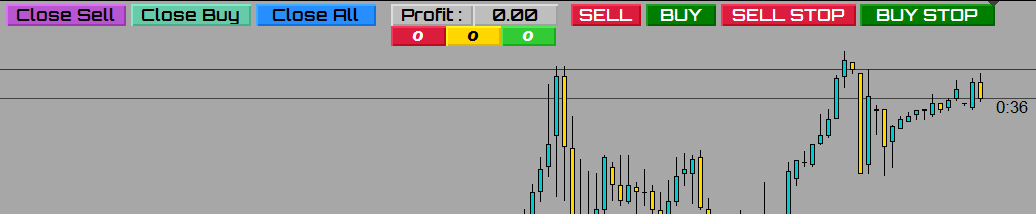
      La información que da es:
      Botones grises: te dan el valor de las ganancias totales de todos los pares, cambia de color rojo si esta en perdidas, en verde si esta en ganancias y gris si es a "cero" o no hay operaciones.
      Botones naranjas : Pues eso lo que indica, la cantidad de operaciones totales abiertas.
      Boton amarillo "Dibujar linea SL : Con este boton loque realizo antes de hacer nada lo presiono y me dibuja una linea horizontal en el precio actual, esta linea una vez dibujada te permite desplazarla al lugar donde quieres el Stop Loss.
      Botones verdes y rojos: Con la linea horizontal situada donde queremos el SL al presionar cualquier boton te calcula segun el boton los Lotes necesarios para que el riesgo sea del 1% Capital, 0.5Capital, 5€ o 3€ segun el boton que presione.
      Boton azul claro "Show/No Show": este boton es para esconder o visualizar los botones que hay debajo.
      Botones amarillos del PAR: si presionas el boton amarillo te cambia el DRAFT o VENTANA actual al par presionado manteniendo la temporalidad y activando los botones para ese PAR.
      Botones blancos: Las dos columnas de botones blancos al lado de los amarillos del PAR a la izquierda informan en rojo operaciones abiertas tipo SELL en ese PAR, en verde las BUY y la columna de botones blancos alargados a la derecha de los amarillos del PAR te informa del beneficio o perdida de ese par de sus operaciones abiertas en el PAR.
      Los otros hacen lo que indican en el PAR activo el de la ventana actual.

      Naturalmente esta en MT4 pues como te comentaba en MT5 aparte de que mi Brocker de cta real no lo acepta para tener un DARWING tambien me daba problemas de retraso, aunque en MT4 a veces se encalla.

      Punto importante, si la distancia de la linea amarilla que te genera el Panel, su distancia es inferior al minimo del Stop Loss que te permite el Brocker en el PAR activo al abrir la operacion o no la abre, o la abre sin SL y TP con un lotaje igual al minimo estipulado por defecto 0.02 lotes. Esto ultimo es un problema global pues todos los paneles de todos los programadores que conozco tienen el mismo problema.

      Espero esto te ayude, ya me diras.

      posted in General Discussions
      XYON126
      XYON126
    • RE: Panel with EA in the same EA

      @banditdos Yes, if possible, I have a trading panel similar to what you want to do and at the same time it has 4 trading strategies or EAs, these run independently and if I want to open a manual operation with my panel it opens it without problems, even in my panel that opens trades with a fixed size of SL but without Take Profit (I don't like to fix it) it gives me the current total and partial Profit. In other words, it runs several things at the same time without problems. I hope I've helped.

      posted in Questions & Answers
      XYON126
      XYON126
    • RE: Video Tutorial - Signals Dashboard EA [advanced] - looping Objects, arrays

      @miro1360 OKAY! Thank you very much, with this I have analysis and learning for a long time and I will be able to finish (I hope so) my operations panel, I will not tire of thanking you, you are a crack, I think that without you fxDreema would not be successful. Thank you very much and I am at your service as much as I can.

      I will inform you about how my super panel is going, rather your super panel since 70% is thanks to your code, the other 30% my adaptation I have an idea of ​​the panel. If you want when I finish it and add all the adapted code that you have taught me, I will share it with you.

      posted in Tutorials by Users
      XYON126
      XYON126
    • RE: Scaricare Consulente esperto con 3 medie mobili

      @l-andorrà Hello @l-andorrà! It is the same problem that I reported in a post of mine, it depends on the day fxDreema does not allow you to upload images, EA link, Files, etc. As we say in Spain "Se le va la olla" and the window appears in the lower right corner in red with "Error, you do not have enough privileges" I have a payment account for up to 6 months at the moment, I have more than 3 hearts ( someone said that was it) and today I have not been able to upload images or files to respond to a post of mine, that is, the @fxDreema should look at these errors and ignore less, people start to get pissed off and not update. Another problem that you just answered me yourself is that between MT5 and MT4 there are big differences with the fxDreema blocks and many blocks do not have equivalents, another very serious error of @fxDreema in my opinion.

      posted in General Discussions
      XYON126
      XYON126
    • RE: Mql4 to Mql5 convertor problem

      The problem is that you have not made the EA in fxDreema MQL4, but the code is original or native MQL4, fxDreema does not recognize it, you should first pass it to fxDreema by hand, that is, generate the EA in fxDreema and then you could convert it into fxDreema to MQL5 but think that there are many blocks that do not exist in MQL4 and / or MQL5 and if one of these is, the translation will be impossible.

      I hope I've helped.

      posted in Bug Reports
      XYON126
      XYON126
    • RE: Panel with EA in the same EA

      @banditdos Hello Banditdos, this is my panel, I don't know if it will help you or not:

      0_1606561227901_86d8a5c3-b39a-414b-bb4c-ef63fe516c57-imagen.png

      I do not know if it will help you, for me there is no problem, anyway if you look in the forum and look for a post about panels you will find mine because I did it in pieces and then add them all in one (this is not in the forum) , you will tell me.

      posted in Questions & Answers
      XYON126
      XYON126
    • RE: Hi guys ! :)What is the correct way to link the time filter block with the constants or variables, and can I allocate more than one time period?

      @zaher-ahmad Hola @zaher-ahmad !
      In this post you have the solution.

      https://fxdreema.com/forum/topic/10564/como-seleccionar-pares-fijos-how-to-select-fixed-pairs-solved

      posted in General Discussions
      XYON126
      XYON126
    • RE: Hi . Is there a simple way to create a recovery cap ?

      @mustapha I see that you are trying to do a Brazilian EA called Coverage EA, it is a fallacy and it bursts accounts, statistically it is impossible no matter how much they sell it to you since with a percentage of the account of 2% you can only fail 68 operations and that technique to The one that you have 6 operations is already above 20% of the account, a European Brocker only allows you 20% of consecutive losses and once that limit closes all the operations automatically, only if you are a Company they allow you 30% so don't waste time on something impossible, it's advice unless it's for fun. 😉

      posted in Questions & Answers
      XYON126
      XYON126
    • RE: Looking for a way (or just an EA Trade Manager) which can place Hard SL on basket of trades corresponding to specific USD value

      @fm2020 Yes, if possible there are many panels with that structure, I have created several with the help of @miro1360 who is the true God in this, because without his help it had been impossible for me, see this link:

      http://fxdreema.com/forum/topic/4501/video-tutorial-signals-dashboard-ea-advanced-looping-objects-arrays/42

      It will clarify things for you or in my user the posts about panels, you will only have to extract what you need and apply it and adjust it to your needs, later when you have it raised and if it does not work we can help you.

      posted in Questions & Answers
      XYON126
      XYON126
    • Doubt with SELL and BUY

      Good morning! I have a question that worries me from the beginning and I do not know if I am applying it well or not. The question is the following, when I select the option in SELL or BUY in the "Money management" the option "% of Equity => Lots" or "% of Balance =>" if my account is € 1000 and I want a risk of 0.5% in the "How much ..." box, which number should I put 0.5, 5, 50 or 500. Thank you very much.

      posted in Questions & Answers
      XYON126
      XYON126
    • Drop-down menu & Ea, s within EA,s.

      Hi. I have a question. It is possible to create a drop-down menu in an EA and make the submenu have other EA,s.
      With the immense help of @miro1360 I managed to have an operations panel from which I think I can get the drop down menu but it would not help me if it is not possible to call and run Scripts or EA, s. from this EA. The Script and EA that will go in the menu are made with fxDreema.

      Thank you very much in advance.

      posted in Questions & Answers
      XYON126
      XYON126
    • Trading information for fxDreema and MT4-MT5.

      @FX-drema Hi, I need information about fxDreema and / or MT4 about their capacity or operability, let me explain, I have made a Panel with many buttons and functions and I find that these buttons (the code + blocks) verify them before incorporating them to the Panel separately and they worked perfectly for me but on the other hand, in the Panel they do not execute anything; Is it possible that MT4 or fxDreema have limitations and do not allow more than a number of functions?

      Thanks a lot

      posted in Questions & Answers
      XYON126
      XYON126
    • RE: Drop-down menu & Ea, s within EA,s.

      @miro1360 Thank you very much @miro1360 . How is it enabled and disabled, with what button? I have not been able to find it.

      posted in Questions & Answers
      XYON126
      XYON126
    • RE: Draw Tredline

      @jsauter86 , @l-andorrà I need to draw a tredline with a button but I do not know how the tredline works to indicate the starting coordinate and the final coordinate indicating it with the mouse and at the same time giving it a specific name so that neither indicators nor draw them manually without first pressing the button.

      posted in Questions & Answers
      XYON126
      XYON126
    • RE: Minimum Stop Loss allowed vs. coin

      @ambrogio Thank you very much for trying to help me.

      posted in Questions & Answers
      XYON126
      XYON126
    • Button with the name of the current symbol or pair.

      Buenas tardes. I need help, I have a panel where a list of buttons serve as a menu to change the pair of currencies, currently it works perfectly for me but I do not easily see which pair is active, my idea is when the active pair is the one of the selected button has a color and the rest of a different color, for example: Yellow for all buttons and green for the button of the active currency pair. How can I change the color and how can I know which currency pair is the asset, with which block or blocks I can do it? Thank you very much in advance.

      https://fxdreema.com/shared/ACf8YjZrc

      posted in Questions & Answers
      XYON126
      XYON126
    • RE: How can Implement the following logic in FXdreema

      @jaypapa123 Hi @jaypapa123! I have looked at your post and what you have commented is possible with a command called MYSQL that is specific to enter mql4 or mql5 code depending on the type of EA you do, but for my humble knowledge of mql4 (since I have passed the fxDreema to mql4, they are lighter and respond without errors like those of fxDreema) you are missing code in your mql expressions unless you already have a structure in fxDreema made but without seeing what you have raised in fxDreema it can hardly help you more, you could Hang what you have of fxDremma (not photo, link) seeing the structure and the code fragments will be able to help you more.

      posted in Questions & Answers
      XYON126
      XYON126
    • RE: How to implement this modified zone recovery algorithm?

      Hi @JayPapa123 ! To do all this, the first thing is to create variables and / or constants so that you can enter that data from outside and then create the fxDreema structure of the algorithm or EA that you want to obtain, as the @l-andorrà hangs the project link and we can help you more.

      posted in Questions & Answers
      XYON126
      XYON126
    • 1
    • 2
    • 1 / 2