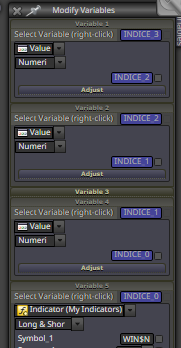
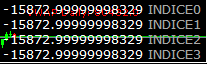
@roar https://fxdreema.com/shared/nzPRTmyeb Project with my indicator
Hello friend, I did exactly the same, just instead of buying I put a condition for him to create a vertical line on the candle, but I realized that it didn't work, is there any connection or wrong parameter that is checking the slope?
I tried to change the values of the constants too but even putting the value 1 didn't work.
F
Posts made by fabiobioware
-
RE: RSI condition about Valueposted in Questions & Answers
-
RE: RSI condition about Valueposted in Questions & Answers
https://fxdreema.com/shared/nzPRTmyeb Project with my indicator
Hello friend, I did exactly the same, just instead of buying I put a condition for him to create a vertical line on the candle, but I realized that it didn't work, is there any connection or wrong parameter that is checking the slope?
I tried to change the values of the constants too but even putting the value 1 didn't work. -
Adjust Spread Valueposted in Questions & Answers
Hello friends, how can I do to adjust the spread value to a whole number?
I created this project but it doesn't display the value correctly.
The value is being displayed as 3.00
I want it to be displayed with just the number 3Reasons:
-
Get the entire value to create a condition for my EA not to open orders if the size of the Spread is above a value.
-
Activate the trailling stop with a calculation of Pips above the Spread value, for example:
Spread value (5) + a value that I determine (20) = 25, when the price is 25 pips away from where the trade was opened pull the stop loss to 15 pips.
-
-
RE: RSI condition about Valueposted in Questions & Answers
@roar said in RSI condition about Value:
You get the slope by comparing current value to ID 1 value, no need for tick measurements.
The variables seem to be technically correct in the project.I didn't understand, can you give me an example by creating a project or including it in my project and sending it back?
What I understood would be the following:
If I create a condition:
value0> value1 = upward slopeIf I create 2 conditions and link one below the other:
value0> value1 = upward slope
value0> value1 = upward slope
Does this correspond to 2 consecutive inclinations? -
RE: RSI condition about Valueposted in Questions & Answers
@roar
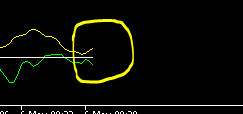
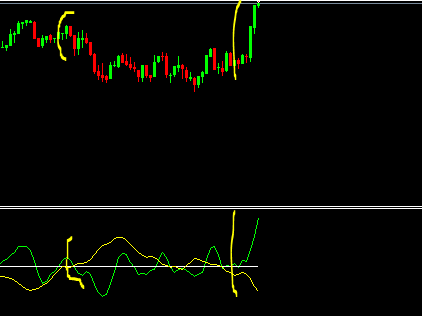
what I want is to know exactly how to create a condition using the variables to get this type of slope that is in the image, whenever this slope of the green and yellow lines happen on opposite sides and with this span it means a demonstration of an enormous strength of trend.
For this reason I am looking to monitor every tick, if you put this indicator on any forex pair you will see what I am talking about. -
RE: RSI condition about Valueposted in Questions & Answers
@roar said in RSI condition about Value:
well, I dont see why you should delay the market prices, because the market will be always real-time anyway. In order to slow the process, you would have to skip some ticks entirely. For example, run the code on every 5th tick.. I think theres a block designed for that
https://fxdreema.com/shared/x2iNXaZRd my project
0_1588768784768_DidiIndex.mq5 Indicator to this strategyCan you see if I'm making the variables correctly?
-
RE: RSI condition about Valueposted in Questions & Answers
@roar said in RSI condition about Value:
do you use mt5? If yes, the tester has an option to go step-by-step.
Open the visual tester, pause it, and then press f12 to test next tick.yes, mt5, i used this option to find out that it is changing, but there is no way to do this in fxdreema for the market?
-
RE: RSI condition about Valueposted in Questions & Answers
can you help me again?
I created the variables 0,1,2,3
I realized that due to the speed of the ticks it is imperceptible to look at the human to see the changed values.
How do I generate a small delay in updating each value that is shown in order to identify if the values are really different at each tick? -
RE: RSI condition about Valueposted in Questions & Answers
@roar said in RSI condition about Value:
yes. You can also put the variables in a comment block and see real-time how they flow through the steps
Greattt @roar thanks for your support, you solve my issue, thank very much.
i have group for fxdreema on whatssapp and telegram, would you like to participate? -
RE: RSI condition about Valueposted in Questions & Answers
@roar if i want to save the last 3 results then i would have to create 3 new variables, example:
old1
old2
old3and order to save the results in each other correct?
example:
old1 saves result on old2
old2 saves result at old3The condition to check if the current value is greater than the value of the last 3 variables is as follows:
current> old
old> old1
old1> old2
old2> old3is correct?
-
RE: RSI condition about Valueposted in Questions & Answers
I managed to get the values of the lines, now maybe to solve the question I can use a rule to check if the current value is greater than the previous value, how do I do this?
I know it involves a variable, but how should I do it to always save the values and compare them?
maybe create 2 variables.
Old value
New value
But how to save an old value and then save the new one in the old one when necessary? -
RE: RSI condition about Valueposted in Questions & Answers
@l-andorrà
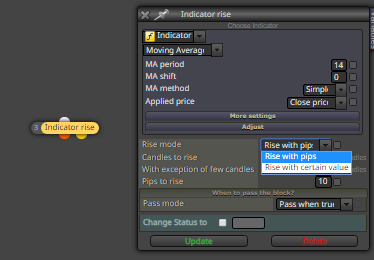
The problem is that from what I understand in this block "indicator rise" it does not check tick by tick, it checks previous candles.
What I need is to check "every tick".
The whole point is to measure the slope of the line, the more inclined the greater the demonstration of strength of the current movement and this is only possible to verify in the current candle. if it shows that the current tick is greater than the previous tick. -
RE: RSI condition about Valueposted in Questions & Answers
@l-andorrà and @roar I will try to be more specific
I use this indicator --> 0_1588040091109_Correlation.mq5
My project --> https://fxdreema.com/shared/VEOJruymeI created a variable to get the real time value of the indicator.
What I want to do is:
First identify
- If the line shown on the indicator is pointing upwards, make a purchase.
- If the line shown in the indicator is pointing to (low) make a sale.
What I thought about doing but I don't know what it is like to record the value of the line for each (previous tick) and record the value of the line for each (current tickt).
If I have the (previous tick) and (current tick) of the line I will know if it is tilted down or up by applying the formula.
If (current tick)> (previous tick) = upward sloping line.
If (current tick) <(previous tick) = downward sloping line.Note that I am not getting values for the candle id1 because all line movement happens at each tick and not at each candle.
I am very grateful if anyone can help by showing an example in a project about how I will obtain these values.
Follows the project that I was trying to obtain these values.
-
RE: RSI condition about Valueposted in Questions & Answers
call me please, i texted you and i can't get an answer.
-
RE: RSI condition about Valueposted in Questions & Answers
@l-andorrà said in RSI condition about Value:
Please let us take a look at your project now. I'm sure that it'll be very different from the last time.

Do you have any hours available on skype?
-
RE: RSI condition about Valueposted in Questions & Answers
Hello friends, remember the old post http: //fxdreema.com/forum/topic/8740/rsi-condition-about-value that I wanted to capture values, I managed, but now I want to know how to create the following condition.
If the current RSI value is lower than the previous
If the current RSI value is higher than the previousHow is the correct way to do this?
Does the RSI line move according to the price height on the chart? or is it according to each candle?