fxDreema

    • Register
    • Login
    • Search
    • Back to the main page
    • Categories
    • Recent
    • Tags
    • Popular
    • Search
    1. Home
    2. fabiobioware
    3. Posts
    F
    • Profile
    • Following 2
    • Followers 3
    • Topics 104
    • Posts 390
    • Best 11
    • Controversial 1
    • Groups 0

    Posts made by fabiobioware

    • RE: RSI condition about Value

      Hello friends, remember the old post vhttp://fxdreema.com/forum/topic/8740/rsi-condition-about-value that I wanted to capture values, I managed, but now I want to know how to create the following condition.

      If the current RSI value is lower than the previous
      If the current RSI value is higher than the previous

      How is the correct way to do this?
      Does the RSI line move according to the price height on the chart? or is it according to each candle?

      posted in Questions & Answers
      F
      fabiobioware
    • RE: Total gains or loss operations

      @l-andorrà said in Total gains or loss operations:

      The you can create two variables, one for gains and another one for losses. Compare each closed trade if it is >0 or <0 to put the in one side or the other. Then create a loop to count them all headed by a 'For each closed trade' block.

      can you give me any example with project on fxdreema?

      posted in Questions & Answers
      F
      fabiobioware
    • RE: Total gains or loss operations

      @l-andorrà trades.

      posted in Questions & Answers
      F
      fabiobioware
    • Total gains or loss operations

      How to account for gains and losses from operations.
      I want to print on the screen, for example:
      Total Gainsr: 10
      Total Losses : 5

      I want the quantity, not the value.

      posted in Questions & Answers
      F
      fabiobioware
    • RE: Hello friends, I would like to find some maximums and minimums, can you help me do this in fxdreema?

      @roar said in Hello friends, I would like to find some maximums and minimums, can you help me do this in fxdreema?:

      You can actually simplify the project by using the mql5 code for the extremes. For example, the code for monthly high is:
      iHigh(NULL, PERIOD_MN1, 0)
      Weekly high:
      iHigh(NULL, PERIOD_W1, 0)
      Daily low:
      iLow(NULL, PERIOD_D1, 0)
      etc. You see the pattern.

      @roar sorry i'm not really a programmer for this everything i do depends on fxdreema, could you help me get these values i need so much?

      posted in Questions & Answers
      F
      fabiobioware
    • RE: Hello friends, I would like to find some maximums and minimums, can you help me do this in fxdreema?

      https://fxdreema.com/shared/q54ELlggd here in english

      posted in Questions & Answers
      F
      fabiobioware
    • RE: Hello friends, I would like to find some maximums and minimums, can you help me do this in fxdreema?

      my concern is whether i will be able to locate all these tops and bottoms on any chart that i put the EA, considering the circuit breaks that existed.
      And if in fact each of these variables are correct, I will put it in English so that you understand it better.

      posted in Questions & Answers
      F
      fabiobioware
    • RE: Hello friends, I would like to find some maximums and minimums, can you help me do this in fxdreema?

      @l-andorrà said in Hello friends, I would like to find some maximums and minimums, can you help me do this in fxdreema?:

      I think it's correct. I'm not so sure about those 4 blocks on the 'on Init' tab. DO they work as intended?

      no, what matters is the blocks on the tick, i'm trying to find the maximum and minimum that i need.

      posted in Questions & Answers
      F
      fabiobioware
    • RE: Hello friends, I would like to find some maximums and minimums, can you help me do this in fxdreema?

      Hello @q8carpenter https://fxdreema.com/shared/vkOJmkBUc is correct?

      posted in Questions & Answers
      F
      fabiobioware
    • Hello friends, I would like to find some maximums and minimums, can you help me do this in fxdreema?

      Current maximum historical
      Current historical low
      Maximum Annual
      Annual Minimum
      Monthly Maximum
      Minimum Monthly
      Weekly Maximum
      Weekly Minimum
      Previous day high
      Previous day's low

      posted in Questions & Answers
      F
      fabiobioware
    • RE: how to keep the distance between 2 prices in a variable?

      @l-andorrà yessss
      https://fxdreema.com/shared/6wqLadwNb

      posted in Questions & Answers
      F
      fabiobioware
    • RE: how to keep the distance between 2 prices in a variable?

      @l-andorrà said in how to keep the distance between 2 prices in a variable?:

      I can't remember the exact mql order right now, but what you get in that way is the price fraction. Maybe that's enough for what you are looking for. Do you really need it to be transfored in to pips?

      not necessarily, I now need it to create other lines with the same distance above or below, how can I do this, automate the creation of the lines.
      Create a condition that when it is met it creates for example 3 lines above and 3 lines below with the same measure of these lines that were created?

      posted in Questions & Answers
      F
      fabiobioware
    • RE: how to keep the distance between 2 prices in a variable?

      @l-andorrà said in how to keep the distance between 2 prices in a variable?:

      You can do it by creating 2 variables. The first two ones are used to catch both price values and the third one to store the difference between them through a 'Formula' block.

      0_1586032671181_MEASSUREPIPS.PNG

      that's right?
      But as I understand it he is measuring the distance of prices, how do I convert this to pips, to know how many pips of distance there is between them?

      posted in Questions & Answers
      F
      fabiobioware
    • how to keep the distance between 2 prices in a variable?

      how to keep the distance between 2 prices in a variable?

      I want to put two horizontal lines on the graph and I want it to show me the distance between them in pips.
      can someone give me an example of how to do this?

      posted in Questions & Answers
      F
      fabiobioware
    • RE: Stop the EA when positions are in progress and Start again after closed position.

      @l-andorrà said in Stop the EA when positions are in progress and Start again after closed position.:

      There are no variables in this imaghe, but constants only. You will never be able to modify them. They are input partameters and that means they are and will always be fix. The only way they can be initialized is by creating true variables. I guess you don't know how to create the input parameters ands them making them reinitializable, maybe?

      now I understand what you meant, yes they are constant, I put it in order to manually change my levels inserted in this place.

      Taking the opportunity to say that I was able to activate and deactivate what I wanted, I left the options to not look at stoploss or take profit and it worked.

      posted in Questions & Answers
      F
      fabiobioware
    • RE: Stop the EA when positions are in progress and Start again after closed position.

      @fxdreema you can help here ?

      posted in Questions & Answers
      F
      fabiobioware
    • RE: Stop the EA when positions are in progress and Start again after closed position.

      @l-andorrà I am not able to understand how to organize the stops and restarts of the variable, I did not understand what I meant by flag one, which block do you consider this flag one and where should it be placed? Can you give me an example or adjust this project of mine?

      posted in Questions & Answers
      F
      fabiobioware
    • RE: Stop the EA when positions are in progress and Start again after closed position.

      @l-andorrà said in Stop the EA when positions are in progress and Start again after closed position.:

      Are all your block IDs correct? I see the trailing stop is programmed to happen BEFORE the buy/sell lauchers. Same for all blocks connected below block 1428. The flag one is suppoed to be executes the last of them all, once all lines have been drawn.

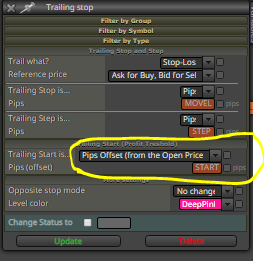
      0_1585852248194_traillingstop.PNG
      Hi @l-andorrà yes, all block ids are correct, my trailing stop
      this to start as soon as the price touches 150 pips above the price and drag it to 75 points and walk every 50 points.
      But my biggest concern is to activate or deactivate the block that updates the variable.

      posted in Questions & Answers
      F
      fabiobioware
    • RE: Stop the EA when positions are in progress and Start again after closed position.

      Hi, @ambrogio not working fine.

      Hello friends, @roar @l-andorrà it didn't work in any way that you guided me or that I tried.
      I don't know if I'm doing it exactly the right way.
      Explaining again what I want to do.

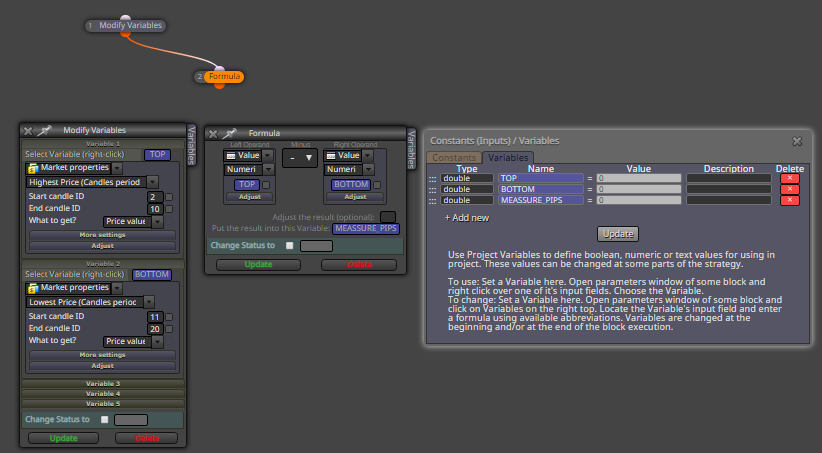
      There is a "variable" block that obtains custom indicator values that mark tops and bottoms.

      I need this block to work at some point and at other times it stops working.

      The correct thing is the following:

      1. When the EA is placed on the chart, the indicator has to locate a top and bottom and plot on the chart and then be disabled.
      2. A buy or sell position is opened, and it happens when the candle crosses and closes above the top or bottom of this indicator.
      3. When the position is closed, either by take profit or stoploss, or even manually, the "variable" block has to be rehabilitated and make a new calculation and then be closed again.

      0_1585834632111_dynamicresistancesupport.mq5
      Indicator used in project in UP

      My project --> https://fxdreema.com/shared/XWGPklfxc
      posted in Questions & Answers
      F
      fabiobioware
    • RE: Stop the EA when positions are in progress and Start again after closed position.

      @ambrogio not working using this method. i wil try another methot after, thanks for your time.

      posted in Questions & Answers
      F
      fabiobioware
    • 1
    • 2
    • 10
    • 11
    • 12
    • 13
    • 14
    • 19
    • 20
    • 12 / 20