fxDreema

    • Register
    • Login
    • Search
    • Back to the main page
    • Categories
    • Recent
    • Tags
    • Popular
    • Search
    1. Home
    2. jstap
    3. Posts
    • Profile
    • Following 2
    • Followers 222
    • Topics 37
    • Posts 9381
    • Best 1086
    • Controversial 23
    • Groups 0

    Posts made by jstap

    • RE: Store Profit whenever there is position // if no more position, profit resets to 0

      you don't need the check count block, did you want the profit or the price level?
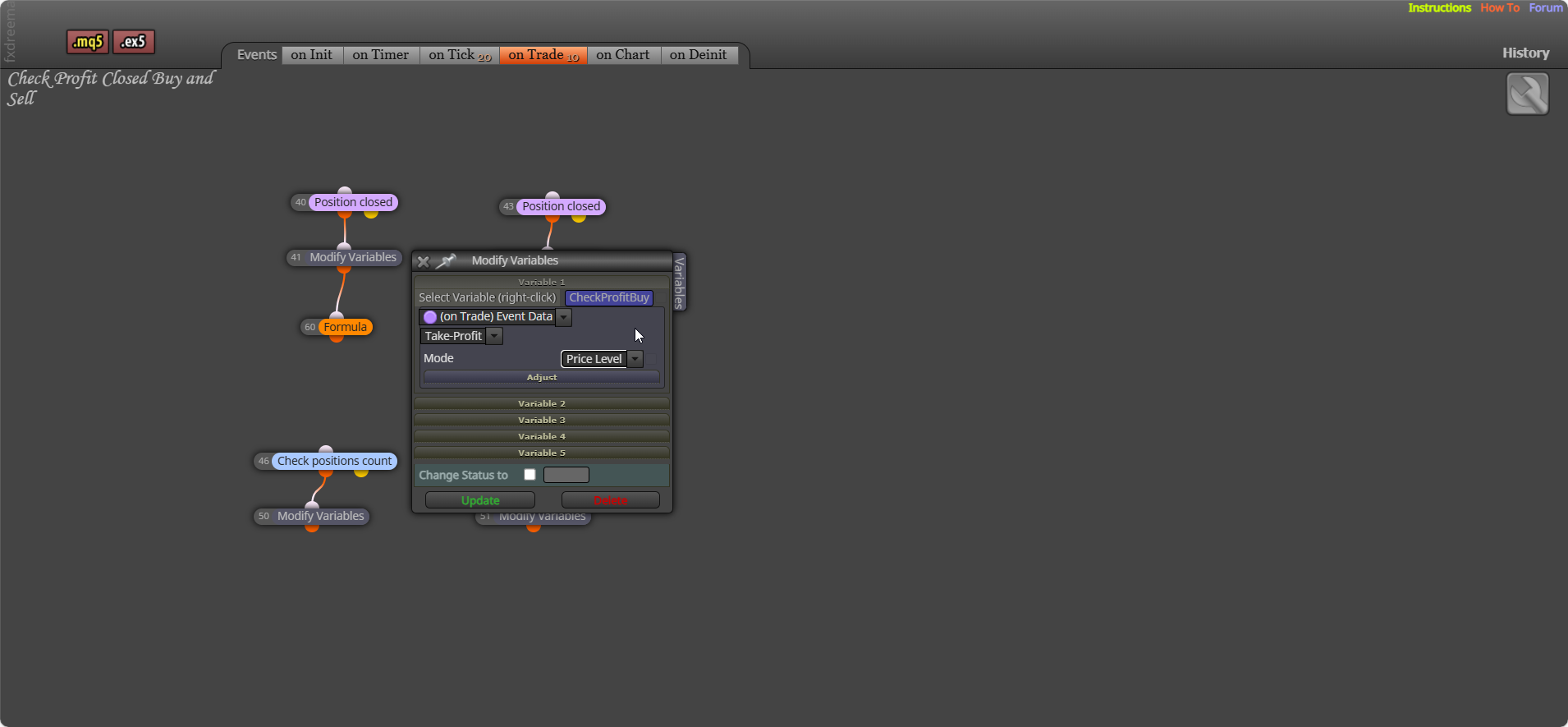

      image.png

      posted in Questions & Answers
      jstap
      jstap
    • RE: Studio Custom Functions All Deleted

      Contact support that's the only possible way of getting help over this.

      posted in Bug Reports
      jstap
      jstap
    • RE: Close Last and Newest trade

      Look at the link I sent this can add more than 1 position at a time, yours was limited to a single position at a time

      posted in Questions & Answers
      jstap
      jstap
    • RE: working on object name and execute trades

      That depends on assets in your brokers market watch. I doubt you need that amount saved.

      posted in Questions & Answers
      jstap
      jstap
    • RE: Most loss position

      This should do it: https://fxdreema.com/shared/Sld2JWJbd

      posted in Questions & Answers
      jstap
      jstap
    • RE: working on object name and execute trades

      yes, once per hour - modify the variable to the value you want (in a separate tree).

      posted in Questions & Answers
      jstap
      jstap
    • RE: Close Last and Newest trade

      It has no way of creating more than 1 position, this should create more than 1 and close when profit is above the price. this is only a test project, you will need to test and change until it's how you want: https://fxdreema.com/shared/ttZkTguNd

      posted in Questions & Answers
      jstap
      jstap
    • RE: Close Last and Newest trade

      This should do it, add this into your bot: https://fxdreema.com/shared/oqT60bwOb

      posted in Questions & Answers
      jstap
      jstap
    • RE: Need Help for How I can close first order when EA opern second order and recover profit for all

      A little more information would help, add a shared link to see what you've done

      posted in Questions & Answers
      jstap
      jstap
    • RE: working on object name and execute trades

      Is the text appearing in your comment, the same as your condition?

      posted in Questions & Answers
      jstap
      jstap
    • RE: Close Last and Newest trade

      Add to what you have from a loop yellow, because it goes to this once the loop has finished, another loop that collects the running profit, then off yellow use condition to check if the variable profit is>$4 to another loop to deleting trades from the oldest.

      posted in Questions & Answers
      jstap
      jstap
    • RE: Price action, CHoCH and BOS

      Start a new question for this, add a shared link to see what you have done, but basically when BE happens, place the trade.

      posted in Questions & Answers
      jstap
      jstap
    • RE: Break Even Only On 1st Trade

      I meant to reply to this yesterday, you cant use group numbers for manual trades, this might do it, but when the trade closes it will work on the next, so you would need to add something like a flag to stop BE working and reset when needed:
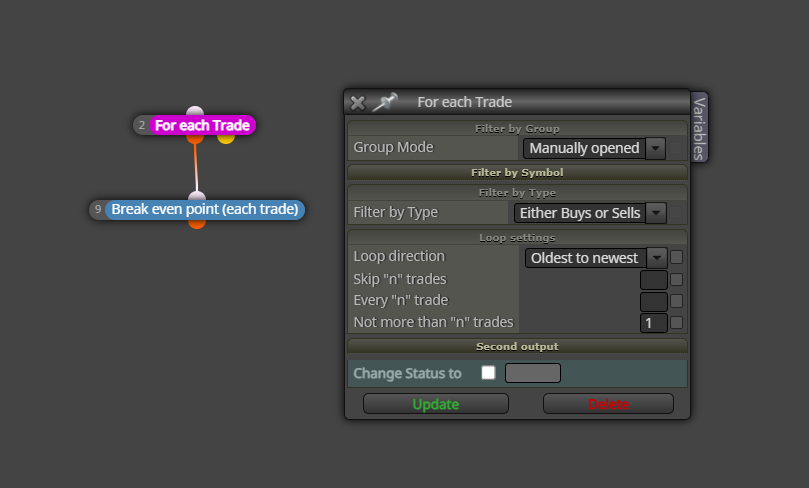
      image.png

      posted in Questions & Answers
      jstap
      jstap
    • RE: Most loss position

      This should put the lowest running profit into the variable

      posted in Questions & Answers
      jstap
      jstap
    • RE: Most loss position

      You mean the total value of all losing positions buys and sells stored separately?

      posted in Questions & Answers
      jstap
      jstap
    • RE: Total Lot size changes to more decimal places

      @pipsondeck 👍

      posted in Questions & Answers
      jstap
      jstap
    • RE: How to use "Custom MQL code"?

      @dee108 You'll have to try it.

      posted in Questions & Answers
      jstap
      jstap
    • RE: How to edit variables in the inputs tab?

      yes call the type color name what you want clr red in the value, should give you the dropdown in your inputs like your picture

      posted in Questions & Answers
      jstap
      jstap
    • RE: number

      add a shared link to see where this is but, NormalizeDouble(variable name,2); will do it

      posted in Questions & Answers
      jstap
      jstap
    • RE: Color

      What though words, arrow, candles... many choices but they're all basically the same draw with the same name, but the colour you want for the reason when something happens.

      posted in Questions & Answers
      jstap
      jstap
    • 1
    • 2
    • 33
    • 34
    • 35
    • 36
    • 37
    • 469
    • 470
    • 35 / 470