fxDreema

    • Register
    • Login
    • Search
    • Back to the main page
    • Categories
    • Recent
    • Tags
    • Popular
    • Search
    1. Home
    2. jstap
    3. Posts
    • Profile
    • Following 2
    • Followers 222
    • Topics 37
    • Posts 9382
    • Best 1086
    • Controversial 23
    • Groups 0

    Posts made by jstap

    • RE: Countdown to executtion

      @youngtreptrader You could set up a variable that counts minutes, start the count at the start of a candle (you could count a 1 minute candle), reset just before you start the count, when a condition meets the required number place the trade, on back test it will likely only count minutes if on the 1m chart.

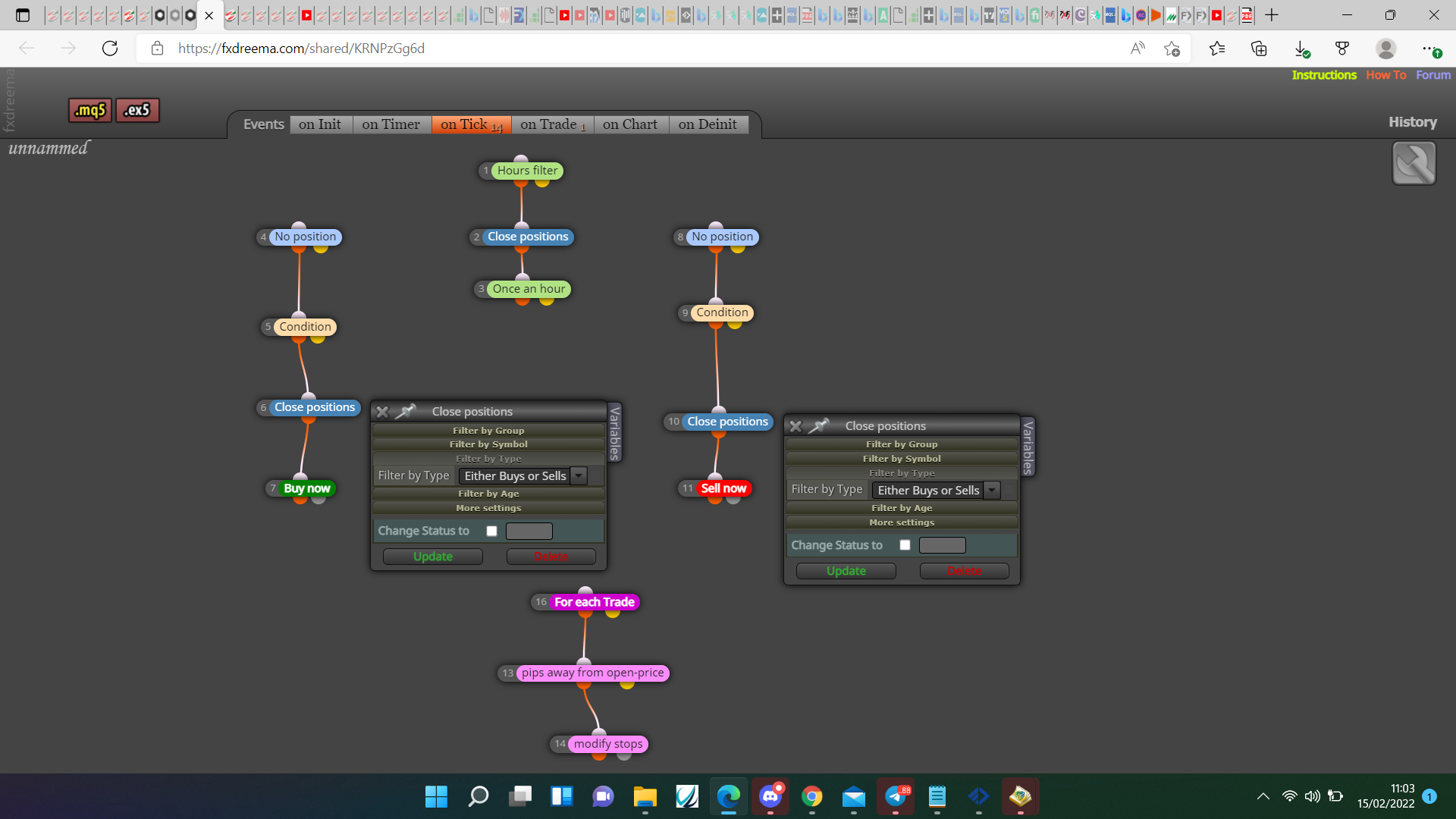
      https://fxdreema.com/shared/mlkTG6w6e

      posted in Questions & Answers
      jstap
      jstap
    • RE: One market trade cancels the other at a given level

      @sleek You don't need a blue block above pink but you do need a pink for each trade, do you need your type to close trades?

      0_1644923049693_cf6fd752-57ff-4a6a-a422-13d518c5f8c0-image.png

      posted in Questions & Answers
      jstap
      jstap
    • RE: One market trade cancels the other at a given level

      @sleek Your shared link just opens builder, open shared link in a web page, copy from there.
      Warnings wont stop the EA working, only errors will.

      posted in Questions & Answers
      jstap
      jstap
    • RE: RSI condition to close trade

      @william-1 This https://fxdreema.com/shared/miLtEu1Td should show you how to connect blocks to do things you need, is using a variable so you can see what is happening in a comment.

      posted in Questions & Answers
      jstap
      jstap
    • RE: Adjusting the order lot size 0.01 0.02 0.04

      @truongvnd Every time you place an order add 1 to the number of placed orders (in a variable), in separate trees check the number in a condition block then modify a variable to the new lot, when sequence is finished reset the variable to 0.01.

      posted in Questions & Answers
      jstap
      jstap
    • RE: Stop Loss Parabolic first dot

      @wctrade36 On a variable leave it at 0 (this is what it will save to), the EA will change it as needed.

      posted in Questions & Answers
      jstap
      jstap
    • RE: Strength Meter

      @pais Put the trend power in a string variable, use this custom code and save into another string variable:

      StringSubstr(string variable name,13,3 );

      this should put the number into the variable
      convert the string into a new double variable with this custom code:

      StrToDouble(new variable)

      you can then use a condition block to check if %number is > 60.

      Try this, it should work, if not let me know.

      posted in General Discussions
      jstap
      jstap
    • RE: RSI condition to close trade

      @william-1 Put a shared link here so what is happening can be assessed.

      posted in Questions & Answers
      jstap
      jstap
    • RE: The EA restart the lot size when computer turn off

      @lali This is working, I wont be about much over the weekend but you should have enough to get on with things, I have checked information is being put in the common file, good luck.

      https://fxdreema.com/shared/myk0x399c

      posted in Questions & Answers
      jstap
      jstap
    • RE: Condition in the Take Profit

      @jrpscanavini A condition block with candle X> MA then a close position block beneath.

      posted in Questions & Answers
      jstap
      jstap
    • RE: GRID that reopen same position after Take PRofit

      @trdjb3 For this use pink block for each closed position>buy/sell, for every option you want to be the same select trade order in loop and the desired option, put this below the purple block.

      posted in Questions & Answers
      jstap
      jstap
    • RE: GRID that reopen same position after Take PRofit

      @trdjb3 On the on trade tab, using the purple blocks, once an order is closed you can recreate anything you want.

      posted in Questions & Answers
      jstap
      jstap
    • RE: The EA restart the lot size when computer turn off

      @lali There is a lot involved in doing this, download the shared file and test, implement into your project, place a shared link so what isn't working can be addressed. If you go to file>data folder then go to terminal then common you will see the created TXT files. These can be used with any/all terminals on your computer.

      I don't mind helping you use this just make a start.

      posted in Questions & Answers
      jstap
      jstap
    • RE: The EA restart the lot size when computer turn off

      @lali You will need to save the used lot to a file and update every time it changes, every time a trade is placed it uses the saved lot.

      This will show you how to save and read to/from a file:

      https://fxdreema.com/shared/oIWQEtdid

      posted in Questions & Answers
      jstap
      jstap
    • RE: How to draw zig zag top and bottom lines.

      @ontradingx MT4 or MT5? If ZZ on way up then the last fixed is H1 & L0, H1 candle high, L0 candle low.

      posted in Questions & Answers
      jstap
      jstap
    • RE: Highest High Lowest Low EA

      @sibkis Your logic is correct just use candle 1 instead of 0, your take profit will just choose the price at start, so isn't guaranteed to be in the best place.

      posted in Questions & Answers
      jstap
      jstap
    • RE: How to draw zig zag top and bottom lines.

      @ontradingx Search @miro1360 and use his code this will give you the price level or candle ID.

      posted in Questions & Answers
      jstap
      jstap
    • RE: STOP LOSS

      @uriel-0 Likely use check average profit block.

      posted in Questions & Answers
      jstap
      jstap
    • RE: Trade Profit/loss at certain price level

      @general-melchett Very good

      posted in Questions & Answers
      jstap
      jstap
    • RE: Times

      @legendarymike To make the shared link easier for people to click click it so it opens in a web page, then copy from there otherwise people have to open a shared link of there own and then copy the half link to past over half there own.

      posted in Questions & Answers
      jstap
      jstap
    • 1
    • 2
    • 376
    • 377
    • 378
    • 379
    • 380
    • 469
    • 470
    • 378 / 470