@jsauter86 I can not give other explanations, if you want, share the project so we can test it.
M
Posts made by miki
-
RE: 2 PC's, Same EAposted in Bug Reports
-
RE: 2 PC's, Same EAposted in Bug Reports
@jsauter86 I was referring to the expert settings not the metatester.The percentages are the same, the number of trades 1/10 try to test in visual mode to understand the differences.
-
RE: 2 PC's, Same EAposted in Bug Reports
@jsauter86 Check the EA settings, the number of trades is very different
-
RE: 2 PC's, Same EAposted in Bug Reports
@jsauter86 Not necessarily, check that the percentage is the same
-
RE: Stop Trading when the daily target or loss is achievedposted in Questions & Answers
@zedeai2 in your project the check is done only on the last position, even by adding "for each trade" block, the check is done in a loop on every single operation. If you want to check a trade basket use "check profit (unrealized)" block, but in this case the percentage must be calculated separately because the block does not have that function. After use close trade block to close all trade not terminate block.
-
RE: Adding custom Currency Strength Meter indicatorposted in Questions & Answers
@sauce The only variable to create is symbol in which we are going to put the symbol to be traded, in this case, buy. Alert should work. The only thing maybe wrong but I haven't tested it are the double quotes on "EURUSD". If you want the alert on your phone you need to set the metaquoteID in the metatrader settings.
-
RE: New order for certain pips awayposted in Questions & Answers
@zedeai2 in pips away block use trading model in direction mode
-
RE: fxDreema Last Update Errorposted in Bug Reports
@cheaponreay01 may be the unbalanced braces in block 178 or in the other custom blocks? It's just a guess. Obviously the lack of telegram.mqh which could contain other #includes inside.
-
RE: Adding custom Currency Strength Meter indicatorposted in Questions & Answers
@sauce you can use weekday filter block + time filter block +close trade block.
-
RE: Adding custom Currency Strength Meter indicatorposted in Questions & Answers
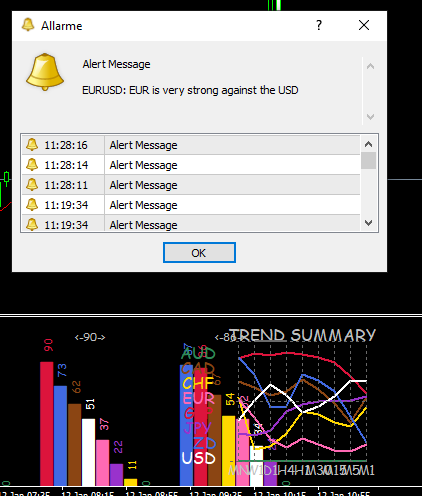
Also, with this setup using OR/AND... isn't it possible that it could send a false alert with EUR<40 and USD<40? We're only looking for a >60 and <40 to pass or vice versa <40 and >60.
Yes @Sauce , not knowing I misinterpreted the indicator. It's sufficent EUR>60 USD<40 or viceversa and it work.

-
RE: Adding custom Currency Strength Meter indicatorposted in Questions & Answers
@sauce It should work just the same
 . I tried to enumerate the variables in order to insert them from the outside but the dashes "-" in the names (CSM-1-H1-AUD) create errors.I'm sorry.
 -
RE: Adding custom Currency Strength Meter indicatorposted in Questions & Answers
@sauce the only thing that comes to mind, given the particularity of the indicator is something like this https://fxdreema.com/shared/jXQf9Zogd which will be replicated for every possible combination. A mammoth project
 .The problem with this indicator is find a valid symbol.
 -
RE: Adding custom Currency Strength Meter indicatorposted in Questions & Answers
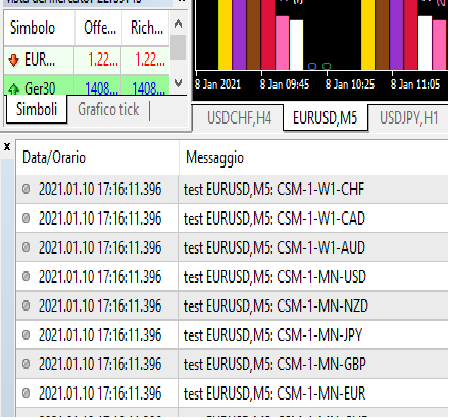
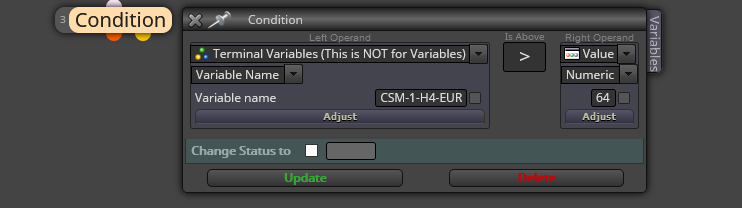
@sauce with this custom code https://fxdreema.com/shared/s2gvJ1zF you can see all global variables name that indicator creates after set true "OutputGlobals" in indicator. After you find the name of the variable you are interested in, use conditin block to use it
-
RE: Invalid Purchase?posted in Bug Reports
@luis-d he had 2 account on fxdreema and upgraded the other one.
[link text]https://fxdreema.com/forum/topic/11352/invalid-purchase-still/6(link url) -
RE: How can I integrate that custom code into fxdreema ?posted in Questions & Answers
@beatking or by hand
-
RE: ATR Stop loss help (Bollinger Bands)posted in Questions & Answers
@deadllee First of all,you must convert atr value in pips therefore you have to multiply the value * 10000 if there is no yen in the symbol otherwise * 100.
-
RE: Question of Bollinger Bands and RSI - I use FXDREEMAposted in Bug Reports
@enzo-1 Perchè continui a scrivere nella sezione bug?
-
RE: Valuating fxDreemaposted in Questions & Answers
Hello @alberto-1 with Fxdreema is possible to create only EA