fxDreema

    • Register
    • Login
    • Search
    • Back to the main page
    • Categories
    • Recent
    • Tags
    • Popular
    • Search
    1. Home
    2. OntradingX
    3. Posts
    • Profile
    • Following 1
    • Followers 7
    • Topics 120
    • Posts 427
    • Best 28
    • Controversial 1
    • Groups 0

    Posts made by OntradingX

    • Put the indicator code directly into the EA.

      Is there any way I can put the indicator's source code directly into the EA?

      I saw an EA that works with a custom indicator, but I didn't need to download the indicator from the internet to use the EA.
      Probably the developer with the intention of not finding out what the indicator and its calculations included in the entire source code of the indicator internally in the robot.
      Does anyone know how to do this in Fxdreema?

      posted in Questions & Answers
      OntradingX
      OntradingX
    • RE: Order opening based on remaining time

      @tipsywisdom
      Sorry friend, I don't understand what you mean, can you clarify?
      Was it something positive or negative?

      posted in Questions & Answers
      OntradingX
      OntradingX
    • RE: Order opening based on remaining time

      @ontradingx
      https://fxdreema.com/shared/Ah2vxiHCc

      posted in Questions & Answers
      OntradingX
      OntradingX
    • Order opening based on remaining time

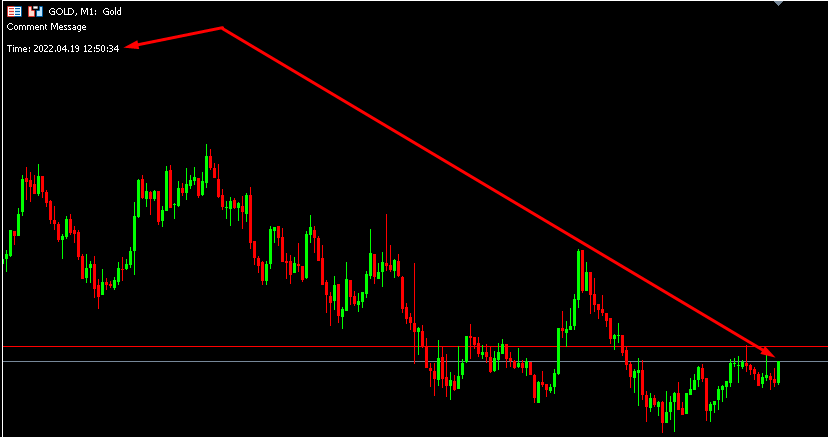
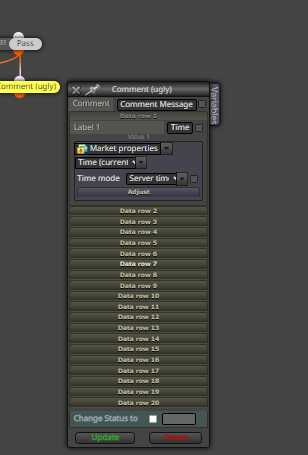
      Note that the information obtained there at the exact moment is:
      Time: 2022.04.19 12:50:34

      I wanted to know how to create conditions with these times.
      For example:

      Every time a 1 minute candle opens then we can say that the information displayed will be for example:

      Time: 2022.04.19 12:50:00
      So I want it when there is an increment of 55 seconds like in the example below:
      Time: 2022.04.19 12:50:55 a trade opens.

      In short, I want (5 seconds to go) for a new candle to open, to open a trade, but it has to be exactly 5 seconds.
      Does anyone know how to do this demonstrating with an example?

      0_1650365506430_timecandle.png
      0_1650365547380_timecandlecomment.png

      posted in Questions & Answers
      OntradingX
      OntradingX
    • RE: Feature Request

      @tipsywisdom
      Let's see if I understand correctly what you need:

      Do you want to get the highest price and lowest price reached from a candle period?

      posted in General Discussions
      OntradingX
      OntradingX
    • RE: Average Open Price not work (DOGEUSD)

      @ambrogio Yes, I've tried several ways, the best was to remove everything, I also work by (points) instead of (pips) most of the markets I operate I do my calculations by points and so far they are working perfectly.

      posted in Questions & Answers
      OntradingX
      OntradingX
    • RE: Average Open Price not work (DOGEUSD)

      @duepips Sorry, I do not understand.
      Did it work or not?

      posted in Questions & Answers
      OntradingX
      OntradingX
    • RE: Average Open Price not work (DOGEUSD)

      @ambrogio What kind of problems, can you specify or give an example?
      I always remove everything and never had any problems.

      posted in Questions & Answers
      OntradingX
      OntradingX
    • Delete chart lines, all lines regardless of name.

      My EA works by creating many lines on the chart and this makes it slow because of these lines, I wanted to know if there is any way to tell when a certain time is reached that the EA deletes any type of line plotted on the chart, today I use the name of the line to delete, but I want to delete them all regardless of the name.
      It's possible? How?

      posted in Questions & Answers
      OntradingX
      OntradingX
    • RE: Average Open Price not work (DOGEUSD)

      @duepips I just erase everything written in rules.
      try this.

      posted in Questions & Answers
      OntradingX
      OntradingX
    • RE: Best practices to improve EA speed (Backtesting)

      @trdjb3 said in Best practices to improve EA speed (Backtesting):

      Como posso verificar o lucro do dia mais rápido do que o bloco feito para esse fim?
      ou, como verificar o patrimônio das posições abertas mais rapidamente do que usar o balde de posições?

      How can I check the day's profit faster than the block made for this purpose?
      The answer is in:
      What is the need for you to have to watch the day's profit at every tick of the market?
      Wouldn't it be more interesting to know this after each trade is closed?

      or, how to check equity of open positions faster than using position bucket?
      I give the same answer to this question.
      You just need to know the balance of open positions "if there was any open position", so put an "if position" block above.

      posted in General Discussions
      OntradingX
      OntradingX
    • RE: Best practices to improve EA speed (Backtesting)

      @trdjb3
      Friend, let's go to some points that helped me a lot to improve the speed of the EA (Backtesting).

      1. Know exactly where to place each block.
        Block (once per bar) - Place them exactly above conditions/rules that need to wait for candles to close, if your strategy is scalp/short trade - fast and you don't aim to make long gains then this block might not be ideal . This block speeds up the backtest speed when it is not necessary for the EA to watch (every tick) and thus saves a lot of time.

      Block ( For each position) or ( For each closed position) - When you are carrying out an order count (profits and losses), performing sums etc... then you do not need this count to be executed every tick, but you need the After each trade or each closed trade this is executed, for this always use these blocks, I noticed that both in ONTICK and ONTRADE they save backtesting time.

      Block ( Check Flag (true-false) When using these blocks, check the need to have a block before them or not so that when this previous block is really needed, then it checks this final block true-false. I noticed that this ends improving the performance of not having to check every tick if the condition is true or false.

      I have cited just a few of the many examples that I could cite here, but in general I would like to inform you that the ideal thing is that you plan your project thoroughly knowing that when all the blocks are IN ORDER, and each one in its DUE place the chances of your backtest not getting slow will be higher, I see that many projects made in FXDREEMA sometimes need a review in this regard.
      The more you use the more you learn, practice makes perfect.

      posted in General Discussions
      OntradingX
      OntradingX
    • RE: Close after certain amount of money profit

      @sirluk @l-andorrà @jstap
      I would like to comment on one detail...
      All this will work in backtest, but I believe that in the real market, as soon as your metatrader restarts or your house light or vps forces the metatrader to restart the value obtained at the beginning of the day will be zero (0).
      I think the ideal thing is for you to loop in search of the amount of gain or loss for the day and save this in a variable. Every time the EA is restarted no matter the reason it will loop and get the balance of the current day.

      posted in Questions & Answers
      OntradingX
      OntradingX
    • RE: My mt5 project turned mt4 without my interference.

      @ontradingx @FXDREEMA

      posted in Questions & Answers
      OntradingX
      OntradingX
    • RE: My mt5 project turned mt4 without my interference.

      @ontradingx 0_1647945822098_mt5tomt4nointerference.png
      It's all messed up

      posted in Questions & Answers
      OntradingX
      OntradingX
    • My mt5 project turned mt4 without my interference.

      Hello admin, why did my project without my request become mt4 format?
      I had a huge job and now this happened for what reason?

      posted in Questions & Answers
      OntradingX
      OntradingX
    • RE: Save all trades in .csv file

      @l-andorrà Hello my friend, I tested the way you said and data was missing, the best way I found was putting the pink block " once per trade/order" connected to "For each closed position" and it worked perfectly.
      Thank you for your help, always very present and enlightening.

      posted in Questions & Answers
      OntradingX
      OntradingX
    • RE: Save all trades in .csv file

      @l-andorrà Will this allow saving all operations that happened at the end of a backtest?
      I managed to achieve my goal by placing the pinv block once per position/order.
      But I will try the way you mentioned.
      Thanks for your help.

      posted in Questions & Answers
      OntradingX
      OntradingX
    • Save all trades in .csv file

      Hello, I created this structure to save data of closed orders in a .csv file in lines, each closed order must be recorded in one line, always in the next line without deleting the previous order.
      What I noticed is that some orders are not being saved.
      Why does this happen?
      Can you help me?
      https://fxdreema.com/shared/5oJrjZhGc

      posted in Questions & Answers
      OntradingX
      OntradingX
    • RE: How to embed an indicator code in the EA.

      @jstap said in How to embed an indicator code in the EA.:

      icustom

      you have one example in Fxdreema?

      posted in Questions & Answers
      OntradingX
      OntradingX
    • 1
    • 2
    • 12
    • 13
    • 14
    • 15
    • 16
    • 21
    • 22
    • 14 / 22