fxDreema

    • Register
    • Login
    • Search
    • Back to the main page
    • Categories
    • Recent
    • Tags
    • Popular
    • Search
    1. Home
    2. OntradingX
    3. Posts
    • Profile
    • Following 1
    • Followers 7
    • Topics 120
    • Posts 427
    • Best 28
    • Controversial 1
    • Groups 0

    Posts made by OntradingX

    • "Add volume" block not Working

      The block to increase the volume" ADD VOLUME " using 120% % over the previous volume is not calculating.
      I put the url below that gives access to the project so they can test.
      This is not the first time that something in Fxdreema has stopped working without warning.
      Note, volume works only after it is set to calculate from 155%.

      https://fxdreema.com/shared/KQzN5zUxd

      posted in Bug Reports
      OntradingX
      OntradingX
    • RE: Problems with the "add volume" block

      @jstap It's really a bug, I've tested it this way and several other ways and the problem persists, but only for new and old EA's this isn't happening.

      posted in Questions & Answers
      OntradingX
      OntradingX
    • Problems with the "add volume" block

      Hi, I believe there is a problem with batch augmentation.
      I have put 120% lot volume increase on each previous trade and the increase is not happening, before it worked and stopped.
      Am I doing something wrong or could it be a bug?

      https://fxdreema.com/shared/KQzN5zUxd

      posted in Questions & Answers
      OntradingX
      OntradingX
    • RE: Changes

      @fxdreema Dear, good to hear from you.
      I've been reading your posts around here and in a way I don't know if I understood it well, maybe because of language issues.

      I managed to withdraw YES money from both the Forex and Brazil market and I still withdraw it with the EA's that I developed on your platform and also with the improvement of my strategies.
      I particularly use Fxdreema to generate extra income.
      I've already developed EA's and sold them.
      I've already developed EA's and provided them for free.
      And I also develop tools to help with negotiations.
      Currently I have more than 500 EA's and tools already created thanks to your tool.
      What I actually learned with my knowledge of Fxdreema is that "Risk management" is in my opinion much more important than the entry and exit strategy of a trade, without knowing the size of the risk, daily, monthly you can take or leave it proportional to the size of your entire capital and any account will be cleared quickly.
      I believe the % increase you aim to do is fair from the point of view that you mention that you are proposing to be more participatory, one of the things that is actually necessary once you've turned it into a (corporate business) and this really goes generate costs for you and you will have to pass them on.
      I know that life as a developer is not easy but in your place I would be proud, you developed something that is brilliant and helps a lot of people around the world, there are few who have ideas like that and have the knowledge, you went far and put it into practice, I suggest that you invest some time in this business because the snowball INCREASES when worked. Good luck.

      posted in Questions & Answers
      OntradingX
      OntradingX
    • RE: I dont understand trailing stop

      @william-1 The stop loss will move every 1 pip of profit, as the 0 is saying this, without delay, every new profit moves the stop loss together.

      posted in Questions & Answers
      OntradingX
      OntradingX
    • RE: I dont understand trailing stop

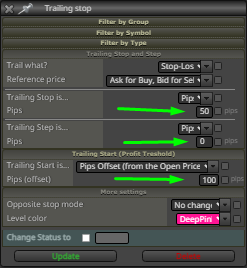
      @william-1 0_1638883813539_Trail 100-50.png

      I'll try to explain to you why I set it up like this:

      Trailling Start set 100, but why?
      Answer: I want when the price reaches 100 points away from (order opening price) it triggers and moves my Stop Loss.

      Trailling Stop set 50, but why?
      Answer: I want that when there is the triggering of Trailling Start, my Stop moves to 50 points away from where the triggering happened, that is, if the triggering happened in 1100, move to 1050.

      Trailling Step I set 0, but why?
      Answer: I want that when the price is above the point where Trailling Start 1100 was triggered, it moves the StopLoss at each point, the 0 means no (delay), every point that walks it will walk together, visibly you are not seeing but there is a level where every time he gets a new point and and pulls the stoploss together also a new point, they go together, if you put for example (5) on the trailling step, you are talking ( delay 5 points to move the Stop Loss The higher the value, the more delay you are putting, the closer to 0 the shorter therefore the movement is faster.

      posted in Questions & Answers
      OntradingX
      OntradingX
    • RE: I dont understand trailing stop

      @william-1
      Hello friend, I don't understand, can you be more specific or send a drawing of what you need?

      posted in Questions & Answers
      OntradingX
      OntradingX
    • RE: K2 robot (multi-currency) - Free !

      @amincgi I run this test on EURUSD H1, default setup you left on your EA, what was the best result this year you got, or does it not work well on backtest?

      posted in Questions & Answers
      OntradingX
      OntradingX
    • RE: K2 robot (multi-currency) - Free !

      @amincgi 0_1638791895437_Screenshot_1.png

      posted in Questions & Answers
      OntradingX
      OntradingX
    • RE: I dont understand trailing stop

      @alphaomega
      Thank you my friend, let's unravel this Fxdreema as much as we can, now I'm working on something custom, as I like Trailling Stop Técnico, I don't believe in anything other than breakpoints or technical balance, I suggest you study more the asset that is operating and try to create trailling stop with strong structures, Trailling stop is great to ensure profit, but the best is you put your stop in the right place and the right place is always behind strong barriers.
      Follow the link to the tutorial already posted.
      https://fxdreema.com/forum/topic/13829/trailling-stop-how-to-use

      posted in Questions & Answers
      OntradingX
      OntradingX
    • Trailling Stop (How to use)

      I will try to explain to you how I understand it and also with a project where I draw lines to see the stopping points of each one.

      Trailling Start - It just asks you:
      (How many profit points above the opening price do you want me to move your Stop Loss?)
      If you enter 300, it will do the following:
      Open order at price 1000 when market price reaches 1300 stop movements.

      Here comes another question, (where should I move the Stop Loss?)
      To answer this question, you must fill in the (Trailing Stop)
      Trailling Stop - Does it ask you?
      How many points below the price of (Trailling Start (1300)) do you want me to put yours (Stop Loss)?
      If you enter 300, it will do the following:
      Trailling Start is at 1300, when the price touches it I will put my Stop Loss at the price of 1000, ie 0x0.
      If you put 250, for example, the StopLoss will be moved to 1050.

      Here comes the final question, the
      that you want (Trailling Step), I understand this as a delay.
      Why delay?
      Answer: If you notice that there is sequence logic, if in (Trailling Step you keep (0), then you're talking about, don't be late, whenever the price makes a new higher price, drag my StopLoss next to each point, that is.
      If my current price is 1300 and I have already secured my 0x0 to the price of 1000, when the price reaches 1301 drag my StopLoss to 1001, go point to point giving me profit.
      Now, if you put a value on Trailling Step (50), you're saying:
      After leaving me at 0x0, when the price is far from the sum of the points of (Trailling Start + TraillingStop, ie (300 + 50 = 350) 350 points above the price where my (Stop Loss) is, immediately move me giving 50 points of gain and I walk like that always.

      I tried to detail it because I see a lot of doubts about this, I hope it helps a lot of people around here, I like to put lines in the chart to unravel how it works and I do this for everything in all my EAs.

      Follow the project link, if anyone has a better idea, share it too.
      https://fxdreema.com/shared/2QD4rMMtd

      posted in Tutorials by Users
      OntradingX
      OntradingX
    • RE: I dont understand trailing stop

      @jstap Could you make this change and generate a project posting here so we can analyze?

      posted in Questions & Answers
      OntradingX
      OntradingX
    • RE: I dont understand trailing stop

      @William-1 @jstap @AlphaOmega
      I'll try to explain it to you as I understand it and also with a project where I drew lines so I could see the stopping points of each one.

      Trailling Start - He just asks you:
      (How many profit points above the opening price do you want me to move your Stop Loss from?)
      If you enter 300, then it will do the following:
      Open order at price 1000, when market price reaches 1300 move Stop.

      Here comes another question, (Where should I move the Stop Loss?)
      To answer this question you must fill in the (Trailing Stop)
      Trailling Stop - He asks you?
      How many points below the price of (Trailling Start(1300)) do you want me to put yours (Stop Loss)?
      If you enter 300, then it will do the following:
      Trailling Start is at 1300, when the price touches it, I will put my Stop Loss at price 1000, that is, 0x0.
      If you put for example 250 the StopLoss would be moved to 1050.

      Here comes the final question,
      What is (Trailling Step) you want, I understand this as a delay.
      Why delay?
      Answer: If you observe there is a sequence logic, if in (Trailling Step you keep (0) then you are talking about, don't be late, whenever the price makes a new higher price, drag my StopLoss next to each point, that is.
      If my current price is at 1300 and I've already secured my 0x0 at the 1000 price, when the price hits 1301 drag my StopLoss to 1001, go point by point giving me profit.
      Now if you put Trailling Step a value (50), you're saying:
      After you have left me at 0x0, when the price is at a distance from the sum of points of (Trailling Start+TraillingStop, ie (300+50=350) 350 points above the price of where my (Stop Loss) is, move it immediately giving me 50 points of gain and walk like that always.

      I tried to detail it because I see a lot of doubts about this, hopefully it helps a lot of people around here, I like to put lines in the graph to unravel the workings and I do this for everything in all my EA's.

      Follow the project link, if anyone has a better idea please share it too.
      https://fxdreema.com/shared/2QD4rMMtd
      posted in Questions & Answers
      OntradingX
      OntradingX
    • RE: Display on chart the real profit/loss (including swaps and commisions)

      @pinoa Hello, I believe that what is missing there is a pink block called "For each Trade" linked to the "variable" block.
      But remembering here, if I'm not mistaken I've already had problems with a logic similar to yours because in the end swap and commissions weren't computed, I believe that Fxdreema couldn't include, otherwise I started to use in my logic " Bucket of Positions " and I started to have the net value already with everything calculated.
      I only noticed when I used it to close trades with "profit", when I used For each positions it always at some point closed some trades losing money, while the bucket of positions closed positively.

      posted in Questions & Answers
      OntradingX
      OntradingX
    • RE: EA multischedule

      @tipsywisdom Thanks my friend, I saw that I can download for (seconds), but I believe that ontick is better because it is milliseconds.
      I will run my tests.
      Thank you very much.
      Now I'm looking for market depth, I'll try to put together another post.

      posted in Questions & Answers
      OntradingX
      OntradingX
    • RE: EA multischedule

      @l-andorrà
      Hi my friend, thanks for your help.
      I found some little problems and I will fix the logic and update the project.
      About the "On Tick" tab, I understood what you meant and I thank you because the intention was actually to have the fastest millisecond.

      But I wanted to explain why I put it on "on Timer":
      I realized that "On Tick" means that everything will happen with each movement of the "candle, or bis, or ask, in short, the market is moved" and I don't know why when I do some things in "Ontick" I get the impression that delays occur, because if the broker crashes, or takes a long time to send this "market tick" to Metatrader, some step of the strategy will skip.
      My intention was that if I put it in the "on Timer" tab it would go away, but this detail of "60 seconds" will unfortunately cause problems with my strategy.
      Thank you so much for evaluating and helping me, it will be a great help in my ideas.

      posted in Questions & Answers
      OntradingX
      OntradingX
    • RE: cryptocurrencies

      @khalids222 Do the following:
      Access the mql5.com website, register as it is free.
      There, request a quote for "Freelance" services and create an ad requesting what you need.

      I created an ad where I want to get cryptocurrency quotes within Metatrader 5.
      And in return I will develop an EA that will be able to send trade (signals) to a Json server that will send via pyton for Binance to open and close a trade at a certain price.
      It's a bit daring but it's possible to have this, it will only cost you some $$$ because the services on mql5.com have values, but nothing that expensive.

      posted in Questions & Answers
      OntradingX
      OntradingX
    • EA multischedule

      Hi friends, can you help me to set up times correctly?
      My EA will work with some time bands and will close orders also when some specific times.
      Can you please validate if you agree with my logic, if there is something wrong or if you would have some better logic?

      Monday
      EA operation from 00:01 to 08:00 closing all orders at 08:00.
      EA returns to work from 12:00 to 00:00 closing all orders at 00:00.
      Tuesday
      EA operation from 00:01 to 08:00 closing all orders at 08:00.
      EA returns to work from 12:00 to 00:00 closing all orders at 00:00.
      Wednesday
      EA operation from 00:01 to 08:00 closing all orders at 08:00.
      EA returns to work from 12:00 to 00:00 closing all orders at 00:00.
      Thursday
      EA operation from 00:01 to 08:00 closing all orders at 08:00.
      EA returns to work from 12:00 to 00:00 closing all orders at 00:00.
      Friday
      EA operation from 00:01 to 08:00 closing all orders at 08:00.
      EA returns to work from 12:00 to 17:00 closing all orders at 17:00.

      My project here : https://fxdreema.com/shared/RNXDvc66c

      posted in Questions & Answers
      OntradingX
      OntradingX
    • RE: Get Daily Change

      @l-andorrà Thanks my friend, I really like to try to unravel what I can in Fxdreema, and only when I run out I look for an indicator.
      But I believe that soon I will find out and here I will share.

      posted in Questions & Answers
      OntradingX
      OntradingX
    • RE: Get Daily Change

      I'm now trying to develop a way to get the following values:
      Higher spread
      Lower spread
      How this should be done.
      A loop should happen through the last 24 hours as soon as the EA is placed on the chart, and the EA should scan for the highest and lowest spread value on that chart where the EA is placed.
      I currently only manage this via backtest, because in the backtest I can get the maximum and minimum value because it is a market simulation, in the real market I was also able to do it because it reads each candlestick and makes the calculation looking for the exceeded maximum and minimum values overcome.
      But the most difficult thing is in the real market to make it look for past values, these values ​​are in the metatrader's history, the Fxdreema Loop only allows it to be done by candles. works by market ticks.
      Having the lowest spread value automatically is a very good thing to have for trading as it avoids entries with absurd fees and saves you from manually looking in the metatrader's history.
      I'm now trying to develop a way to get the following values:
      Higher spread
      Lower spread
      How this should be done.
      A loop should happen through the last 24 hours as soon as the EA is placed on the chart, and the EA should scan for the highest and lowest spread value on that chart where the EA is placed.
      I currently only manage this via backtest, because in the backtest I can get the maximum and minimum value because it is a market simulation, in the real market I was also able to do it because it reads each candlestick and makes the calculation looking for the exceeded maximum and minimum values overcome.
      But the most difficult thing is in the real market to make it look for past values, these values ​​are in the metatrader's history, the Fxdreema Loop only allows it to be done by candles. works by market ticks.
      Having the lowest spread value automatically is a very good thing to have for trading as it avoids entries with absurd fees and saves you from manually looking in the metatrader's history.
      Do you have any idea how we can get this?

      posted in Questions & Answers
      OntradingX
      OntradingX
    • 1
    • 2
    • 18
    • 19
    • 20
    • 21
    • 22
    • 20 / 22