fxDreema

    • Register
    • Login
    • Search
    • Back to the main page
    • Categories
    • Recent
    • Tags
    • Popular
    • Search
    1. Home
    2. OntradingX
    3. Posts
    • Profile
    • Following 1
    • Followers 7
    • Topics 120
    • Posts 427
    • Best 28
    • Controversial 1
    • Groups 0

    Posts made by OntradingX

    • RE: Help please, I want to identify where the error of this EA is and correct it so that it works...

      You're not boring, I spend very little time here on the forum.
      I believe that what you need is to use a global variable to store the values or the (last values) filled in and place it so that when the EA is removed from the chart it saves the last data in these variables, in the same way, insert it in On init to so that your EA can read the variables and fill them in again. I'm going to take a look at my projects to see if I have anything that can help, if I do I'll put it in the answered topic, I'm sorry I can't help you quickly this time.

      posted in Questions & Answers
      OntradingX
      OntradingX
    • RE: Help please, I want to identify where the error of this EA is and correct it so that it works...

      @DragonZueloTrends Great My Friend, go to win

      posted in Questions & Answers
      OntradingX
      OntradingX
    • RE: Help please, I want to identify where the error of this EA is and correct it so that it works...

      https://fxdreema.com/shared/vVejswNld CHECK THIS, i believe this solved

      To solve I use ObjectSetInterger, one example below....

      ObjectSetInteger(0, "btnCloseSell", OBJPROP_STATE, 0);

      posted in Questions & Answers
      OntradingX
      OntradingX
    • RE: Input Variables

      @alok good job, thanks.
      You have name and value to coordinates x and y?

      posted in Tutorials by Users
      OntradingX
      OntradingX
    • Slowness in closing all orders at the same time.

      Does anyone else notice that there is a slowness in closing all orders simultaneously?
      I realized that using the Close Position block it is closing the orders one by one individually, wouldn't the correct option be to close them all at the same time quickly?
      Is there any code that we can use in an mql5 code block to execute this?

      cb78e5fb-aa46-46df-8c81-f66afa8bde5e-image.png

      posted in Questions & Answers
      OntradingX
      OntradingX
    • RE: How to save the time of a vertical line in a variable?

      great work fine, thankssss @jstap thankss

      posted in Questions & Answers
      OntradingX
      OntradingX
    • How to save the time of a vertical line in a variable?

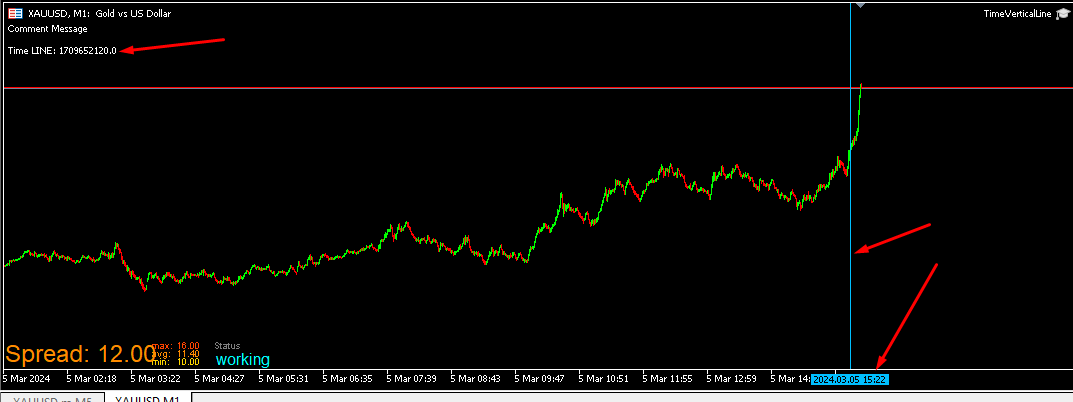
      Can anyone help me with how to save the time of a vertical line that I had plotted on the graph in a variable?

      Here is the example project:

      dfd0a7fd-f9b4-4301-9a05-036a17381f18-image.png

      https://fxdreema.com/shared/QT6G7eIAc

      posted in Questions & Answers
      OntradingX
      OntradingX
    • RE: Position Count Not Working

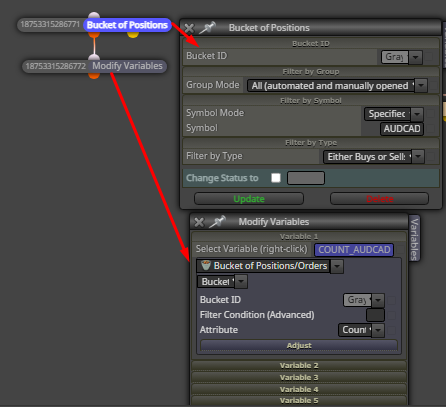
      @Rafik Use this to try solve.

      7f259085-aed1-4d8e-8f79-17ab826c2813-image.png

      posted in Bug Reports
      OntradingX
      OntradingX
    • Find the nearest round number, does anyone know how to do it?

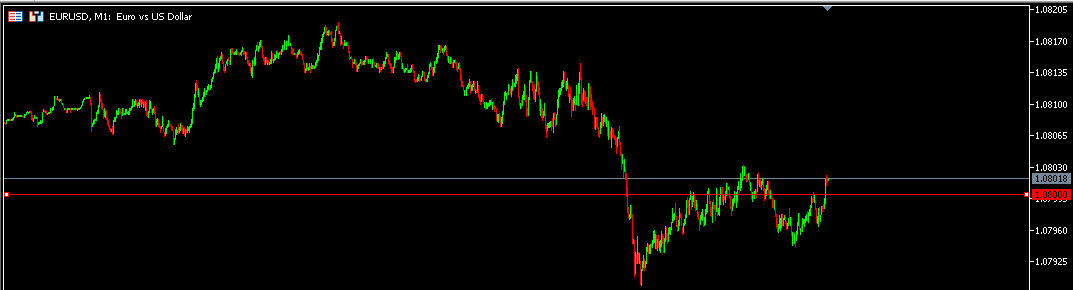
      I need to find a way for my EA to always locate the round number closest to the current price.
      For example, if I am at EURUSD 1.08014 then the closest round number is 1.08000
      I also need to know how to search for this by range, for example:

      Round number closest to 500 points
      Round number closest to 1000 points.

      Does anyone have any ideas?

      521665d6-fc38-426f-82d3-4cf920cfe708-image.png

      posted in Questions & Answers
      OntradingX
      OntradingX
    • Eliminate (individual) negative orders

      Hello friends, I need help fixing a rule that I call eliminate orders. (I did it as shown in the project but it is not working), it is eliminating all orders at once instead of eliminating one order at a time.

      Here is the project: https://fxdreema.com/shared/dRSBN1Wbc

      What I want to do is the following:
      Track 1 order at a time, always checking (from the oldest order to the newest) and then check if the value (loss) of this order is less than the value I defined, which in this case in the EA is 100$ and if this happens, it deletes just that single order and checks the next one.

      In short:
      Value Informed to be used $100

      Step 1, when there are more than 3 open orders.
      Step 2, always check from oldest to newest order.
      Step 3, individually check each order if the loss is less than the reported value of $100.
      Step 4, if for example the oldest order the value is negative at -25$ it means that this value is less than 100$, then this order can be deleted.
      Step 5, repeat the procedure again for the next orders and delete 1 order at a time whenever their negative value is lower than the value entered.
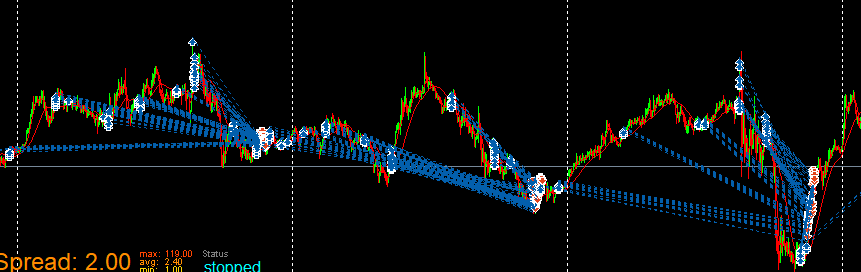

      7797849a-6ca2-4c08-b081-2fc639e328c4-image.png

      posted in Questions & Answers
      OntradingX
      OntradingX
    • RE: Help - Custom MQL Code

      @jstap
      I wanted to say in the message some solution for MT5 that does not need to use (libraries) and that is (similar) to the MT4 solution where it works to compile directly in Fxdreema without having to generate the .mq5 file and include it manually within the code.
      But it's okay if there is no such solution and I'll check if I can make it work and post the solution here for everyone when I find it.

      posted in Questions & Answers
      OntradingX
      OntradingX
    • RE: Help - Custom MQL Code

      @willramsey
      @jonatassantanacaje
      @jstap
      @sktsec

      Does anyone have a similar solution to Disable AlgoTrading on MT5 that doesn't need to use libraries?

      posted in Questions & Answers
      OntradingX
      OntradingX
    • ISSUES in the "On Trade" tab blocks are possible TEMPORARY SOLUTION!

      PROJECT --> https://fxdreema.com/shared/YO9s8vEBc

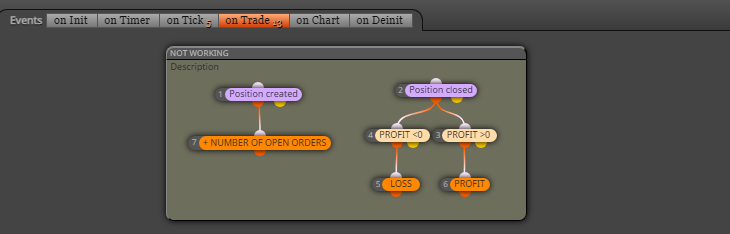
      Attention, all conditions that contain rules similar to these (They used to work, and now they no longer work).
      c39d507a-c9de-4a95-a6f0-65a4fa326071-image.png

      Here below is how I managed to get it working again:
      a2f56e8d-bb09-46c5-84e0-c0cc9d7a30b7-image.png

      I hope it helps someone.

      posted in Bug Reports
      OntradingX
      OntradingX
    • RE: Position closed block not working correctly.

      @mariussun Unfortunately, I'm encountering many problems even in ONCHART too and most of them didn't exist before, even in mt4 it happens too. I would like the administrator to be more attentive, because we pay for the service and we deserve to have a minimum of attention, as the days are deducted from our plans, but we were unable to move forward due to the lack of correction.

      posted in Bug Reports
      OntradingX
      OntradingX
    • RE: Position closed block not working correctly.

      @mariussun MT4 work fine, but MT5 no. I will try other methods to solve and wait @fxDreema verify this.

      posted in Bug Reports
      OntradingX
      OntradingX
    • RE: Position closed block not working correctly.

      @jstap This shouldn't matter, I've always used it this way, even so I believe it's a defect in the block, I see a lot of posts from people complaining about the same problem, I'm only using it in one symbol and that's what the block should do, or am I wrong ?

      posted in Bug Reports
      OntradingX
      OntradingX
    • Position closed block not working correctly.

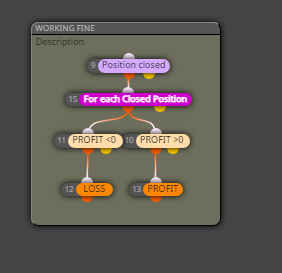
      Position closed block not working correctly.

      I'm just trying to detect if the order was closed by Stop-Loss and I noticed that the block is not passing on this information.
      @fxDreema can you check this?
      dc7b3c64-0b64-4bbd-9e53-e3c3f91799f1-image.png
      Project Below:
      https://fxdreema.com/shared/s77Ekci2b

      posted in Bug Reports
      OntradingX
      OntradingX
    • RE: Web Request - $EVZ (barchart.com)

      @FaulknerTrading1 Solve ?

      posted in Questions & Answers
      OntradingX
      OntradingX
    • RE: Web Request - $EVZ (barchart.com)

      @FaulknerTrading1 Perfect, I believe your next step is to create a google script or google api and publish this value on the web. Once this is done, point Fxdreema using the http request (get) block to this link and save the result in your variable within Fxdreema .
      Post here if it works, even if you can make a tutorial, I believe it will help many people learn how to do this, which is very useful.

      posted in Questions & Answers
      OntradingX
      OntradingX
    • RE: Web Request - $EVZ (barchart.com)

      @FaulknerTrading1

      Friend, I hope to try to help with something.

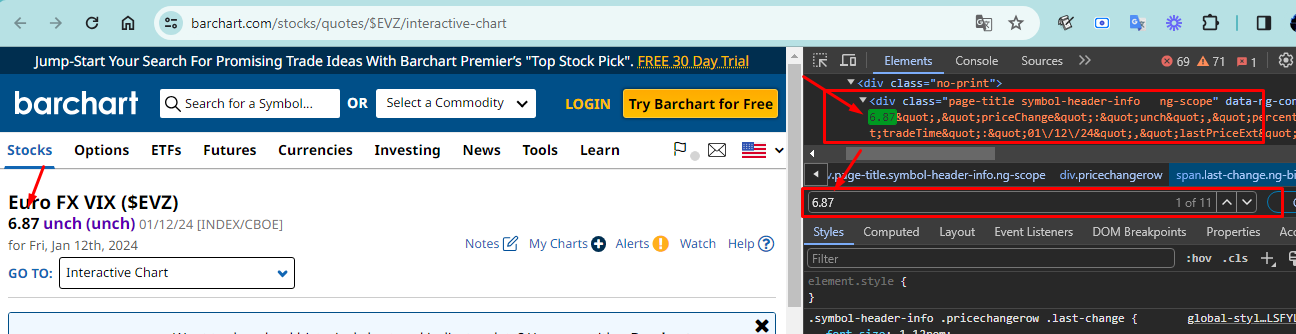
      First I identified the path through Google Chrome by inspecting elements

      https://www.barchart.com/stocks/quotes/$EVZ/interactive-chart/
      <span class="last-change ng-binding" data-ng-class="highlightValue('lastPrice')">6.87</span>

      c882ba14-060e-49e3-a5da-7dcd9bd92ceb-image.png

      I'm not a programmer, but I believe it's possible for you to extract this value in some way using an API, it could be via Google Sheet, Pyton, in Fxdreema I still believe there is some way to get to this result and extract it, I've already had to do something similar and created a form on google that I inserted and updated in the google sheet so that at the end I could read it via fxdreema's http request block, but it was very complex, if I discover something I'll come back to this post to tell you, but there are some expert guys here who will perhaps intervene to help you more easily.

      posted in Questions & Answers
      OntradingX
      OntradingX
    • 1
    • 2
    • 3
    • 4
    • 5
    • 21
    • 22
    • 3 / 22