fxDreema

    • Register
    • Login
    • Search
    • Back to the main page
    • Categories
    • Recent
    • Tags
    • Popular
    • Search
    1. Home
    2. OntradingX
    3. Posts
    • Profile
    • Following 1
    • Followers 7
    • Topics 120
    • Posts 427
    • Best 28
    • Controversial 1
    • Groups 0

    Posts made by OntradingX

    • RE: How to perform a loop in a specific month to account for closed operations?

      @jstap

      Example:

      % Annual profit or loss: 21% ( this is a sum of profit and loss of all months). Update in real time.
      January: 3%
      February: -2%
      March: -3%
      April:3%
      May: 4%
      June: 5%
      July:-10%
      August: 5%
      September: 6%
      October: -5%
      November: 8%
      December: 7%

      Monthly Break Even Rule = If the sum of previous Months is positive at a certain specified value, then place a Break Even at 50%, always protecting Profit in the current month.
      Daily Break Even Rule = If the sum of previous days is positive by a certain specified value, then place a Break Even at 50%, always protecting the Profit on the current day.
      If the protection (Monthly Break Even) is triggered, resume operations the following month.
      If the protection (daily Break Even) is triggered, operate again the next day.

      posted in Questions & Answers
      OntradingX
      OntradingX
    • RE: How to perform a loop in a specific month to account for closed operations?

      @jstapI did this, I always save the balance for each new 1-month candle and calculate the value of this variable - the value of the current balance, but I don't think it's the most effective way.
      What I thought of is creating variables for:
      January, February, March, April and so on each month in sequence until December.
      Once this is done, I maintain loops saving the results of the respective months and with this all unify my management that I already have created which analyzes each individual trade observing the results of the previous month to make a break even (daily) and (monthly).

      Therefore, I would set a target in monthly % for profit or a monthly limit in % for loss based on the previous month, if in a set of the last 3 months I have a gain greater than 10% for example I could set another lock to reduce the lots, or increase them, in short, my management is complex and requires me to separately obtain the profit result month by month.

      posted in Questions & Answers
      OntradingX
      OntradingX
    • How to perform a loop in a specific month to account for closed operations?

      Does anyone have any idea how I can perform a Loop to save the final result of the sum of operations that were completed?

      posted in Questions & Answers
      OntradingX
      OntradingX
    • RE: How to obtain (Ticket Number) of closed order?

      @diazoviedo
      Got it, but test it yourself.
      Open an order, and get the ticket, it will for example get the (ticket number) 00001111.
      Close this same order, and get the ticket, it will, for example, get the (deal) 00002222 or 00006789, it will not bring the (ticket number) 00001111.

      I don't understand why he simply exchanges obtaining the (ticket number) for the (deal).

      posted in Questions & Answers
      OntradingX
      OntradingX
    • How to obtain (Ticket Number) of closed order?

      I'm trying to get the (Ticket Number) of the last order that closed, but it's not giving it to me, instead it's giving me the (Deal), does anyone know why this is happening?
      I want to get the same number as the Ticket Number of the order that was opened after it was closed.
      In the project below I demonstrate how my unsuccessful attempts were.

      https://fxdreema.com/shared/N3aBl2BK

      posted in Questions & Answers
      OntradingX
      OntradingX
    • RE: TRAILING STOP NOT WORKING PROPERLY

      @Sos_Fx
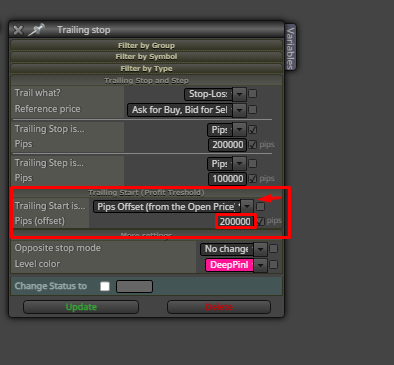
      I recommend that you always work with the Trailling Stop this way.
      It was the single most efficient way I found.
      In this example I am requesting that the Stop Loss be moved from the original place to 0x0
      The (Trailling Start) means (Trigger Point), that is, the place that being reached triggers the movement of the Stop Loss, it then reads what is being informed in (Trailling Stop) and moves its Stop Loss to the related Distance informed where was the trigger point.
      The (Trailling Step) are just steps that, when reached, will always move the Stop by the same distance.
      In short, Trailling start is the question, where do you want the trigger to happen, Trailling stop tells you, place it (x) points away from where it was triggered.
      Hope this helps.

      21950da9-2695-44ea-91a6-36a228f5c16a-image.png

      posted in Bug Reports
      OntradingX
      OntradingX
    • Draw Indicators on the Main screen.

      I saw an indicator called On-chart RSI, it practically draws the RSI indicator with its levels on the main screen and not in the sub-window.
      Would anyone know or have tried doing this on Fxdreema?

      Here is the indicator I mentioned.
      https://www.mql5.com/en/code/23919

      posted in Questions & Answers
      OntradingX
      OntradingX
    • RE: every tick based on real ticks - MT5, huge variance in results

      I don't know what type of market you are operating in, but I will give some examples of Forex as an example of some observations and opinions:
      Opinion ---> When you obtain similar results (similar and not precisely the same, closer both in capital curvature and in values and quantity of operations) in OHLC, EACH TICK and EACH REAL TICK, then you can be sure that your next step is to put it on a REAL account for at least 1 week, and the following week you compare whether the backtest entries are similar to those on the real account. After carrying out these tests, if the information is close then you have an EXCELLENT EA. Other than that, the rest is a waste of time.

      Observation ---> Most EA's Scalpers (who look for very few TP points or who use a short Trailling give positive results in OHLC and a super-negative result in each real tick, because OHLC as mentioned above by someone else It does not have slippage and a series of delays and particularities that brokers have, so for quick Scalpers, always try to follow the rules in testing (Each Real tick) do not waste your time with OHLC.

      OHLC is more used for non-scalper strategies, or Day trade, it is more used for Swing Trade, strategies that can be positioned for days and have a TP and a Fixed SL without Trailling and size in long pips, in these cases it is worth testing in OHLC because Spread or Slippage and all the brokers' nonsense will not interfere.

      Finally, always keep in mind that before developing your EA, think about the entire context in which it should work and even think and study the characteristics of brokers, for example, Scalpers work very well at ICMARKETS, TICKMIL, EXNESS , but on FBS, ROBOFOREX or FTMO proprietary tables Scalpers catch high slippages, so there is a need to know very well what you are planning and (where to plan to run).
      Study about Market Makers, Plugin, Slippage, Hyperactivity, Physical distance from liquidity provider to broker and Spread and with this, try to find out which factors most harm your strategy and avoid brokers that make it easier for these factors to hinder you.

      I have helped in something.

      posted in Questions & Answers
      OntradingX
      OntradingX
    • RE: Finally, News Filter for MT5 in 1 easy to use Block !!

      @abinfoappp write ALL

      posted in Tutorials by Users
      OntradingX
      OntradingX
    • RE: What is the correct delimiter for next line?

      I achieved "%0a" is a correct Delimiter for this, thanks for you help @sktsec and for ChatGPT heheh

      posted in Questions & Answers
      OntradingX
      OntradingX
    • RE: What is the correct delimiter for next line?

      @sktsec I did a little test and it didn't work.

      ACTIVE + "%250A" + DIRECTION

      posted in Questions & Answers
      OntradingX
      OntradingX
    • RE: What is the correct delimiter for next line?

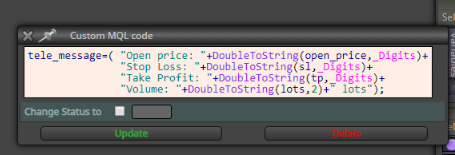
      @fxDreema I tried to generate an mql block with the \n function but it seems to me that this function is not accepted in Fxdreema to implement in messages that are sent via the http block to Telegram, is there any other solution?
      https://fxdreema.com/forum/assets/uploads/files/1569506163914-7def6979-4120-484d-96ac-695291a0e101-image.png
      image.png

      Here below the code
      tele_message = "Open price: " + DoubleToString(open_price, _Digits) + "\n" +
      "Stop Loss: " + DoubleToString(sl, _Digits) + "\n" +
      "Take Profit: " + DoubleToString(tp, _Digits) + "\n" +
      "Volume: " + DoubleToString(lots, 2) + " lots";

      posted in Questions & Answers
      OntradingX
      OntradingX
    • RE: What is the correct delimiter for next line?

      ATIVO + " " + DIRECAO + " " + DoubleToString(v::Preco_de_Entrada, 6) + "\nTP " + DoubleToString(v::Take_Profit, 6) + "\nSL " + DoubleToString(v::Stop_Loss, 6) + " ";
      not working \n

      posted in Questions & Answers
      OntradingX
      OntradingX
    • RE: What is the correct delimiter for next line?

      I'm currently using this:

      ATIVO + " " + DIRECAO + " " + DoubleToString(v::Preco_de_Entrada, 6) + " TP " + DoubleToString(v::Take_Profit, 6) + " SL " + DoubleToString(v::Stop_Loss, 6) + " ";

      4e026d6f-372d-4a26-a922-3d80de3ae84f-image.png

      posted in Questions & Answers
      OntradingX
      OntradingX
    • What is the correct delimiter for next line?

      I am able to write data on the same line, but when I try to use the command \r\n or just \n so that the information appears on the next line, fxdreema does not recognize the text code input.

      Does anyone know how to resolve this?
      So I can make it appear using the + sign (delimiter).
      XAUUSD BUY 2028.070000 TP 2029.070000 SL 2027.070000

      But the correct thing is like this:
      XAUUSD BUY 2028.070000
      TP 2029.070000
      SL 2027.070000

      posted in Questions & Answers
      OntradingX
      OntradingX
    • RE: Trailing Stop For Each Trade Block

      @Fibonatic
      https://fxdreema.com/shared/HvKPP6h1e

      posted in Questions & Answers
      OntradingX
      OntradingX
    • RE: Trailing Stop For Each Trade Block

      @Fibonatic
      I believe you have to do the following:

      1. Create a condition so that every time you open an order a horizontal line is drawn, name it TraillingStart.
      2. Create a condition so that another line is drawn and that it is at a distance from the TraillingStart line, call it Trailling Stop.
      3. Create a condition that whenever there is a buy trade (for example) and the closing price of candle close (0) is > than the line called TraillingStart, then this line should move to the price of candle close (0 ).

      Automatically the TraillingStop line will move along synchronously.
      And to close, just create a condition (If the candle close (0) <= the TraillingStop line close the trade.

      posted in Questions & Answers
      OntradingX
      OntradingX
    • RE: Using #resource to copy code into the EA

      @jstap I didn't understand. Do you want to know if I have a strategy ready?

      posted in Questions & Answers
      OntradingX
      OntradingX
    • RE: Using #resource to copy code into the EA

      I didn't understand. Do you want to know if I have a strategy ready?

      posted in Questions & Answers
      OntradingX
      OntradingX
    • RE: Using #resource to copy code into the EA

      @jstap Do you say I create a custom block in fxdreema/studio or use an mql code block?
      Would you have any examples?

      posted in Questions & Answers
      OntradingX
      OntradingX
    • 1
    • 2
    • 3
    • 4
    • 5
    • 6
    • 21
    • 22
    • 4 / 22