@traderea6 I think the same.
Its a shame so many new traders are guided towards mt4, as mt5 offers far better environment for developing EAs.

@traderea6 I think the same.
Its a shame so many new traders are guided towards mt4, as mt5 offers far better environment for developing EAs.
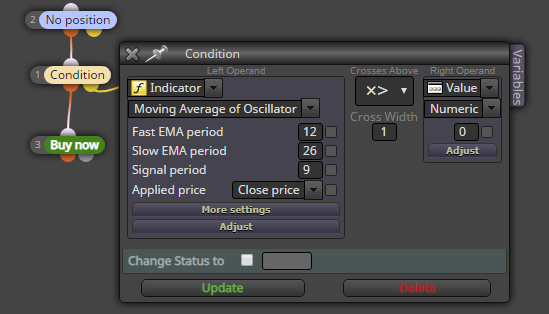
@ebony this is your blue circle:
This is your red circle:
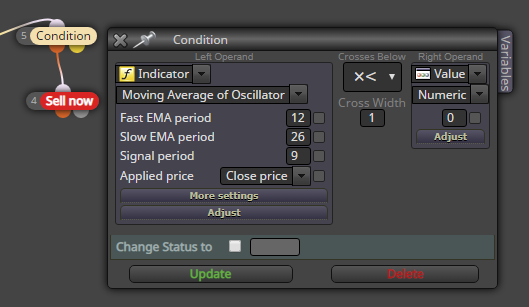
https://fxdreema.com/shared/4wkGLBjRc
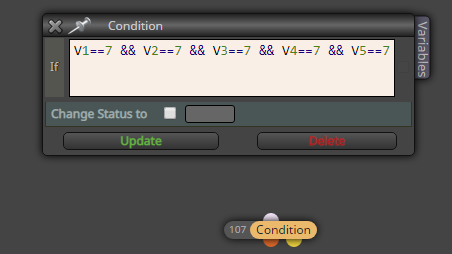
@migen take the darker condition block and do this:
@pippusher618 here's an example project:
https://fxdreema.com/shared/2HpRtQ8Pb
However, an EA will sometimes find divergences in unexpected places, because you only see the profitable ones.
@darazarbaf yes, use the Formula block for the calculation
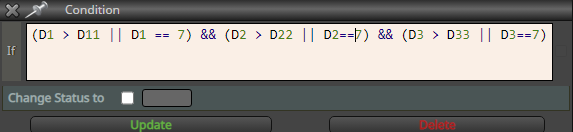
@migen This should work
(D1 > D11 || D1 == 7) && (D2 > D22 || D2==7) && (D3 > D33 || D3==7)
@migen I'm not sure, but generally a logical TRUE is equal to numeric 1. So you could try just replacing && with + sign:
variable = (D1 > D11 || D1 == 7) + (D2 > D22 || D2==7) + (D3 > D33 || D3==7)
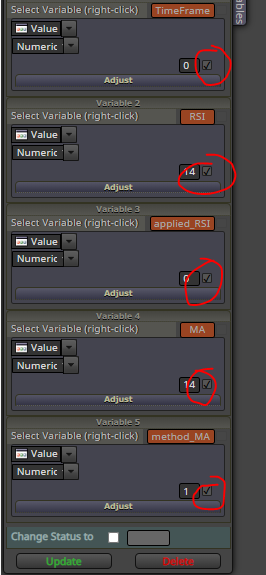
These tick marks makes the values appear. Untick them. Also, the brown things are constants, not variables. You cant change constants in "modify variables".
@abderrahman this is impossible. A straight line balance always means that the system works only on history data, not in future.
You cant optimize this on other pairs, you cant trade this, not even on EURUSD. Its best to move on and find a more realistic strategy, a strategy that doesn't require 100% winning trades.
You probably wont believe me, I'm just trying to save you some time..
@abderrahman I hope you succeed, however unlikely it is 
Please consider the short backtest period as well. I would bet any amount of money that this same EA will erase the account if tested on EURUSD from 2019.01.01 to today.
@rajab you are asking your EA to trade if CCI is above 65, and also trade if CCI is below 65.
Of course it will trade immediately, one of the conditions is always true.
@sonixhd3 I think this is what you need:
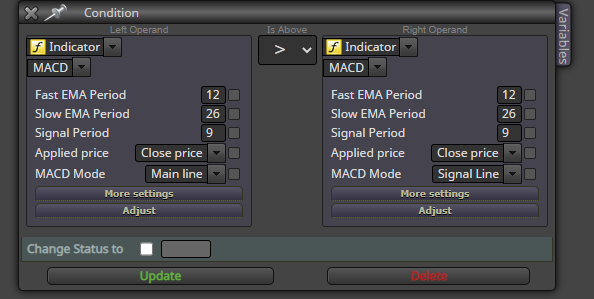
@sonixhd3 the histogram is "main line" in fxdreema. You can also set "cross above" instead of "is above", as is in my picture.
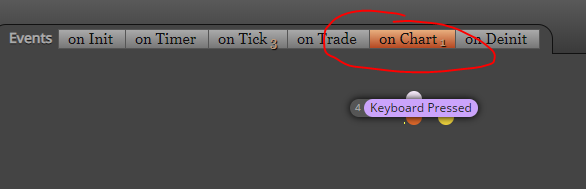
@dan-2 On Chart tab will get you started, I don't know any more about it
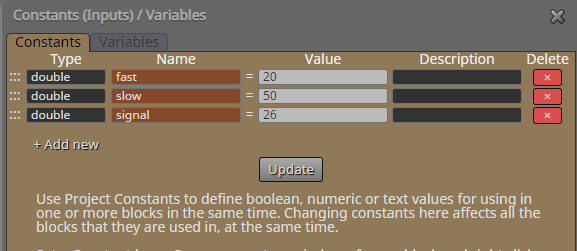
@sonixhd3 don't see the error, but let me build you a more optimized version, maybe it works
Here: https://fxdreema.com/shared/Zfrd2IUBd
Tips:
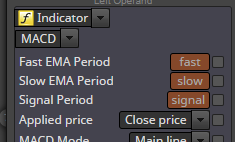
@sonixhd3 to speed up optimization, you can use open prices modelling, because your system is based on "once per bar" logic. Also remember to use genetic algorithm.
My thoughts on the system itself:
Trading 1-minute chart will be tough. Your win-loss ratio will be very close to 50:50, maybe 51:49, but commissions will take a big piece from both trades, wins and loses. I'd consider M5 or even M30. I target around 200-500 trades per year (on netting account).
Also, MACD system could use some volatility filtering, for example ADX. Myself I prefer to compare the ratio between 144-ATR and 13-ATR, but thats bit more technical to set up and read..
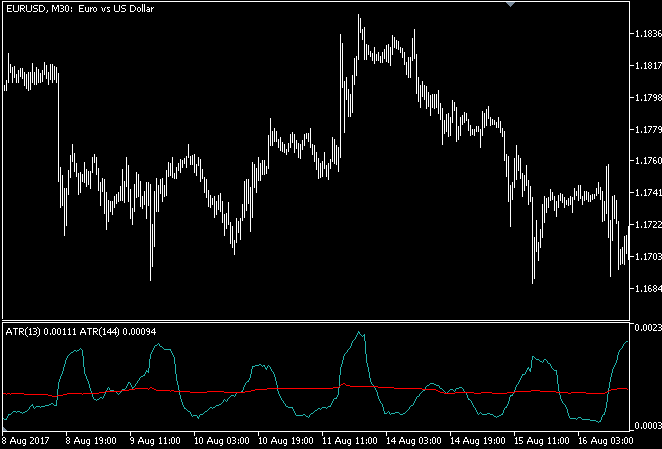
@sonixhd3 open the navigator pane in mt5 and just drag and drop indicators in the same window. Then go to indicator properties and set scale to "Inherit scale".
This is just a visual thing for planning the EA, there is no technical difference whether the indicators are in same window or separate. Fxdreema-made EA will always draw the indicators in separate windows.
Hope you arent angry because of my beginner questions.
Its no problem lol
@ikarus_ said
Just one thing from the moment the candle close was above the tenkan sen Line it should always close above.
So the condition is "each of last 30 candles are above tenkan-sen"?
Then use the loop to try and find a candle that doesnt meet the condition -> now set your tracking variable to FALSE. The logic flow continues to next stage only if the variable keeps its TRUE value throughout the whole loop. Hope you get what I mean...
Also the Loop conditions have to always be on Tick right?
Not necessary.. As long as you can activate the loop (using OnTick, OnTrade, OnInit, whatever), it will surely do its thing.
@ikarus_ Your example is missing all variables - you need to declare them yourself, exactly as is shown in my pictures above.
I don't know any great learning source, my style is to try and fail, learn that way...
Well, Miro has created a loop tutorial but that uses the actual, official loop block, I didnt.
http://fxdreema.com/forum/topic/4510/tutorial-loop-advanced-find-and-save-specific-value-from-indicator-history
By the way, you can reset your block IDs from "Project Options"