fxDreema

    • Register
    • Login
    • Search
    • Back to the main page
    • Categories
    • Recent
    • Tags
    • Popular
    • Search
    1. Home
    2. roar
    3. Posts
    • Profile
    • Following 0
    • Followers 184
    • Topics 35
    • Posts 2406
    • Best 422
    • Controversial 6
    • Groups 0

    Posts made by roar

    • RE: Two Condition Trees but if both are true only one of them should trigger a trade

      @aramsamsam69
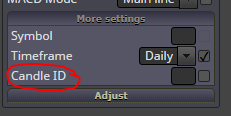
      No need for that... int means whole numbers, double means numbers with decimals, candle ID is whole number.

      I'm not sure what is wrong here.. Try troubleshooting piece by piece:

      • Maybe the "(loop) break" causes some bug, originally it's not really meant for this purpose
      • Maybe there is something wrong with the custom indicators, try some simple default indicator
      • Your top block "Once per tick" is useless, if you are on the OnTick event in the first place:

        0_1569614827314_3f64c4ce-fc28-4f3d-82fa-2fffa2382d8e-image.png
      posted in Questions & Answers
      roar
      roar
    • RE: Two Condition Trees but if both are true only one of them should trigger a trade

      @aramsamsam69 said in Two Condition Trees but if both are true only one of them should trigger a trade:

      Did I make a mistake?

      Yes, a tiny one πŸ˜‰

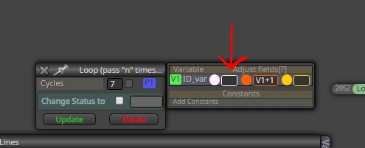
      0_1569611818461_a4e1d903-ba15-48ab-b00a-769d566067fd-image.png

      We must reset the ID_var to 0 before the loop work begins. If we don't reset it, the variable will remember its previous value from some earlier calculations: at the end of your test period, ID_var is probably something like 2458 πŸ˜„

      So, put 0 to the white field πŸ™‚

      posted in Questions & Answers
      roar
      roar
    • RE: No more than one trade per bar

      Oh, @l-andorrΓ  is totally right - I didn't see your shared

      How "once per bar" works here:

      • let's say a bar consists of 60 ticks ("events")
      • orange will be active on tick 1
      • yellow will be active on ticks 2-60
      posted in Questions & Answers
      roar
      roar
    • RE: pending order details

      Try putting some filter to that loop block, for example "Not more than 1 trades" starting from newest

      posted in Questions & Answers
      roar
      roar
    • RE: pending order details

      The loop should be able to pick them up:
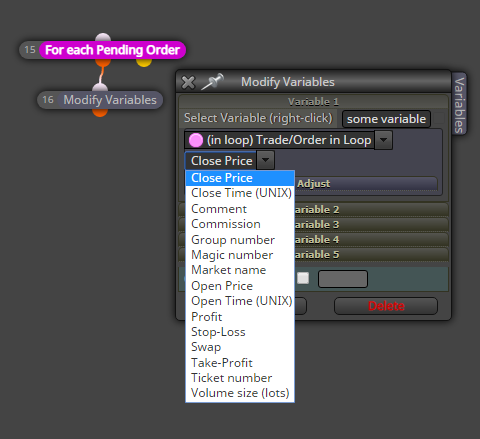
      0_1569602972973_add07bbb-5540-4d0b-af0b-179908b723f1-image.png

      posted in Questions & Answers
      roar
      roar
    • RE: No more than one trade per bar

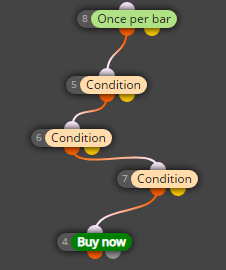
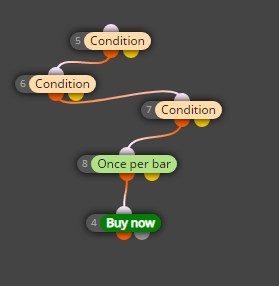
      @eli The "once per bar" block. As the name says, that block will limit everything below it to max 1 times per bar.

      The numbers don't mean anything if all your logic is in one long string

      posted in Questions & Answers
      roar
      roar
    • RE: Ea for once per candle

      @adrinicu
      I didn't fully understand you, but start with this:
      https://fxdreema.com/shared/TAzsDUI5e

      It will buy when price is above previous candle high, and
      sell when price is below previous candle low.
      You can also change the timeframe.

      I'm sad to hear you took losses. Please, take your time to develop your EA, the market will always be there, don't trade before your system is ready πŸ™‚
      Make use of the backtest function!

      posted in General Discussions
      roar
      roar
    • RE: No more than one trade per bar

      This is even better, if your system allows it:
      0_1569600472161_07cba031-cbfd-46ec-a6e9-1d695afa304e-image.png

      posted in Questions & Answers
      roar
      roar
    • RE: No more than one trade per bar

      @eli Do this:
      0_1569600420472_e173d70b-551e-474f-adc1-509a2c070202-image.png

      posted in Questions & Answers
      roar
      roar
    • RE: I don't see "share" and "save" options

      @marianomartinez You are using the program "showcase". The actual builder is at https://fxdreema.com/builder

      posted in Questions & Answers
      roar
      roar
    • RE: EA taking trades with candle ID 0, instead of 1, as parameters say

      @marianomartinez
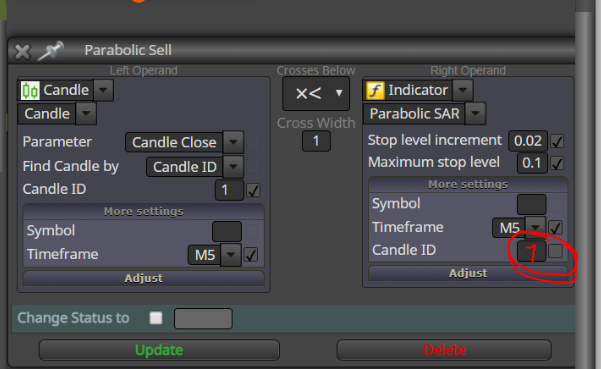
      You must have the same ID on all indicators:
      0_1569583801822_20f5fa85-6aa8-4dd1-8779-cde25b8c0e9f-image.png

      posted in Questions & Answers
      roar
      roar
    • RE: Two Condition Trees but if both are true only one of them should trigger a trade

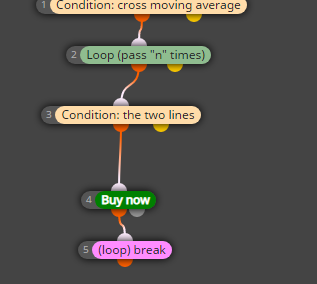
      Finally, we should take care of the fact that this loop system could find multiple crossings, so it would open multiple trades.
      If this is not what we want, just put a loop break block after the buy - loop will stop at that point.
      0_1569579262762_fe74a333-d494-4040-ae91-7c1595c9dcce-image.png

      posted in Questions & Answers
      roar
      roar
    • RE: Two Condition Trees but if both are true only one of them should trigger a trade

      @aramsamsam69 said in Two Condition Trees but if both are true only one of them should trigger a trade:

      @roar sorry to bother you again.

      How can I build this.

      Condition 1 : If Price has crossed Moving Average to the upside, then enter Long.

      Conditon 2 : But only if the 2 Lines Indicator also has crossed above, doesnt matter if it happened at the same time. But the Crossing shouldnt be older than 7 Candles.

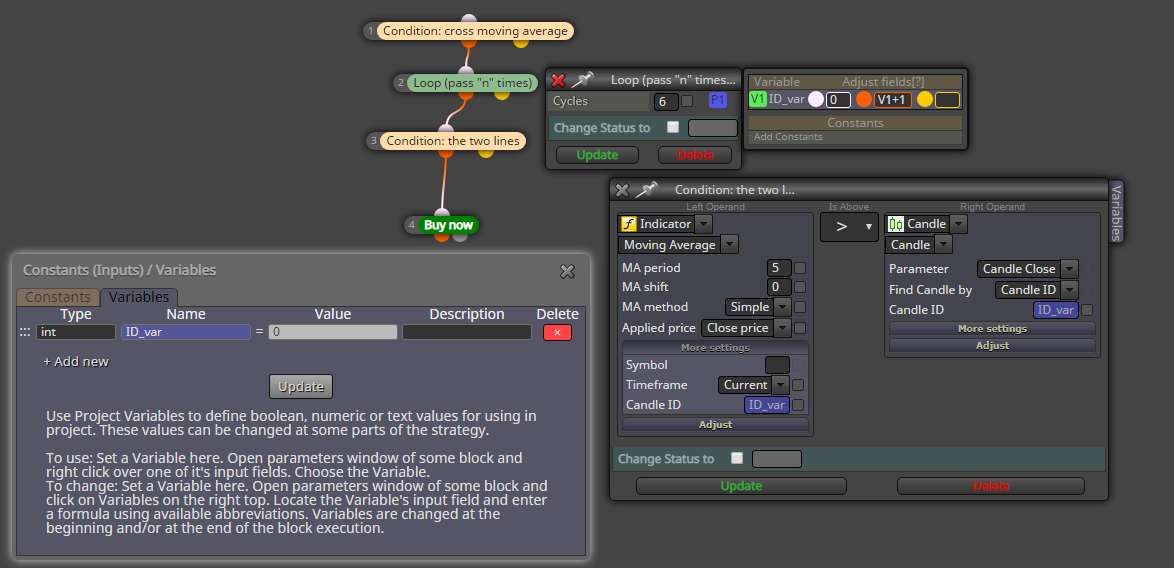
      For this, I'd introduce a loop logic. Its a bit more advanced thing, but not too complicated.

      • First, check that MA cross

      • Next, we are going to check two lines indicator 6 times in a row (I don't have that indicator, so using simple MA in the example). Each time we check the indicator, we use a different candle for the measurement. That is accomplished by the candle ID setting. ID 0 is current candle, ID 1 is last completed candle, ID 2 is 2nd completed candle etc.

      • I created a variable for the ID setting, called ID_var

      • This variable is set to 0 at the beginning of work, and each of the 6 iterations it is increased by 1.

      • Now the loop cycles setting will determine how old the 2line crossing can be - you can change the number at your will

      https://fxdreema.com/shared/Lxyio0Gbd
      0_1569577881680_1a77a2dc-d043-48f9-b4f0-8e57f2831a9b-image.png

      posted in Questions & Answers
      roar
      roar
    • RE: Two Condition Trees but if both are true only one of them should trigger a trade

      @aramsamsam69
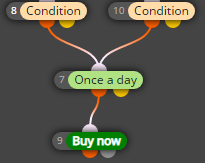
      Hmm, maybe it's easiest to put some filter before the trade block:
      0_1569527671320_089f4354-79bc-46d7-9601-d7e7047bb608-image.png

      posted in Questions & Answers
      roar
      roar
    • RE: New to fxdreema and would like some advice please

      @alphaandy Ah, ok, so all the conditions will be simultaneously true, even though the exact crossing points aren't.
      The EA you built should work as expected.

      Do you want to check conditions on closed candles, not active candle? In that case, use candle ID 1 in these settings:
      0_1568284146898_9bb52a7f-5cc0-4dc3-b01d-cdb9252065c5-image.png
      By default, its empty, that means candle 0, the current candle.

      posted in Questions & Answers
      roar
      roar
    • RE: New to fxdreema and would like some advice please

      @alphaandy Ok, this complicates the build a bit.. You see, normally the EA works tick-by-tick, everything that happened last tick will be totally forgotten when a new tick happens.

      To "remember", we have to use variables

      posted in Questions & Answers
      roar
      roar
    • RE: New to fxdreema and would like some advice please

      @alphaandy Technically it's fully working EA. If you chain the conditions like that, the order doesn't matter. The EA checks the conditions on each new tick.

      Do you want all the conditions to be true simultaneously, or can there be time difference? Like, today the accelerator condition is ok, tomorrow the rest of conditions are ok but accelerator is not -> open trade?

      posted in Questions & Answers
      roar
      roar
    • RE: New to fxdreema and would like some advice please

      @alphaandy
      The logic flow in the picture is correct, nothing wrong there.

      See the Close trades -blocks, have you filtered them to work on only buys / only sells?

      posted in Questions & Answers
      roar
      roar
    • RE: Problem with Support fxdreema - no any answer

      Hi @emaniek!

      Bombarding the admin with a dozen emails will not help, I'm afraid.
      He will answer your messages, eventually.

      If it's a technical challenge, I'ts usually faster to ask from this forum, there's more than 1 person answering.

      posted in Questions & Answers
      roar
      roar
    • RE: What is causing this error?

      @specialfx Yes, that's a logical error in some function. Check that line 6099 from your .mq4 code.

      posted in Questions & Answers
      roar
      roar
    • 1
    • 2
    • 84
    • 85
    • 86
    • 87
    • 88
    • 120
    • 121
    • 86 / 121