Draw Line
-
I would like to be able to draw a horizontal line at the level I want to take a trade but have the line start at the time I initialize the EA.
I have found the Draw Line block and have used this to draw a line at the correct level but it is across the whole screen whereas I would like it to only start from the time of initializing the EA and then to continue only to the right of this point?
-
Horizontal line is this line that is across the whole chart. What you want is a trend line.
-
I have changes to trend line. It now goes vertically upwards and not horizontally.
Please provide example of how I would use the blocks to place the line on a chart.
-
I don't know why that happens with Trendline by Angle. It looks that it works with correctly with angles different than 0. And with angle 0 it works fine initially, but then the line becomes vertical.
I placed this block in "on Init", so it creates only 1 line at the beginning. At first tick the line looks horizontal, only to become vertical (or sometimes disappear) on the next tick.
Actually, the line becomes vertical even if I only click on the chart with the mouse. I put the Tester on pause, so everything that the EA does is to run the block in "on Init" to create a trend line, which appears horizontal at first... until I click somewhere.What is notice is that in the properties of the object we can see slightly different values in both Value inputs. In the MQL4 code we provide only one value (for Price 1), while the other value (Price 2) is set to 0. MetaTrader is supposed to automatically calculate it, and I guess that it should set it to be exactly the same as the first value... but for some reason it decides to change it a little bit, I don't know for what reason.
By the way I see that in your project you have "hedge" in the title. My opinion about this is that it is a scam. I think that "hedging" in the same symbol is useless, too complicated, hard to do and the result is surely not that magical.
-
Yes same issue as I get. Any ideas how we can fix it? Is there a change you can make to how the block works?
I have read previously your dislike for hedging. I'm not sure that my idea of hedging is the same as what other people have tried to do (maybe it is). I'm also not after something that is magical. I do know of some very successful stock investors who hedge their position and see no reason for it not to work as I intend in FX.
I would really appreciate your help with the trend line issue. Thanks.
-
-
-
Thank you @miro1360 . I have made some changes to your suggestion to get the level that I want. Of course I know have some further queries/questions.
- The trend line shows on the screen when the EA is first added to a chart.
- If amendments are made to the EA inputs the trend line doesn't move to where the new inputs say it should.
- I wonder if that's because of how the EA is initialized? I have (hopefully) added a screenshot to show what I mean. When the EA is first loaded the inputs are shown on the next line with the next line showing it as being initialized. However when changing inputs the initialized line comes before the inputs line. Does this mean that in the second instance the blocks in the oninit tab don't actually do anything? Because MT4 doesn't know they exist at the time of initialization?
You can see in the screen shot the LongValue was initially 1.1868 and with the 2 pip adjustment the trend line is at 1.1870. When the inputs are amended to LongValue 1.1862 the trend line should be at 1.1864 but it has stayed at 1.1870.
Hope that makes sense?
A further question that I thinks has a similar issue is that when first loading and initializing the EA, if the level that needs to be broken i.e. bid < longvalue is valid then the trade is actioned. If however the condition is valid after changing the longvalue but not deleting and loading again the EA then the trade is not actioned.
Does this have to do with the set flag to false on initialization working when the EA is first loaded but not working when the inputs are amended?
The trendline EA can be found here https://fxdreema.com/shared/KuXrTD1Id
The reason I have used the flag is because if a long trade is closed but price is below the LongValue I don't want a new trade to be automatically opened.
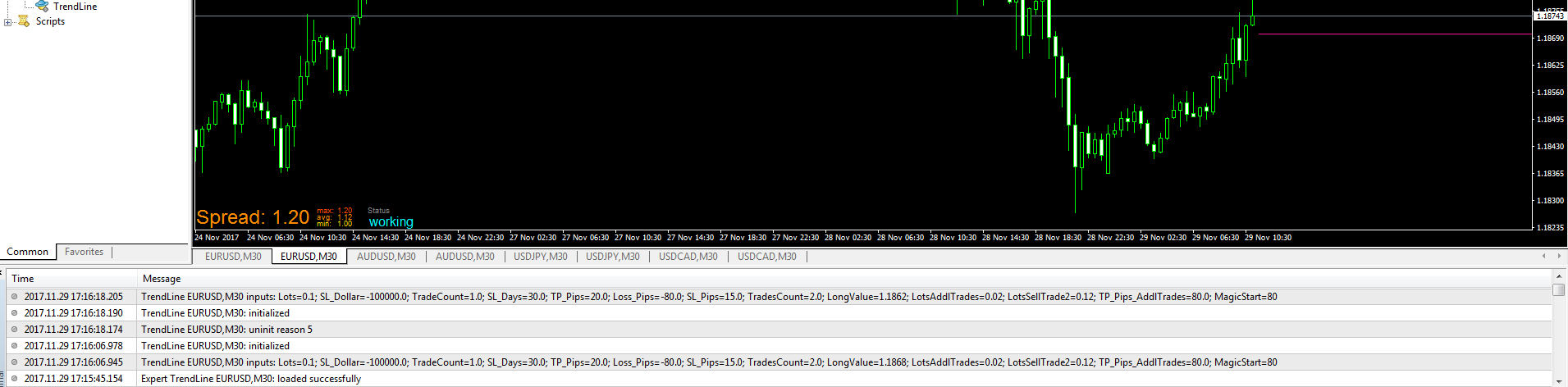
-
A further question @miro1360 is it possible to get the trend line to start on the bar that is on the screen and not on the next not yet commenced bar?
Should I be able to see the trend line on any timeframe?
Is it possible to have the trendline stay on the chart until manually removed?
-
-
-
- EA is working in way, when parameters are changed, than "on Init" section is skipped (so your trendline is not updated) ... you must remove EA from chart and than attach it again to full update (or change it in code, I posted few times how to do it - but this is not so elegant because you need do it again and again manually after each change in builder) .... not sure how to help you here with this ...
but this is the part of code:
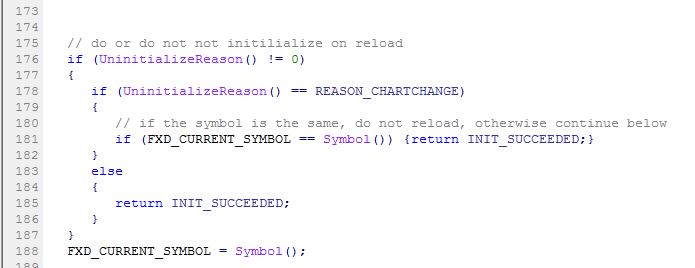
- EA is working in way, when parameters are changed, than "on Init" section is skipped (so your trendline is not updated) ... you must remove EA from chart and than attach it again to full update (or change it in code, I posted few times how to do it - but this is not so elegant because you need do it again and again manually after each change in builder) .... not sure how to help you here with this ...
and do comments to disable it:
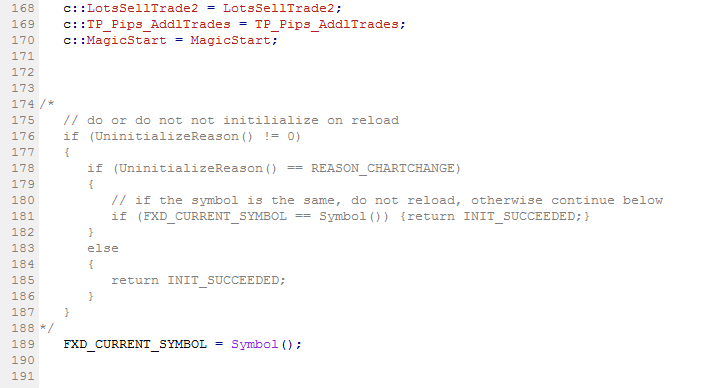
and click Compile button (in metaeditor)
... you are working with "hidden" values and if you want exactly answers for this, instead of flags you can use your own variables as "flag", set variable1=0 to be false or variable1=1 to be true, or any other value and than compare it with condition block ... you can than display these values on chart with comment block to see its actual value ...
yes you can set trendline on current bar (not exactly current bar, because trendline need at least 2 bars, so candle 0 and candle 1 are needed, without shift in time)
, set parameters:
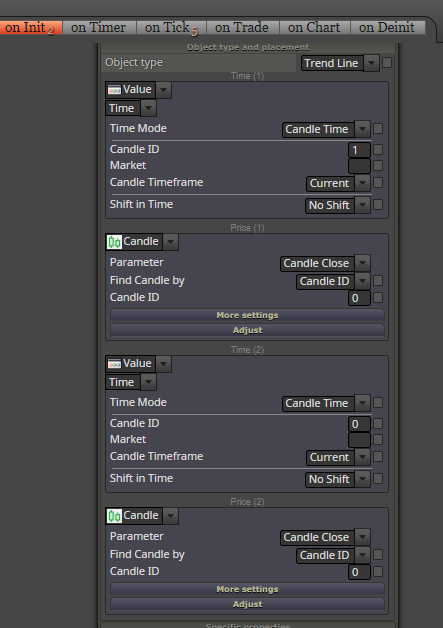
when you remove EA, trendline should stay on the chart, also when you "switch" TF to another (lower) TF, trendline is shown ... for higher TFs is not displayed for logically reason ...
-
-
note, that first recommendation with change in code for initialization can be done as this:
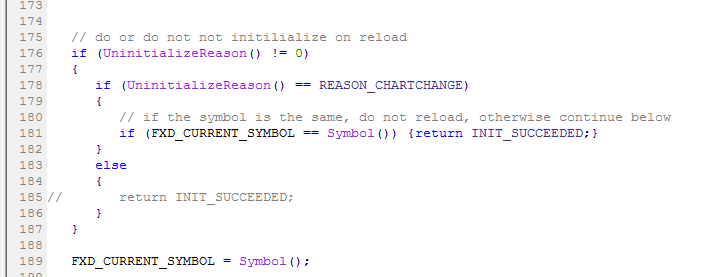
in first change when you switch chart TF with attached EA, than inputs are updated - and it is not what you want ..... but this second change do not touch inputs when chart TF is switched ...
-
Thank you @miro1360 for spending your time to provide your response. I will see if I can incorporate it into my EA. I'm sure I'll be back with more questions.
-
@miro1360 , good day.
I found your work in this 4 years thread.
https://fxdreema.com/shared/CMjGUicHd
I'm trying to make this same type of line but using value fibo retracement level 38.2
same as the line value from the indicator i attached below, only that i want to use fibo line from fxdreema.
0_1623475810084_fibonacci_38.2.mq4
could you please help me with this one? thanks a lot.
-
Can anyone help me with this please?
-
@biztet I'm afraid miro is not participating in the forum anymore. His last post was one month ago and the previous one was 2 months ago. I hope he's not abandoned us!
-
Oh, what a news.
Looks like i need to call out other experts also..
@roar @miro1360 @trader-philipps @seb-0 @AlphaOmega
and any other experts that can help. Thanks.
-
@biztet How is it mate?... I do not use mt4 and not sure what you want exactly but I put something down for you to start on. l'andorrà is actually more a boffin on fibos!! I never use them.
https://fxdreema.com/shared/SdXxFWzre -
@l-andorrà
Don't worry, I am still here and I watch people to learn, to come, to try and give up and leave
Between trading and gambling is a very small gap, be careful.
-
Thanks @AlphaOmega . I've try it but the level is not the same as the indicator that i attached.