fxDreema

    • Register
    • Login
    • Search
    • Back to the main page
    • Categories
    • Recent
    • Tags
    • Popular
    • Search
    1. Home
    2. jstap
    3. Best
    • Profile
    • Following 2
    • Followers 222
    • Topics 37
    • Posts 9381
    • Best 1086
    • Controversial 23
    • Groups 0

    Best posts made by jstap

    • RE: EA does not follow conditions set.

      With custom indicators, you need to check that the used buffer contains a useable value.

      posted in Questions & Answers
      jstap
      jstap
    • RE: EA does not follow conditions set.

      Need your shared link to look at, but it sounds like you need a condition of something like ID3 is bear, Id 2&1 is bull-buy, reverse for sells.

      posted in Questions & Answers
      jstap
      jstap
    • RE: ATR for SL and TP, Risk differences

      Have never used custom price fraction as SL & TP, you may need to use the current price, then +iATR(NULL,0,14,1) or -iATR(NULL,0,14,1)in adjust.

      posted in Questions & Answers
      jstap
      jstap
    • RE: ATR for SL and TP, Risk differences

      ATR is a price fraction, I have never used it like this, if you use what I put above in the adjust field, then it will add or minus the ATR pip value to the current price, candle ID0 close

      posted in Questions & Answers
      jstap
      jstap
    • RE: EA does not follow conditions set.

      On every candle draw a red or green line so on backtest you can check if the line colours match up with the indicator

      posted in Questions & Answers
      jstap
      jstap
    • RE: show indicator

      Save a template on your terminal with the same name as your ea

      posted in Questions & Answers
      jstap
      jstap
    • RE: Doesnt trade

      Candle open will never move, candle close on 0 is the current moving price.

      posted in Questions & Answers
      jstap
      jstap
    • RE: Condition based on user-input in the EA

      Create the constant
      type=bool
      name=what you want
      value=true/false
      right click and add to your condition block

      posted in Questions & Answers
      jstap
      jstap
    • RE: Zig Zag Indicator - Draw New Line after No Trade

      Add a shared link to look at

      posted in Questions & Answers
      jstap
      jstap
    • RE: ZigZag horizontal lines

      Use a trend line

      posted in Questions & Answers
      jstap
      jstap
    • RE: how can i make moving lines?

      Put the price in a variable, draw from the variable, in a condition use candle 0 close < or >the value then + or - 5 pips in adjust, under change the variable number to current candle 0 close

      posted in Questions & Answers
      jstap
      jstap
    • RE: Draw arrow

      In the block select Wingding, and get the code from that page

      posted in Questions & Answers
      jstap
      jstap
    • RE: How I can make background for the comment area?

      What I said was misleading, do what I said but it can be without the one per bar block, if this is redrawn every tick it will still work.

      posted in Questions & Answers
      jstap
      jstap
    • RE: how can I set pending orders one after another? wanna try hedghe strategy

      Once per position order needs a for each position above

      posted in Questions & Answers
      jstap
      jstap
    • RE: need help grid system

      Every thing is whatever you want, it says in the blocks what each option does

      posted in Questions & Answers
      jstap
      jstap
    • RE: stop the trades if there are 2 consecutive losses

      In blue blocks, there is a block called check consecutive losses, put a flag under this, check above buy/sell, and reset once per daily bar.

      posted in Questions & Answers
      jstap
      jstap
    • RE: show indicator

      What I do is ctrl x to cut the file, then ctrl v to past and replace the file, this way the name remains the same. And you don't end up with many junk files.

      posted in Questions & Answers
      jstap
      jstap
    • RE: Logic questions.
      1. You can add as many as you want, just ensure they are only activated when needed.
      2. Use them when necessary, the logic is basically if "this" happens, do "this".
      3. Without looking at it, there will be two buffers use the one for the level you need, 0 can be referred to by using the value 0.
      4. Need more information on what you require, some coding can help, but for the most part, it is already inside blocks.
      5. You have to explain more, but this works as stated, and if you drag your terminal cross hair between open and TP/SL you will see it matches.
      6. Once bar happens every X minutes, 1 minute chart it happens once every minute, 1 hour chart it happens once every 60 minutes, referred to as the candle opening. Once per tick happens every tick, which varies between many per second, to a few in an hour.
      7. You can have as many as you want, separate trees, and tabs and in the same trees and tabs.
      posted in Questions & Answers
      jstap
      jstap
    • RE: I AM GETTING FUSTRATED, PLEASE HELP I BEG.

      In blocks you have the manually opened option, use this, test, and then if not working add a shared link and say what isn't working.
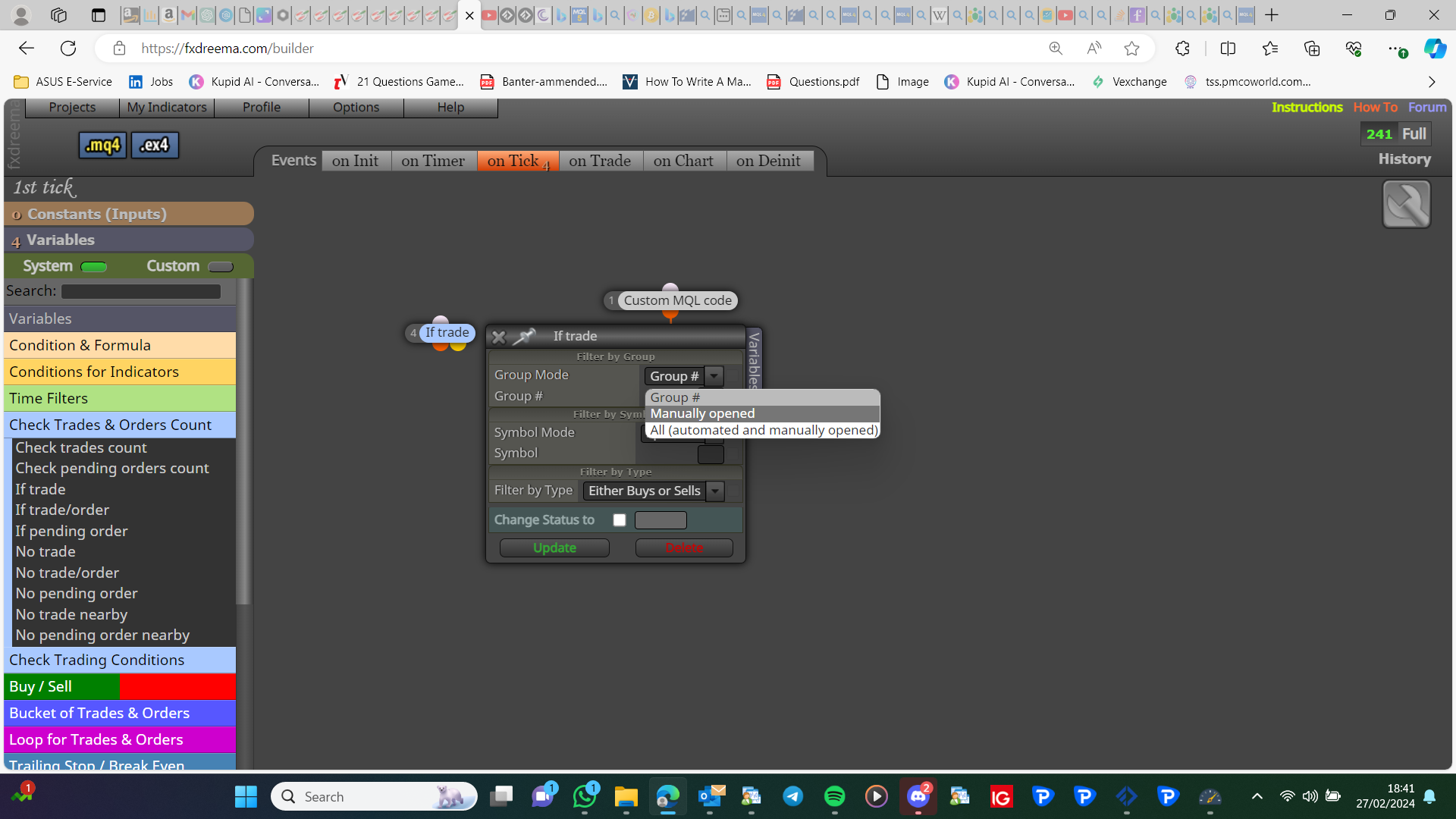
      image.png

      posted in Questions & Answers
      jstap
      jstap
    • RE: MQL4 to ctrader converter

      Don't think you can, you would need to find a coder that could rewrite it.

      posted in Questions & Answers
      jstap
      jstap
    • 1
    • 2
    • 29
    • 30
    • 31
    • 32
    • 33
    • 54
    • 55
    • 31 / 55