To change the colour the only thing (that I know of) is to draw a rectangle over it, not worth the trouble in my opinion

To change the colour the only thing (that I know of) is to draw a rectangle over it, not worth the trouble in my opinion
MODE-MA is a predefined meta trader enum. Does the project creating these errors have any more in it than the indicator? pass block - a block using this indicator
no trade block - condition block (candle 0 close x< or x> daily candle 0 open, adjusted to + or - 10 pips) - sell or buy block
Yes but exactly what you need will depend, custom code block with v2 + v1 +v3;for example will add them all
These are added with the MQ file, so if you use the EX file you have to add them manually. This can be done but, multiple colour buffers cant be added, so you wont be sable to make it work
All I can say is I won't waste my time on this. Something that's free will not work like claimed; otherwise, it wouldn't be free. The comments seem fake. High-frequency trading in a real account is open to massive slippage.
Feel free to recreate but do not expect good results...
This will create the draggable lines, maybe re-draw daily so they are always on screen, add to this and add a shared link if you get stuck.https://fxdreema.com/shared/4qDIXSyfb
Add a shared link to see what happening
You do know on chart events don't work in backtest?
Add your link and I'll see if I can see the problem
You read them by selecting terminal variable and putting in the name:
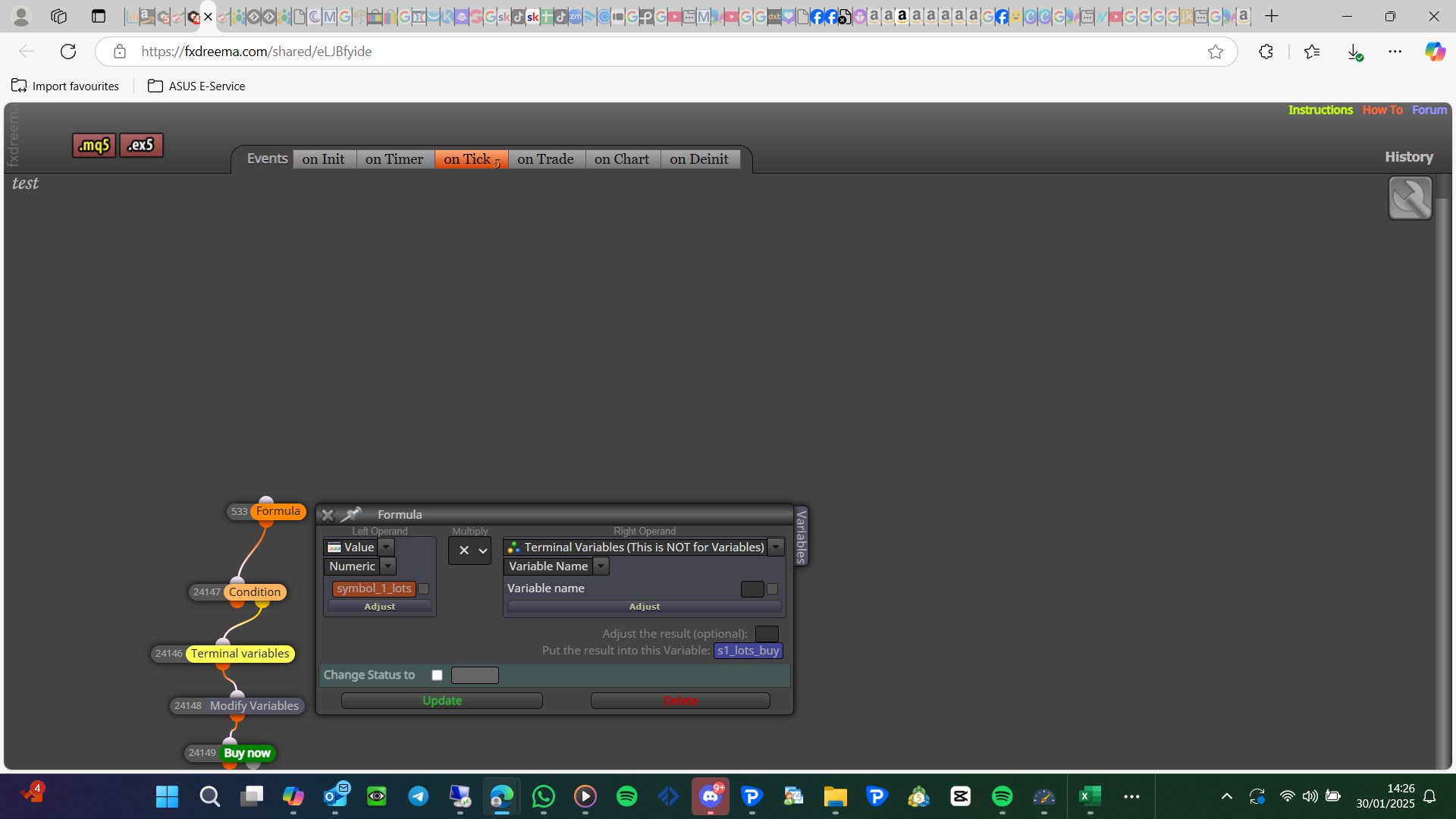
You can only get source code by giving the source code, or an FX-shared link (even then would likely need a full account)
level is the price (as seen on the right of your chart), fraction is the distance of 2 of these levels
You will have to create 2 blocks, 1 to close buys, and 1 for sells, haven't tested but should work.
Buys:
// On tick section:
startTime = GetMicrosecondCount(); // Record start time
sTrade.SetAsyncMode(true); // Enable asynchronous trade operations
CloseBuyPositions(); // Call function to close only buy positions
PrintPerformance(startTime); // Monitor performance
// Global variables section:
#include <Trade/Trade.mqh>
ulong startTime; // To store the start time for performance measurement
CTrade sTrade; // Trade object used for operations
// Custom function section:
void CloseBuyPositions() {
for (int cnt = PositionsTotal() - 1; cnt >= 0 && !IsStopped(); cnt--) {
ulong ticket = PositionGetTicket(cnt);
if (ticket > 0) {
// Check if the position is a BUY
if (PositionGetInteger(POSITION_TYPE) == POSITION_TYPE_BUY) {
sTrade.PositionClose(ticket, 100);
uint code = sTrade.ResultRetcode();
Print("Close BUY result code: ", IntegerToString(code));
}
}
}
}
void PrintPerformance(ulong startTime) {
for (int i = 0; i < 100; i++) {
Print("Elapsed time: ", IntegerToString(GetMicrosecondCount() - startTime),
" microseconds. Open positions: ", IntegerToString(PositionsTotal()));
if (PositionsTotal() <= 0) { break; }
Sleep(100);
}
}
Sells:
// On tick section:
startTime = GetMicrosecondCount(); // Record start time
sTrade.SetAsyncMode(true); // Enable asynchronous trade operations
CloseSellPositions(); // Call function to close only sell positions
PrintPerformance(startTime); // Monitor performance
// Global variables section:
#include <Trade/Trade.mqh>
ulong startTime; // To store the start time for performance measurement
CTrade sTrade; // Trade object used for operations
// Custom function section:
void CloseSellPositions() {
for (int cnt = PositionsTotal() - 1; cnt >= 0 && !IsStopped(); cnt--) {
ulong ticket = PositionGetTicket(cnt);
if (ticket > 0) {
// Check if the position is a SELL
if (PositionGetInteger(POSITION_TYPE) == POSITION_TYPE_SELL) {
sTrade.PositionClose(ticket, 100);
uint code = sTrade.ResultRetcode();
Print("Close SELL result code: ", IntegerToString(code));
}
}
}
}
void PrintPerformance(ulong startTime) {
for (int i = 0; i < 100; i++) {
Print("Elapsed time: ", IntegerToString(GetMicrosecondCount() - startTime),
" microseconds. Open positions: ", IntegerToString(PositionsTotal()));
if (PositionsTotal() <= 0) { break; }
Sleep(100);
}
}
Custom function is not global variables, there 1/2 way down on the right side, there are 3 sections and there all labelled on tick (for this) is the top section, custom functions is on the right, global variables is on the bottom
@sktsec could be wright I didn't notice that, normalise block id's is in options project options, I mean number 1 - 20
Add a shared link to see what you have done, bull/bear block, once per bar - buy/sell block
I don't know somethings on MT5 don't work as well, if you add a shared link it can be looked at but unlikely to see the problem
@tec-nacks On MT5 you will need to create the same with pink blocks
Yes open the MQ file in meta editor and compile