@sirluk Condition button == 1, redraw the button with a different colour, opposite for off condition == 0, you'll see options in here:

@sirluk Condition button == 1, redraw the button with a different colour, opposite for off condition == 0, you'll see options in here:
@danzig55 It should do as all blocks have the place to set symbol.
@jackeaa The problem I see is that you have the bools set to true but nothing setting them back to false, decide what makes the condition false, maybe delete arrows when this happens and things should work as needed.
@spenza42 You'll probably need to find a indicator, or set on boom for buy only and set on crash for sell only.
@spenza42 Boom is only tradeable on 1 broker, Derive (I believe), find a broker that suites your needs.
@pais Put a condition in your tree, trend number>80.
@uriel-0 To have the panel disappear I would use a button to delete other buttons and then redraw, haven't managed to get each button to stop others but this does have 1 that controls the other.
@spenza42 To do this simply change the group number in the position block and in the buy/sell block, each group of blocks should have a individual number.
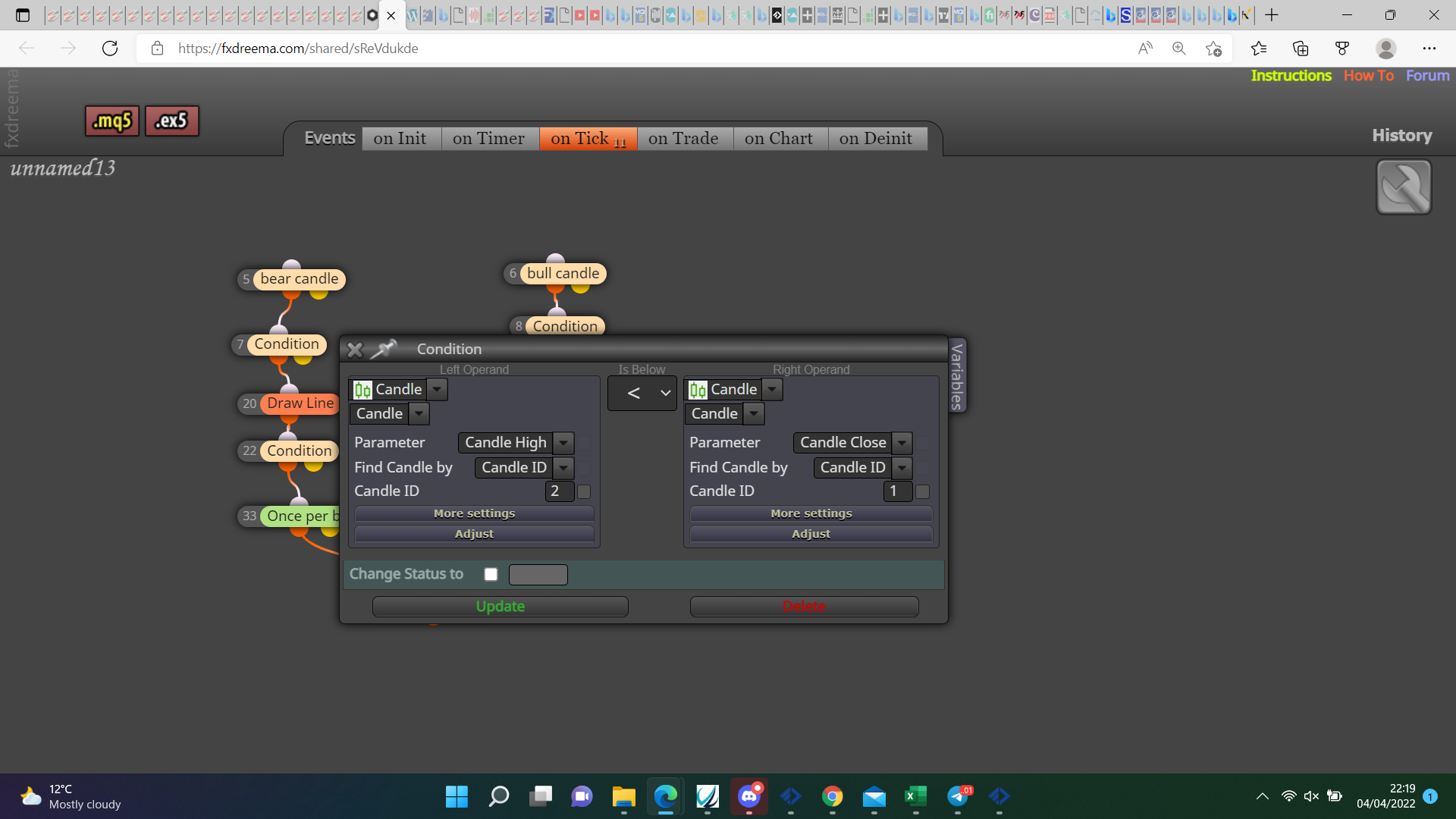
@plentygrazes Although your condition probably works you may as well use the candle instead of the line, the condition in the below picture cannot be true, candle high will never be below the close maybe = but even that is unlucky, change this and should work.
@plentygrazes there is no bug, I've done similar things many times, put a shared link here so all can be assessed.
@spenza42 Pictures are not as good as a shared link, create one then ask about any problems you are having.
@uriel-0 for this you don't need to use the yellow output, when 1 button is pressed redraw the other buttons as un-pressed.
@plentygrazes Yes, you could also share the 1 block, did this fix the problem?
@plentygrazes Just move toe once per bar block to directly above the alert block.
@samgeezy Inputs are the options you can change, the edit field is on the right of the screen.
@plentygrazes This is likely the position of the once per bar block, put it under all conditions but above alert.
@samgeezy If back testing MT5 put it in the inputs, otherwise put it in the on screen edit field.
@spenza42 This can be done but, you need to ask specific questions and put a shared link.
@kaastad Sorry there is nothing else I can do.
@samgeezy Do you know what values are in your indicator buffers? It should work if the values are price fractions from the main chart, or if they're values from indicator window, put them into a comment so you know what is doing what, I would also strip it back (turn blocks off) to get one section working before looking at the rest.