@tashab Hi, in this picture you will see how to place a pending BUY whenever a sell trade is created, you can also have it do this whenever an order is created. Purple blocks need to be used on the on trade tab.
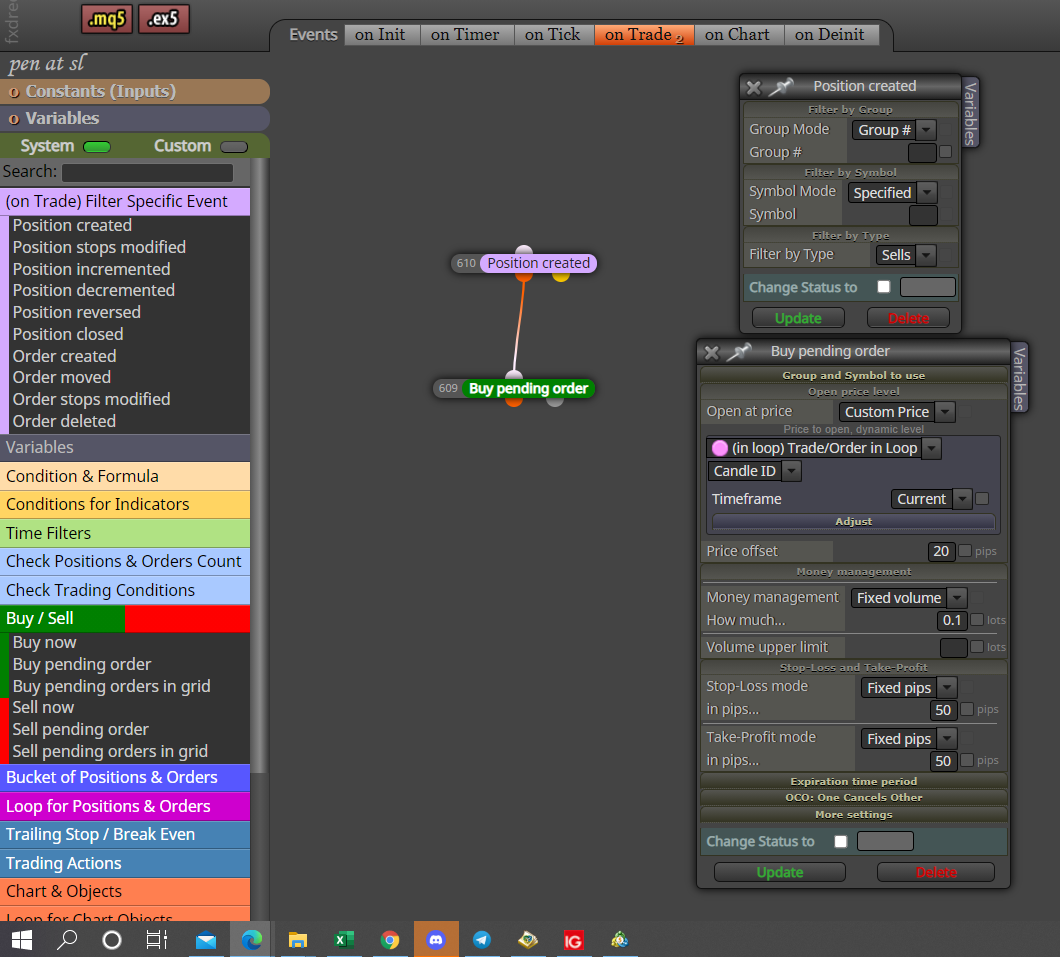

@tashab Hi, in this picture you will see how to place a pending BUY whenever a sell trade is created, you can also have it do this whenever an order is created. Purple blocks need to be used on the on trade tab.
@mohamed80 Every block has group numbers, the trail will work with only with whatever group is inserted, the magic number in settings determines what trades the EA interacts with, 0 is manually placed, I think the group number is placed on the end. I would set up different trailing stops to interact with your different groups, I would put magic to 0 unless not interfering with manual is what you require.
In here you will find how to put ATR pips into a variable so you can use for whatever you want.
https://fxdreema.com/forum/topic/12854/help-please-using-atr-as-stop-loss
Hope this helps
@mohamed80 I think this is doing what you have requested but, you will need to ad another condition otherwise you will never hit TP so you may as well not have a TP. hope this helps.
@jpsam Doesn't your strategy include a candle interacting with the indicator? If it does then you need a condition, if not you need to save the indicator on your platform, save template. You can then use the apply template block.
@wichi You might find that indicator is visible is what works. If you put the buffer into a comment block you will be able to see what is is doing, buffer will most likely comment as a number.
@abanob I have found this more than once with indicators, if you put this indicators buffer values in to a comment block you will see what they contain, FX needs a value changing in a buffer to be able to act on it.
@abanob Hi, this indicator has the same value in all bar 1 buffer, the one that doesn't moves with price, because of this your condition will never be true, as it will never be true.
@mohamed80 If this helps, putting a calculation in a calculation:
WINM= (PROFIT_PER_MIN_LOT*(LOT*100));
@sikhofx This will only work for the currently loaded order, if you place more than 1 it will only reference the last.
@l-andorrà He is correct on Saturday I couldn't get any large EA's downloaded, not the first time bit annoying and always seems to be at weekend, took me hours to do a simple 10 block EA, in the end I gave up.
As other people have said this is how to do it, I have found that using ctrl C & V doesn't work and you must right click, sometimes ctrl V will just past the last block copied and sods law says it will be just 1.
@mohamed80 This is true and previous candle close = current candle open (unless there is a gap).
VARIABLE 1= (VARIABLE 2/100*23+VARIABLE 3);
You can also add if's like this
if(VARIABLE 1 < VARIABLE 2 ) { VARIABLE 3 = 2.00; }
you can add multiple lines into the block, I always put anything that needs calculated first above the rest.
if you put this in custom code then the result will be put into VARIABLE 1, This is for MT4 but I think is the same for MT5, the best you can do is candle open >or< current price as at any point within candle 0 there will be no close. If you start a new project and just put different versions of custom code into variable and place tis into a comment block you will be able to see what your code is doing.
In here link text you will see some examples of code I have used, another tip I will use excel if and = formulas to convert 1 line into multiple, I separate the line into cells and then copy/change it all down until I copy all into the custom code, at this point it will go back into 1 line, probably better ways but I don't know them.
Good luck
@gordonhmilton once you have pips in a variable you can multiply and use the variable in the buy sell block.
@gordonhmilton You should find all you need here:
https://fxdreema.com/forum/topic/12843/atr-to-pips-new-formula
@sikerentea I'm not sure how to do it in FX and have never tried but, if you search google you will find the few lines of code you can add once project finished to achieve this.
@mohamed80 Hi Mohamed, try changing all your candle ID's to 1, 0 is the current candle so it will only ever have a split second to catch the candle close.
In this link is how to do an if statement, NAME & RESULT are variables, what you have written above can be put into MX code but probably easier to store data, if you wat to do a formula in custom code then like XL you put it in brackets as you did above, E.G (1+9)/8)}.
Hope this helps